 PluginStats
eslint-plugin-astro weekly downloads statistics
By ota-meshi (10 listings) · npm · ESLint plugins
ESLint plugin for Astro component
eslint-plugin-astro has 503,689 recorded weekly downloads on npm, a decrease of 30.6% over the past 30 days.
It ranks #258 of 2,251 tracked npm listings by weekly downloads.
Over 90 days, weekly downloads changed by -14.8%.
PluginStats has 543 daily observations since Apr 23, 2025; the latest is from Oct 17, 2026.
About eslint-plugin-astro
Introduction
eslint-plugin-astro is [ESLint] plugin for [Astro components]. You can check on the Online DEMO.
This plugin is in the _experimental stages_ of development.
At least it works fine with a withastro/docs repository.
📛 What is this plugin?
[ESLint] plugin for [Astro components].
• Linting Astro components using ESLint. • Find problems with Astro components. • Apply a consistent code style to Astro components. • Linting targets include [Frontmatter], [HTML Template], [JSX-like Expressions], [Client-Side Scripts], [Directives], and more. • Check code in real time with the ESLint editor integrations.
📖 Documentation
See documents.
💿 Installation
If you write TypeScript in Astro components, you also need to install either typescript-eslint or @typescript-eslint/parser:
If you want to use the rules for checking accessibility (A11Y), you also need to install [eslint-plugin-jsx-a11y] or [eslint-plugin-jsx-a11y-x] additionally: (Either plugin may be used internally by the A11Y rules.)
or
Requirements
- ESLint v10.0.0 and above - Node.js v22.22.3, v24.16.0, v26.3.0 and above
📖 Usage
Configuration
Flat Config \(eslint.config.js\)
This package is ESM-only. Use eslint.config.mjs, or use eslint.config.js in a project with "type": "module". See also: https://eslint.org/docs/latest/use/configure/configuration-files.
Example eslint.config.js:
This plugin provides configs:
• base ... Minimal configuration to enable correct Astro component linting. • recommended ... Above, plus rules to prevent errors or unintended behavior. • all ... Configuration enables all astro rules. It's meant for testing, not for production use because it changes with every minor and major version of the plugin. Use it at your own risk. • Extension of sharable configuration provided by [eslint-plugin-jsx-a11y]. You need to install [eslint-plugin-jsx-a11y] or [eslint-plugin-jsx-a11y-x] to use it. • jsx-a11y-recommended ... Similar to the jsx-a11y recommended configuration, but with the rules extended for Astro components enabled. • jsx-a11y-strict ... Similar to the jsx-a11y strict configuration, but with the rules extended for Astro components enabled.
See the rule list to get the rules that this plugin provides.
The pull request diff here is an example of introducing eslint-plugin-astro to the withastro/docs repository.
Parser Configuration
See https://github.com/ota-meshi/astro-eslint-parser#readme.
Using eslint-plugin-import
When using eslint-plugin-import, configure it to parse Astro files and recognize Astro's virtual modules. After applying the plugin's recommended configuration, add the following config object:
Add any other virtual astro:* modules that your project imports to import/core-modules. Only include parser entries for file types and parsers that your project uses.
Resolving Error in JSX: Unsafe return of an any typed value
Astro supports JSX from multiple frameworks such as React, Preact, and Solid.js by defining JSX Elements as HTMLElement | any;. When a framework with a JSX type definition is not present in your project this any can cause the ESLint error @typescript-eslint/no-unsafe-return.
This can be resolved by overriding the astroHTML.JSX.Element definition with a *.d.ts file such as jsx.d.ts in your project root directory:
Add this *.d.ts to your tsconfig.eslint.json:
If you use typed linting for Astro files, point languageOptions.parserOptions.project at this config:
Alternatively, add the project option to an existing Astro config entry:
Running ESLint from the command line
If you want to run eslint from the command line, make sure you include the .astro extension using a glob pattern, because ESLint targets only .js files by default.
Examples:
💻 Editor Integrations
Visual Studio Code
Use the dbaeumer.vscode-eslint extension that Microsoft provides officially.
You have to configure the eslint.validate option of the extension to check .astro files, because the extension targets only *.js or *.jsx files by default.
Example .vscode/settings.json:
Zed
Zed has built-in support for ESLint. However, you need to configure ESLint to work with Astro files.
Example .zed/settings.json:
✅ Rules
The --fix option on the command line automatically fixes problems reported by rules which have a wrench 🔧 below. The rules with the following star ⭐ are included in the recommended config.
Doesn't the rule you want exist? Share your idea of that rule with us.
Possible Errors
These rules relate to possible syntax or logic errors in Astro component code:
| Rule ID | Description | |
| astro/missing-client-only-directive-value | the client:only directive is missing the correct component's framework value | ⭐ | | astro/no-conflict-set-directives | disallow conflicting set directives and child contents | ⭐ | | astro/no-deprecated-astro-canonicalurl | disallow using deprecated Astro.canonicalURL | ⭐ | | astro/no-deprecated-astro-fetchcontent | disallow using deprecated Astro.fetchContent() | ⭐🔧 | | astro/no-deprecated-astro-resolve | disallow using deprecated Astro.resolve() | ⭐ | | astro/no-deprecated-getentrybyslug | disallow using deprecated getEntryBySlug() | ⭐ | | astro/no-exports-from-components | disallow value export | ⭐ | | astro/no-prerender-export-outside-pages | disallow prerender export outside of pages/ directory | ⭐ | | astro/no-unused-define-vars-in-style | disallow unused define:vars={...} in style tag | ⭐ |
Security Vulnerability
These rules relate to security vulnerabilities in Astro component code:
| Rule ID | Description | |
| astro/no-set-html-directive | disallow use of set:html to prevent XSS attack | | | astro/no-unsafe-inline-scripts | disallow inline without src to encourage CSP-safe patterns | |
Best Practices
These rules relate to better ways of doing things to help you avoid problems:
| Rule ID | Description | |…
Description from the npm listing.
- eslint
- eslint-plugin
- eslintplugin
- astro
- astrojs
Where eslint-plugin-astro sits in the listing
Each band is one page of 20. Weekly downloads on a log scale. Placement is projected from weekly downloads, so it can differ from the marketplace's own sort order. Hover a dot to see the listing.


Charts
Images: 30d · 1y · all time · 1600×900 dark
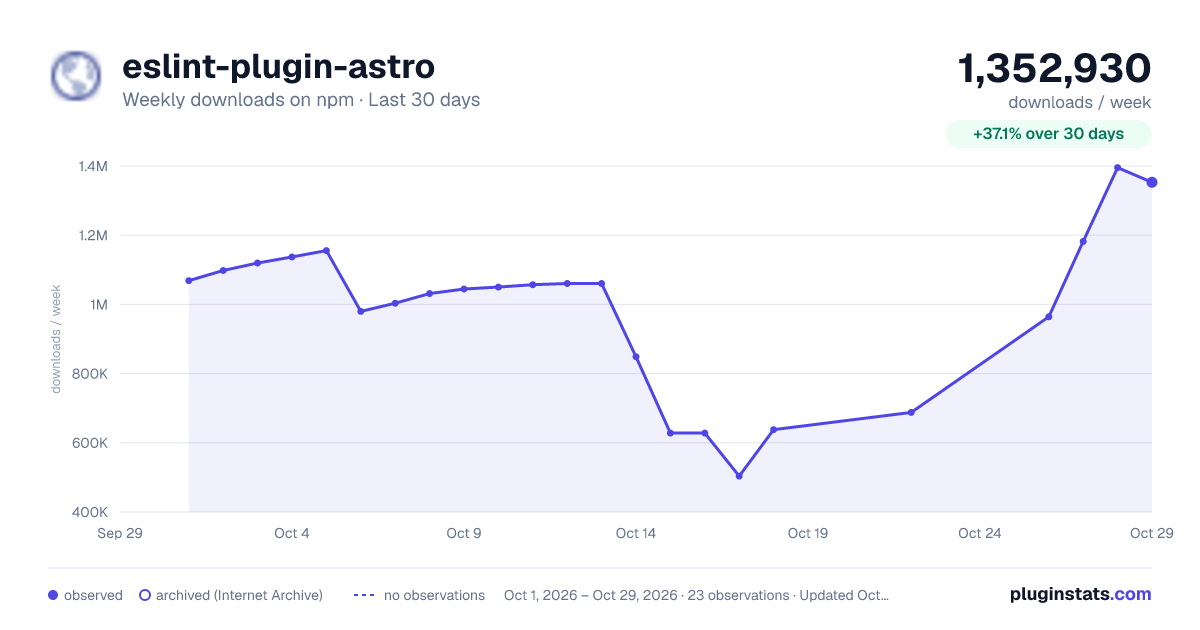
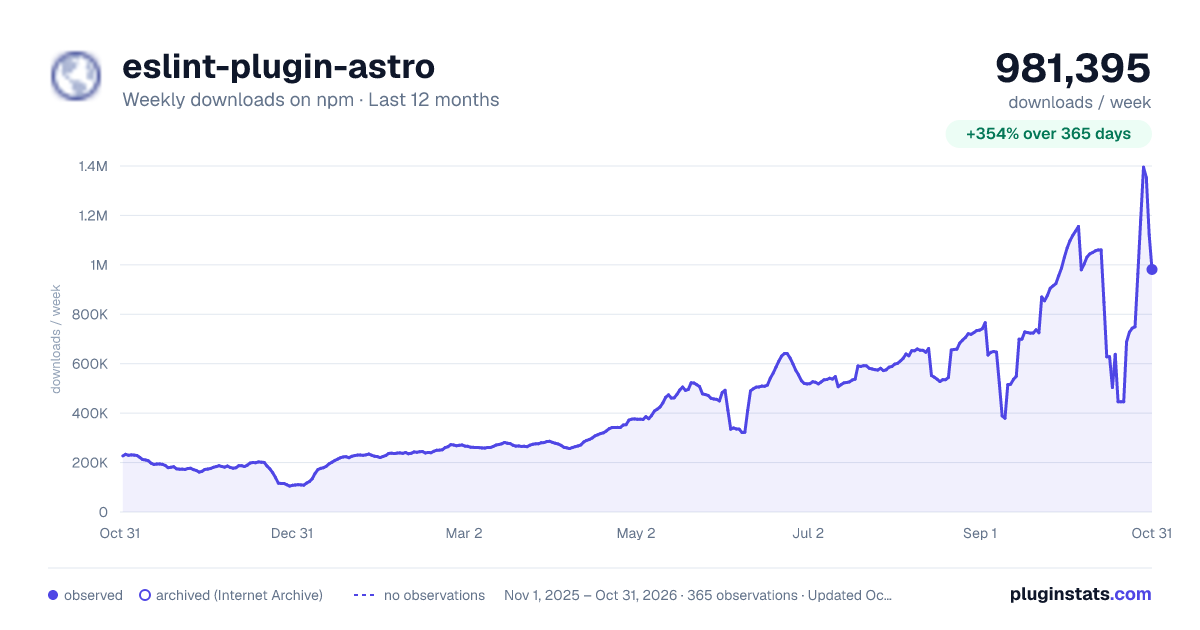
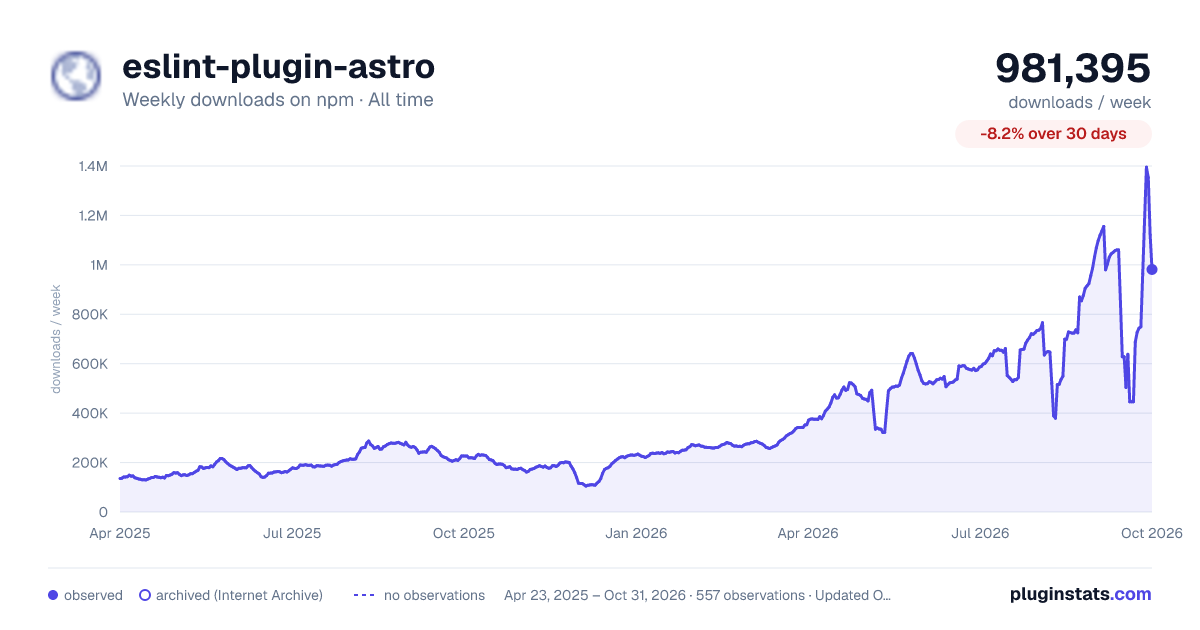

Adoption over time


7/30/90-day growth


Filled points are observed values; hollow points come from Internet Archive snapshots of the listing page. Dashed segments span periods with no observations — values between points are not interpolated.
Recent observations
Full history (543)Similar npm ESLint plugins plugins
Data source
Weekly downloads (trailing 7 complete days) come from the official npm downloads API. Downloads include CI and mirrors and are not equivalent to installs or users. npm publishes no ratings.
Listing: https://www.npmjs.com/package/eslint-plugin-astro. First seen Oct 16, 2026; last successful collection Oct 18, 2026. See the methodology.