 PluginStats
asset-module-webpack-plugin weekly downloads statistics
By exponentjs · npm · Webpack plugins
A webpack plugin that emits JS modules for your assets such as images. This allows Node to load the modules that webpack generated for your assets without having to run webpack's bundle on the server.
asset-module-webpack-plugin has 6 recorded weekly downloads on npm, a decrease of 70.0% over the past 30 days.
It ranks #2017 of 2,251 tracked npm listings by weekly downloads.
Over 90 days, weekly downloads changed by +20.0%.
PluginStats has 121 daily observations since Jun 19, 2026; the latest is from Oct 17, 2026.
About asset-module-webpack-plugin
AssetModulePlugin
A webpack plugin that emits JS modules for your assets such as images. This allows Node to load the modules that webpack generated for your assets without having to run webpack's bundle on the server.
Purpose
This plugin was written to facilitate server-side rendering of React components. The traditional approach is to build two webpack bundles, one for the browser and one for the server. This works, but there a few things about it that are unappealing:
• You need to write a second webpack config for the server-side bundle • The generated bundle is harder to debug and requires configuring Node to use source maps • Node has to read and parse the entire bundle the first time it is required, rather than lazily parsing components as needed
What we really wanted to do was run our JS files on Node directly instead of a bundle. The enhanced-require package looks like the most comprehensive solution, as it polyfills webpack for the server. However, it is unmaintained, and we needed only two features anyway: We wanted to be able to require CSS/LESS files without throwing an error, and we wanted require('./icon.png') to return the full CDN path to the icon. My goal was for this code to run:
How it works
The plugin runs after compilation and translates the path of the source asset to a destination path (you configure this with the sourceBase and destinationBase options). It then writes the full path of the asset to a file at the destination path. It emit files like this:
How to use it
In your webpack configuration file, add this to your list of plugins:
This takes your assets whose filenames don't end in ".js" and aren't under "node_modules" and moves them from "src" to "build". The original asset's path relative to "src" will be the same as the emitted module's path relative to "build".
Requirements
We use the class keyword so io.js 2.0+ is required.
Ideas
If you have ideas for how to improve server-side rendering we'd be happy to chat. Open up a GitHub issue or join our Slack chat at http://exp.host/community.
Contributing
Run npm run-script build to build lib from src.
Description from the npm listing.
- webpack
- webpack-plugin
- assets
- server-side-rendering
Where asset-module-webpack-plugin sits in the listing
Each band is one page of 20. Weekly downloads on a log scale. Placement is projected from weekly downloads, so it can differ from the marketplace's own sort order. Hover a dot to see the listing.


Charts
Images: 30d · 1y · all time · 1600×900 dark
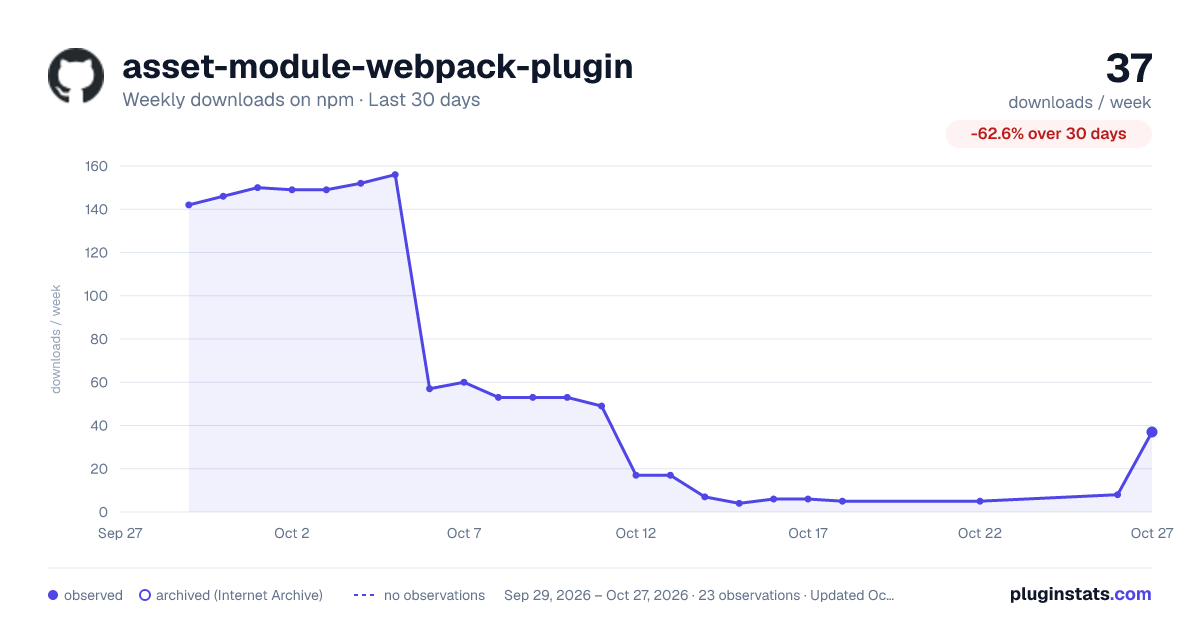
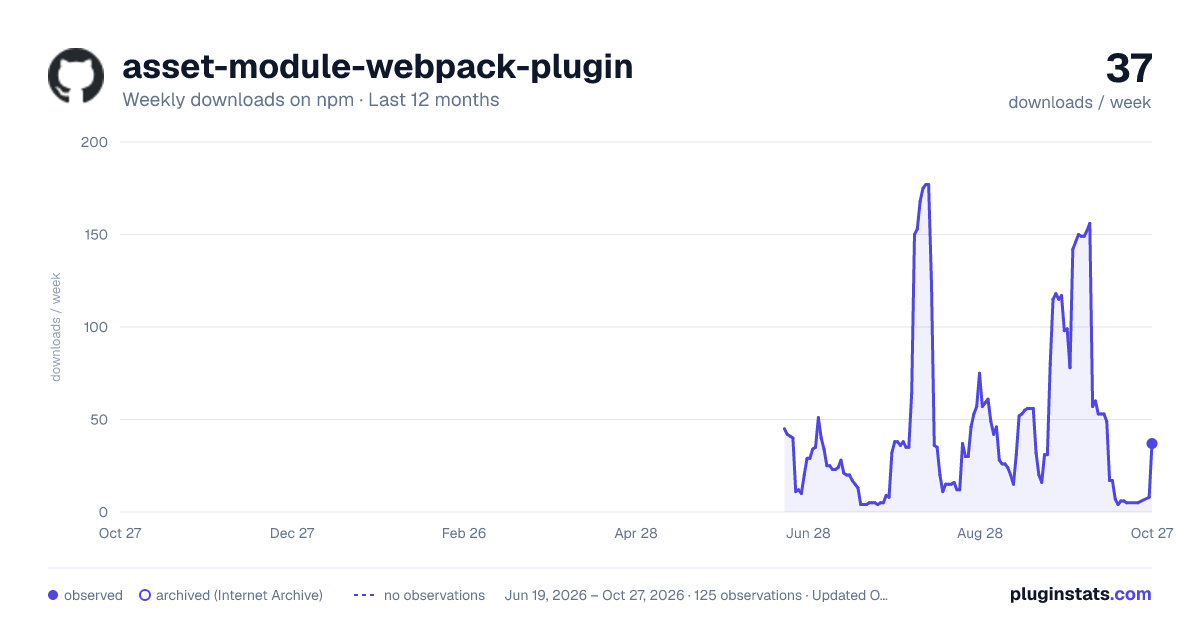
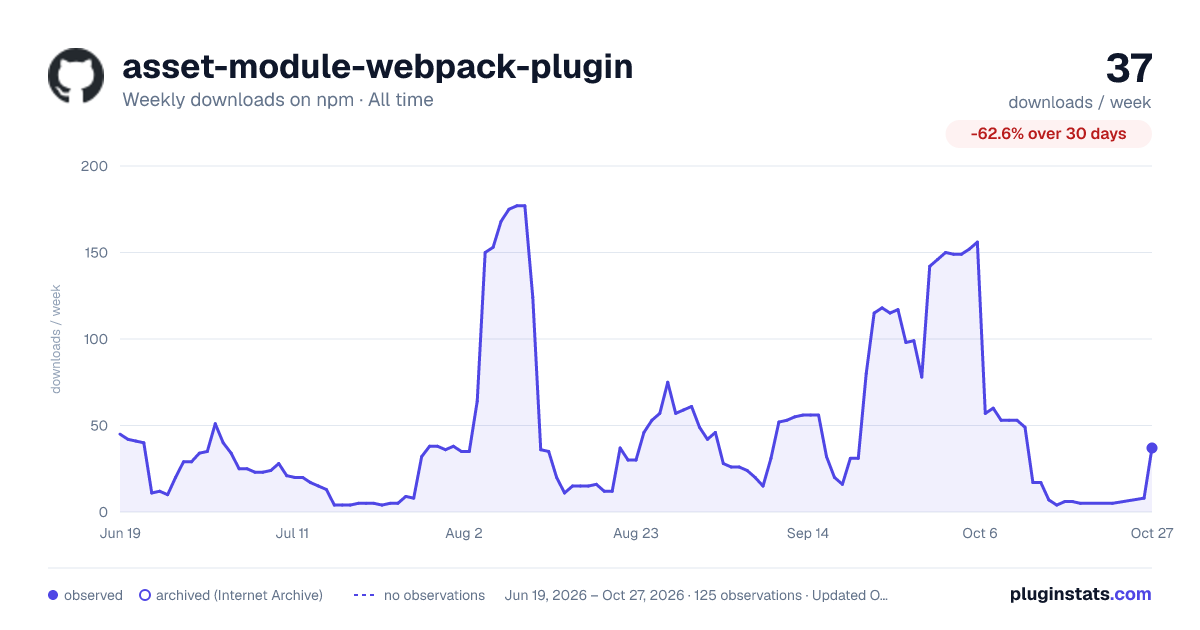

Adoption over time


7/30/90-day growth


Filled points are observed values; hollow points come from Internet Archive snapshots of the listing page. Dashed segments span periods with no observations — values between points are not interpolated.
Recent observations
Full history (121)Similar npm Webpack plugins plugins
Data source
Weekly downloads (trailing 7 complete days) come from the official npm downloads API. Downloads include CI and mirrors and are not equivalent to installs or users. npm publishes no ratings.
Listing: https://www.npmjs.com/package/asset-module-webpack-plugin. First seen Oct 16, 2026; last successful collection Oct 18, 2026. See the methodology.