 PluginStats
codeburn weekly downloads statistics
By getagentseal · npm · Claude Code
See where your AI spend goes - by task, tool, model, and project
codeburn has 4,803 recorded weekly downloads on npm, a decrease of 53.5% over the past 30 days.
It ranks #1102 of 2,251 tracked npm listings by weekly downloads.
Over 90 days, weekly downloads changed by -45.7%.
PluginStats has 543 daily observations since Apr 23, 2025; the latest is from Oct 17, 2026.
About codeburn
See where your AI spend goes.
If CodeBurn shows you something your bill never did, star the repo so other developers find it, and consider sponsoring to keep 42 integrations honest.
npx codeburn
To keep it: npm install -g codeburn or brew install codeburn. Needs Node.js 22.13+.
The macOS builds are signed with a Developer ID and notarized by Apple.
The problem
Your bill gives you a month total. It does not break that down by project, by model or by task, and it does not show which part of it was wasted.
Claude Code, Codex, Cursor and the rest each write a session file every time you use them, and those files hold every token and every model call. CodeBurn reads those files and produces the breakdown.
Desktop app, macOS menu bar, Capacity Dock and the Claude glance card, one engine behind all of them.
Sixty seconds
There is no account and no sign-up. CodeBurn looks in the folders your tools already write to, prices every token, and prints what you spent.
Under the total are the tables: cost by tool, by model, by project and by task. Task means what the agent was doing, such as coding, debugging or planning, worked out from the session itself.
Arrow keys move the period, from today out to your whole history. Press p to switch between tools. Press q to quit.
See it
The desktop app is the same data with room to move around in. It opens on today: what you have spent, what the month is on pace to cost, and the last thirty days day by day.
One click from the clock, the menu bar popover shows the short version of that page. The Capacity Dock adds a ring per provider at the screen edge. Hover a ring and a glance card tells you what is running right now and which limits are filling up.
All four read the same files on your disk, so they show the same numbers, allowing for when each one last refreshed.
The same numbers are in your browser with codeburn web, and in the terminal with codeburn.
Understand it
Every number in the app is clickable. Click today's total and you land on Sessions, one row per session with its project, its model, its tokens and its cost. Click a row and you get the turns inside it, so you can see which part of the work was expensive.
On the Spend page the same money is cut four ways, by project, by git branch, by model and by task. The branch view adds up every session you ran while you were on that branch, so you get the cost of a feature.
Compare periods puts two date ranges side by side and shows the difference. Use it after you change something, a model or a workflow or a prompt, to find out whether the change actually cost less.
The Pull requests page matches spend against the pull requests your sessions recorded, so you can see which spend shipped (Yield).
Fix it
Optimize reads your sessions and your config, then lists what costs tokens without earning them. A file the agent re-reads on every turn. An MCP server you installed months ago and never call. A CLAUDE.md that grew long enough to ride along in every single request.
Each finding comes with a grade, the fix, and what that fix should save you over the period it scanned.
CodeBurn can make the config changes for you, and take them back:
Files are backed up before they are changed, and you see the change before anything is applied. A few days later, codeburn act report checks what each fix promised against what your sessions actually did, including the fixes that changed nothing.
Stay ahead
Tell CodeBurn which subscription you pay for and it stops showing only what you spent. It shows how much of the plan you have used, and whether the month is on pace to run past it.
codeburn quota reads the live limits out of the tools you are already signed in to. That is where the five-hour and weekly windows come from. Check it before a long run.
Guard is opt-in and local. codeburn guard install adds Claude Code hooks that warn a session once it passes $5 and stop it at $15. Both numbers are yours to change, codeburn guard status shows where the hooks live, and codeburn guard uninstall takes them out again.
Always in view
Today's spend sits in the macOS menu bar, beside the clock. Click it and the popover opens on the same figures as the app, with today, the period switcher, the trend and the per-model breakdown.
The Capacity Dock docks a thin rail to any edge of your screen, with one ring per provider showing how much of that plan is left. It shows what is left before you start a run, not after.
Turn either on from the desktop app's Plugins page in one click, or from the command line:
On Linux the same view lives in the top panel, as a GNOME Shell extension.
The desktop app runs on Windows. Install it from the Microsoft Store, which is the recommended way and keeps itself up to date, or take the direct installer. The Windows tray app shows today's cost next to the clock, the same way the macOS menu bar does, and clicking it opens the same popover. The Capacity Dock is there too, from the tray menu or the app's Plugins page. If you run your agents inside WSL, CodeBurn reads the distro's home directory as well as your Windows profile, so sessions you ran in Linux are counted without you installing anything twice.
Setup for all three platforms, including WSL, is in Menu bar and tray.
Inside your agent
That registers a local MCP server over stdio. Your agent can then answer "where did my tokens go this week" or "what should I change to spend less" without you leaving the conversation.
It reads the same files on disk that the CLI reads. The server answers from that local data and makes no network call of its own, and project names are pseudonymized unless the agent asks for them.
Works with 42 tools
CodeBurn detects the tools you already use. There is nothing to configure and no folder to point it at. If a tool is installed and has sessions on disk, it shows up. Each logo links to that tool's page.
LingTai TUI
All 42 tools…
Description from the npm listing.
- claude-code
- cursor
- codex
- kimi
- devin
- ibm-bob
- opencode
- pi
- codebuff
- codewhale
- dsh
- ai-coding
- token-usage
- cost-tracking
- observability
- developer-tools
Where codeburn sits in the listing
Each band is one page of 20. Weekly downloads on a log scale. Placement is projected from weekly downloads, so it can differ from the marketplace's own sort order. Hover a dot to see the listing.


Charts
Images: 30d · 1y · all time · 1600×900 dark
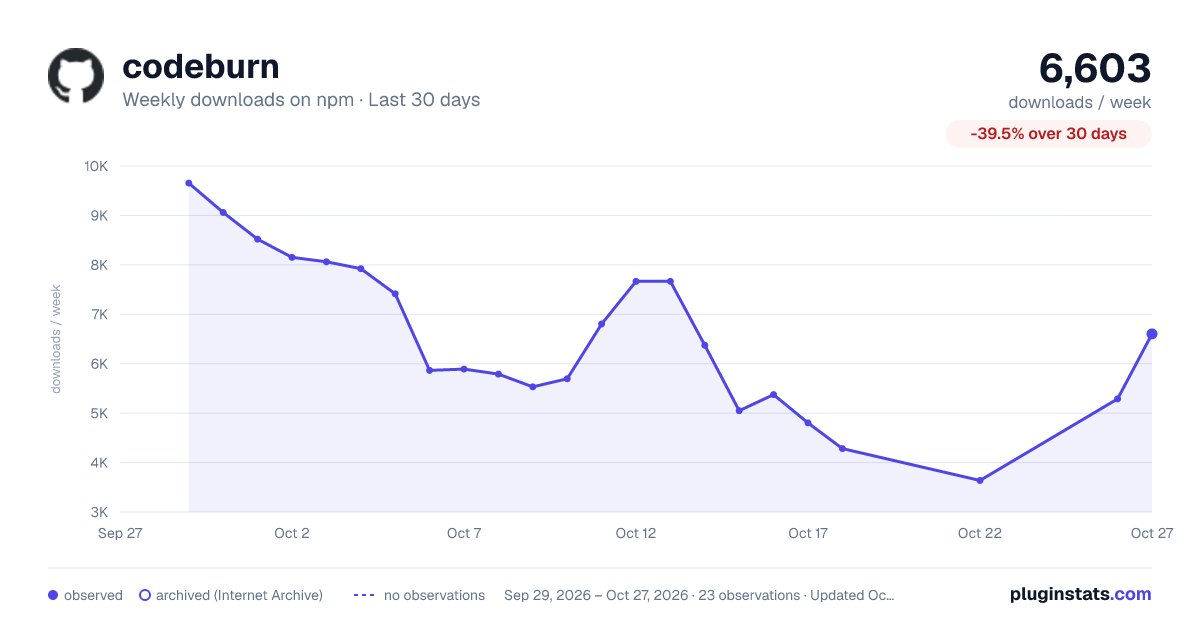
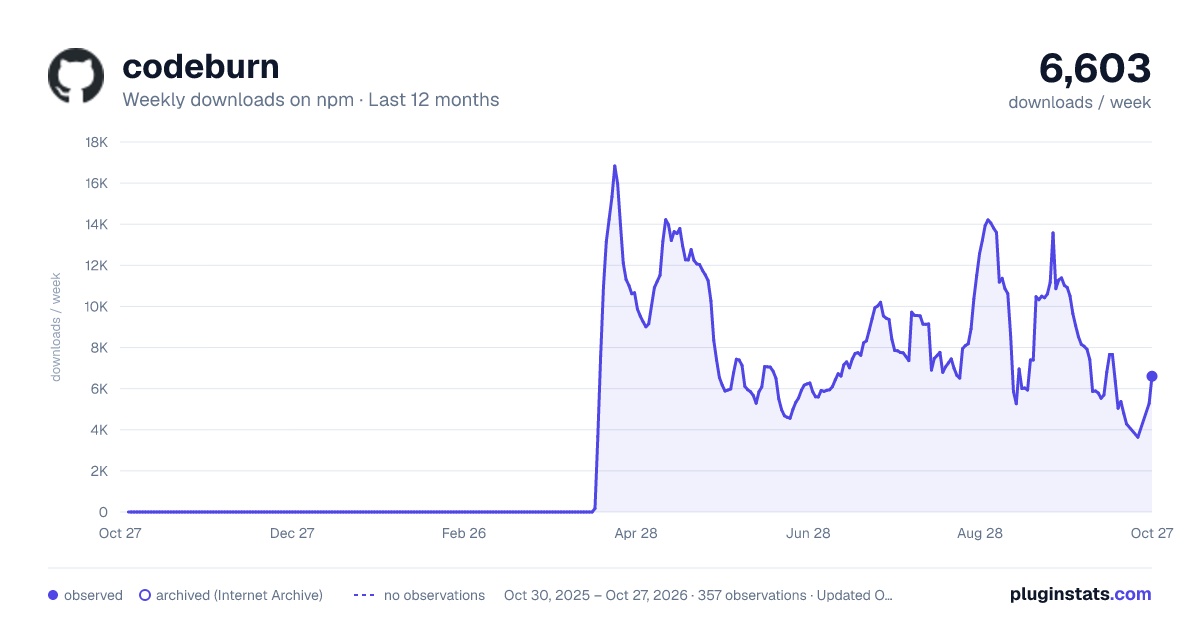
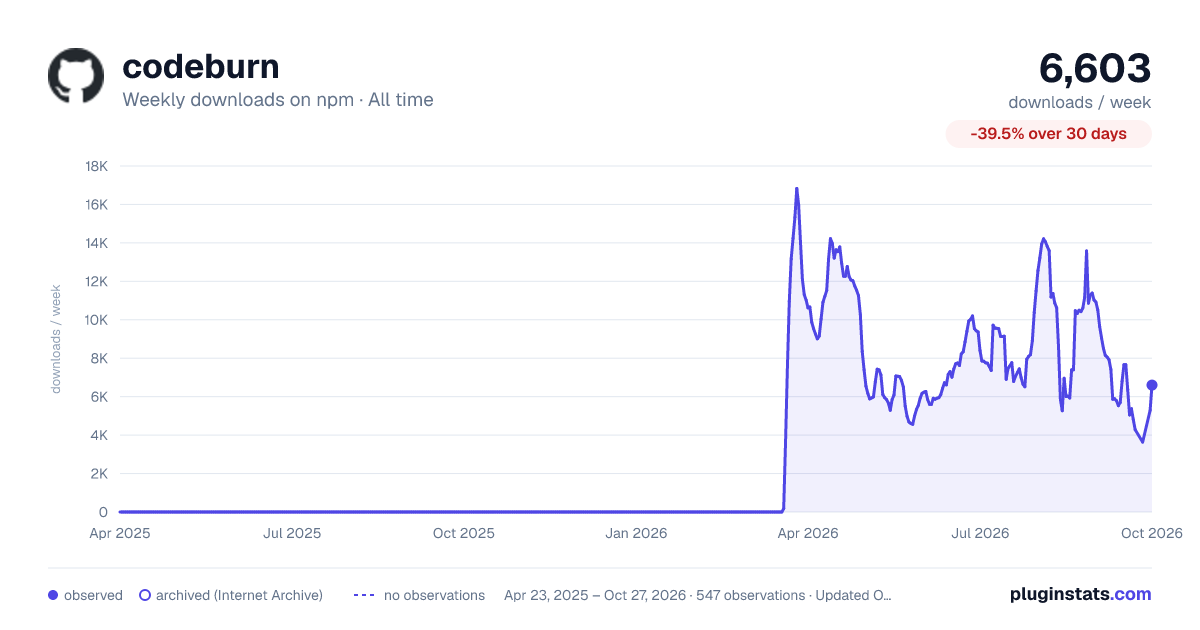

Adoption over time


7/30/90-day growth


Filled points are observed values; hollow points come from Internet Archive snapshots of the listing page. Dashed segments span periods with no observations — values between points are not interpolated.
Recent observations
Full history (543)Similar npm Claude Code plugins
Data source
Weekly downloads (trailing 7 complete days) come from the official npm downloads API. Downloads include CI and mirrors and are not equivalent to installs or users. npm publishes no ratings.
Listing: https://www.npmjs.com/package/codeburn. First seen Oct 16, 2026; last successful collection Oct 18, 2026. See the methodology.