 PluginStats
html-minimizer-webpack-plugin weekly downloads statistics
By webpack (4 listings) · npm · Webpack plugins
html minimizer plugin for Webpack
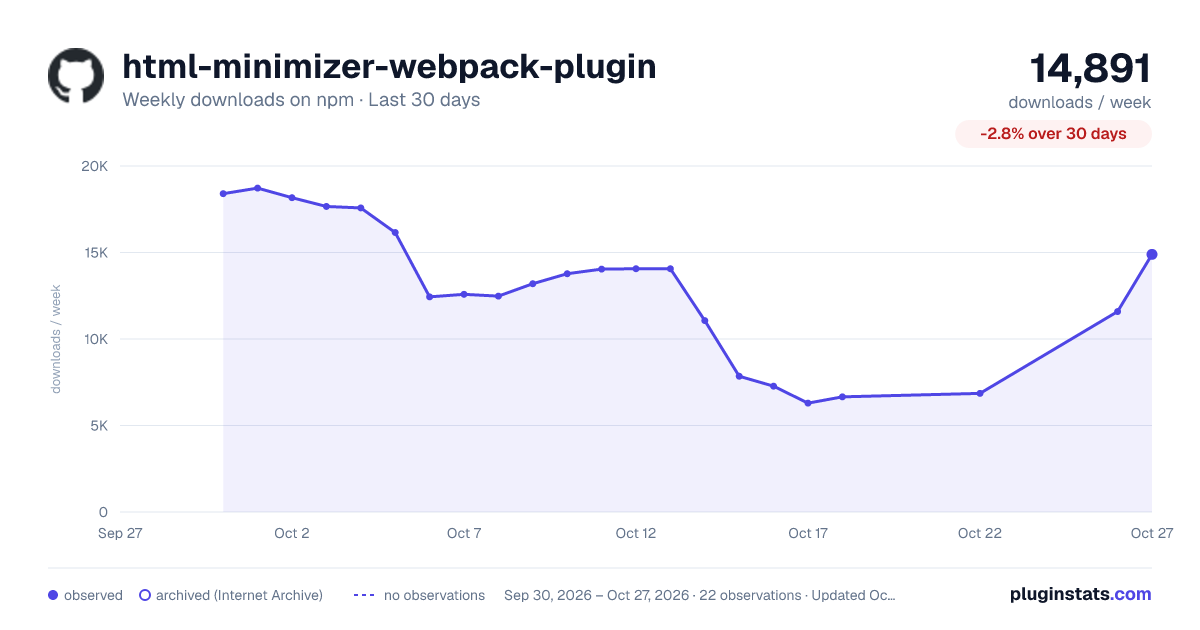
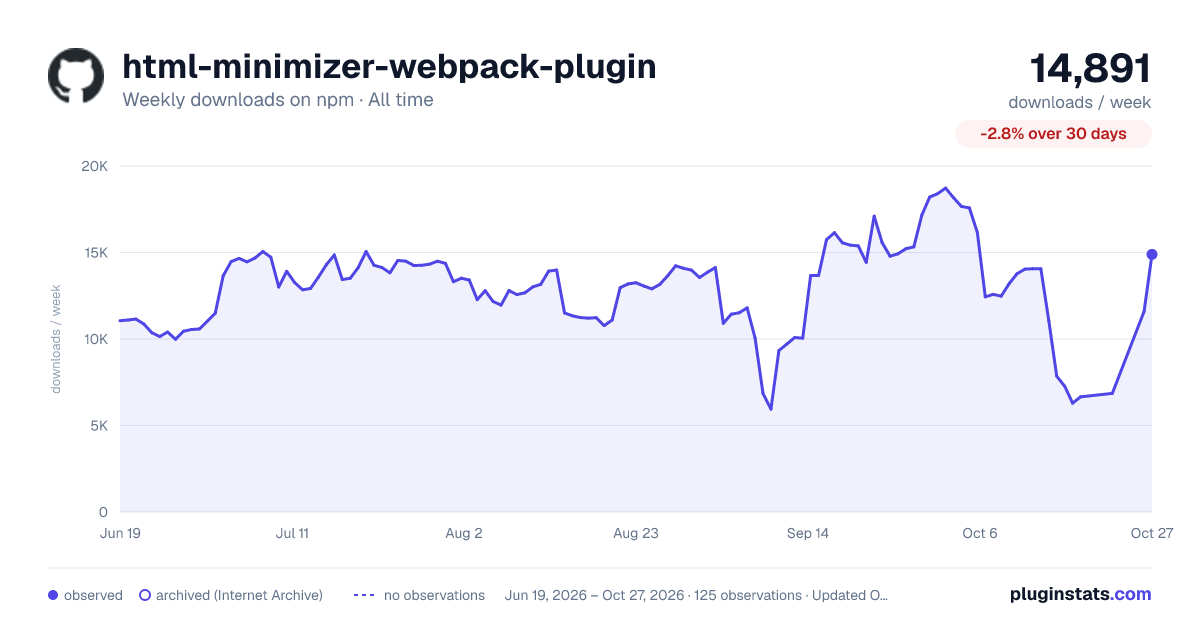
html-minimizer-webpack-plugin has 6,656 recorded weekly downloads on npm, a decrease of 57.2% over the past 30 days, ranking #1067 of 2,322 tracked listings.
About html-minimizer-webpack-plugin
[![npm][npm]][npm-url] [![node][node]][node-url] [![tests][tests]][tests-url] [![cover][cover]][cover-url] [![discussion][discussion]][discussion-url] [![size][size]][size-url]
html-minimizer-webpack-plugin
This plugin can use 3 tools to optimize and minify your HTML:
swc- very fast Rust-based platform for the Web.html-minifier-terser(by default) - JavaScript-based HTML minifier.@minify-html/node- A Rust HTML minifier meticulously optimised for speed and effectiveness, with bindings for other languages.
This plugin integrates seamlessly into your Webpack build pipeline to reduce HTML size and improve loading performance.
Getting Started
To begin, you'll need to install html-minimizer-webpack-plugin:
npm install html-minimizer-webpack-plugin --save-dev
or
yarn add -D html-minimizer-webpack-plugin
or
pnpm add -D html-minimizer-webpack-plugin
Additional step: If you want to use @swc/html you need to install it:
npm install @swc/html --save-dev
or
yarn add -D @swc/html
or
pnpm add -D @swc/html
Additional step: If you want to use @minify-html/node you need to install it:
npm install @minify-html/node --save-dev
or
yarn add -D @minify-html/node
or
pnpm add -D @minify-html/node
Then add the plugin to your webpack configuration. For example:
webpack.config.js
const CopyPlugin = require("copy-webpack-plugin");
const HtmlMinimizerPlugin = require("html-minimizer-webpack-plugin");

module.exports = {
  module: {
    rules: [
      {
        test: /\.html$/i,
        type: "asset/resource",
      },
    ],
  },
  plugins: [
    new CopyPlugin({
      patterns: [
        {
          context: path.resolve(__dirname, "dist"),
          from: "./src/*.html",
        },
      ],
    }),
  ],
  optimization: {
    minimize: true,
    minimizer: [
      // For webpack@5 you can use the `...` syntax to extend existing minimizers (i.e. `terser-webpack-plugin`), uncomment the next line
      // `...`

      // For `html-minifier-terser`:
      //
      new HtmlMinimizerPlugin(),

      // For `@swc/html`:
      //
      // HTML documents - HTML documents with `Doctype` and `<html>/`<head>`/`<body>` tags
      //
      // Options - https://github.com/swc-project/bindings/blob/main/packages/html/index.ts#L5
      //
      // new HtmlMinimizerPlugin({
      //   minify: HtmlMinimizerPlugin.swcMinify,
      //   minimizerOptions: {}
      // })
      //
      //
      // HTML fragments - HTML fragments, i.e. HTML files without doctype or used in `<template></template>` tags or HTML parts which injects into another HTML parts
      //
      // Options - https://github.com/swc-project/bindings/blob/main/packages/html/index.ts#L38
      //
      // new HtmlMinimizerPlugin({
      //   minify: HtmlMinimizerPlugin.swcMinifyFragment,
      //   minimizerOptions: {}
      // })
    ],
  },
};
[!NOTE]
HTML will only be minimized in production mode by default. To enable minification in development, explicitly set
optimization.minimize: true.
Finally, run webpack using the method you normally use (e.g., via CLI or an npm script).
[!NOTE]
Removing and collapsing spaces in the tools differ (by default).
@swc/html- Remove and collapse whitespaces only in safe places (for example - aroundhtmlandbodyelements, inside theheadelement and between metadata elements -<meta>/script/link/etc.)html-minifier-terser- Always collapse multiple whitespaces to 1 space (never remove it entirely), but you can change it usingoptions@minify-html/node- Please read documentation https://github.com/wilsonzlin/minify-html#whitespace for detailed whitespace behavior.
Options
test
Type:
type test = string | RegExp | (string | RegExp)[];
Default: /\.html(\?.*)?$/i
Test to match files against.
module.exports = {
  optimization: {
    minimize: true,
    minimizer: [
      new HtmlMinimizerPlugin({
        test: /\.foo\.html/i,
      }),
    ],
  },
};
include
Type:
type include = string | RegExp | (string | RegExp)[];
Default: undefined
Files to include for minification.
webpack.config.js
module.exports = {
  optimization: {
    minimize: true,
    minimizer: [
      new HtmlMinimizerPlugin({
        include: /\/includes/,
      }),
    ],
  },
};
exclude
Type:
type exclude = string | RegExp | (string | RegExp)[];
Default: undefined
Files to exclude from minification.
webpack.config.js
module.exports = {
  optimization: {
    minimize: true,
    minimizer: [
      new HtmlMinimizerPlugin({
        exclude: /\/excludes/,
      }),
    ],
  },
};
parallel
Type:
type parallel = undefined | boolean | number;
Default: true
Enables multi-process parallelization to improve build performance.
-
If
true, usesos.cpus().length - 1oros.availableParallelism() - 1(if available). -
If
number, sets the number of concurrent workers.
[!NOTE]
Parallelization can speed up your build significantly and is therefore highly recommended.
boolean
Enable or disable multi-process parallel running.
webpack.config.js…
Description from the npm listing.
- html
- webpack
- webpack-plugin
- minimize
- minimizer
- minify
- minifier
- optimize
- optimizer
README badge
Show your rank in a README or on your website. The badge updates automatically.
Charts
Images: 30d · 1y · all time · 1600×900 dark


Adoption over time
7/30/90-day growth
Ranking history
Listing placement
Listing placement
Filled points are observed values; hollow points come from Internet Archive snapshots of the listing page. Dashed segments span periods with no observations — values between points are not interpolated.
Each band is one page of 20. Weekly downloads on a linear scale. Placement is projected from weekly downloads, so it can differ from the marketplace's own sort order. Hover a dot to see the listing.
Recent observations
Full history (122)Similar npm Webpack plugins plugins
All 20 html-minimizer-webpack-plugin alternatives- 5.5K weekly downloads-32.2%
- 4.6K weekly downloads-54.2%
Data source
Weekly downloads (trailing 7 complete days) come from the official npm downloads API. Downloads include CI and mirrors and are not equivalent to installs or users. npm publishes no ratings.
Listing: https://www.npmjs.com/package/html-minimizer-webpack-plugin. First seen Oct 16, 2026; last successful collection Oct 20, 2026. See the methodology.