 PluginStats
cclsp weekly downloads statistics
By ktnyt · npm · Claude Code
MCP server for accessing LSP functionality
cclsp has 3,212 recorded weekly downloads on npm, a decrease of 8.1% over the past 30 days.
It ranks #1191 of 2,251 tracked npm listings by weekly downloads.
Over 90 days, weekly downloads changed by -37.4%.
PluginStats has 543 daily observations since Apr 23, 2025; the latest is from Oct 17, 2026.
About cclsp
cclsp - not your average LSP adapter
cclsp is a Model Context Protocol (MCP) server that seamlessly integrates LLM-based coding agents with Language Server Protocol (LSP) servers. LLM-based coding agents often struggle with providing accurate line/column numbers, which makes naive attempts to integrate with LSP servers fragile and frustrating. cclsp solves this by intelligently trying multiple position combinations and providing robust symbol resolution that just works, no matter how your AI assistant counts lines.
Setup & Usage Demo
https://github.com/user-attachments/assets/52980f32-64d6-4b78-9cbf-18d6ae120cdd
Table of Contents
• Why cclsp? • Features • 📋 Prerequisites • ⚡ Setup • Automated Setup (Recommended) • Claude Code Quick Setup • Manual Setup • Language Server Installation • Verification • 🚀 Usage • As MCP Server • Configuration • 🛠️ Development • 🔧 MCP Tools • find_definition • find_references • rename_symbol • rename_symbol_strict • get_diagnostics • restart_server • 💡 Real-world Examples • Finding Function Definitions • Finding All References • Renaming Symbols • 🔍 Troubleshooting • 🤝 Contributing • 📄 License
Why cclsp?
When using AI-powered coding assistants like Claude, you often need to navigate codebases to understand symbol relationships. cclsp bridges the gap between Language Server Protocol capabilities and Model Context Protocol, enabling:
• 🔍 Instant symbol navigation - Jump to definitions without manually searching • 📚 Complete reference finding - Find all usages of functions, variables, and types • ✏️ Safe symbol renaming - Rename across entire codebases with confidence • 🌍 Universal language support - Works with any LSP-compatible language server • 🤖 AI-friendly interface - Designed for LLMs to understand and use effectively
Features
• Go to Definition: Find where symbols are defined • Find References: Locate all references to a symbol • Multi-language Support: Configurable LSP servers for different file types • TypeScript: Built-in support via typescript-language-server • Python: Support via python-lsp-server (pylsp) • Go: Support via gopls • And many more: Extensive language server configurations
📋 Prerequisites
• Node.js 18+ or Bun runtime • Language servers for your target languages (installed separately)
⚡ Setup
cclsp provides an interactive setup wizard that automates the entire configuration process. Choose your preferred method:
Automated Setup (Recommended)
Run the interactive setup wizard:
The setup wizard will:
1. 🔍 Auto-detect languages in your project by scanning files 2. 📋 Show pre-selected LSP servers based on detected languages 3. 📦 Display installation requirements with detailed guides 4. ⚡ Install LSPs automatically (optional, with user confirmation) 5. 🔗 Add to Claude MCP (optional, with user confirmation) 6. ✅ Verify setup and show available tools
Setup Options
• Project Configuration (default): Creates .claude/cclsp.json in current directory • User Configuration (--user): Creates global config in ~/.config/claude/cclsp.json
Manual Setup
If you prefer manual configuration:
1. Install cclsp:
2. Install language servers (see Language Server Installation)
3. Create configuration file:
4. Add to Claude MCP:
Language Server Installation
The setup wizard shows installation commands for each LSP, but you can also install them manually:
📦 Common Language Servers
TypeScript/JavaScript
Python
Go
Rust
C/C++
Ruby
PHP
For more languages and detailed instructions, run npx cclsp@latest setup and select "Show detailed installation guides".
🚀 Usage
As MCP Server
Configure in your MCP client (e.g., Claude Code):
Using npm package (after global install)
Using local installation
Configuration
Interactive Configuration Generator
For easy setup, use the interactive configuration generator:
The interactive tool will:
• Show you all available language servers • Let you select which ones to configure with intuitive controls: • Navigation: ↑/↓ arrow keys or Ctrl+P/Ctrl+N (Emacs-style) • Selection: Space to toggle, A to toggle all, I to invert selection • Confirm: Enter to proceed • Display installation instructions for your selected languages • Generate the configuration file automatically • Show you the final configuration
Manual Configuration
Alternatively, create an cclsp.json configuration file manually:
Configuration Options:
• extensions: Array of file extensions this server handles • command: Command array to spawn the LSP server • rootDir: Working directory for the LSP server (optional, defaults to ".") • restartInterval: Auto-restart interval in minutes (optional) • initializationOptions: LSP server initialization options (optional)
The initializationOptions field allows you to customize how each LSP server initializes. This is particularly useful for servers like pylsp (Python) that have extensive plugin configurations, or servers like devsense-php-ls that require specific settings.
📋 More Language Server Examples
🛠️ Development
🔧 MCP Tools
The server exposes these MCP tools:
find_definition
Find the definition of a symbol by name and kind in a file. Returns definitions for all matching symbols.
Parameters:
• file_path: The path to the file • symbol_name: The name of the symbol • symbol_kind: The kind of symbol (function, class, variable, method, etc.) (optional)
find_references
Find all references to a symbol across the entire workspace. Returns references for all matching symbols.
Parameters:
• file_path: The path to the file where the symbol is defined • symbol_name: The name of the symbol • symbol_kind: The kind of symbol (function, class, variable, method, etc.) (optional) • include_declaration: Whether to include the declaration (optional, default: true)
rename_symbol…
Description from the npm listing.
- mcp
- lsp
- language-server
- model-context-protocol
- claude-code
Where cclsp sits in the listing
Each band is one page of 20. Weekly downloads on a log scale. Placement is projected from weekly downloads, so it can differ from the marketplace's own sort order. Hover a dot to see the listing.


Charts
Images: 30d · 1y · all time · 1600×900 dark
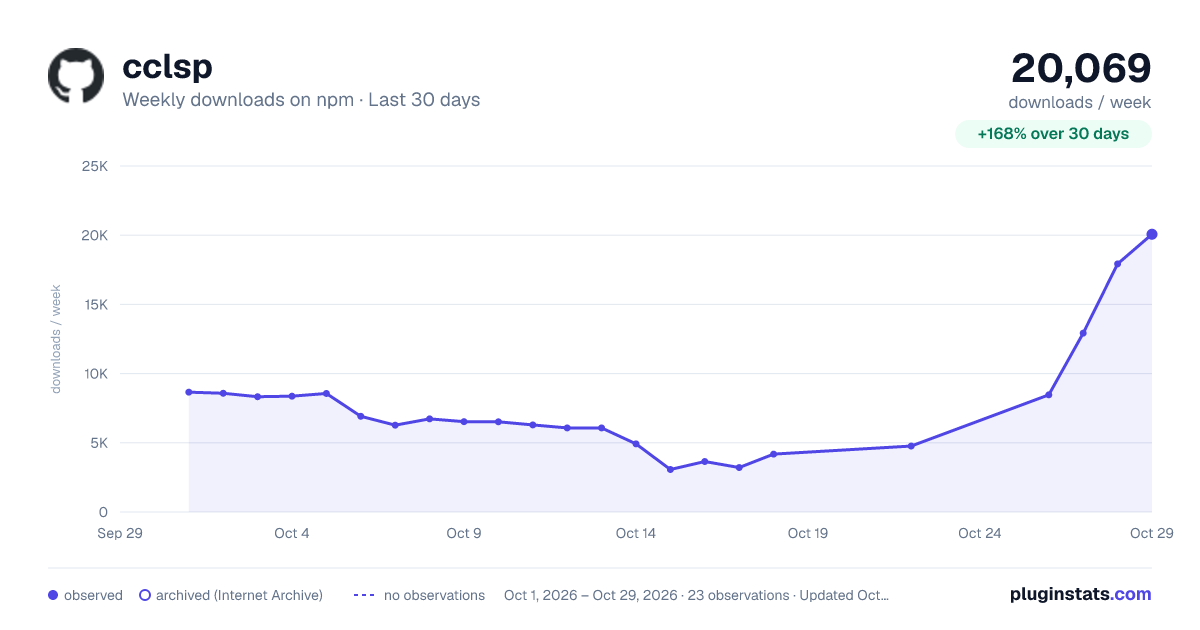
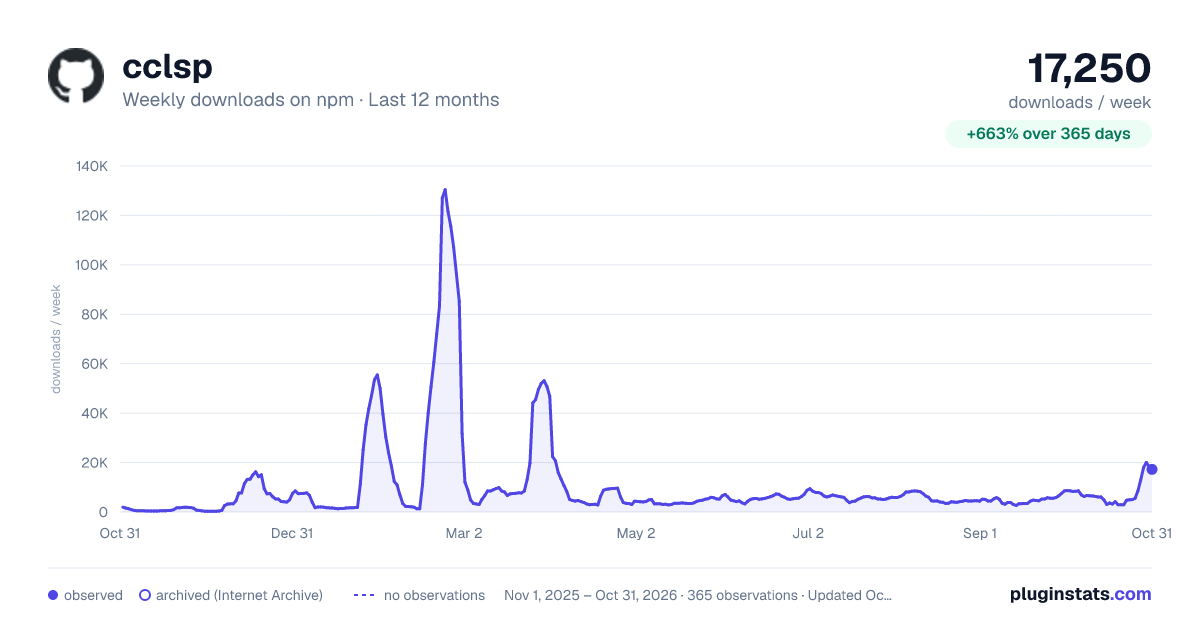
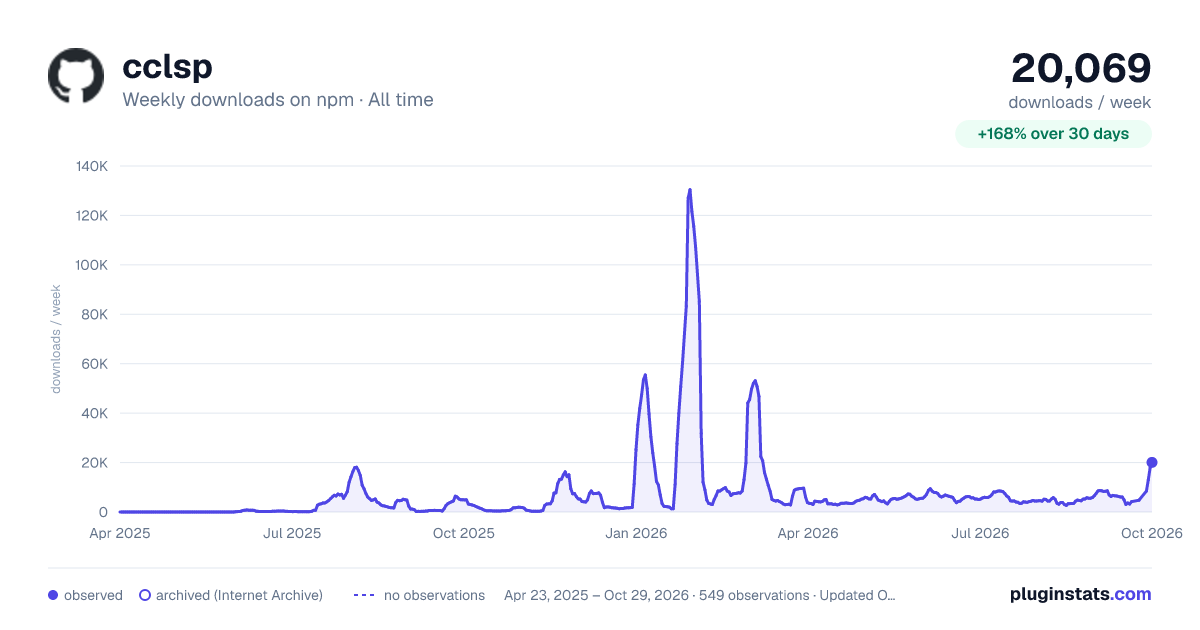

Adoption over time


7/30/90-day growth


Filled points are observed values; hollow points come from Internet Archive snapshots of the listing page. Dashed segments span periods with no observations — values between points are not interpolated.
Recent observations
Full history (543)Similar npm Claude Code plugins
Data source
Weekly downloads (trailing 7 complete days) come from the official npm downloads API. Downloads include CI and mirrors and are not equivalent to installs or users. npm publishes no ratings.
Listing: https://www.npmjs.com/package/cclsp. First seen Oct 16, 2026; last successful collection Oct 18, 2026. See the methodology.