 PluginStats
prettier-plugin-astro weekly downloads statistics
By withastro · npm · Prettier plugins
A Prettier Plugin for formatting Astro files
prettier-plugin-astro has 772,320 recorded weekly downloads on npm, a decrease of 21.5% over the past 30 days, ranking #214 of 2,322 tracked listings.
About prettier-plugin-astro
Prettier Plugin for Astro
Official Prettier plugin adding support for formatting .astro files.
Installation
First install Prettier and the plugin:
npm i --save-dev prettier prettier-plugin-astro
pnpm add --save-dev prettier prettier-plugin-astro
Then add the plugin to your Prettier configuration:
// .prettierrc.mjs
/** @type {import("prettier").Config} */
export default {
  plugins: ['prettier-plugin-astro'],
};
Recommended configuration
For optimal compatibility with the different package managers and Prettier plugins, we recommend manually specifying the parser to use for Astro files in your Prettier config as shown in the example below:
// .prettierrc.mjs
/** @type {import("prettier").Config} */
export default {
  plugins: ['prettier-plugin-astro'],
  overrides: [
    {
      files: '*.astro',
      options: {
        parser: 'astro',
      },
    },
  ],
};
To customize formatting behavior, see the Configuration section below.
Formatting with the VS Code Prettier extension directly
Note > The Astro VS Code extension uses Prettier and this plugin (
prettier-plugin-astro) to format your code. You will only need to install this plugin separately for formatting if:
- You are not using Astro's VS Code extension.
- You want to use features of the Prettier extension that not supported by Astro's own VS Code extension, such as the toolbar panel showing Prettier's status.
Install the VS Code Prettier extension and add the following settings to your VS Code configuration:
{
  "prettier.documentSelectors": ["**/*.astro"],
  "[astro]": {
    "editor.defaultFormatter": "esbenp.prettier-vscode"
  }
}
The settings above ensure that VS Code is aware that Prettier can be used for Astro files, and sets Prettier as the default formatter for Astro files.
Reporting issues
When submitting issues about formatting your .astro files in VS Code, please specify which extension you are using to format your files: Astro's own extension or the Prettier extension.
Configuration
Most options from Prettier will work with the plugin and can be set in a configuration file or through CLI flags.
Astro Allow Shorthand
Controls formatting of matching identifier attributes (for example, <element name={name} /> and <element {name} />). When unset, the formatter preserves the input form. When true, it uses shorthand; when false, it uses the explicit form where possible.
| Default | CLI Override | API Override |
|---|---|---|
| unset | --astro-allow-shorthand <bool> | astroAllowShorthand: <bool> |
Astro Skip Frontmatter
If you are using another tool to format your JavaScript code, like Biome for example, it is possible to skip formatting the frontmatter.
| Default | CLI Override | API Override |
|---|---|---|
false | --astro-skip-frontmatter <bool> | astroSkipFrontmatter: <bool> |
Astro Compress HTML
Mirror of compressHTML in astro.config.mjs. It tells the formatter which whitespace the compiler will collapse, so that reformatting a file never changes what it renders.
Astro's own default is 'jsx' (since Astro 7.0.0), where a whitespace run containing a newline is dropped and a same-line space is content. Set this to match your project if you have changed compressHTML; true and false are accepted as aliases for 'html' and 'none' so the value can be copied across verbatim.
| Default | CLI Override | API Override |
|---|---|---|
'jsx' | --astro-compress-html <html|jsx|none> | astroCompressHTML: "html" | "jsx" | "none" |
Example .prettierrc.cjs
{
  astroAllowShorthand: false;
  astroSkipFrontmatter: false;
  astroCompressHTML: 'jsx';
}
Contributing
Pull requests of any size and any skill level are welcome, no contribution is too small. Changes to the Astro Prettier Plugin are subject to Astro Governance and should adhere to the Astro Style Guide.
See CONTRIBUTING.md for instructions on how to set up your development environment.
Sponsors
Astro is free, open source software made possible by these wonderful sponsors.
<p align="center"> <a target="_blank" href="https://github.com/sponsors/withastro"> <img alt="sponsors" src="https://astro.build/sponsors.png"> </a> </p>Description from the npm listing.
- prettier-plugin
- prettier
- astro
- formatter
README badge
Show your rank in a README or on your website. The badge updates automatically.
Charts
Images: 30d · 1y · all time · 1600×900 dark
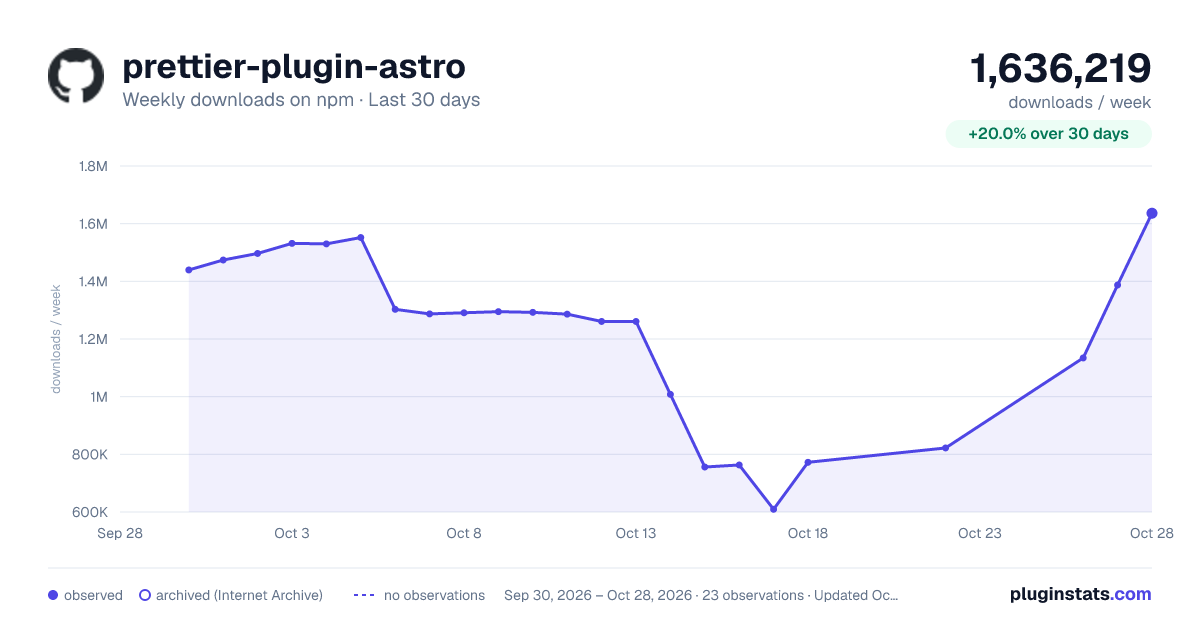
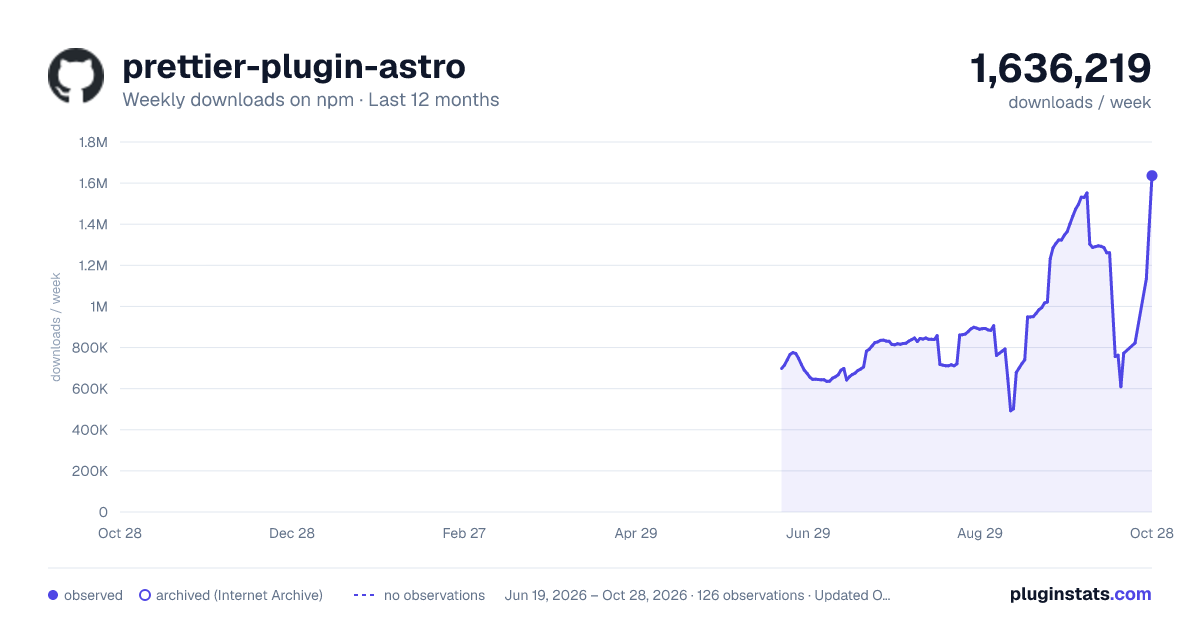
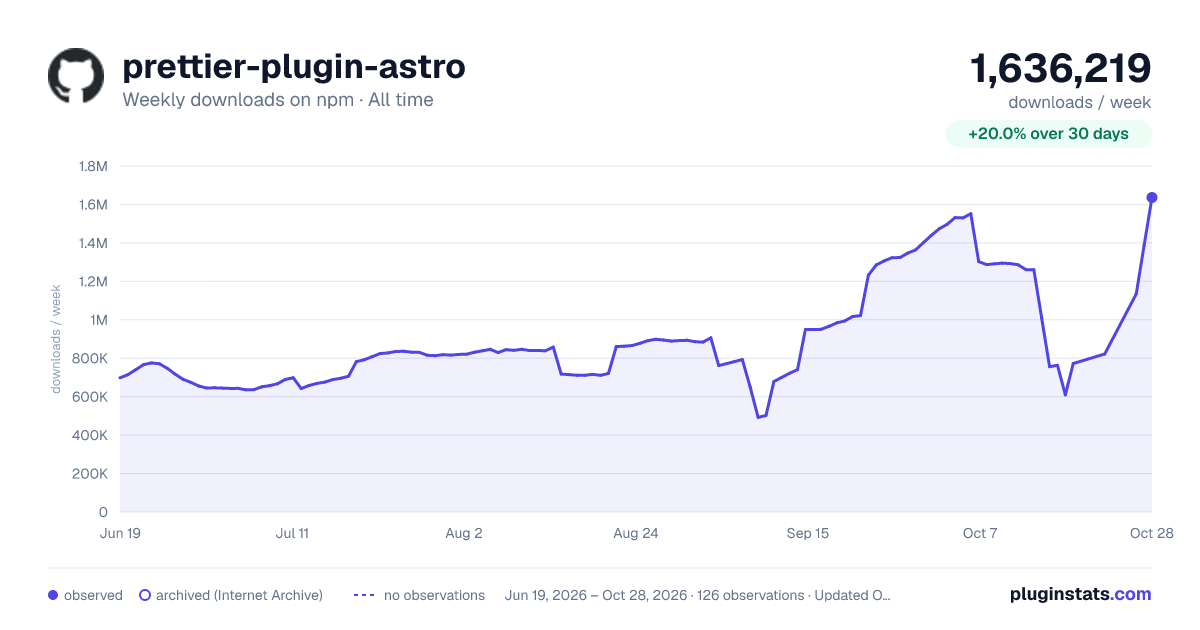

Adoption over time
7/30/90-day growth
Ranking history
Listing placement
Listing placement
Filled points are observed values; hollow points come from Internet Archive snapshots of the listing page. Dashed segments span periods with no observations — values between points are not interpolated.
Each band is one page of 20. Weekly downloads on a linear scale. Placement is projected from weekly downloads, so it can differ from the marketplace's own sort order. Hover a dot to see the listing.
Recent observations
Full history (122)Similar npm Prettier plugins plugins
All 20 prettier-plugin-astro alternativesData source
Weekly downloads (trailing 7 complete days) come from the official npm downloads API. Downloads include CI and mirrors and are not equivalent to installs or users. npm publishes no ratings.
Listing: https://www.npmjs.com/package/prettier-plugin-astro. First seen Oct 16, 2026; last successful collection Oct 20, 2026. See the methodology.