 PluginStats
pushary weekly downloads statistics
Permission hooks for AI coding agents: route tool approvals through Pushary push notifications
pushary has 2,027 recorded weekly downloads on npm.
It ranks #1282 of 2,251 tracked npm listings by weekly downloads.
Over the past 7 days it changed by -64.6%.
PluginStats has 543 daily observations since Apr 23, 2025; the latest is from Oct 17, 2026.
About pushary
Pushary
Push notifications, questions, and permission approvals for AI agents. Get a push when your agent finishes work, answer its questions from your phone, and approve risky commands before they run. Works with Claude Code, Codex, Cursor, VS Code, OpenCode, Gemini CLI, Hermes, and fx.
Your agent froze waiting for a yes. This is how it reaches you.
One command wires up the MCP server, the permission hooks, and the agent instruction files. Then you close your laptop and the agent still reaches you.
What it does
There are three things.
Notify. The agent sends a push when a long task finishes or when a build, test, or deploy fails. The notification can carry what changed, the error, and suggested next steps.
Ask. The agent asks you questions through push: yes/no, multiple choice, or free text. It waits for your answer. When Pushary is connected, the agent sends its questions to your phone instead of stalling in the terminal.
Gate. Risky shell commands (rm -rf, force pushes, history rewrites, database drops, deploys) are checked before they run. What happens is set by your dashboard policy: auto approve trusted read-only commands, push to your phone for approval, or hold for the phone and never auto-deny. If the check cannot run, the decision falls back to the agent's own permission prompt in the terminal; nothing is silently allowed. Without an API key configured, the hooks stay out of the way entirely and only count what they would have gated.
Just want a bell? That part is free.
If your agent runs in front of you and you only need to know when it finishes, you do not need any of the above and you should not pay for it:
That is the whole thing. It makes a noise in your terminal and raises a desktop notification when Claude Code says an agent finished or is waiting on you. It rides Claude Code's own notification events, so it fires when you have actually stepped away rather than after every reply. No account, no API key, no network call, nothing leaves your machine. Turn it off with pushary bell --off; it touches nothing else in your settings.
If you landed here from error: unknown option '--global'
You probably ran this, from a blog post or an answer somewhere:
claude config set no longer takes --global. The setting moved into ~/.claude/settings.json, so the direct equivalent is to put it there yourself:
That rings on Claude Code's own notification events. pushary bell does the same job through a hook instead, which means it also fires on Stop (the agent finished, which is the case most people actually want) and can raise a real desktop notification rather than only a beep. Either is fine. Neither costs anything.
Where the free part stops
A bell has a ceiling, and the ceiling is how many agents you run:
• One agent. A bell is perfect. Pushary is overkill and we would rather you did not buy it. • Two or three. The bell rings and you cannot tell which agent. You alt-tab looking for it. • Four or more. The bell is noise, and you have left the room anyway.
Above three concurrent agents the bell says so, once a day, and then stops talking. Set PUSHARY_BELL_QUIET=1 if you would rather it never mentioned it.
Setup
Run setup:
It shows a QR code and short link. Open either in the Pushary app, check that the fingerprint matches, and approve. Setup then stores the credential and configures the agents it detects. If this machine already has a key, setup reuses it and skips pairing.
For CI or another non-interactive install, pass an existing key explicitly:
Verify it worked:
Setup installs this package globally with npm, at the version you ran, because the hooks run from that install. You never install it by hand.
Remove it
It removes the hooks, the MCP entries, the stored key and the background service. Add --dry-run to see what it would remove first.
One package, two names
pushary and @pushary/agent-hooks are the same build, published at the same version. Every older command keeps working: npx @pushary/agent-hooks@latest setup does exactly what npx pushary@latest setup does.
pip install pushary is a different package: the Pushary Python SDK.
Supported agents
| Agent | Notify | Ask | Gate |
| Claude Code | yes | yes | yes | | Codex | yes | yes | yes | | Cursor | yes | yes | yes | | Gemini CLI | yes | yes | yes | | Hermes | yes | yes | yes | | VS Code | yes | yes | yes | | OpenCode | yes | yes | yes | | fx | yes | yes | no |
Any other MCP client can use notify and ask by pointing at the Pushary MCP endpoint directly.
Control an agent from your phone
The Pushary app can start an agent on a connected computer and send instructions to a running session. It is deliberately not a remote shell: the phone submits a task to the selected agent, and the agent still runs with its normal permissions, hooks, and approval policy on your computer.
| Control | Claude Code | Codex | Gemini CLI | Other agents |
| Start a new session | yes | yes | yes | no | | Send an instruction to a live session | yes | yes | yes | wrapper-dependent | | Approve, deny, and answer | yes | yes | yes | yes via MCP |
Requirements and limits:
• Run setup once. It installs a per-user background service using LaunchAgent on macOS, systemd on Linux, or Task Scheduler on Windows. • The computer must be awake, logged in, online, and have the selected agent CLI installed. Pushary advertises only providers it finds on that machine. • Start and Send require Face ID, Touch ID, or the device passcode. Controls are hidden when the machine or session has no recent live consumer. • An instruction may remain queued on Pushary's server for up to one hour while delivery retries. It is delivered to the agent session, never executed as a raw terminal command. • Agent control requires a paid plan after the trial. Current terms are on the pricing page.
Service lifecycle is explicit and cross-platform:…
Description from the npm listing.
- pushary
- claude-code
- claude-code-hooks
- codex
- cursor
- gemini-cli
- hermes
- mcp
- mcp-server
- ai-agent
- ai-coding-agent
- human-in-the-loop
- hitl
- push-notifications
- notifications
- agent-permissions
- permission-hooks
- tool-approvals
- pretooluse
Where pushary sits in the listing
Each band is one page of 20. Weekly downloads on a log scale. Placement is projected from weekly downloads, so it can differ from the marketplace's own sort order. Hover a dot to see the listing.


Charts
Images: 30d · 1y · all time · 1600×900 dark
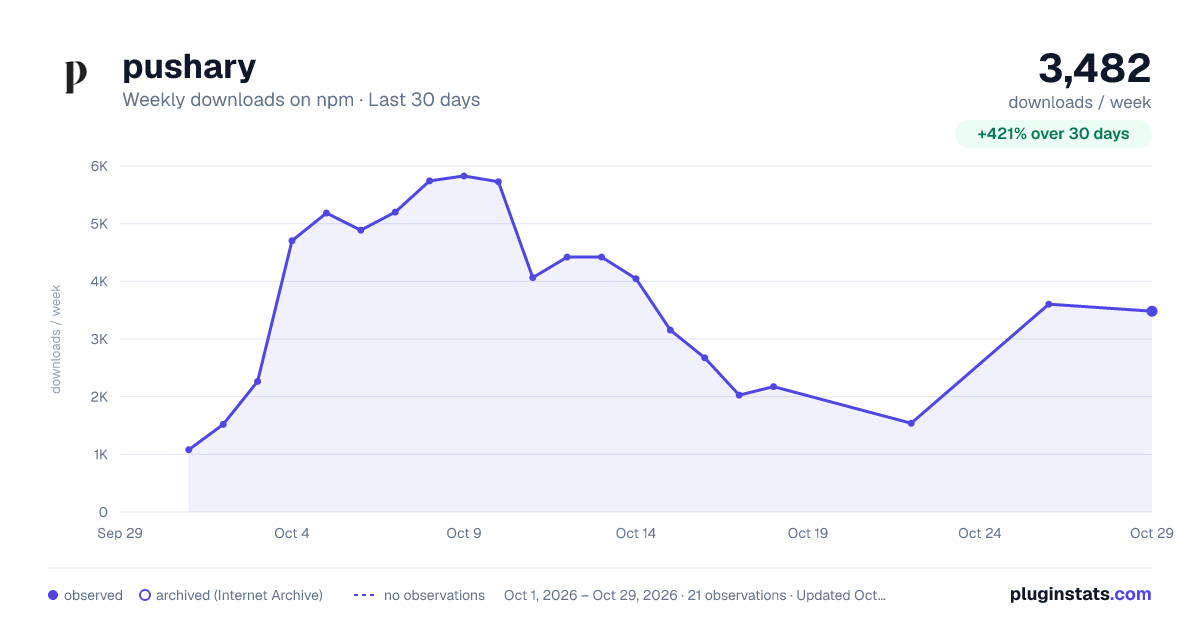
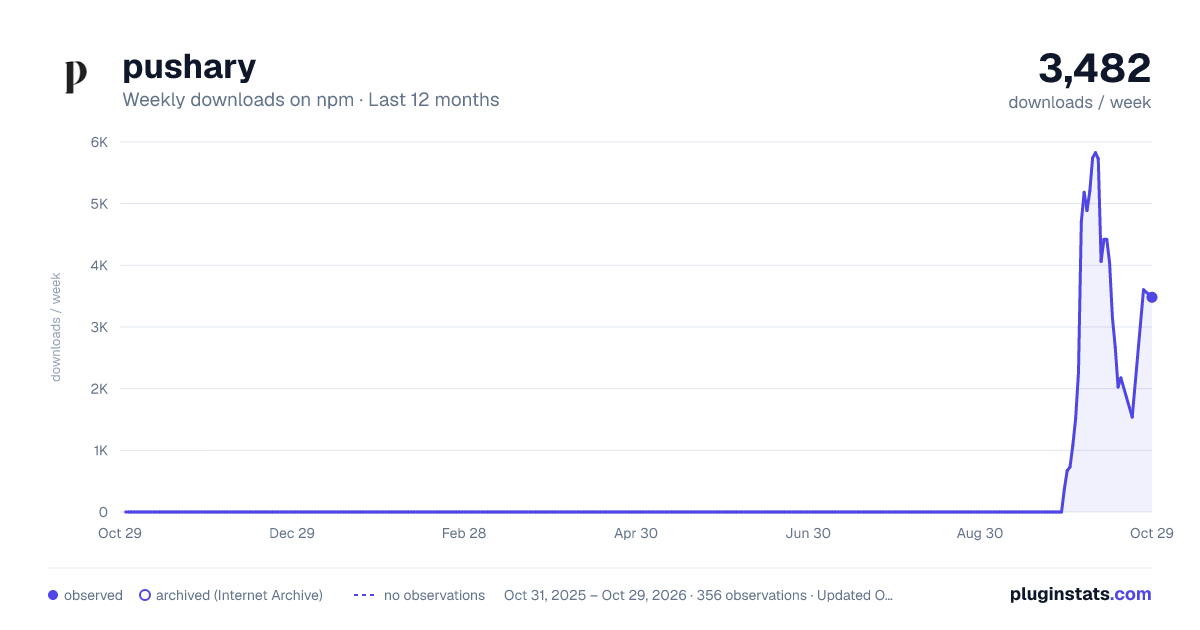
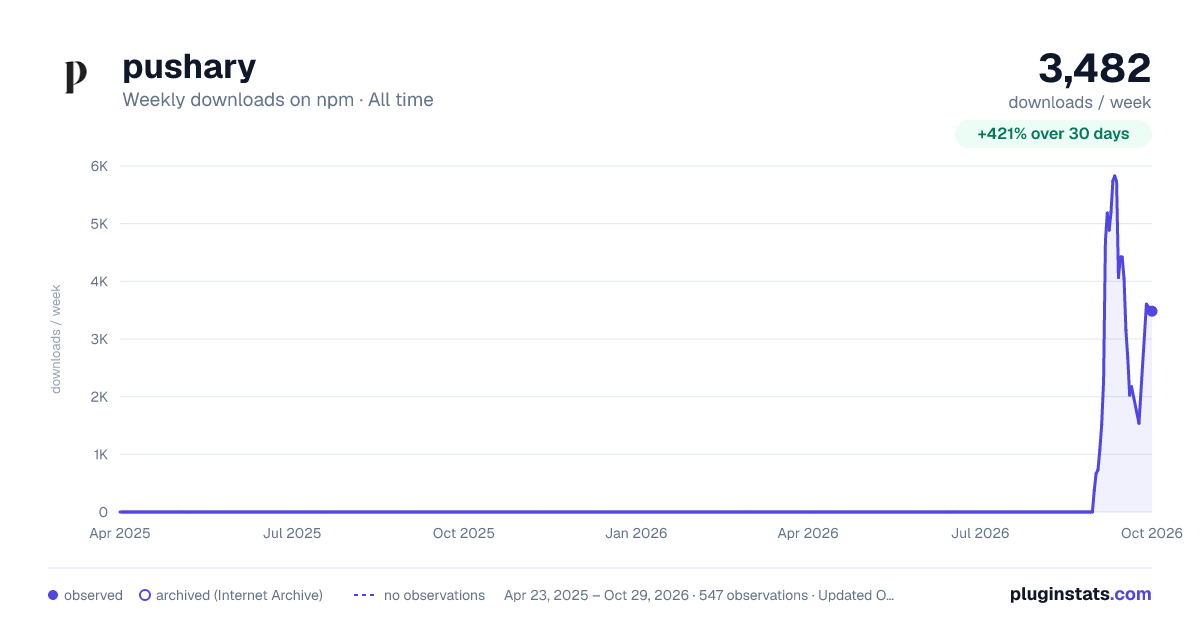

Adoption over time


7/30/90-day growth


Filled points are observed values; hollow points come from Internet Archive snapshots of the listing page. Dashed segments span periods with no observations — values between points are not interpolated.
Recent observations
Full history (543)Similar npm Claude Code plugins
Data source
Weekly downloads (trailing 7 complete days) come from the official npm downloads API. Downloads include CI and mirrors and are not equivalent to installs or users. npm publishes no ratings.
Listing: https://www.npmjs.com/package/pushary. First seen Oct 16, 2026; last successful collection Oct 16, 2026. See the methodology.