 PluginStats
eslint-plugin-no-secrets weekly downloads statistics
By nickdeis · npm · ESLint plugins
An eslint rule that searches for potential secrets/keys in code
eslint-plugin-no-secrets has 156,121 recorded weekly downloads on npm, a decrease of 38.8% over the past 30 days.
It ranks #398 of 2,251 tracked npm listings by weekly downloads.
Over 90 days, weekly downloads changed by -44.0%.
PluginStats has 542 daily observations since Apr 24, 2025; the latest is from Oct 17, 2026.
About eslint-plugin-no-secrets
eslint-plugin-no-secrets
An eslint rule that searches for potential secrets/keys in code and JSON files.
This plugin has two rules:
• no-secrets: Find potential secrets using cryptographic entropy or patterns in the AST (acts like a standard eslint rule, more configurable) • no-pattern-match: Find potential secrets in text (acts like grep, less configurable, but potentially more flexible) • 1. Usage • 1.1. Flat config • 1.2. eslintrc • 1.3. Include JSON files • 1.3.1. Include JSON files with in "flat configs" • 2. no-secrets • 2.1. no-secrets examples • 2.2. When it's really not a secret • 2.2.1. Either disable it with a comment • 2.2.2. use the ignoreContent to ignore certain content • 2.2.3. Use ignoreIdentifiers to ignore certain variable/property names • 2.2.4. Use additionalDelimiters to further split up tokens • 2.3. no-secrets Options • 3. no-pattern-match • 3.1. no-pattern-match options • 4. Acknowledgements
1. Usage
npm i -D eslint-plugin-no-secrets
1.1. Flat config
_eslint.config.js_
1.2. eslintrc
_.eslintrc_
1.3. Include JSON files
To include JSON files, install eslint-plugin-jsonc or @eslint/json (if using ESLint version 9.6 or above)
npm install --save-dev eslint-plugin-jsonc
Then in your .eslint configuration file, extend the jsonc base config
or if you are using ESLint 9.6 or above
1.3.1. Include JSON files with in "flat configs"
_eslint.config.js_
2. no-secrets
no-secrets is a rule that does two things:
1. Search for patterns that often contain sensitive information 2. Measure cryptographic entropy to find potentially leaked secrets/passwords
It's modeled after early truffleHog, but acts on ECMAscripts AST. This allows closer inspection into areas where secrets are commonly leaked like string templates or comments.
2.1. no-secrets examples
Decrease the tolerance for entropy
Add additional patterns to check for certain token formats. Standard patterns can be found here
2.2. When it's really not a secret
2.2.1. Either disable it with a comment
This will tell future maintainers of the codebase that this suspicious string isn't an oversight
2.2.2. use the ignoreContent to ignore certain content
2.2.3. Use ignoreIdentifiers to ignore certain variable/property names
2.2.4. Use additionalDelimiters to further split up tokens
Tokens will always be split up by whitespace within a string. However, sometimes words that are delimited by something else (e.g. dashes, periods, camelcase words). You can use additionalDelimiters to handle these cases.
For example, if you want to split words up by the character . and by camelcase, you could use this configuration:
2.3. no-secrets Options
| Option | Description | Default | Type |
| tolerance | Minimum "randomness"/entropy allowed. Only strings above this threshold will be shown. | 4 | number | | additionalRegexes | Object of additional patterns to check. Key is check name and value is corresponding pattern | {} | {\[regexCheckName:string]:string \| RegExp} | | ignoreContent | Will ignore the _entire_ string if matched. Expects either a pattern or an array of patterns. This option takes precedent over additionalRegexes and the default regular expressions | [] | string \| RegExp \| (string\|RegExp)[] | | ignoreModules | Ignores strings that are an argument in import() and require() or is the path in an import statement. | true | boolean | | ignoreIdentifiers | Ignores the values of properties and variables that match a pattern or an array of patterns. | [] | string \| RegExp \| (string\|RegExp)[] | | ignoreCase | Ignores character case when calculating entropy. This could lead to some false negatives | false | boolean | | additionalDelimiters | In addition to splitting the string by whitespace, tokens will be further split by these delimiters | [] | (string\|RegExp)[] |
3. no-pattern-match
While this rule was originally made to take advantage of ESLint's AST, sometimes you may want to see if a pattern matches any text in a file, kinda like grep.
For example, if we configure as follows:
We would match const SECRET, but not var SECRET. We would match keys that were called "SECRET" in JSON files if they were configured to be scanned.
3.1. no-pattern-match options
| Option | Description | Default | Type |
| patterns | An object of patterns to check the text contents of files against | {} | {\[regexCheckName:string]:string \| RegExp} |
4. Acknowledgements
Huge thanks to truffleHog for the inspiration, the regexes, and the measure of entropy.
Description from the npm listing.
- eslint
- eslint-plugin
- security
- secure
- secrets
- lint
- eslintplugin
Where eslint-plugin-no-secrets sits in the listing
Each band is one page of 20. Weekly downloads on a log scale. Placement is projected from weekly downloads, so it can differ from the marketplace's own sort order. Hover a dot to see the listing.


Charts
Images: 30d · 1y · all time · 1600×900 dark
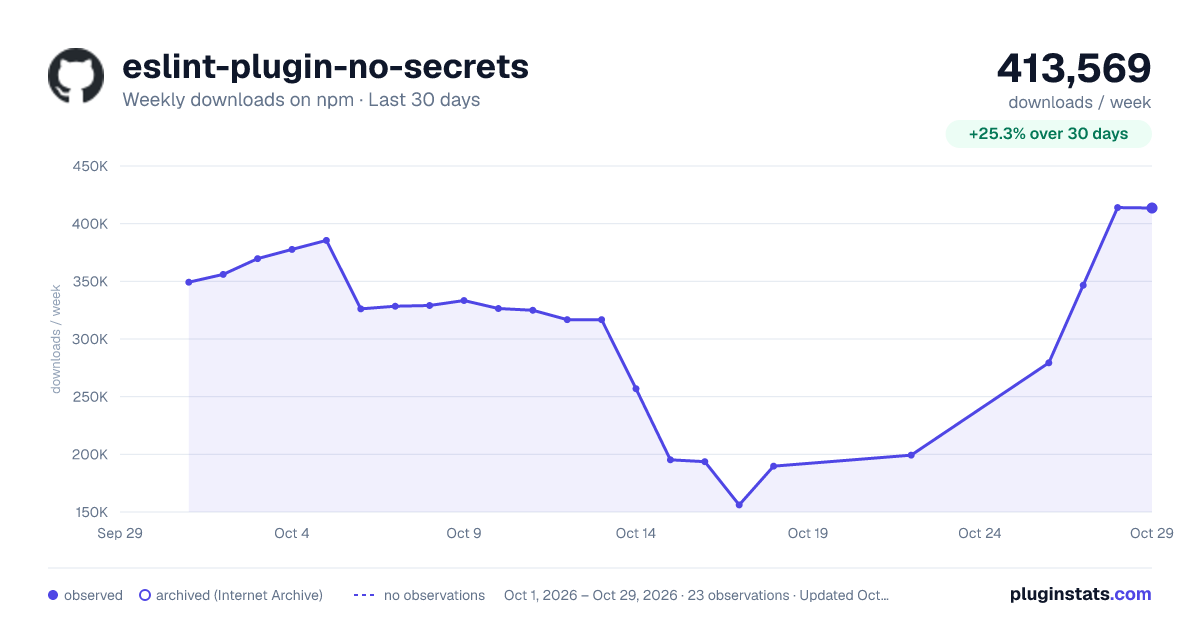
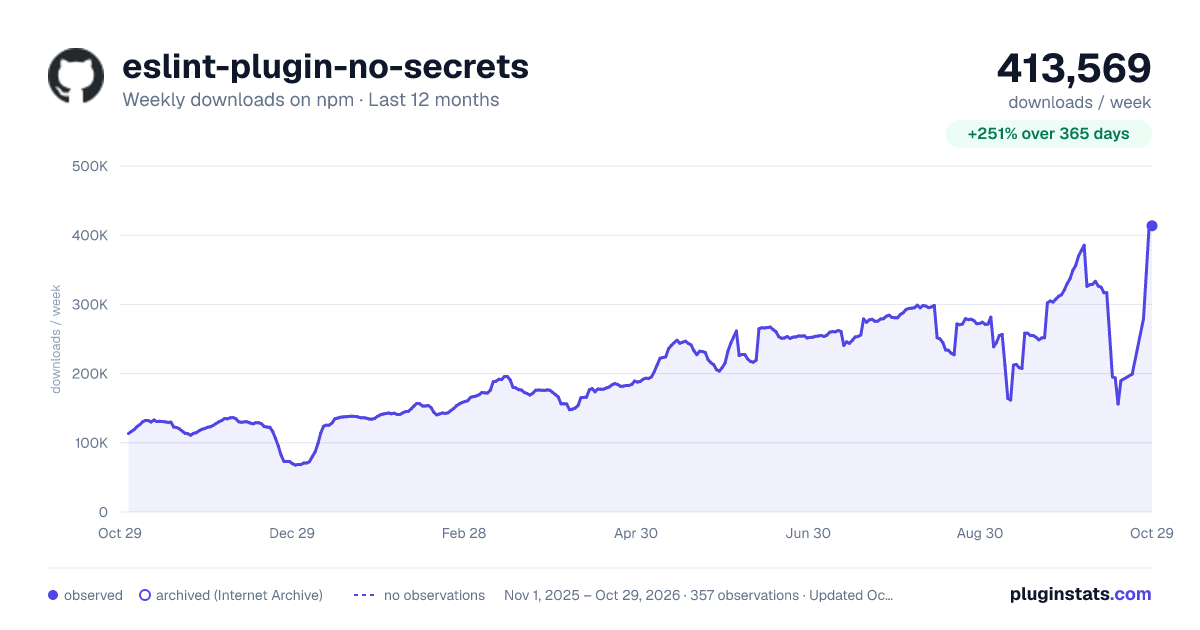
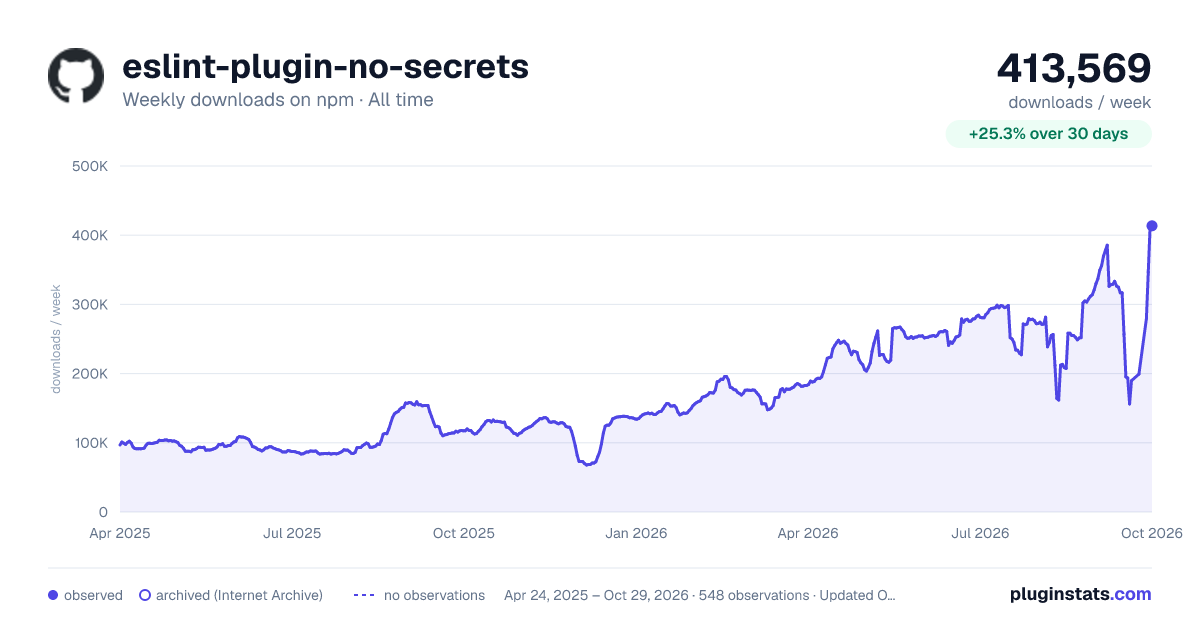

Adoption over time


7/30/90-day growth


Filled points are observed values; hollow points come from Internet Archive snapshots of the listing page. Dashed segments span periods with no observations — values between points are not interpolated.
Recent observations
Full history (542)Similar npm ESLint plugins plugins
Data source
Weekly downloads (trailing 7 complete days) come from the official npm downloads API. Downloads include CI and mirrors and are not equivalent to installs or users. npm publishes no ratings.
Listing: https://www.npmjs.com/package/eslint-plugin-no-secrets. First seen Oct 16, 2026; last successful collection Oct 18, 2026. See the methodology.