 PluginStats
eslint-plugin-yml weekly downloads statistics
By ota-meshi (10 listings) · npm · ESLint plugins
This ESLint plugin provides linting rules for YAML.
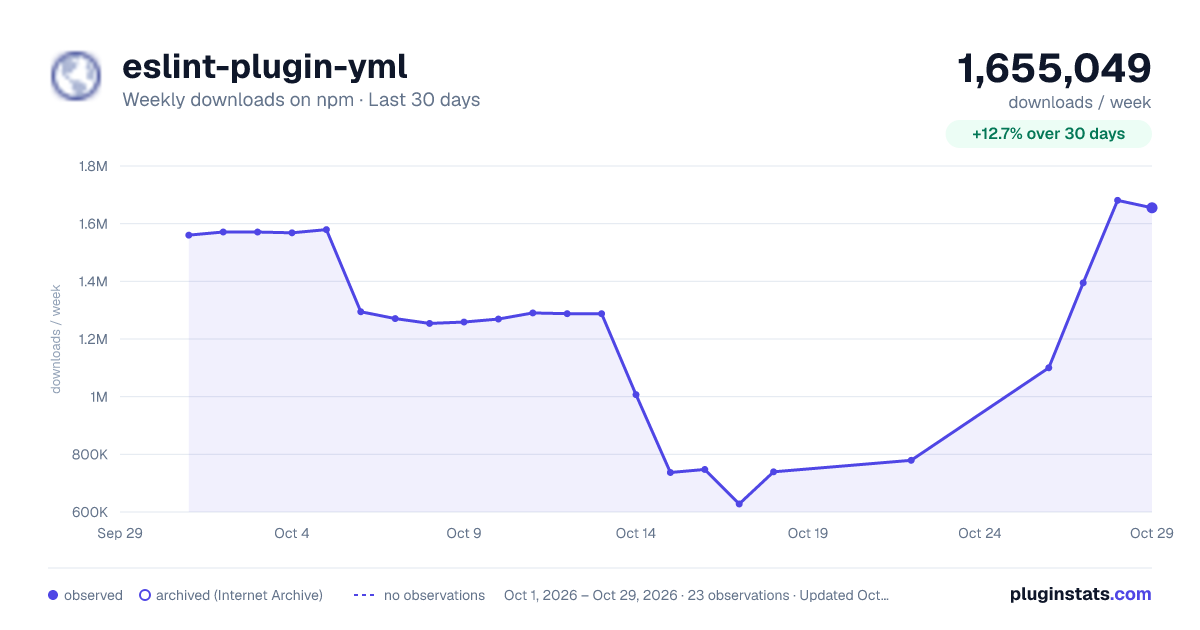
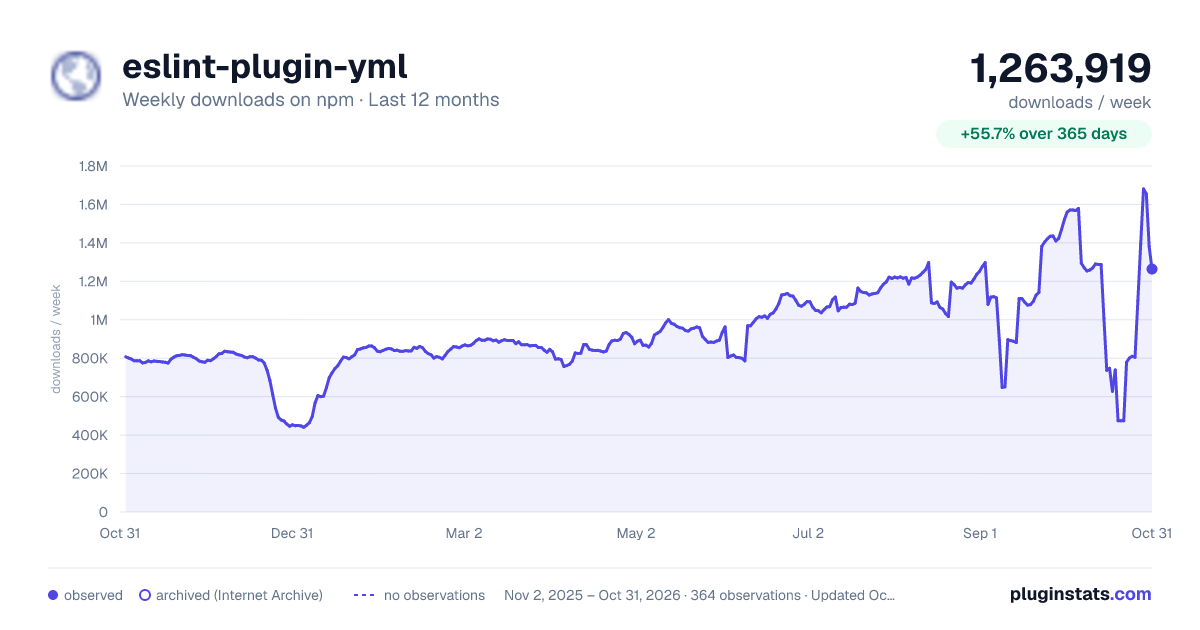
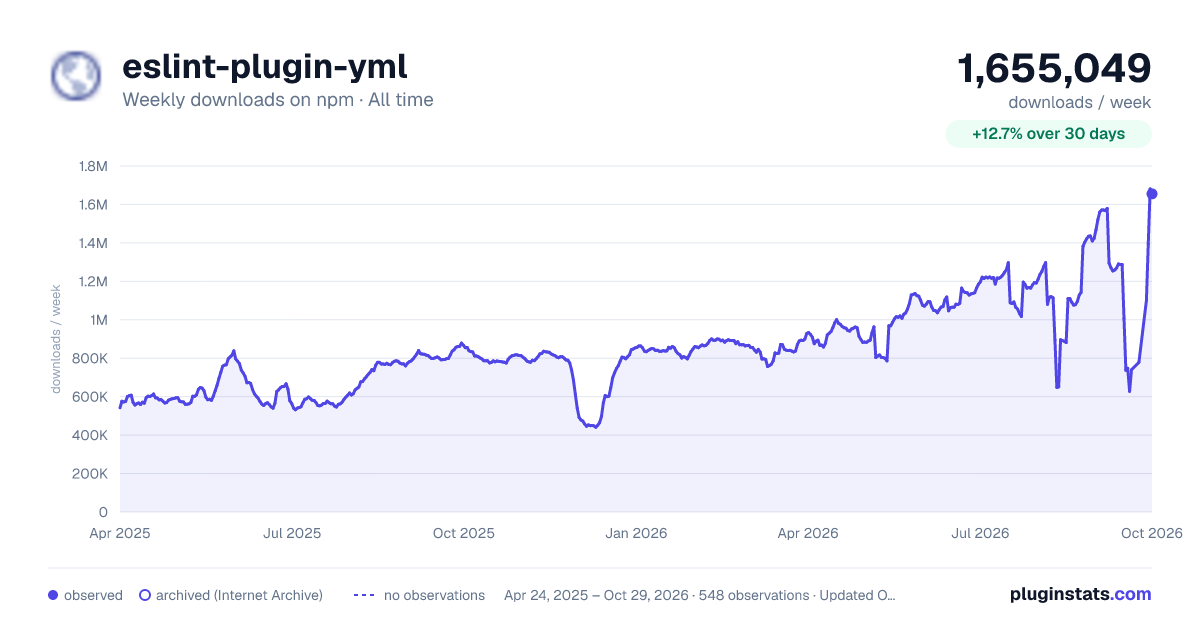
eslint-plugin-yml has 627,860 recorded weekly downloads on npm, a decrease of 41.7% over the past 30 days.
It ranks #216 of 2,251 tracked npm listings by weekly downloads.
Over 90 days, weekly downloads changed by -46.1%.
PluginStats has 542 daily observations since Apr 24, 2025; the latest is from Oct 17, 2026.
About eslint-plugin-yml
Introduction
eslint-plugin-yml is ESLint plugin provides linting rules for [YAML].
:name_badge: Features
This ESLint plugin provides linting rules for [YAML].
• You can use ESLint to lint [YAML]. • You can find out the problem with your [YAML] files. • You can apply consistent code styles to your [YAML] files. • Supports Vue SFC custom blocks such as . Requirements vue-eslint-parser v7.3.0 and above. • Supports ESLint directives. e.g. # eslint-disable-next-line • You can check your code in real-time using the ESLint editor integrations.
You can check on the Online DEMO.
:question: How is it different from other YAML plugins?
Plugins that do not use AST
e.g. eslint-plugin-yaml
These plugins use the processor to parse and return the results independently, without providing the ESLint engine with AST and source code text.
Plugins don't provide AST, so you can't use directive comments (e.g. # eslint-disable). Plugins don't provide source code text, so you can't use it with plugins and rules that use text (e.g. eslint-plugin-prettier, eol-last).
eslint-plugin-yml works by providing AST and source code text to ESLint.
:book: Documentation
See documents.
:cd: Installation
Requirements
- ESLint v9.38.0 and above - Node.js v20.19.0 or higher (in the 20.x line), v22.13.0 or higher (in the 22.x line), or v24.0.0 and above
:book: Usage
Configuration
Use eslint.config.js file to configure rules. See also: .
Example eslint.config.js:
This plugin provides configs:
• *.configs.base ... Configuration to enable correct YAML parsing. • *.configs.recommended ... Above, plus rules to prevent errors or unintended behavior. • *.configs.standard ... Above, plus rules to enforce the common stylistic conventions. • *.configs.prettier ... Turn off rules that may conflict with Prettier.
See the rule list to get the rules that this plugin provides.
Note: The *.configs['flat/*'] configs are still available for backward compatibility, but it is recommended to use the new config names without the flat/ prefix.
Parser Configuration
If you have specified a parser, you need to configure a parser for .yaml.
For example, if you are using the "@babel/eslint-parser", configure it as follows:
Parser Options
The following parser options for yaml-eslint-parser are available by specifying them in parserOptions in the ESLint configuration file.
See also https://github.com/ota-meshi/yaml-eslint-parser#readme.
Running ESLint from the command line
With ESLint v9 and flat config, ESLint automatically lints all files matched by your config. You typically don't need the --ext option anymore.
Examples:
Languages
This plugin provides the following language identifiers for use in ESLint configurations:
• yml/yaml ... YAML files
For example, to apply settings specifically to YAML files, you can use the language field in your ESLint configuration:
The configuration above is included in the shareable configs provided by this plugin, so using configs is generally recommended.
See also
:computer: Editor Integrations
Visual Studio Code
Use the dbaeumer.vscode-eslint extension that Microsoft provides officially.
You have to configure the eslint.validate option of the extension to check .yaml files, because the extension targets only *.js or *.jsx files by default.
Example .vscode/settings.json:
JetBrains WebStorm IDEs
In any of the JetBrains IDEs you can configure the linting scope. Following the steps in their help document, you can add YAML files to the scope like so:
1. Open the Settings/Preferences dialog, go to Languages and Frameworks | JavaScript | Code Quality Tools | ESLint, and select Automatic ESLint configuration or Manual ESLint configuration. 2. In the Run for files field, update the pattern that defines the set of files to be linted to include YAML files as well:
:white_check_mark: Rules
The --fix option on the command line automatically fixes problems reported by rules which have a wrench :wrench: below. The rules with the following star :star: are included in the config.
YAML Rules
| Rule ID | Description | Fixable | RECOMMENDED | STANDARD |
| yml/block-mapping-colon-indicator-newline | enforce consistent line breaks after : indicator | :wrench: | | :star: | | yml/block-mapping-question-indicator-newline | enforce consistent line breaks after ? indicator | :wrench: | | :star: | | yml/block-mapping | require or disallow block style mappings. | :wrench: | | :star: | | yml/block-sequence-hyphen-indicator-newline | enforce consistent line breaks after - indicator | :wrench: | | :star: | | yml/block-sequence | require or disallow block style sequences. | :wrench: | | :star: | | yml/file-extension | enforce YAML file extension | | | | | yml/indent | enforce consistent indentation | :wrench: | | :star: | | yml/key-name-casing | enforce naming convention to key names | | | | | yml/no-boolean-key | disallow boolean mapping keys | | | | | yml/no-empty-document | disallow empty document | | :star: | :star: | | yml/no-empty-key | disallow empty mapping keys | | :star: | :star: | | yml/no-empty-mapping-value | disallow empty mapping values | | :star: | :star: | | yml/no-empty-sequence-entry | disallow empty sequence entries | | :star: | :star: | | yml/no-tab-indent | disallow tabs for indentation. | | :star: | :star: | | yml/no-trailing-zeros | disallow trailing zeros for floats | :wrench: | | :star: | | yml/plain-scalar | require or disallow plain style scalar. | :wrench: | | :star: | | yml/quotes | enforce the consistent use of either double, or single quotes | :wrench: | | :star: | | yml/require-string-key | disallow mapping keys other than strings | | | | | yml/sort-keys | require mapping keys to be sorted | :wrench: | | | | yml/sort-sequence-values | require sequence values to be sorted | :wrench: | | | | yml/vue-custom-block/no-parsing-error | disallow parsing errors in Vue custom blocks | | :star: | :star: |
Extension Rules…
Description from the npm listing.
- eslint
- eslintplugin
- eslint-plugin
- yaml
- yml
- lint
Where eslint-plugin-yml sits in the listing
Each band is one page of 20. Weekly downloads on a log scale. Placement is projected from weekly downloads, so it can differ from the marketplace's own sort order. Hover a dot to see the listing.


Charts
Images: 30d · 1y · all time · 1600×900 dark

Adoption over time


7/30/90-day growth


Filled points are observed values; hollow points come from Internet Archive snapshots of the listing page. Dashed segments span periods with no observations — values between points are not interpolated.
Recent observations
Full history (542)Similar npm ESLint plugins plugins
Data source
Weekly downloads (trailing 7 complete days) come from the official npm downloads API. Downloads include CI and mirrors and are not equivalent to installs or users. npm publishes no ratings.
Listing: https://www.npmjs.com/package/eslint-plugin-yml. First seen Oct 16, 2026; last successful collection Oct 18, 2026. See the methodology.