 PluginStats
@pinegrow/tailwindcss-plugin weekly downloads statistics
By pinegrow · npm · Tailwind plugins
Pinegrow TailwindCSS Plugin
@pinegrow/tailwindcss-plugin has 39 recorded weekly downloads on npm, a decrease of 81.6% over the past 30 days.
It ranks #1758 of 2,251 tracked npm listings by weekly downloads.
Over 90 days, weekly downloads changed by -88.6%.
PluginStats has 121 daily observations since Jun 19, 2026; the latest is from Oct 17, 2026.
About @pinegrow/tailwindcss-plugin
Pinegrow TailwindCSS Plugin
[![npm version][npm-version-src]][npm-version-href] [![npm downloads][npm-downloads-src]][npm-downloads-href] [![License][license-src]][license-href]
Tailwind CSS plugin for Pinegrow ⚡️
Pinegrow TailwindCSS Plugin enables intellisense, visual control customization and theming in Pinegrow apps (currently only Pinegrow Web Editor & Vue Designer).
The plugin supports Tailwind CSS v3 and v4 projects, including v4 projects that use @tailwindcss/vite or @tailwindcss/postcss.
Note:
• This plugin is generally used in conjunction with the Pinegrow Vite Plugin or with the meta-framework specific Pinegrow modules for Nuxt, Quasar, Iles and Astro. • To use Tailwind CSS in Pinegrow apps, you require an active Tailwind Addon subscription. • Learn more about Vue Designer
Features
• 🎨 Visually live-design your Vite-powered tailwind apps (Vue, Nuxt, Quasar, Iles, Astro, etc) • ⚙️ Smartly integrates into your Vite workflow in dev-mode only • ✨ Clean code 😃, No lock-in - You are in control of your projects and development workflow ❤️
Quick Setup
1. Install: Add @pinegrow/tailwindcss-plugin to your project
2. Configure: Add tailwindcss with your Tailwind entry CSS path as options to liveDesigner in your config. For Tailwind CSS v3 projects, or v4 projects that still use a JavaScript config, provide configPath as well.
3. Now, open your project in your Pinegrow app (currently only Vue Designer). ✨
4. Theme Customization (optional) - Pinegrow Tailwind CSS addon enables easy theming based on colors, fonts and background images. Theme files are saved at the location specified by the themePath option (default: [src]/themes/pg-tailwindcss/tokens.[cjs,mjs]). To use the theme, follow the instructions in the Config Panel of your Pinegrow app (currently only Vue Designer) under @pinegrow/tailwindcss-plugin package.
Tailwind Config Plugin Usage
In CommonJS-style Tailwind config files, the package can be required and called directly:
In ESM or TypeScript Tailwind config files, default import remains the preferred form:
The previous CommonJS .default(...) form is no longer supported by current package builds. Update older Tailwind config files to call the required package directly.
Tailwind CSS v4 Notes
For Tailwind CSS v4 projects, set cssPath to the CSS file that imports Tailwind:
The @config line is optional for CSS-first projects. Provide configPath only when your project still uses a Tailwind config file.
Options
License
MIT License
Copyright (c) Pinegrow
Description from the npm listing.
- pinegrow
- vue designer
- vuedesigner
- tailwindcss-plugin
- @pinegrow/tailwindcss-plugin
Where @pinegrow/tailwindcss-plugin sits in the listing
Each band is one page of 20. Weekly downloads on a log scale. Placement is projected from weekly downloads, so it can differ from the marketplace's own sort order. Hover a dot to see the listing.


Charts
Images: 30d · 1y · all time · 1600×900 dark
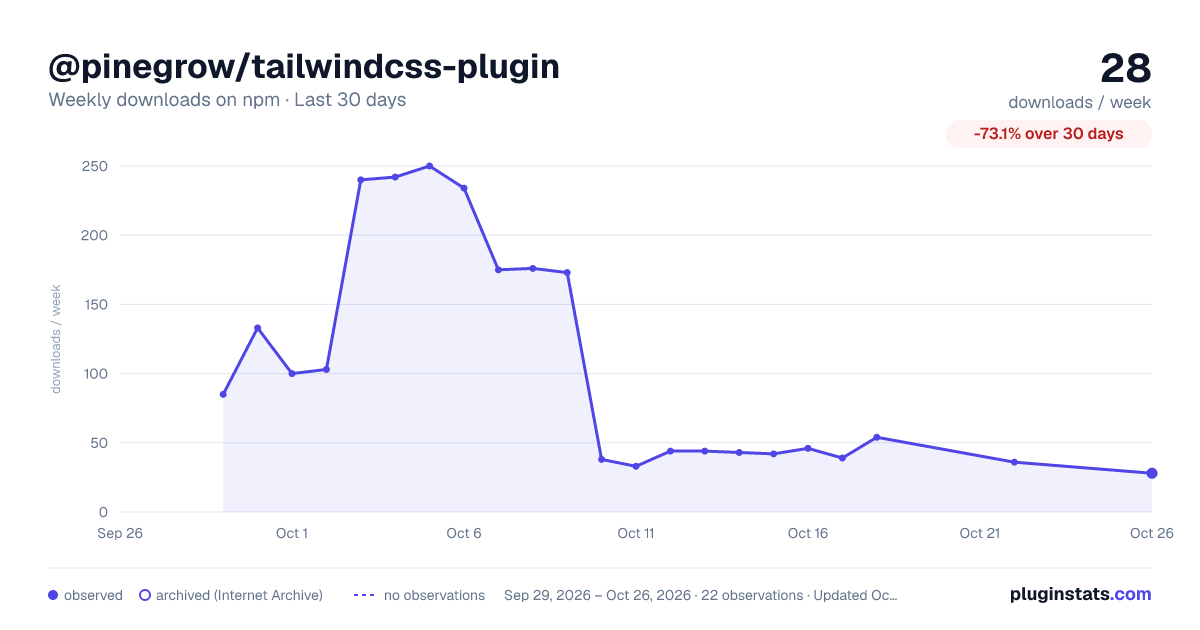
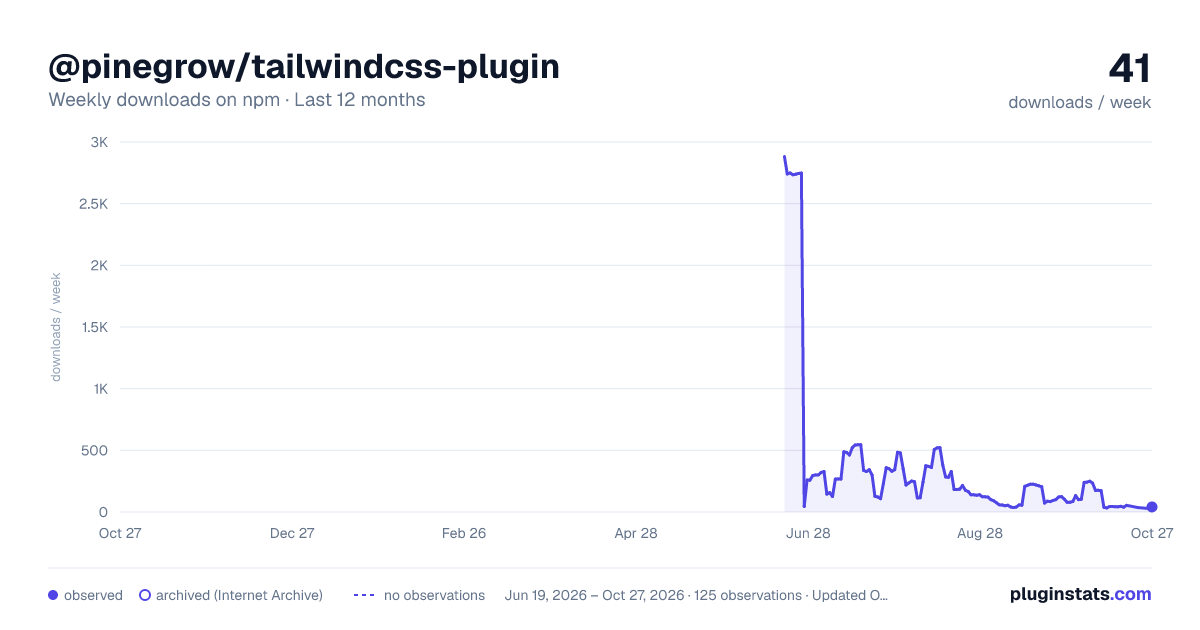
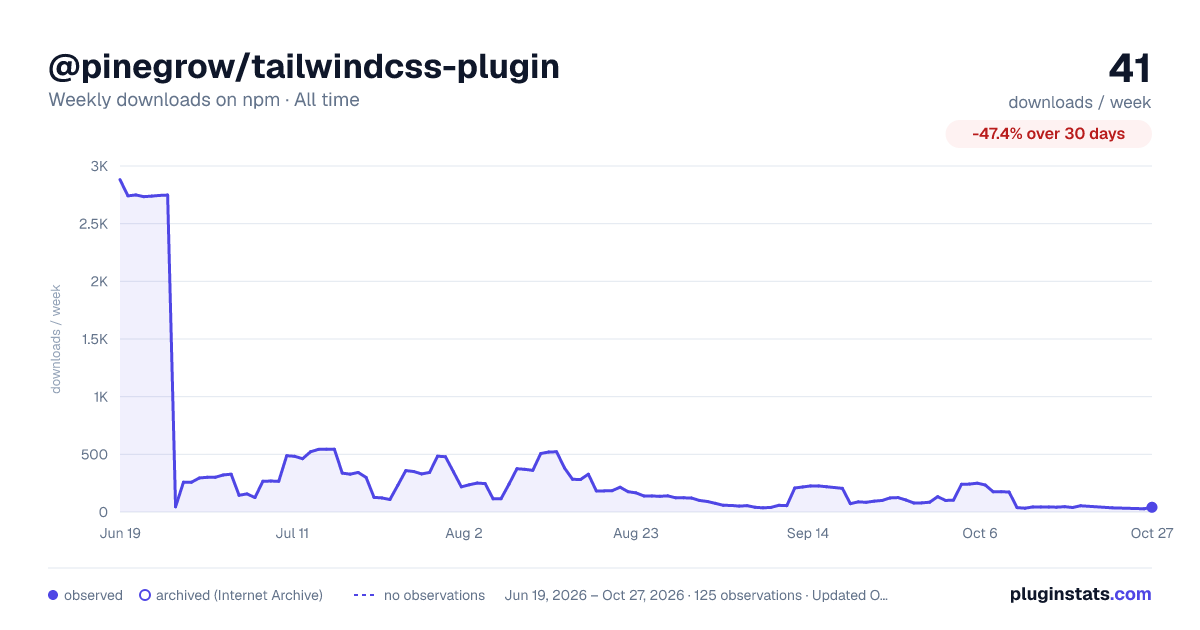

Adoption over time


7/30/90-day growth


Filled points are observed values; hollow points come from Internet Archive snapshots of the listing page. Dashed segments span periods with no observations — values between points are not interpolated.
Recent observations
Full history (121)Similar npm Tailwind plugins plugins
Data source
Weekly downloads (trailing 7 complete days) come from the official npm downloads API. Downloads include CI and mirrors and are not equivalent to installs or users. npm publishes no ratings.
Listing: https://www.npmjs.com/package/@pinegrow/tailwindcss-plugin. First seen Oct 16, 2026; last successful collection Oct 18, 2026. See the methodology.