 PluginStats
css-modular-type weekly downloads statistics
By saurabhchardereal · npm · Tailwind plugins
A PostCSS and TailwindCSS plugin for generating modular type scales.
css-modular-type has 2 recorded weekly downloads on npm, a decrease of 96.3% over the past 30 days.
It ranks #2152 of 2,251 tracked npm listings by weekly downloads.
Over 90 days, weekly downloads changed by -71.4%.
PluginStats has 121 daily observations since Jun 19, 2026; the latest is from Oct 17, 2026.
About css-modular-type
CSS Modular Type
A PostCSS and TailwindCSS plugin to generate modular type scales, inspired by Fluid Type Scale Calculator.
Warning
Still in beta. Report any issues if found.
Getting Started
Installation
Usage
You can add this plugin as a PostCSS plugin inside your postcss.config.js:
Or as a TailwindCSS plugin by adding in your tailwind.config.js file:
Input
Output
Configuration
The plugin comes with the following default configuration, but it is possible to customise pretty much all config options to your liking.
Default configuration
Options
Note
Options marked as (p) only applies to postcss plugin.
minScreenWidth
Type: number
Viewport width of your font's baseline step on minimum (mobile) screens widths.
maxScreenWidth
Type: number
Viewport width of your font's baseline step on maximum (desktop) screens widths.
minFontSize
Type: number
Minimum font size of your baseline step on minimum (mobile) screen widths. The base font size won't go below this size when the viewport is at minScreenWidth or below.
maxFontSize
Type: number
Maximum font size of your baseline step on maximum (desktop) screen widths. The base font size won't go above this size when the viewport is at maxScreenWidth or above.
minRatio | maxRatio
Type: number
Font scaling ratio for minimum/maximum screen width. Could be one of the ratio given below or a custom one.
• 1.067 (Minor Second) • 1.125 (Major Second) • 1.200 (Minor Third) • 1.250 (Major Third) • 1.333 (Perfect Fourth) • 1.414 (Augmented Fourth) • 1.500 (Perfect Fifth) • 1.618 (Golden Ratio)
minStep
Type: number
Minimum steps of font scales to produce (excluding your base font size on minimum screen width). So, if you set minStep to 2 and maxStep to 5, it'll generate 8 font scales variables i.e, minStep + maxStep + 1 (base font size).
maxStep
Type: number
Maximum steps of font scales to produce (excluding your base font size on maximum screen width). So, if you set minStep to 1 and maxStep to 3, it'll generate 5 font scales variables i.e, minStep + maxStep + 1 (base font size).
rootFontSize
Type: number
Root font size (default is usually 16px on all browsers). This is used to calculate rem values.
precision
Type: number
Precision of generated font values.
prefix
Type: string
Prefix of generated font variables.
suffixType
Type: "numbered" | "values"
Suffix to use for generated font scales. Could be one of:
• numbered: Generated font variables will have the format of --${prefix}${number}. For example, with default configuration, it'll generate variables as: --font-size--1, --font-size-0, --font-size-2 etc. • values: Generated font variables will have the format of --${prefix}${suffixValues[]}. For example, if suffixType is set to values, it'll generate variables with suffix from suffixValues config option, like: --font-size-sm, --font-size-base, --font-size-md, etc.
suffixValues
Type: string[] | (defaultValues: string[]) => string[]
Array of suffix for each step in your type scale, in ascending order of font size. Will be used if suffixType is set to values.
Also takes a function which is called with the default values in case you want to extend the default values array like:
unit
Type: "px" | "rem"
Unit of output CSS.
replaceInline (p)
Type: boolean
Whether to replace font variables inline.
Although, it is recommended to include all font variables using generatorDirective inside your :root {} selector so that you can access them globally, however, if you prefer to replace them inline you can do so by enabling replaceInline:
Input
Output
generatorDirective (p)
Type: string
Generator directive string. Adding this string (as a comment) in any CSS selector will replace it with generated font variables. Requires replaceInline to be disabled.
It is recommended that you put this into your :root {} CSS selector so that you can access font variables globally.
insertMinMaxFontAsVariables (p)
Type: boolean
Whether to insert min and max font size as variables instead of inserting them directly.
Input
Output
TailwindCSS Plugin
In a tailwind project adding this plugin will create utility classes for changing font sizes. All options are the same between postcss and tailwindcss plugin (except for the ones marked as postcss-only).
Example usage:
Shows added utilities in auto-completion:
Acknowledgments
This plugin is mostly inspired by this blog post by Aleksandr Hovhannisyan.
Further resources:
• Generating font-size CSS Rules and Creating a Fluid Type Scale • Flexible typography with CSS locks • UTOPIA
Description from the npm listing.
- css
- postcss
- postcss-plugin
- tailwind
- tailwindcss-plugin
- tailwindcss
- type
- typography
- fluid
Where css-modular-type sits in the listing
Each band is one page of 20. Weekly downloads on a log scale. Placement is projected from weekly downloads, so it can differ from the marketplace's own sort order. Hover a dot to see the listing.


Charts
Images: 30d · 1y · all time · 1600×900 dark
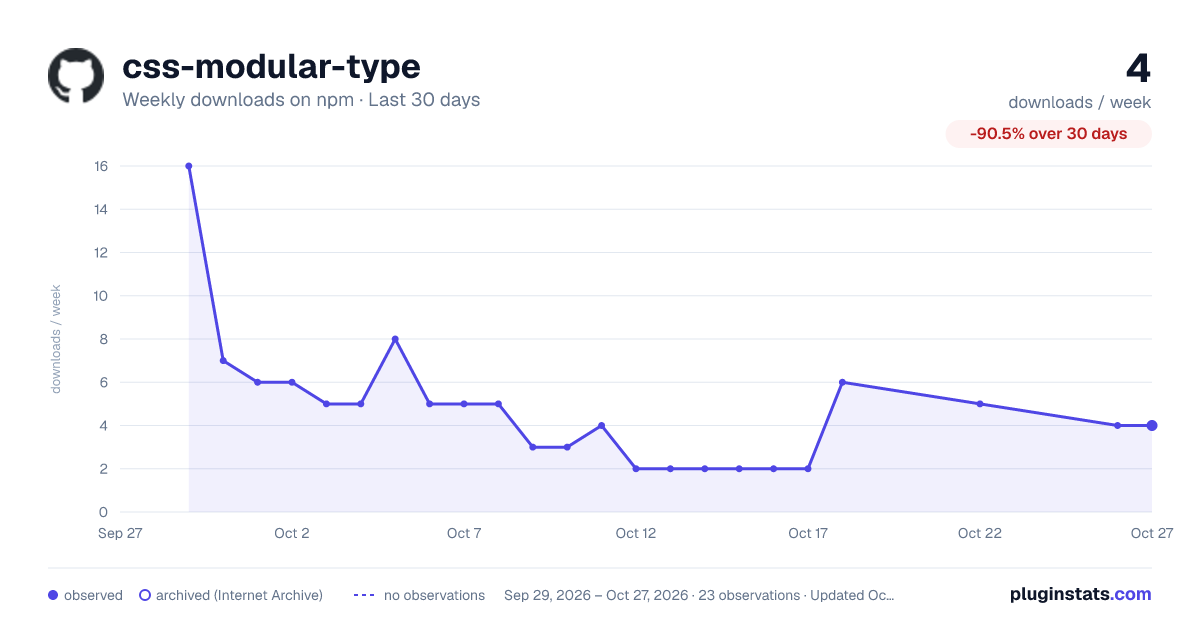
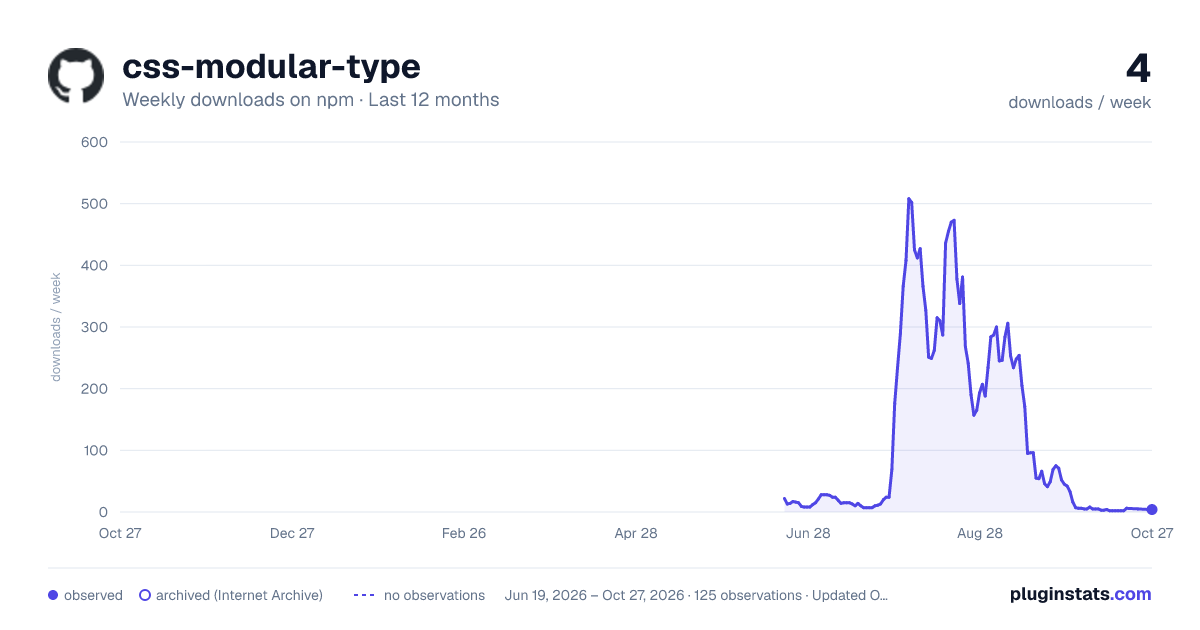
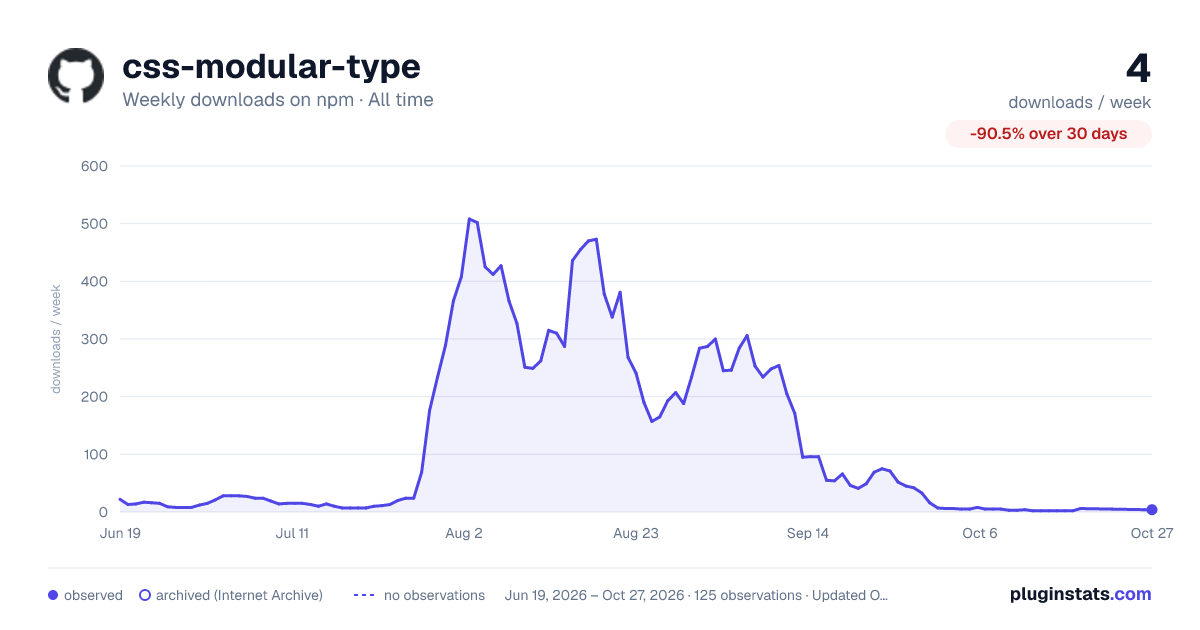

Adoption over time


7/30/90-day growth


Filled points are observed values; hollow points come from Internet Archive snapshots of the listing page. Dashed segments span periods with no observations — values between points are not interpolated.
Recent observations
Full history (121)Similar npm Tailwind plugins plugins
Data source
Weekly downloads (trailing 7 complete days) come from the official npm downloads API. Downloads include CI and mirrors and are not equivalent to installs or users. npm publishes no ratings.
Listing: https://www.npmjs.com/package/css-modular-type. First seen Oct 16, 2026; last successful collection Oct 18, 2026. See the methodology.