 PluginStats
nightwind weekly downloads statistics
By jjranalli · npm · Tailwind plugins
An automatic, overridable, customisable Tailwind dark mode plugin
nightwind has 1,345 recorded weekly downloads on npm, a decrease of 62.5% over the past 30 days.
It ranks #1347 of 2,256 tracked npm listings by weekly downloads.
Over 90 days, weekly downloads changed by -76.6%.
PluginStats has 543 daily observations since Apr 23, 2025; the latest is from Oct 17, 2026.
About nightwind
A Tailwind CSS plugin that gives you an out-of-the-box, customisable, overridable dark mode.
Nightwind uses the existing Tailwind color palette and your own custom colors to automatically generate the dark mode version of the Tailwind color classes you use.
For example, whenever you use a class like bg-red-600 it gets automatically switched to bg-red-300 in dark mode.
You can see it in action on https://nightwindcss.com
1. Installation 2. Helper functions 3. Getting started 4. Configuration • Colors • Variants and color classes • The 'nightwind-prevent' class • Transitions • Custom color scale • Important selector 5. Color mappings • Individual colors • Color classes • Hybrid mapping 6. Overrides 7. Typography
Installation
Enable the Dark class variant in your tailwind.config.js file.
In older Tailwind versions ( Next.js (using the next-themes library)
_app.js
Add ThemeProvider using the following configuration
Toggle
Set it up using the useTheme hook
Create React App (using the react-helmet library)
index.jsx
Add Helmet using the following configuration
Toggle
Set it up using the default example
Pure JavaScript or Alpine.js The whole idea is to deconstruct helper.js, converting it from a module to a var. And unpacking the 'init' function from within helper to be its own script body to execut at DOM render. Here is the code for that at the time of writing (Oct 14th 2021). As long as the classes made it to tailwind.css (did you configure the plugins right?) then this will enable nightwind.toggle() and nightwind.enable()
Getting started
This is some examples of what Nightwind does by default:
• 'bg-white' in dark mode becomes 'bg-black' • 'bg-red-50' in dark mode becomes 'bg-red-900' • 'ring-amber-100' in dark mode becomes 'ring-amber-800' • 'placeholder-gray-200' in dark mode becomes 'placeholder-gray-700' • 'hover:text-indigo-300' in dark mode becomes 'hover:text-indigo-600' • 'sm:border-lightBlue-400' in dark mode becomes 'sm:border-lightBlue-500' • 'xl:hover:bg-purple-500' in dark mode becomes 'xl:hover:bg-purple-400'
Supported classes
Due to file size considerations, Nightwind is enabled by default only on the 'text', 'bg' and 'border' color classes, as well as their 'hover' variants.
You can also extend Nightwind to other classes and variants:
• Color classes: 'placeholder', 'ring', 'ring-offset', 'divide', 'gradient' • Variants: all Tailwind variants are supported
Configuration
Colors
Nightwind switches between opposite color weights when switching to dark mode. So a -50 color gets switched with a -900 color, -100 with -800 and so forth.
Note: Except for the -50 and -900 weights, the sum of opposite weights is always 900. To customise how Nightwind inverts colors by default, see how to set up a custom color scale
If you add your custom colors in tailwind.config.js using number notation, Nightwind will treat them the same way as Tailwind's colors when switching into dark mode.
Check out color mappings to see how to further customize your dark theme.
Variants and color classes
Variants and other color classes can be enabled for Nightwind like so:
The 'gradient' color class enables Nightwind for the 'from', 'via' and 'to' classes, allowing automatic dark gradients.
The 'nightwind-prevent' class
If you want an element to remain exactly the same in both light and dark modes, you can achieve this in Nightwind by adding a 'nightwind-prevent' class to the element.
Note: if you only want some of the colors to remain unchanged, consider using overrides.
To prevent all children of an element to remain unchanged in dark mode, you can add the 'nightwind-prevent-block' class to the element. All descandant nodes of the element will be prevented from switching.
You can customize the name of both classes in your tailwind.config.js file
Note: The 'nightwind-prevent' class doesn't work with @apply, so always add it in the html.
Transitions
Nightwind by default applies a '300ms' transition to all color classes. You can customize this value in your tailwind.config.js file, through the transitionDuration property.
If you wish to disable transition for a single class, you can add the 'duration-0' class to the element (it's already included in Nightwind).
If you wish to disable the generation of all transition classes, you can do so by setting the same value to false.
Transition Classes
Nightwind by default generates transition classes for 'text', 'bg' and 'border' color classes. This should make most elements transition smoothly without affecting performances.
In your configuration file you can also set the transitionClasses property to 'full' to enable generation of transition classes for all color classes used throughout your website (i.e. rings, divide and placeholder).
Alternatively, you can also specify which color classes you'd like to generate transition classes for.
Custom color scale
This configuration allows you to define how one or more color weights convert in dark-mode. Note that these affects all color classes.
For example, you could make all -100 colors switch into -900 colors like so.
Note: These settings can still be overridden for specific colors using color mappings, or in specific elements with overrides
Reduced preset
This preset simulates how Nightwind would behave without the -50 color classes. Any -50 color will essentially appear the same as -100 colors (both becomes -900)
This behaviour may be desirable for two main reasons:
• Makes the reversed -800 and -900 colors darker and more different between themselves. • -500 colors remain the same in both dark and light mode
This is the corresponding scale:
Note: When using a preset, specific weights will be ignored.
Important selector
If you're using the important ID selector strategy in your config, such as
Please note that Nightwind assumes that the #app element is a parent of the element which contains the toggled 'dark' and 'nightwind' classes.…
Description from the npm listing.
- tailwind
- tailwindcss
- tailwindcss-plugin
- dark-mode
- dark-theme
- postcss
- css
- javascript
Where nightwind sits in the listing
Each band is one page of 20. Weekly downloads on a log scale. Placement is projected from weekly downloads, so it can differ from the marketplace's own sort order. Hover a dot to see the listing.


Charts
Images: 30d · 1y · all time · 1600×900 dark
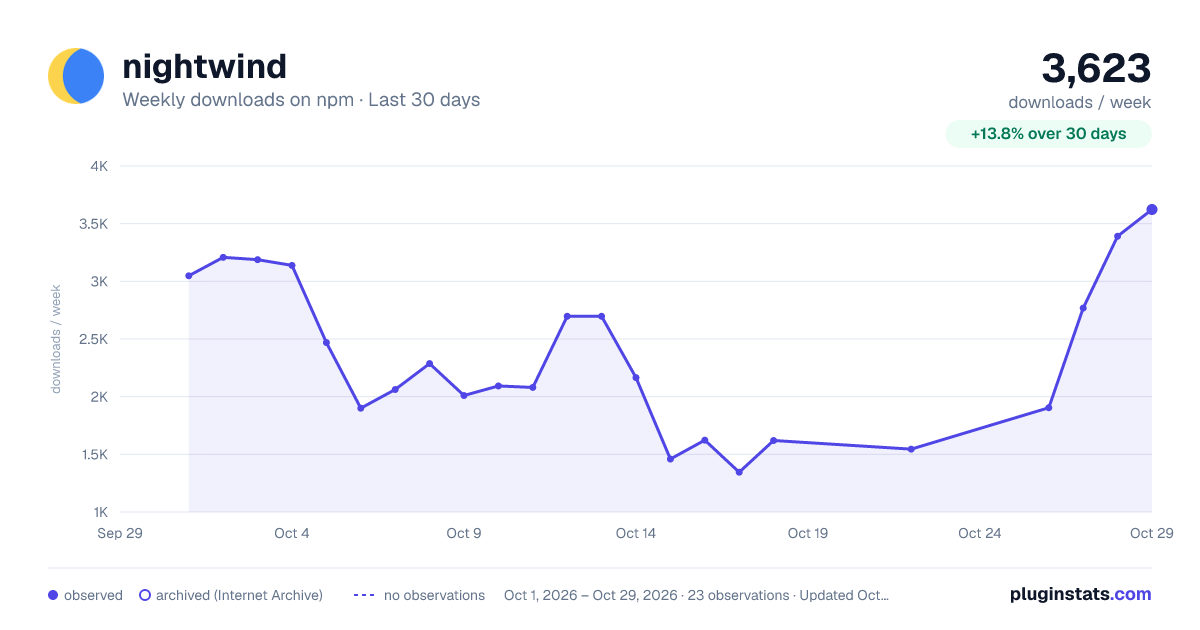
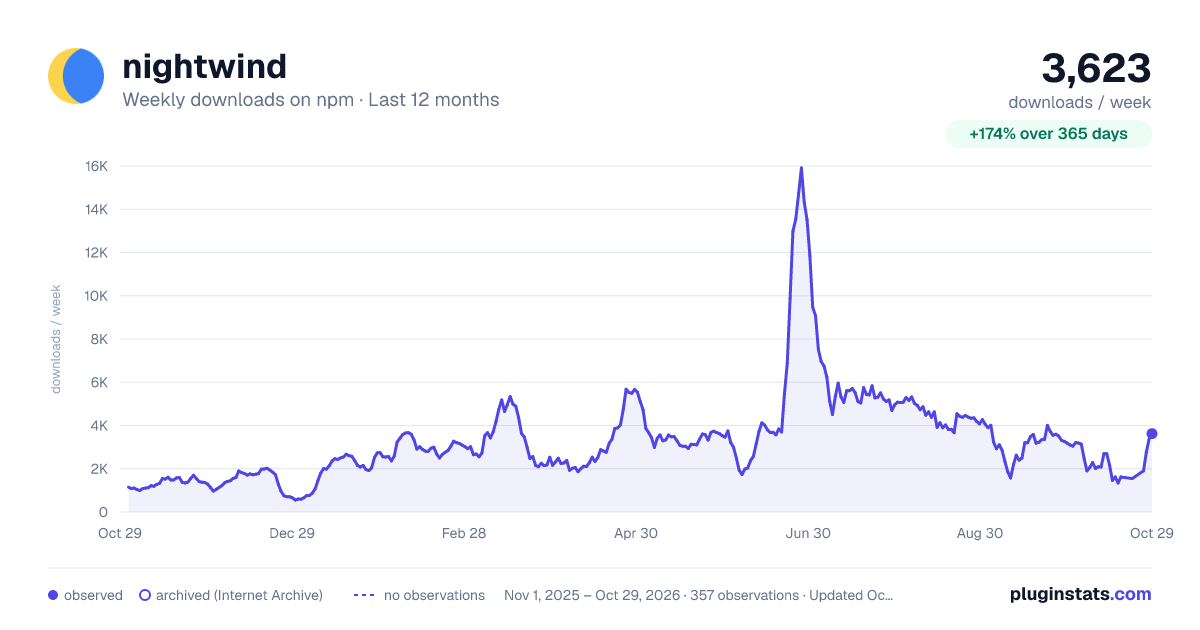
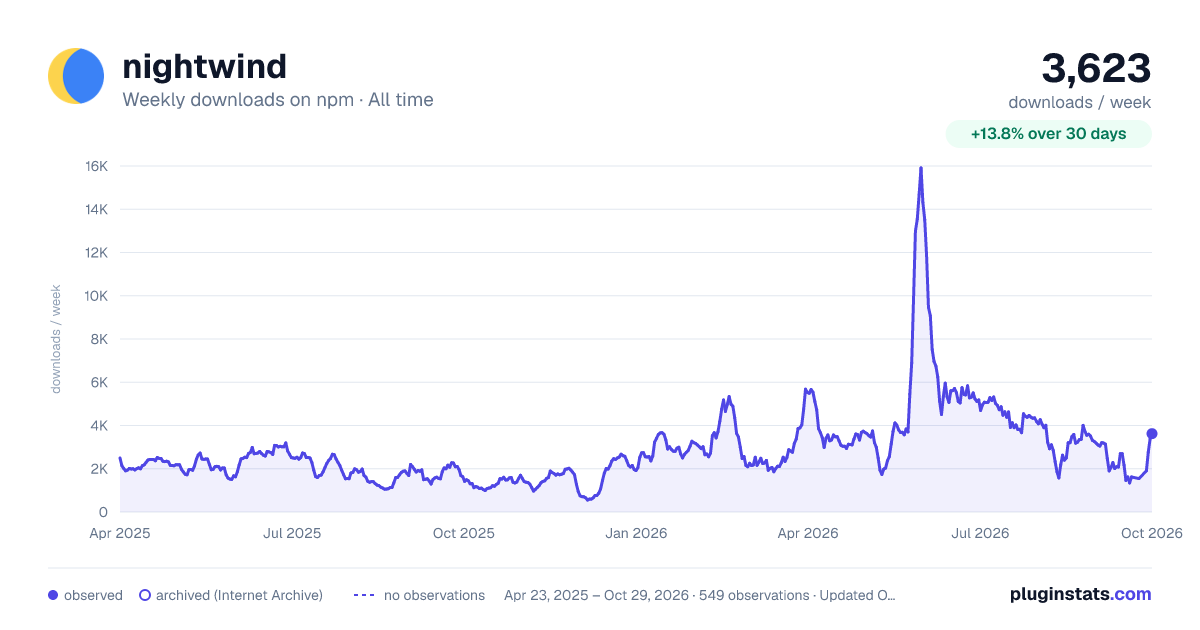

Adoption over time


7/30/90-day growth


Filled points are observed values; hollow points come from Internet Archive snapshots of the listing page. Dashed segments span periods with no observations — values between points are not interpolated.
Recent observations
Full history (543)Similar npm Tailwind plugins plugins
Data source
Weekly downloads (trailing 7 complete days) come from the official npm downloads API. Downloads include CI and mirrors and are not equivalent to installs or users. npm publishes no ratings.
Listing: https://www.npmjs.com/package/nightwind. First seen Oct 16, 2026; last successful collection Oct 19, 2026. See the methodology.