 PluginStats
tailwindcss-animation-delay weekly downloads statistics
By burnworks (2 listings) · npm · Tailwind plugins
Tailwind CSS plugin, add animation-delay CSS property.
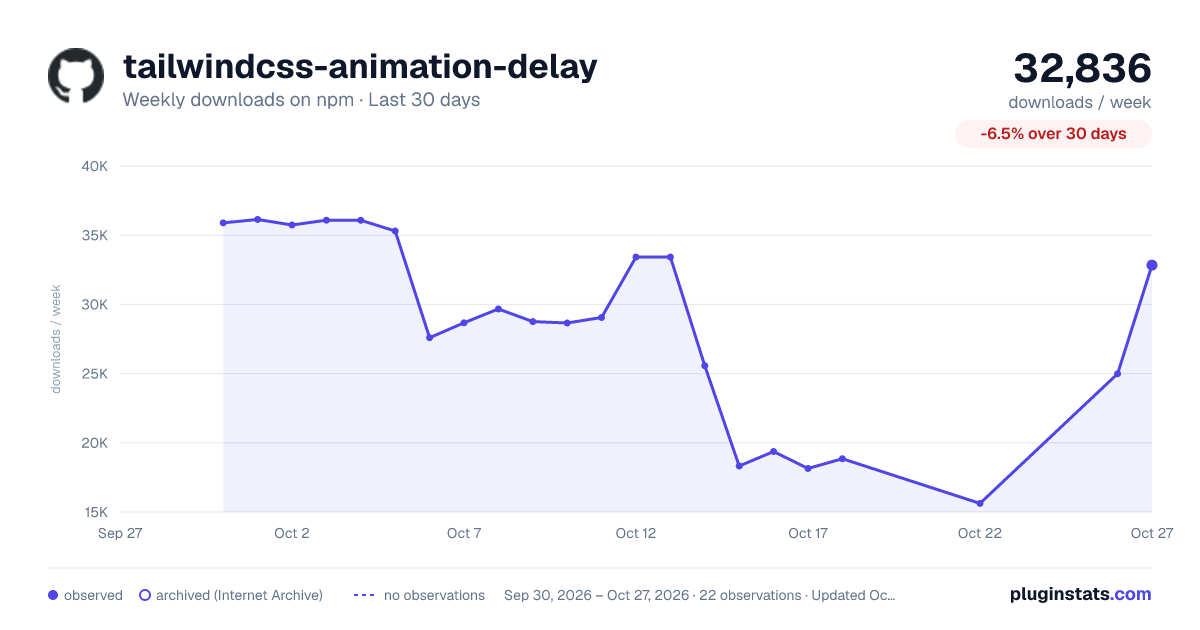
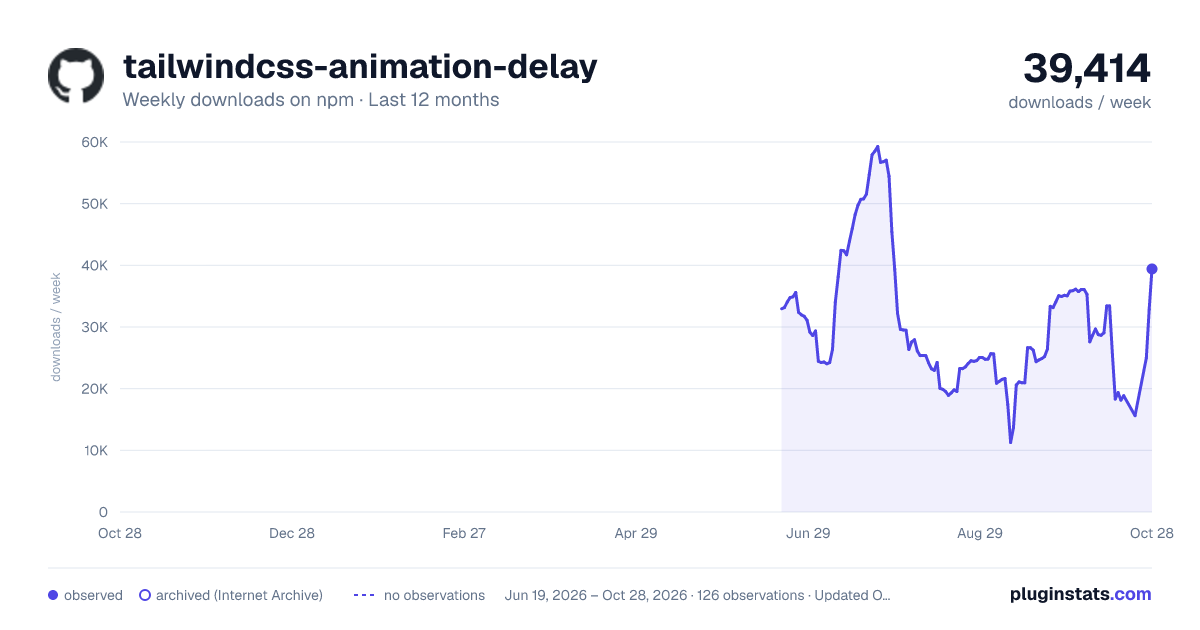
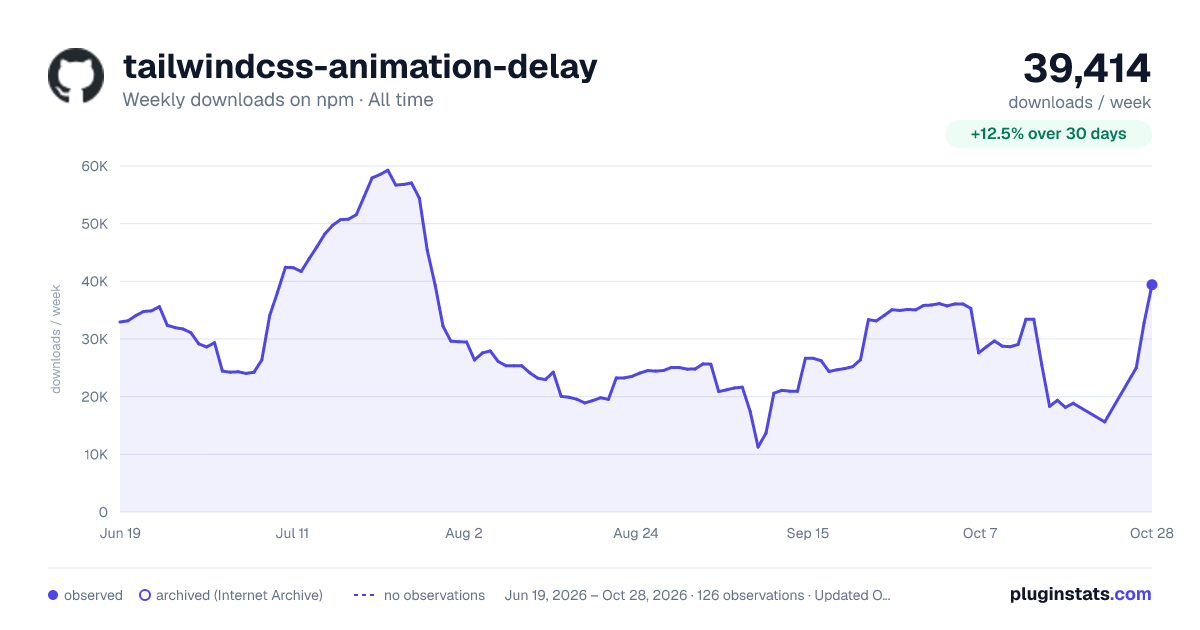
tailwindcss-animation-delay has 18,144 recorded weekly downloads on npm, a decrease of 25.6% over the past 30 days.
It ranks #777 of 2,251 tracked npm listings by weekly downloads.
Over 90 days, weekly downloads changed by -64.8%.
PluginStats has 121 daily observations since Jun 19, 2026; the latest is from Oct 17, 2026.
About tailwindcss-animation-delay
tailwindcss-animation-delay
Tailwind CSS plugin, add animation-delay CSS property.
[!NOTE] With Tailwind CSS v4, you can now define custom properties directly in your CSS file without using any plugins. If you’re working with v4.0 or later, please include the contents of tailwindcss-v4.css.
Installation
Install the plugin from npm:
Then add the plugin to your tailwind.config.js file:
Usage
animation-delay-{n} class to specifies the amount of time to wait from applying the animation to an element before beginning to perform the animation.
Negative values
To use a negative animation-delay value, prefix the class name with a dash to convert it to a negative value.
| Class | Properties |
| animation-delay-none | animation-delay: 0s; | | animation-delay-75 | animation-delay: 75ms; | | animation-delay-100 | animation-delay: 100ms; | | animation-delay-150 | animation-delay: 150ms; | | animation-delay-200 | animation-delay: 200ms; | | animation-delay-300 | animation-delay: 300ms; | | animation-delay-400 | animation-delay: 400ms; | | animation-delay-500 | animation-delay: 500ms; | | animation-delay-600 | animation-delay: 600ms; | | animation-delay-700 | animation-delay: 700ms; | | animation-delay-800 | animation-delay: 800ms; | | animation-delay-900 | animation-delay: 900ms; | | animation-delay-1000 | animation-delay: 1000ms; | | animation-delay-1100 | animation-delay: 1100ms; | | animation-delay-1200 | animation-delay: 1200ms; | | animation-delay-1300 | animation-delay: 1300ms; | | animation-delay-1400 | animation-delay: 1400ms; | | animation-delay-1500 | animation-delay: 1500ms; | | animation-delay-2000 | animation-delay: 2000ms; | | animation-delay-3000 | animation-delay: 3000ms; | | animation-delay-4000 | animation-delay: 4000ms; | | animation-delay-5000 | animation-delay: 5000ms; | | animation-delay-6000 | animation-delay: 6000ms; | | animation-delay-7000 | animation-delay: 7000ms; | | animation-delay-8000 | animation-delay: 8000ms; | | animation-delay-9000 | animation-delay: 9000ms; | | -animation-delay-75 | animation-delay: -75ms; | | -animation-delay-100 | animation-delay: -100ms; | | -animation-delay-150 | animation-delay: -150ms; | | -animation-delay-200 | animation-delay: -200ms; | | -animation-delay-300 | animation-delay: -300ms; | | -animation-delay-400 | animation-delay: -400ms; | | -animation-delay-500 | animation-delay: -500ms; | | -animation-delay-600 | animation-delay: -600ms; | | -animation-delay-700 | animation-delay: -700ms; | | -animation-delay-800 | animation-delay: -800ms; | | -animation-delay-900 | animation-delay: -900ms; | | -animation-delay-1000 | animation-delay: -1000ms; | | -animation-delay-1100 | animation-delay: -1100ms; | | -animation-delay-1200 | animation-delay: -1200ms; | | -animation-delay-1300 | animation-delay: -1300ms; | | -animation-delay-1400 | animation-delay: -1400ms; | | -animation-delay-1500 | animation-delay: -1500ms; | | -animation-delay-2000 | animation-delay: -2000ms; | | -animation-delay-3000 | animation-delay: -3000ms; | | -animation-delay-4000 | animation-delay: -4000ms; | | -animation-delay-5000 | animation-delay: -5000ms; | | -animation-delay-6000 | animation-delay: -6000ms; | | -animation-delay-7000 | animation-delay: -7000ms; | | -animation-delay-8000 | animation-delay: -8000ms; | | -animation-delay-9000 | animation-delay: -9000ms; |
Configuration
You can configure which values and variants are generated by this plugin under the animationDelay key in your tailwind.config.js file:
Extending the default theme
If you’d like to preserve the default values for a theme option but also add new values, add your extensions under the theme.extend key in your configuration file.
Description from the npm listing.
- tailwindcss
- tailwindcss-plugin
- animation-delay
Where tailwindcss-animation-delay sits in the listing
Each band is one page of 20. Weekly downloads on a log scale. Placement is projected from weekly downloads, so it can differ from the marketplace's own sort order. Hover a dot to see the listing.


Charts
Images: 30d · 1y · all time · 1600×900 dark

Adoption over time


7/30/90-day growth


Filled points are observed values; hollow points come from Internet Archive snapshots of the listing page. Dashed segments span periods with no observations — values between points are not interpolated.
Recent observations
Full history (121)Similar npm Tailwind plugins plugins
Data source
Weekly downloads (trailing 7 complete days) come from the official npm downloads API. Downloads include CI and mirrors and are not equivalent to installs or users. npm publishes no ratings.
Listing: https://www.npmjs.com/package/tailwindcss-animation-delay. First seen Oct 16, 2026; last successful collection Oct 18, 2026. See the methodology.