 PluginStats
eslint-plugin-react-native-a11y weekly downloads statistics
By FormidableLabs (3 listings) · npm · ESLint plugins
React Native specific accessibility linting rules.
eslint-plugin-react-native-a11y has 138,125 recorded weekly downloads on npm, a decrease of 41.0% over the past 30 days, ranking #417 of 2,256 tracked listings.
About eslint-plugin-react-native-a11y
![Maintenance Status][maintenance-image]
Eslint-plugin-react-native-a11y is a collection of React Native specific ESLint rules for identifying accessibility issues. Building upon the foundation set down by eslint-plugin-jsx-a11y, eslint-plugin-react-native-a11y detects a few of the most commonly made accessibility issues found in react native apps. These rules make it easier for your apps to be navigable by users with screen readers.
Setup
Pre-Requisites
Before starting, check you already have ESLint as a devDependency of your project.
Projects created using react-native init will already have this, but for Expo depending on your template you may need to follow ESLint's installation instructions.
Installation
Next, install eslint-plugin-react-native-a11y:
Note: If you installed ESLint globally (using the -g flag in npm, or the global prefix in yarn) then you must also install eslint-plugin-react-native-a11y globally.
Configuration
This plugin exposes four recommended configs.
| Name | Description |
| basic | Only use basic validation rules common to both iOS & Android | | ios | Use all rules from "basic", plus iOS-specific extras | | android | Use all rules from "basic", plus Android-specific extras | | all | Use all rules from "basic", plus iOS-specific extras, plus Android-specific extras |
If your project only supports a single platform, you may get the best experience using a platform-specific config. This will both avoid reporting issues which do not affect your platform and also results in slightly faster linting for larger projects.
If you are unsure which one to use, in most cases all can be safely used.
Add the config you want to use to the extends section of your ESLint config using the pattern plugin:react-native-a11y/ followed by your config name, as shown below:
Alternatively if you do not want to use one of the pre-defined configs — or want to override the behaviour of a specific rule — you can always include a list rules and configurations in the rules section of your ESLint config.
For more information on configuring behaviour of an individual rule, please refer to the ESLint docs
Supported Rules
Basic
• has-accessibility-hint: Enforce accessibilityHint is used in conjunction with accessibilityLabel • has-accessibility-props: Enforce that components only have either the accessibilityRole prop or both accessibilityTraits and accessibilityComponentType props set • has-valid-accessibility-actions: Enforce both accessibilityActions and onAccessibilityAction props are valid • has-valid-accessibility-role: Enforce accessibilityRole property value is valid • has-valid-accessibility-state: Enforce accessibilityState property value is valid • has-valid-accessibility-states: Enforce accessibilityStates property value is valid • has-valid-accessibility-component-type: Enforce accessibilityComponentType property value is valid • has-valid-accessibility-traits: Enforce accessibilityTraits and accessibilityComponentType prop values must be valid • has-valid-accessibility-value: Enforce accessibilityValue property value is valid • no-nested-touchables: Enforce if a view has accessible={true}, that there are no touchable elements inside • has-valid-accessibility-descriptors: Ensures that Touchable* components have appropriate props to communicate with assistive technologies
iOS
• has-valid-accessibility-ignores-invert-colors: Enforce that certain elements use accessibilityIgnoresInvertColors to avoid being inverted by device color settings.
Android
• has-valid-accessibility-live-region: Enforce accessibilityLiveRegion prop values must be valid • has-valid-important-for-accessibility: Enforce importantForAccessibility property value is valid
Rule Options
The following options are available to customize the recommended rule set.
Custom Touchables
react-native-a11y/has-accessibility-props and react-native-a11y/no-nested-touchables allow you to define an array of names for custom components that you may have that conform to the same accessibility interfaces as Touchables.
Custom Invertable Components (iOS)
react-native-a11y/has-valid-accessibility-ignores-invert-colors allows you to optionally define an Array of component names to check in addition to .
For more information, see the rule docs.
Creating a new rule
If you are developing new rules for this project, you can use the create-rule script to scaffold the new files.
Attribution
This project started as a fork of eslint-plugin-jsx-a11y and a lot of the work was carried out by its contributors, to whom we owe a lot!
License
eslint-plugin-react-native-a11y is licensed under the MIT License.
Maintenance Status
Active: Nearform is actively working on this project, and we expect to continue for work for the foreseeable future. Bug reports, feature requests and pull requests are welcome.
Description from the npm listing.
- eslint
- eslintplugin
- eslint-plugin
- a11y
- accessibility
- react-native
README badge
Show your rank in a README or on your website. The badge updates automatically.
Charts
Images: 30d · 1y · all time · 1600×900 dark
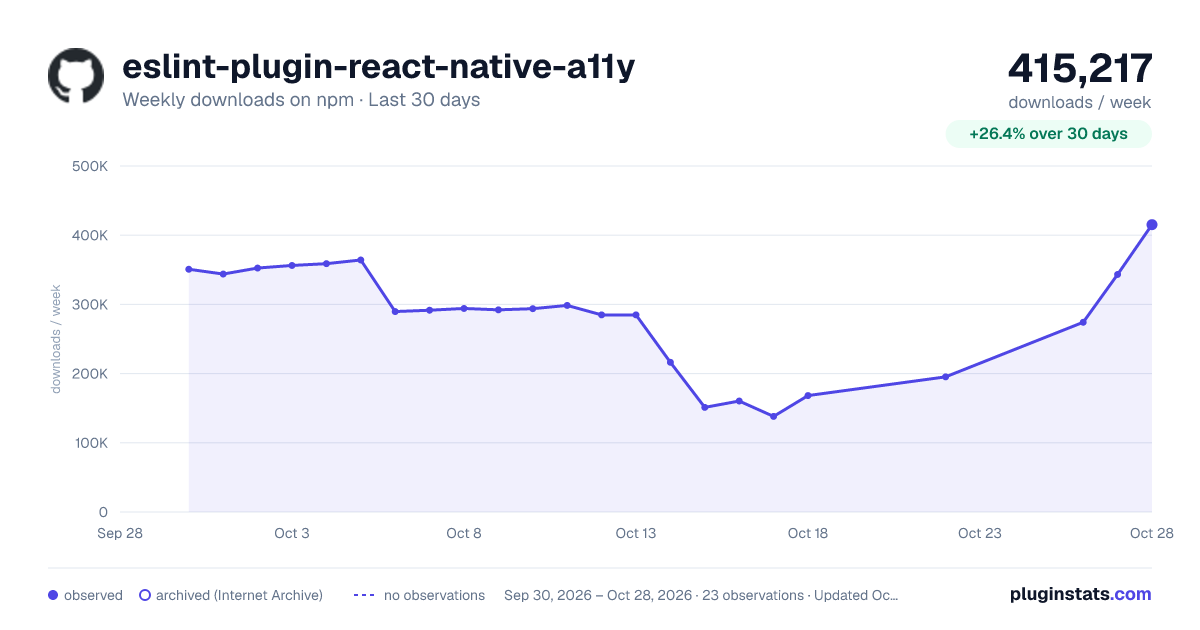
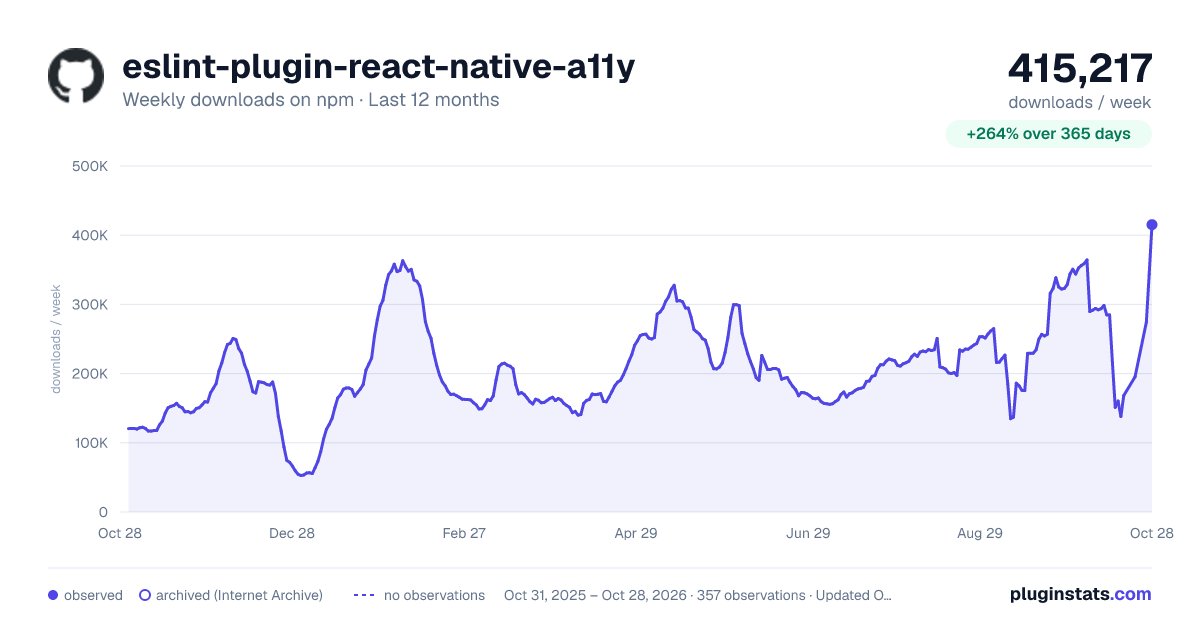
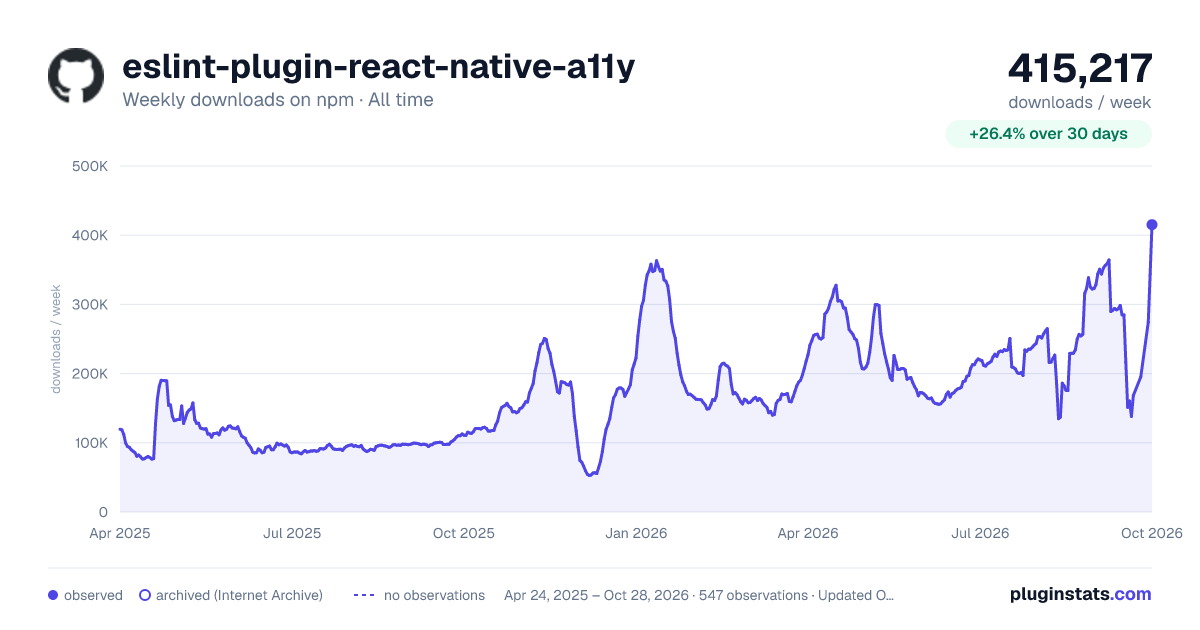

Adoption over time
7/30/90-day growth
Ranking history
Listing placement
Listing placement
Filled points are observed values; hollow points come from Internet Archive snapshots of the listing page. Dashed segments span periods with no observations — values between points are not interpolated.
Each band is one page of 20. Weekly downloads on a linear scale. Placement is projected from weekly downloads, so it can differ from the marketplace's own sort order. Hover a dot to see the listing.
Recent observations
Full history (542)Similar npm ESLint plugins plugins
All 20 eslint-plugin-react-native-a11y alternatives- 139.6K weekly downloads-58.6%
- 146.6K weekly downloads-61.5%
- 154.7K weekly downloads-47.8%
Data source
Weekly downloads (trailing 7 complete days) come from the official npm downloads API. Downloads include CI and mirrors and are not equivalent to installs or users. npm publishes no ratings.
Listing: https://www.npmjs.com/package/eslint-plugin-react-native-a11y. First seen Oct 16, 2026; last successful collection Oct 19, 2026. See the methodology.