 PluginStats
ai-sdk-tool-code-execution has 71 recorded weekly downloads on npm, a decrease of 84.4% over the past 30 days.
It ranks #1701 of 2,251 tracked npm listings by weekly downloads.
Over 90 days, weekly downloads changed by -91.1%.
PluginStats has 121 daily observations since Jun 19, 2026; the latest is from Oct 17, 2026.
About ai-sdk-tool-code-execution
AI SDK Code Execution Tool
A TypeScript package that provides a code execution tool for the AI SDK. Execute Python code in a sandboxed environment using Vercel Sandbox.
Installation
Prerequisites
• A Vercel account with access to Vercel Sandbox (available in Beta on all plans) • Vercel CLI installed • A Vercel OIDC token for authentication
Setup
1. Link your Vercel project
From your project directory, link to a new or existing Vercel project:
2. Pull environment variables
Download your Vercel OIDC token:
This creates a .env.local file with your VERCEL_OIDC_TOKEN that the SDK uses to authenticate with Vercel Sandbox.
Note: Development tokens expire after 12 hours. Run vercel env pull again when your token expires.
3. Add your AI provider credentials
If using Vercel AI Gateway, add your API key to .env.local:
Usage
The executeCode tool allows your AI agent to run Python 3.13 code in a Vercel Sandbox environment. The agent can perform calculations, data processing, and other computational tasks safely in an isolated environment.
Options
Configure the tool with optional parameters:
Example with debug enabled:
When debug is enabled, you'll see detailed logs of code execution in your terminal.
How it works
This package uses Vercel Sandbox to execute Python code in an ephemeral, isolated environment. Each code execution:
1. Creates a new sandbox with Python 3.13 runtime 2. Executes your code using python3 -c 3. Captures stdout, stderr, and exit codes 4. Automatically stops the sandbox after execution
Important notes
• Python 3.13 runtime: Code runs in Vercel Sandbox's python3.13 image • Not a REPL: You must use print() to see output. Bare expressions produce no output • Isolated execution: Each sandbox runs in a secure, ephemeral environment on Amazon Linux 2023 • Authentication required: Requires a valid Vercel OIDC token • Resource limits: See Vercel Sandbox pricing and limits
Alternative authentication
If you cannot use VERCEL_OIDC_TOKEN, you can authenticate with access tokens. Set these environment variables:
Find your team ID, project ID, and create an access token in your Vercel dashboard.
Development
Testing locally
Test the tool with the included test script:
Building
Build the package:
Publishing
Update the version in package.json, then publish:
The package automatically builds before publishing.
Project structure
Monitoring usage
Track your sandbox usage in the Vercel dashboard:
1. Go to your project 2. Click the AI tab 3. Click Sandboxes to view execution history and URLs
View compute usage across all projects in the Usage tab of your dashboard.
Learn more
• Vercel Sandbox documentation • Vercel Sandbox examples • Vercel Sandbox SDK reference
License
ISC
Description from the npm listing.
- ai
- ai-sdk
- tools
Where ai-sdk-tool-code-execution sits in the listing
Each band is one page of 20. Weekly downloads on a log scale. Placement is projected from weekly downloads, so it can differ from the marketplace's own sort order. Hover a dot to see the listing.


Charts
Images: 30d · 1y · all time · 1600×900 dark
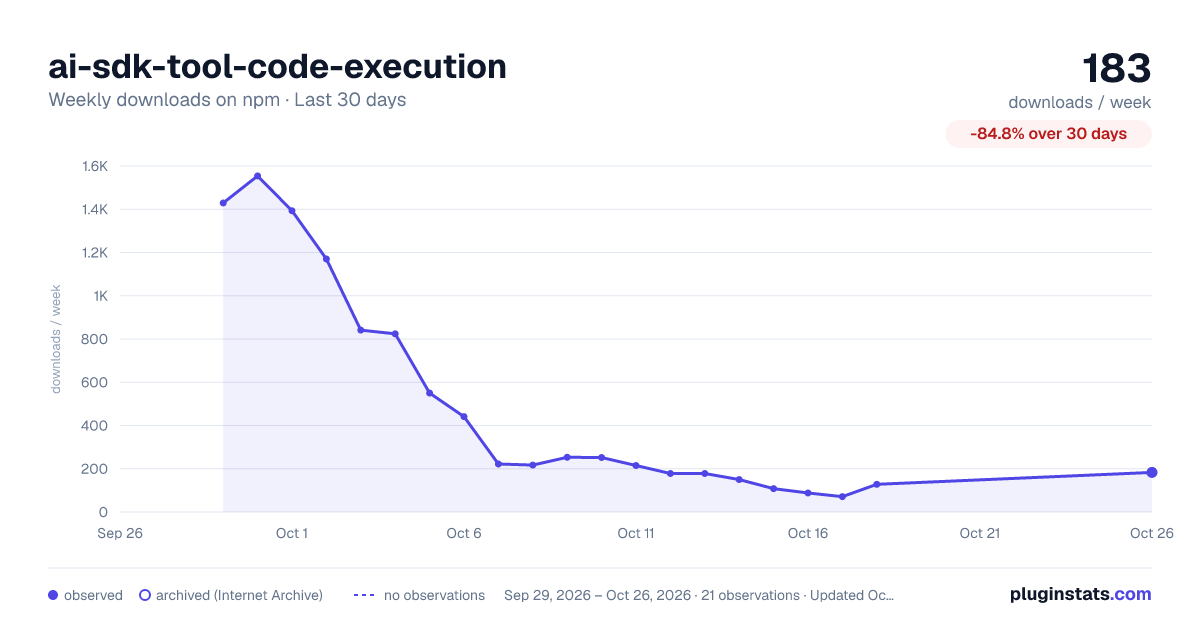
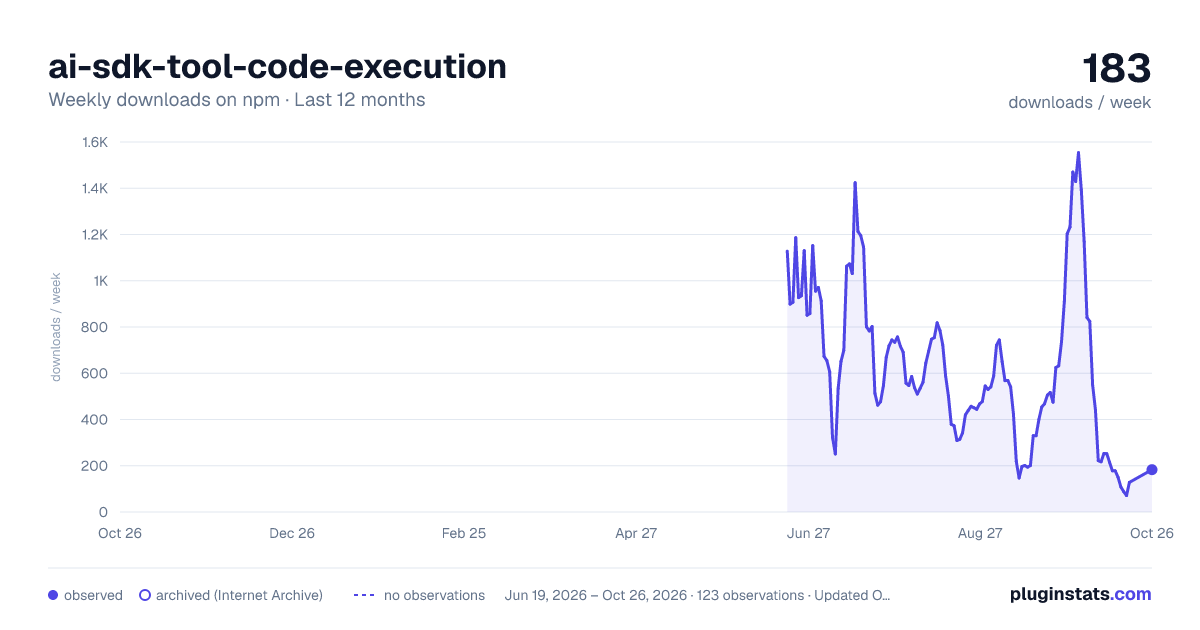
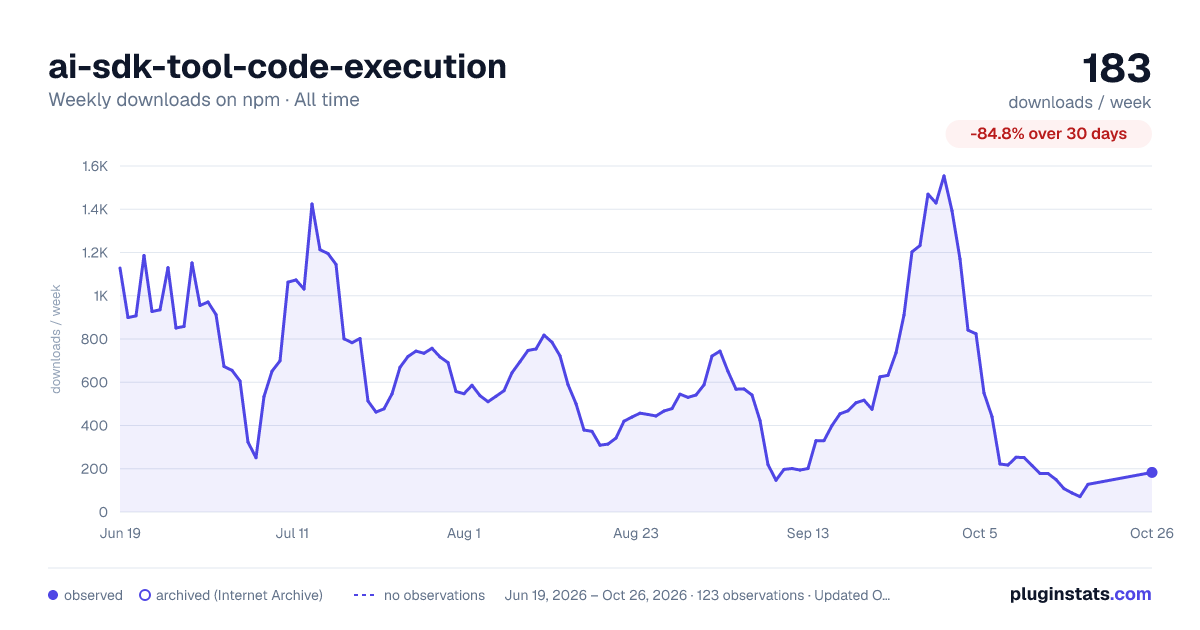

Adoption over time


7/30/90-day growth


Filled points are observed values; hollow points come from Internet Archive snapshots of the listing page. Dashed segments span periods with no observations — values between points are not interpolated.
Recent observations
Full history (121)Similar npm AI SDKs plugins
Data source
Weekly downloads (trailing 7 complete days) come from the official npm downloads API. Downloads include CI and mirrors and are not equivalent to installs or users. npm publishes no ratings.
Listing: https://www.npmjs.com/package/ai-sdk-tool-code-execution. First seen Oct 16, 2026; last successful collection Oct 18, 2026. See the methodology.