 PluginStats
mock-service-plugin weekly downloads statistics
By bianliuzhu · npm · Webpack plugins
Simulated backend interface service
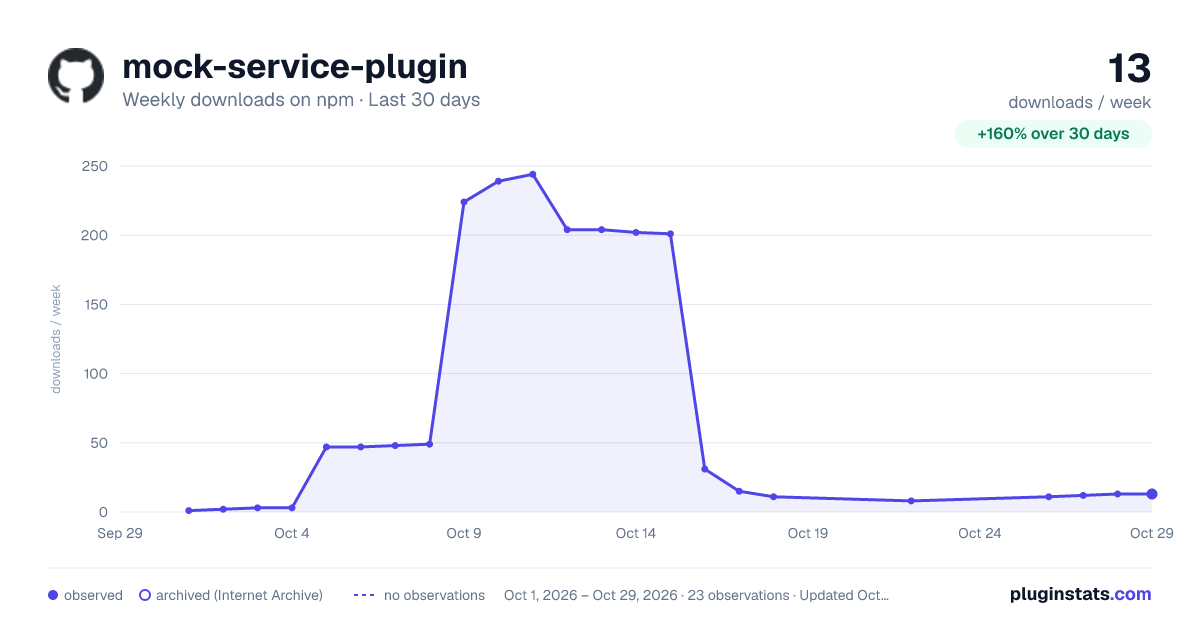
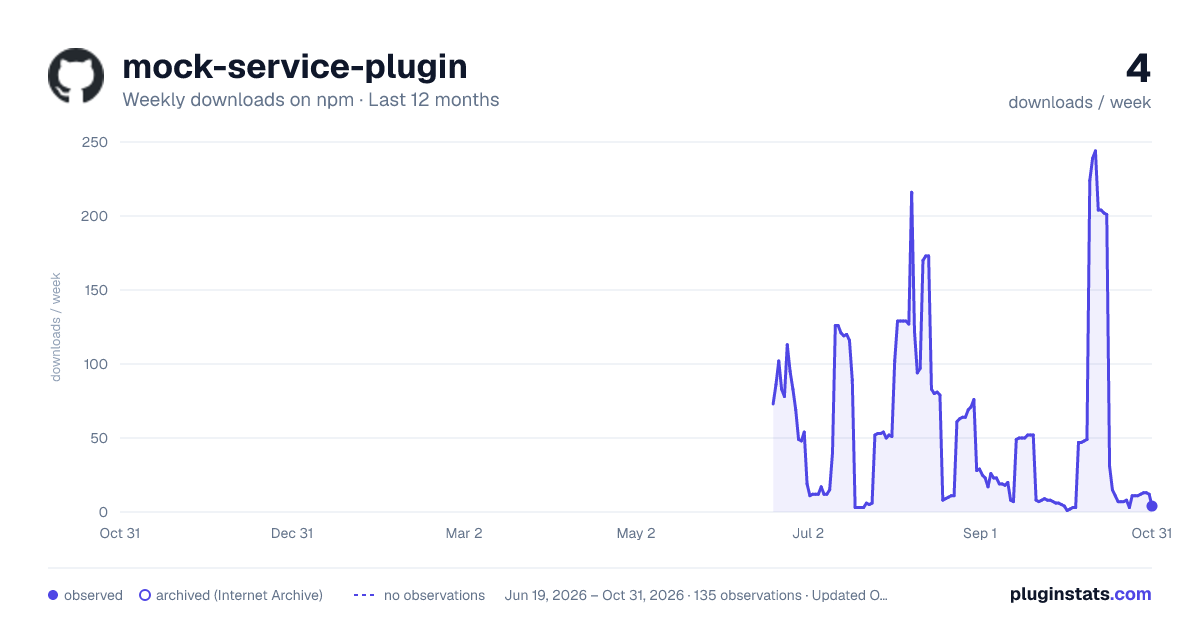
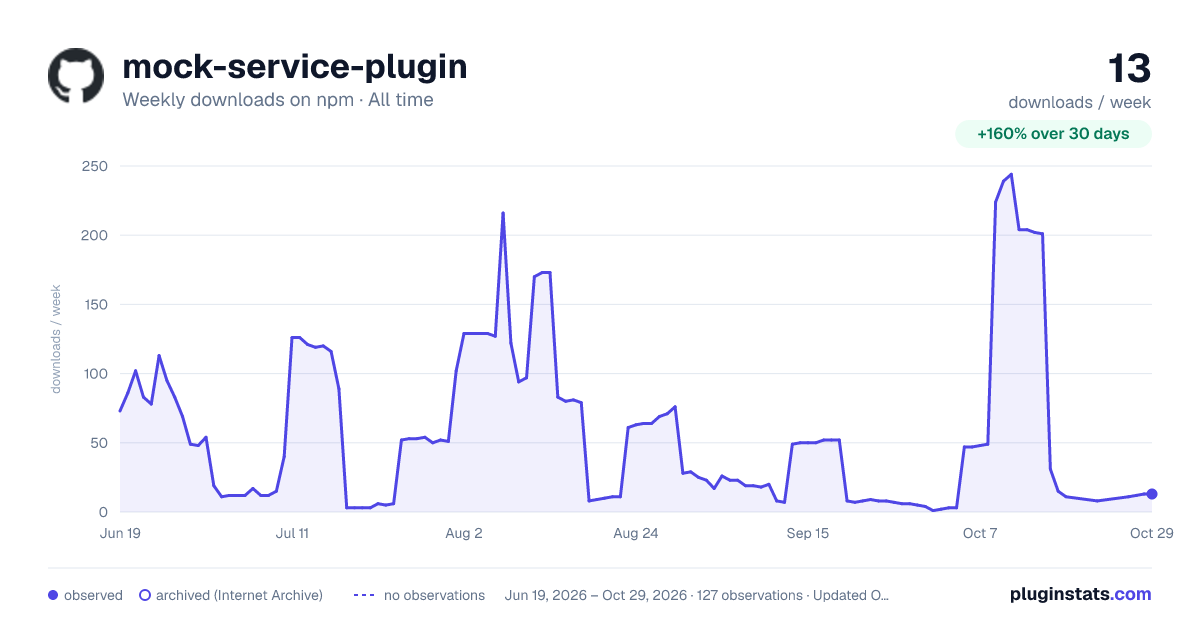
mock-service-plugin has 15 recorded weekly downloads on npm, a decrease of 71.2% over the past 30 days, ranking #1872 of 2,256 tracked listings.
About mock-service-plugin
mock-service-plugin
English | 中文
A powerful local Mock service plugin that supports Webpack, Vite, and other mainstream build tools — letting you develop and debug frontend pages even before the backend APIs are ready.
Table of Contents
• What is Mocking? • Features • Installation • 5-Minute Quick Start • Mock File Specification • MockJS Syntax Reference • Supported File Formats • Full Format Examples • Advanced Features • Framework Integration • Debug Interface • FAQ • Example Projects
What is Mocking?
In real-world development, frontend and backend teams often work in parallel. When the backend APIs aren't ready yet, the frontend has no data to work with and development stalls.
Mocking means running a fake backend service locally that returns dummy data according to the agreed API contract, so frontend development can proceed independently without relying on a real backend.
What mock-service-plugin does is: read your mock data files, automatically start a local HTTP server, and return the corresponding data when frontend requests come in.
Features
• 🚀 Supports multiple build tools: Webpack 4/5, Vite, Vue CLI, Create React App • 🎯 Compatible with Vue, React, and other mainstream frameworks • 🔥 Feature-rich • RESTful API support (GET / POST / PUT / DELETE, etc.) • Dynamic route parameters (e.g. /api/users/:id) • Streaming responses (SSE / EventStream, simulates AI typewriter effect) • Multiple response formats (JSON / XML / CSV / Image / Plain text, etc.) • 💡 Minimal configuration, hot reload, built-in debug interface
Installation
5-Minute Quick Start
The following uses a Vite + Vue project as an example to walk you through your first Mock API from scratch.
Step 1: Install the Plugin
Step 2: Create the Mock Directory and File
Create a mocks folder in the project root and add a file mocks/user.json:
Contents of mocks/user.json:
The /** ... */ comment at the top is the route configuration, telling the plugin which API path and HTTP method this file corresponds to. @cname, @email, etc. are MockJS random data placeholders — each request generates different random data. See MockJS Syntax Reference for full syntax.
Step 3: Start the Mock Service in Vite
Create vite-mock-plugin.ts in the project root:
Update vite.config.ts:
Add a mock start script to package.json:
Step 4: Start and Test
After starting, open http://localhost:3008/api/user/info in your browser and you'll see randomly generated user data:
Congratulations! You've successfully set up your first Mock API. 🎉
Mock File Specification
File Structure
Each mock file consists of two parts:
Annotation Reference
| Annotation | Required | Description | Example |
| @url | ✅ Yes | API path, supports dynamic parameters | @url /api/users/:id | | @method | Optional | HTTP method, defaults to GET | @method POST | | @content-type | Optional | Override the default Content-Type. Preferably use the file extension as reference — see Supported File Formats. | @content-type image/png |
Dynamic Route Parameters
Use :paramName to define dynamic path segments:
Both /api/users/123 and /api/users/456 will match this file.
Managing Multiple APIs in One Directory
It's recommended to organize files by business module:
The plugin recursively scans the entire mocks directory and automatically registers all routes found in every file.
MockJS Syntax Reference
MockJS is a data mocking library that generates random data using template syntax. The plugin bundles MockJS, so it can be used directly in .json mock files.
VS Code Completion Extension
For a better template editing experience, use Mock.js Completion, a companion VS Code extension that provides MockJS placeholder and parameter completion.
• Install: Requires VS Code 1.85.0 or later. Search for bianliuzhu.mockjs-completion in the Extensions view and install it, or run code --install-extension bianliuzhu.mockjs-completion. • Use: Open your project root in VS Code and edit a .json file under mocks/ (including subdirectories). Type @ inside a string value to see suggestions such as @cname, @email, and @integer; use Tab to move between parameters after accepting a suggestion. • Language mode: For files with top-of-file route annotations, select JSON with Comments (JSONC) while keeping the .json extension. The response body must still be valid JSON, without comments or trailing commas.
This optional extension only assists with template editing. It does not install or start mock-service-plugin; custom mock directories outside the workspace-root mocks/ folder and .sse files are not supported by the extension.
Random Value Placeholders
See Full Syntax Categories
| Syntax | Description | Example Output |
| @id | Random ID number | "420000199206230937" | | @guid | Random GUID | "662C63B4-FD43-66F4-3328" | | @cname | Random Chinese name | "Wang Fang" | | @name | Random English name | "Charles Lopez" | | @email | Random email address | "x.fwtue@pbgty.com" | | @url | Random URL | "http://ljwih.io/lxqf" | | @ip | Random IP address | "52.249.14.3" | | @integer(min, max) | Random integer in range | @integer(1, 100) → 42 | | @float(min, max, dMin, dMax) | Random float | @float(1, 100, 2, 2) → 36.14 | | @boolean | Random boolean | true or false | | @date | Random date | "2021-07-30" | | @datetime | Random datetime | "2021-07-30 10:42:01" | | @now | Current time | "2026-03-27 14:22:00" | | @csentence(min, max) | Random Chinese sentence | "学中用称化置速。" | | @ctitle(min, max) | Random Chinese title | "Sample Product Name" | | @cparagraph | Random Chinese paragraph | A paragraph of random Chinese text | | @image('WxH') | Random placeholder image URL | @image('200x100') | | @pick(['a','b','c']) | Pick one item randomly from array | "b" | | @increment(1) | Auto-incrementing number (starts at 1) | 1, 2, 3... | | @string('lower', 8) | Random string | "abcdefgh" |
Generating Arrays (Bulk Data)
Append |count to a field name to generate an array:…
Description from the npm listing.
- mock
- mockjs
- webpack-plugin
- mock service
- json server
README badge
Show your rank in a README or on your website. The badge updates automatically.
Charts
Images: 30d · 1y · all time · 1600×900 dark

Adoption over time
7/30/90-day growth
Ranking history
Listing placement
Listing placement
Filled points are observed values; hollow points come from Internet Archive snapshots of the listing page. Dashed segments span periods with no observations — values between points are not interpolated.
Each band is one page of 20. Weekly downloads on a linear scale. Placement is projected from weekly downloads, so it can differ from the marketplace's own sort order. Hover a dot to see the listing.
Recent observations
Full history (121)Similar npm Webpack plugins plugins
All 20 mock-service-plugin alternativesData source
Weekly downloads (trailing 7 complete days) come from the official npm downloads API. Downloads include CI and mirrors and are not equivalent to installs or users. npm publishes no ratings.
Listing: https://www.npmjs.com/package/mock-service-plugin. First seen Oct 16, 2026; last successful collection Oct 19, 2026. See the methodology.