 PluginStats
@sellable/install weekly downloads statistics
By sellable (2 listings) · npm · Claude Code
One-command installer for Sellable MCP in Claude Code, Codex, and Hermes
@sellable/install has 1,533 recorded weekly downloads on npm, a decrease of 35.6% over the past 30 days.
It ranks #1318 of 2,251 tracked npm listings by weekly downloads.
Over 90 days, weekly downloads changed by -52.8%.
PluginStats has 121 daily observations since Jun 19, 2026; the latest is from Oct 17, 2026.
About @sellable/install
Sellable Installer
Installs Sellable MCP for Claude Code, Codex, and Hermes.
Paste that command in your terminal, not inside the Codex chat. It downloads a reviewable bootstrapper that installs or reuses Node >=20, runs @sellable/install, and verifies the Sellable MCP runtime.
Windows users can use PowerShell or Windows Terminal:
After install, restart Codex Desktop, Claude Code, or Hermes so Sellable MCP tools and skills reload. In an active Hermes session, /reload-mcp and /reload-skills can reload the new config.
Verify the runtime tools with:
After install, sellable create is a terminal helper that prints the correct agent command for launching a campaign:
Campaign creation, sender send refills, foundation memory, content capture/ideation, and post drafting run inside Claude Code, Codex, or Hermes, where the Sellable MCP tools and approval flows are available.
Install is auth-free by default. The normal path is first-run login: launch a Sellable workflow in Claude Code, Codex, or Hermes and the agent handles Sellable sign-in with a browser magic-link handoff.
The installer uses package stdio MCP by default:
That keeps new Claude Code/Codex/Hermes MCP starts on the latest stable package. The MCP server also checks npm at startup and during get_auth_status, caching the result at ~/.sellable/update-check.json so users are prompted to rerun the latest installer only when an update is actually available.
Agents should use the agent-readable handoff instead of guessing commands:
The direct npm installer is only a package-level troubleshooting fallback for maintainers. Public installs should keep using the curl endpoint above because it bootstraps Node, repairs legacy state, installs skills, and runs runtime verification in one path:
For scripted fallback after browser login, paste the command shown by Sellable:
For CI/env-only installs, operators can still pass --token / SELLABLE_TOKEN plus --workspace-id / SELLABLE_WORKSPACE_ID. Do not use env vars as the primary human setup path.
Auth is stored once at:
Hermes Profile-Scoped Installs
For a single local Hermes profile, point Sellable auth and memory at the profile instead of the global ~/.sellable/config.json:
That writes SELLABLE_CONFIG_PATH and SELLABLE_CONFIGS_DIR into mcp_servers.sellable.env, so first-run login, get_auth_status, workspace switches, and Sellable memory all use the same profile-local files. Hosted MCP mode does not receive local filesystem paths.
For zero-shot local or Hostinger/Linux VPS bootstrap, use the profile command:
It creates:
Bootstrap also writes SELLABLE_LOCK_WORKSPACE_ID= and SELLABLE_REQUIRE_WORKSPACE_LOCK=1 into the profile's Hermes MCP env. Customer profiles are therefore locked to their own Sellable workspace: Sellable MCP requests are forced to that workspace, workspace switching/creation is blocked, workspace listings are filtered, and a missing lock fails closed instead of falling back to shared/admin config. Use the sellable-admin profile for provisioning or cross-profile inspection.
See HERMES-SLACK-PROFILE-SCOPING.md for the customer Slack isolation contract and Socket Mode token requirements.
If no token is supplied, bootstrap still creates a pending sellable/config.json so the profile path is concrete from the first MCP launch. Finish auth with:
Slack Socket Mode tokens can be written profile-locally:
The Slack app must also be configured for inbound Socket Mode delivery. Outbound Slack Web API sends can work before this is complete, but Hermes will not hear mentions until the app has Socket Mode enabled, an app-level token with connections:write, bot scopes/events for app_mention plus channel/group/IM message events, and a fresh workspace reinstall after scope or event changes.
Scope the profile to its customer channel at install time:
When --slack-home-channel is supplied without --slack-allowed-channels, bootstrap writes SLACK_ALLOWED_CHANNELS= too. That fail-closes a customer profile to the intended channel by default. Use --slack-allowed-channels C...,G... only when a profile is deliberately allowed to listen in multiple channels. Pass channel IDs, not #channel-name, and use separate Slack bot/app tokens per customer profile when you need hard isolation between concurrently listening Hermes profiles.
Customer profiles should use customer-scoped Sellable credentials. A shared Sellable admin token can work for internal admin automation, but it is weaker isolation and should not be the default for customer profiles. After changing Hermes profile config, restart the gateway/session or run /reload-mcp and /reload-skills.
Validate the active profile with the same path inputs:
Claude Code, Codex, and Hermes are configured to launch the same packaged MCP server. The installer also writes Sellable agent definitions from the packaged agents/ registry, but normal create-campaign runs use only the Message Drafting background agent (post-find-leads-message-scout). Source discovery and filter/rubric setup stay in the parent thread with product-native MCP tools. get_post_find_leads_scout_registry returns the Message Drafting worker for the normal path; get_source_scout_registry intentionally returns no custom source-scout agents.
Names
Use the same public entrypoints across supported hosts:…
Description from the npm listing.
- sellable
- mcp
- claude-code
- codex
- hermes
- outbound
Where @sellable/install sits in the listing
Each band is one page of 20. Weekly downloads on a log scale. Placement is projected from weekly downloads, so it can differ from the marketplace's own sort order. Hover a dot to see the listing.


Charts
Images: 30d · 1y · all time · 1600×900 dark
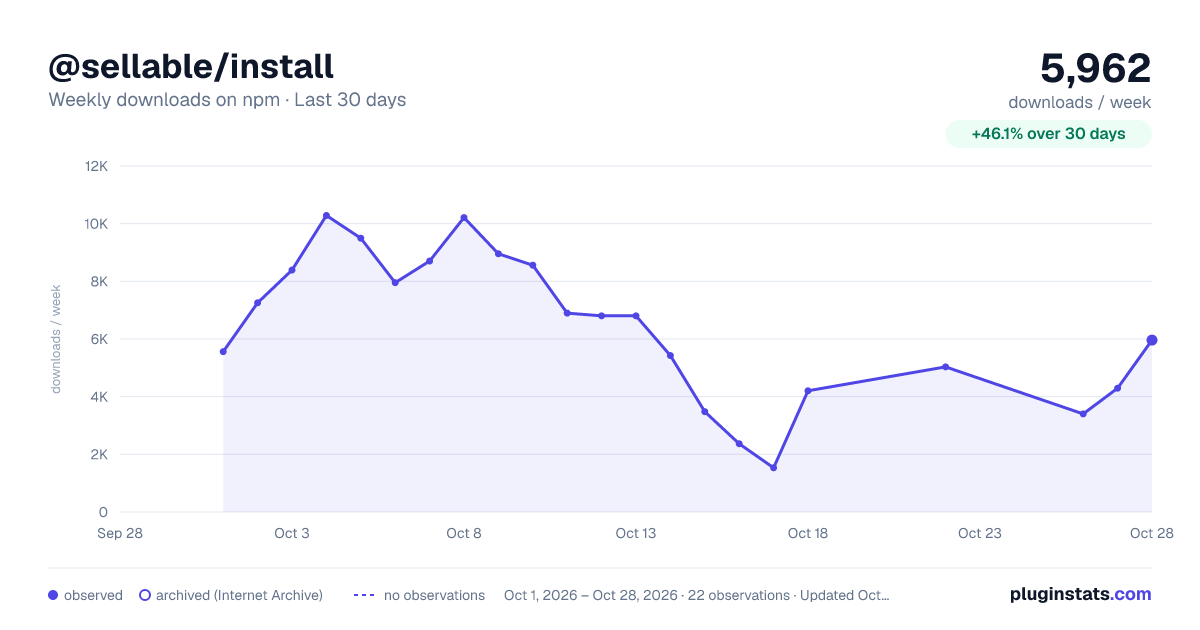
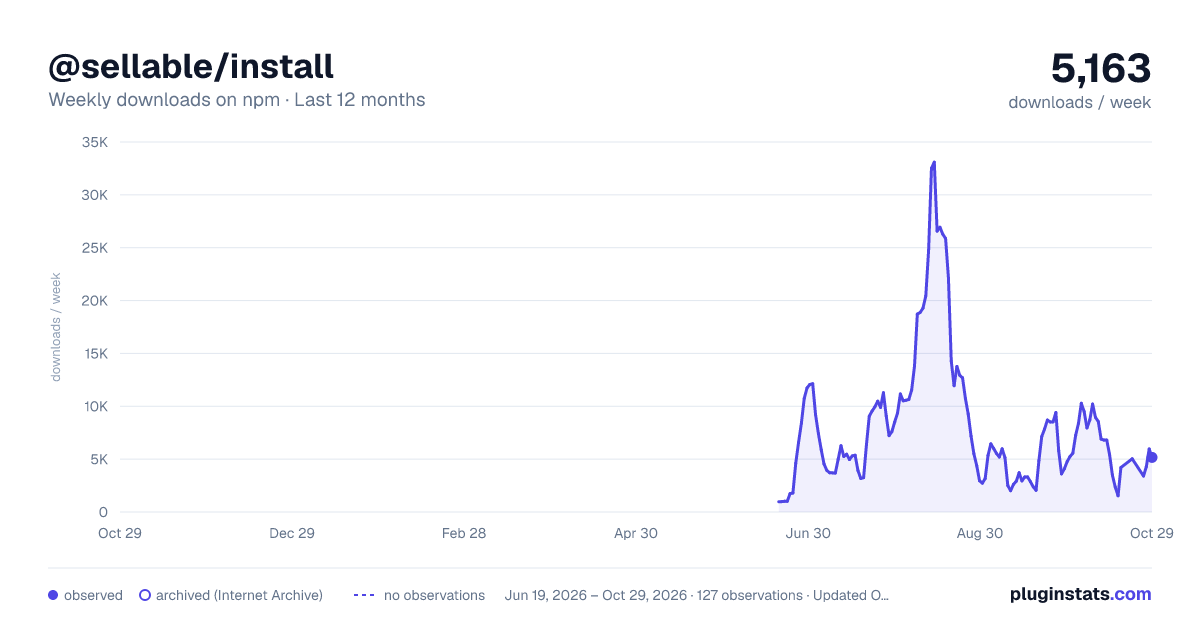
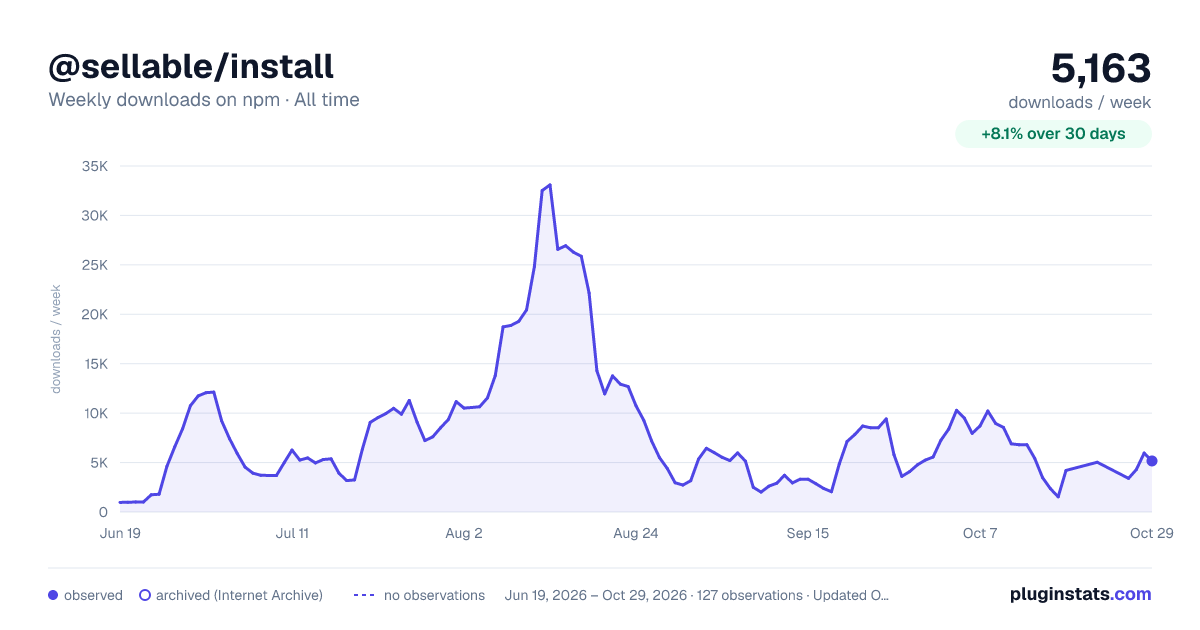

Adoption over time


7/30/90-day growth


Filled points are observed values; hollow points come from Internet Archive snapshots of the listing page. Dashed segments span periods with no observations — values between points are not interpolated.
Recent observations
Full history (121)Similar npm Claude Code plugins
Data source
Weekly downloads (trailing 7 complete days) come from the official npm downloads API. Downloads include CI and mirrors and are not equivalent to installs or users. npm publishes no ratings.
Listing: https://www.npmjs.com/package/@sellable/install. First seen Oct 16, 2026; last successful collection Oct 18, 2026. See the methodology.