 PluginStats
wordpress-shortcode-webpack-plugin weekly downloads statistics
By studio-lagier · npm · Webpack plugins
Create Wordpress plugins from React apps built using Webpack
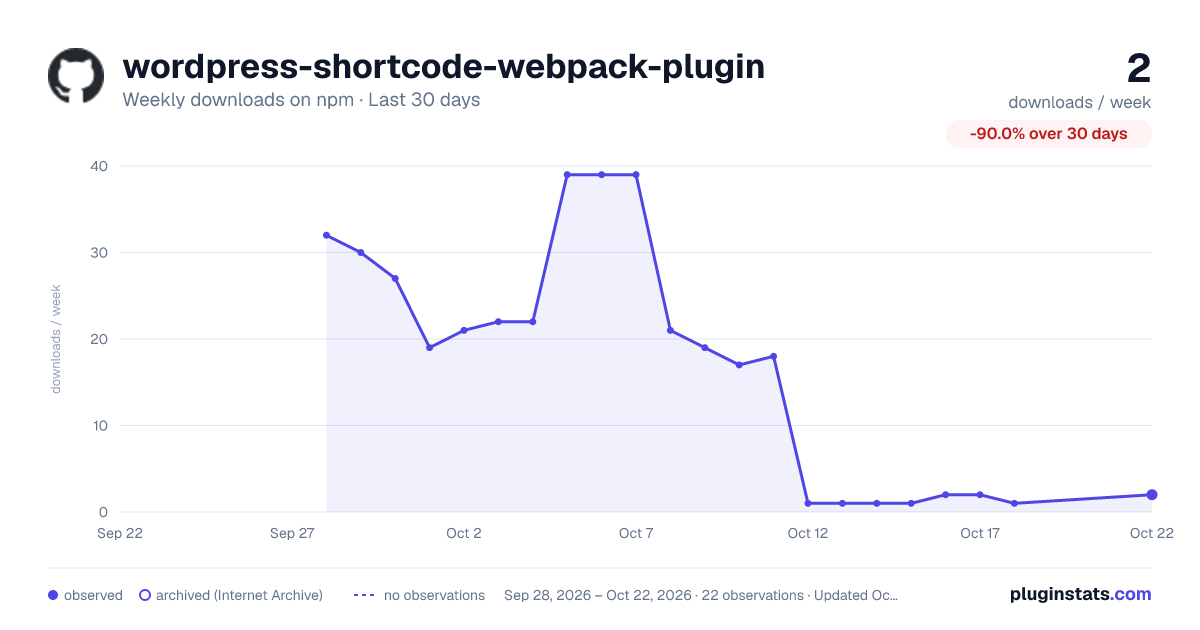
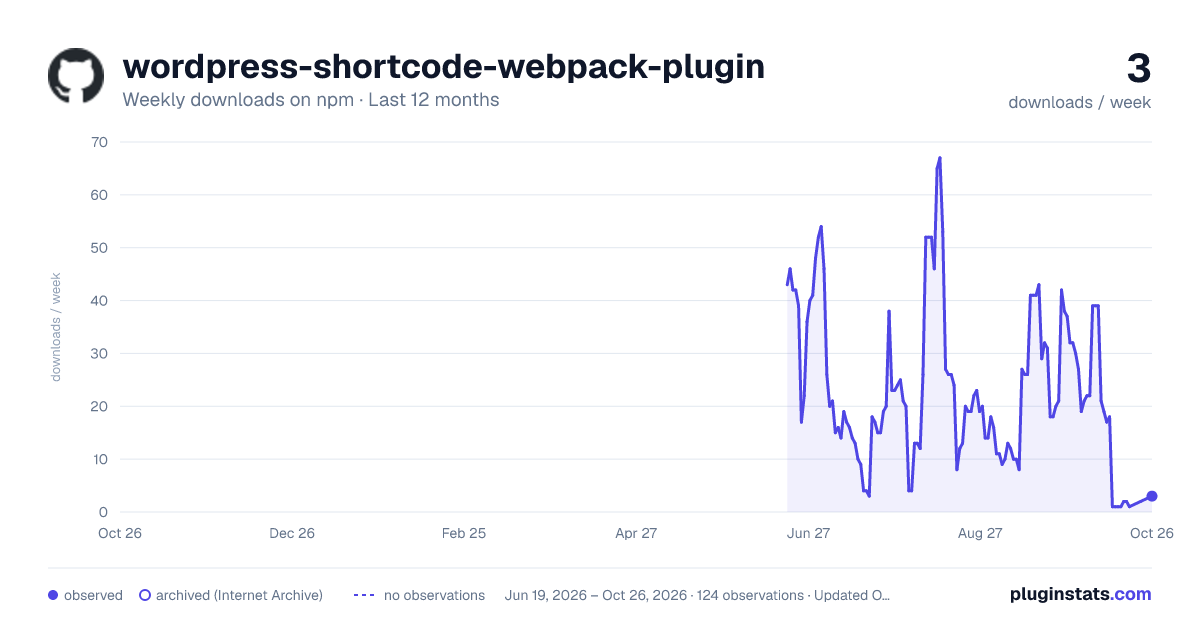
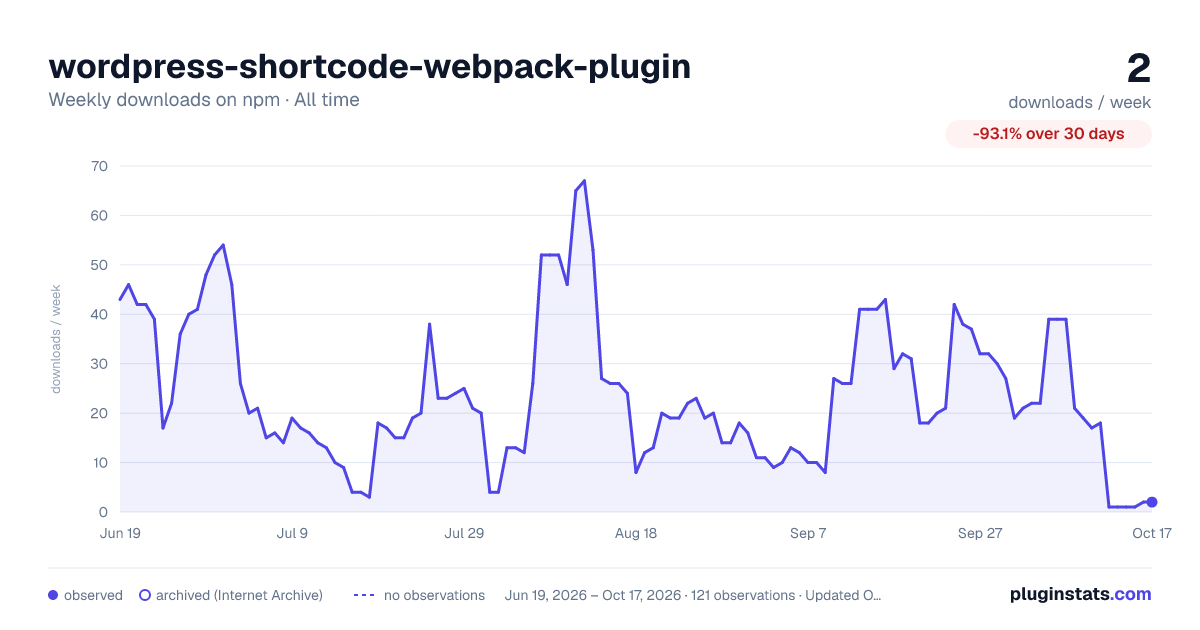
wordpress-shortcode-webpack-plugin has 2 recorded weekly downloads on npm, a decrease of 93.1% over the past 30 days.
It ranks #2175 of 2,251 tracked npm listings by weekly downloads.
Over 90 days, weekly downloads changed by -88.9%.
PluginStats has 121 daily observations since Jun 19, 2026; the latest is from Oct 17, 2026.
About wordpress-shortcode-webpack-plugin
wordpress-shortcode-webpack-plugin
This Webpack plugin is for Wordpress developers who want an easy way to drop React apps into Wordpress pages. It creates a simple Wordpress plugin from your Webpack configuration, registering each Webpack entry as a Wordpress shortcode.
Requires Webpack 4 or 5
Installation
Usage
Import the plugin, tell it a bit about your desired Wordpress plugin output, and add it to your Webpack configuration.
webpack.config.js
When built, this will output the following assets in the build directory:
Once uploaded, you can use the entrypoints specified in your Webpack configuration as shortcodes. By default the shortcodes are registered as {pluginName}-{entryName}. For our example, the one shortcode registered would be my-awesome-plugin-main.
So, in Wordpress, we could use the shortcode like [my-awesome-plugin-main].
You can see an example Create React App repo here.
Options
wordpressPluginName (required)
Type: string
Your plugin's name in kebab-case.
shortcodePrefix
Type: string Default: wordpressPluginName
The prefix used instead of wordpressPluginName to create your shortcodes. With shortcodePrefix: 'my-shortcode', the main entry shortcode would be [my-shortcode-main].
headerFields
Type:
Default: {}
Header fields for the Wordpress plugin. See https://developer.wordpress.org/plugins/plugin-basics/header-requirements/#header-fields
entryToRootId
Type: object Default: {}
A map of overrides for the root element ID for each entrypoint. By default we just use root as the ID for the root element, per React convention. If that ID conflicts with something else on the page, you can adjust it with this map.
pluginTemplate
Type: string Default: ./src/default-template.php (in the wordpress-shortcode-webpack-plugin repo)
Path to the template file that should be used to generate the Wordpress plugin file.
The template file is a PHP file with the following tokens that get replaced with content. You can customize the behavior of the Wordpress plugin by modifying the template.
{{plugin_header}}
Replaced with the Wordpress comment indicating the plugin name and other plugin metadata.
{{asset_manifest}}
Replaced with an associative array of entrypoint to an array of files that should be loaded for that entrypoint. Required for {{shortcode_registration}} and {{shortcode_definitions}}.
{{shortcode_definitions}}
Function that is invoked when the shortcode is called. Enqueues the assets for the entry and returns the React root HTML as a string.
Override this if you'd like to enhance the logic that gets run when your shortcode is run, e.g. by supplying attributes or setting global variables in the markup.
The naming convention for shortcodes that get registered is create_{entry}_app.
Requires {{shortcode_registration}}.
{{shortcode_registration}}
Function that registers the shortcode definition functions and their assets with Wordpress.
{{add_action}}
Adds the {{shortcode_registration}} function as an action during Wordpress's init phase.
Build locally
Clone the project
Go to the project directory
Install dependencies
Build
Running Tests
To run tests, run the following command
License
MIT
Description from the npm listing.
- webpack
- react
- wordpress
- webpack-plugin
- wordpress-plugin
Where wordpress-shortcode-webpack-plugin sits in the listing
Each band is one page of 20. Weekly downloads on a log scale. Placement is projected from weekly downloads, so it can differ from the marketplace's own sort order. Hover a dot to see the listing.


Charts
Images: 30d · 1y · all time · 1600×900 dark

Adoption over time


7/30/90-day growth


Filled points are observed values; hollow points come from Internet Archive snapshots of the listing page. Dashed segments span periods with no observations — values between points are not interpolated.
Recent observations
Full history (121)Similar npm Webpack plugins plugins
Data source
Weekly downloads (trailing 7 complete days) come from the official npm downloads API. Downloads include CI and mirrors and are not equivalent to installs or users. npm publishes no ratings.
Listing: https://www.npmjs.com/package/wordpress-shortcode-webpack-plugin. First seen Oct 16, 2026; last successful collection Oct 18, 2026. See the methodology.