 PluginStats
pi-claude-marketplace weekly downloads statistics
By acolomba · npm · Claude Code
Access Claude plugin marketplaces from Pi Coding Agent. Supports Claude commands, skills, agents, hooks, MCP servers, and workflows.
pi-claude-marketplace has 5,452 recorded weekly downloads on npm, an increase of 965% over the past 30 days.
It ranks #1069 of 2,251 tracked npm listings by weekly downloads.
Over 90 days, weekly downloads changed by +1588%.
PluginStats has 121 daily observations since Jun 19, 2026; the latest is from Oct 17, 2026.
About pi-claude-marketplace
Pi Claude Marketplace
Access Claude plugin marketplaces from Pi Coding Agent. Supports Claude commands, skills, agents, hooks, MCP servers and workflows.
Features
This extension installs plugins from Claude plugin marketplaces that contain these components:
• Commands. • Skills. • Agents. Requires pi-subagents. • Hooks. Partial support. For more information, see Hook compatibility. • MCP servers. Requires pi-mcp-adapter. For more information, see MCP compatibility. • Workflows. Requires @quintinshaw/pi-dynamic-workflows. For more information, see Workflow compatibility.
Plugins that contain unsupported components can be partially installed. A partially installed plugin may fail to work as intended.
The /claude:plugin command manages Claude marketplaces and plugins, like Claude Code's /plugin. A desired-state configuration in [~/].pi/agent/claude-plugins[.local].json files makes plugin installations automatic and repeatable. You can share these files across machines or team members.
Prerequisites
• Pi Coding Agent 1.0.0 or newer • pi-subagents 0.74.0 or newer (optional but recommended, pi install npm:pi-subagents) • pi-mcp-adapter 5.2.0 or a later 5.x release (optional but recommended, pi install npm:pi-mcp-adapter). Pi's built-in MCP support does not satisfy this requirement. • @quintinshaw/pi-dynamic-workflows (optional but recommended, pi install npm:@quintinshaw/pi-dynamic-workflows)
Usage
Install the Pi extension:
Bootstrap the official Claude plugin marketplace (anthropics/claude-plugins-official):
List plugins available for installation:
Install a plugin:
Add another marketplace:
List its plugins:
Add another plugin:
Then reload:
Run a plugin:
Name mapping
This extension prefixes command and skill names with the plugin name. If the name already starts with the plugin name and -, this extension removes that common part.
Commands use a colon (:) on POSIX and a dot (.) on Windows:
| Plugin name | Command name | Pi name (POSIX) | Pi name (Windows) |
| foo | bar | /foo:bar | /foo.bar | | foo | foo-bar | /foo:bar | /foo.bar | | foo | foo | /foo:foo | /foo.foo |
Skills use Pi's /skill: form and also have an alias in interactive sessions:
| Plugin name | Skill name | Pi skill form | Interactive alias |
| foo | bar | /skill:foo-bar | /foo:bar | | foo | foo-bar | /skill:foo-bar | /foo:bar | | foo | foo | /skill:foo | /foo:foo |
Skill aliases use a colon on every platform. If an alias conflicts with a command, the command takes precedence. Use /skill:foo-bar to invoke the skill.
Plugin MCP servers get the names that Claude Code gives them. The model sees each tool as mcpplugin__. pi-mcp-adapter stores each server under a key that ends with _. /claude:plugin info shows each server as plugin::.
| Plugin name | mcpServers key | Adapter server key | Tool names | Name shown by info |
| foo | api | plugin_foo_api_ | mcpplugin_foo_api | plugin:foo:api | | foo | my.db | plugin_foo_my_db_ | mcpplugin_foo_my_db | plugin:foo:my.db | | bar | api | plugin_bar_api_ | mcpplugin_bar_api | plugin:bar:api |
Scoping
You can install marketplaces and plugins in the user scope or the project scope. The default is user scope.
The project scope inherits the user scope. So you can install a plugin from a user-scope marketplace into the project scope.
You can also install the same plugin in both the user and project scopes. Then the user-scope plugin takes precedence.
Partially available plugins
Some plugins contain unsupported components: an unmappable hook, an LSP server, a theme, or an MCP server that uses a feature pi-mcp-adapter cannot run. To install or update these plugins partially, pass the --partial option. This extension installs the supported components and ignores the unsupported ones.
List partially available plugins.
Install a partially available plugin. Put --partial first to enable argument completion for partially available plugins. Without that flag, completion excludes them.
Configuration files
Each scope stores its declarative configuration for marketplaces and plugins in claude-plugins.json, under the scope root.
| Scope | File path |
| user | ~/.pi/agent/claude-plugins.json | | project | /.pi/claude-plugins.json |
These files are the authoritative record of the installed marketplaces and plugins. Pi applies their contents at extension load (/reload).
Whether Pi applies a declared plugin's components depends on the entry's optional enabled key and on the install-time default the plugin author declares. For more information, see Plugin enablement.
Local configuration files
Each scope can also have a claude-plugins.local.json file alongside the base file.
| Scope | File path |
| user | ~/.pi/agent/claude-plugins.local.json | | project | /.pi/claude-plugins.local.json |
The local file overrides individual entries from the base file. An entry in claude-plugins.local.json replaces the same-keyed entry in claude-plugins.json completely.
For commands that write configuration, --local selects claude-plugins.local.json. Reads always combine both configuration files. Marketplace update still refreshes cached sources and installed-plugin state.
Gitignore convention
In the project scope, commit claude-plugins.json. Then your collaborators install the same marketplaces and plugins. Keep claude-plugins.local.json out of version control. Add this line to your project's .gitignore:
User-scope files live in your home directory. They are personal and never shared.
Command reference
This extension mirrors Claude Code's /plugin command. Use /claude:plugin in Pi for marketplace and plugin operations. After you install, uninstall, update, or reinstall plugins, run /reload. Then Pi discovers the changed resources.
Marketplace
Add a marketplace from a GitHub repository owner/repo shorthand.
[!NOTE] If Git is not already authenticated, a private repository will trigger Device Flow authentication.
Add the same marketplace from a GitHub URL.…
Description from the npm listing.
- claude
- claude-code
- marketplace
- pi
- pi-coding-agent
- pi-extension
- pi-package
- plugins
Where pi-claude-marketplace sits in the listing
Each band is one page of 20. Weekly downloads on a log scale. Placement is projected from weekly downloads, so it can differ from the marketplace's own sort order. Hover a dot to see the listing.


Charts
Images: 30d · 1y · all time · 1600×900 dark
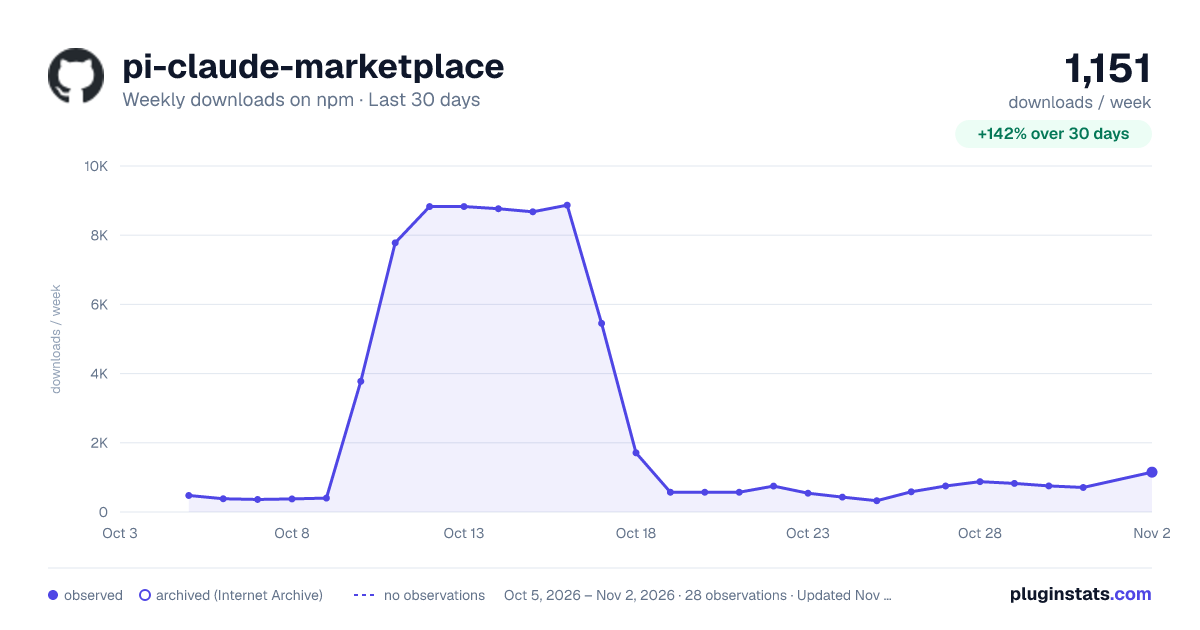
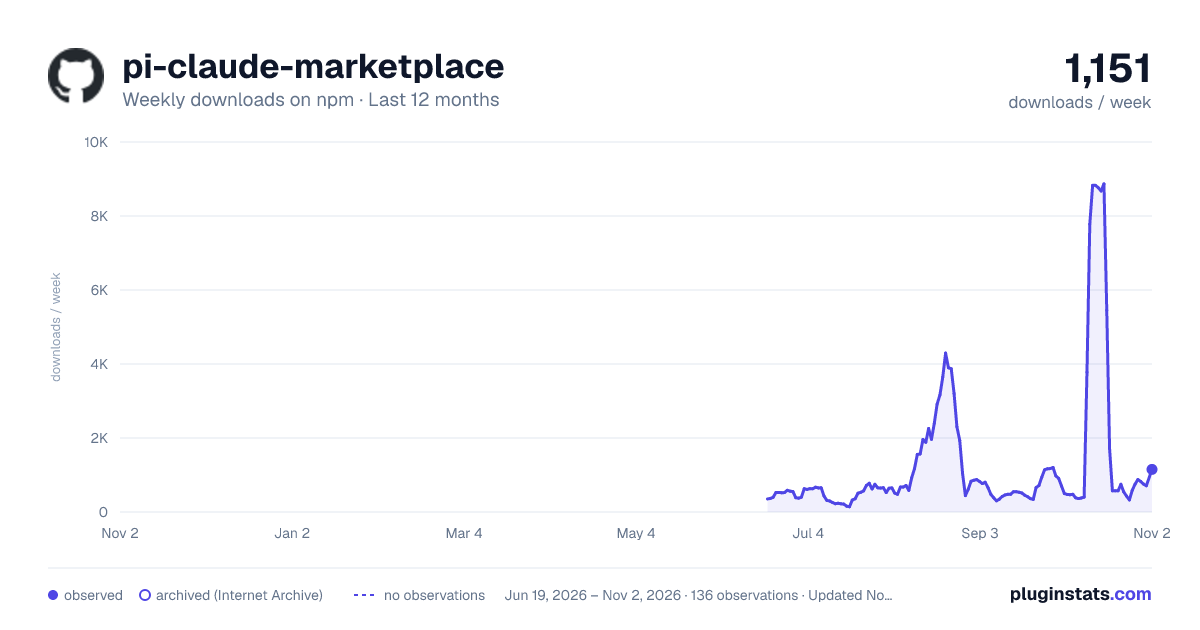
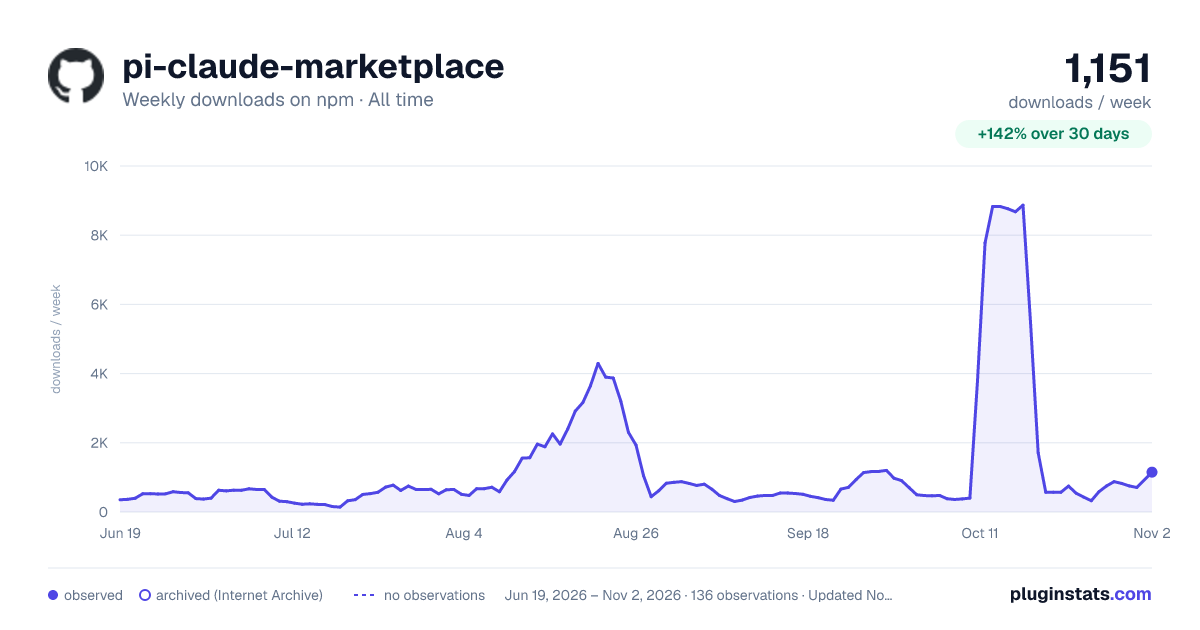

Adoption over time


7/30/90-day growth


Filled points are observed values; hollow points come from Internet Archive snapshots of the listing page. Dashed segments span periods with no observations — values between points are not interpolated.
Recent observations
Full history (121)Similar npm Claude Code plugins
Data source
Weekly downloads (trailing 7 complete days) come from the official npm downloads API. Downloads include CI and mirrors and are not equivalent to installs or users. npm publishes no ratings.
Listing: https://www.npmjs.com/package/pi-claude-marketplace. First seen Oct 16, 2026; last successful collection Oct 18, 2026. See the methodology.