 PluginStats
eslint-plugin-project-structure weekly downloads statistics
By Igorkowalski94 · npm · ESLint plugins
Powerful ESLint plugin with rules to help you achieve a scalable, consistent, and well-structured project. Create your own framework! Define your folder structure, file composition, advanced naming conventions, and create independent modules. Take your pr
eslint-plugin-project-structure has 46,985 recorded weekly downloads on npm, a decrease of 28.5% over the past 30 days.
It ranks #575 of 2,251 tracked npm listings by weekly downloads.
Over 90 days, weekly downloads changed by -30.7%.
PluginStats has 121 daily observations since Jun 19, 2026; the latest is from Oct 17, 2026.
About eslint-plugin-project-structure
eslint‑plugin-project‑structure
Powerful ESLint plugin with rules to help you achieve a scalable, consistent, and well-structured project.
Create your own framework! Define your folder structure, file composition, advanced naming conventions, and create independent modules.
Take your project to the next level and save time by automating the review of key principles of a healthy project!
📋 General information
🎮 Playground for eslint-plugin-project-structure rules.
Check the latest releases and stay updated with new features and changes.
Become part of the community! Leave a ⭐ and share the link with your friends.
• If you have any questions or need help creating a configuration that meets your requirements, help. • If you have found a bug or an error in the documentation, report issues. • If you have an idea for a new feature or an improvement to an existing one, ideas. • If you're interested in discussing project structures across different frameworks or want to vote on a proposed idea, discussions.
📚 Documentation
• project-structure/folder-structure • project-structure/independent-modules • project-structure/file-composition
project‑structure/folder‑structure
Enforce rules on folder structure to keep your project consistent, orderly and well thought out.
Features:
• Validation of folder structure. Any files/folders outside the structure will be considered an error. • File/Folder name regex validation with features like wildcard * and treating . as a character, along with other conveniences. • Build in case validation. • Inheriting the folder's name. The file/folder inherits the name of the folder in which it is located. Option of adding your own prefixes/suffixes or changing the case. • Enforcing the existence of a files/folders when a specific file/folder exists. For example, if ./src/Component.tsx exists, then ./src/Component.test.tsx and ./src/stories/Component.stories.tsx must also exist. • Reusable rules for folder structures. • An option to create a separate configuration file with TypeScript support. • Forcing a nested/flat structure for a given folder. • Support for all file extensions. • Folder recursion. You can repeatedly nest a folder structure and set a limit on the nesting depth. There is also an option to change the rule at the final level, such as flattening the folder structure. • Fewer repetitions and precise error messages, even for deeply nested folders (recursion), by representing the folder structure as a tree. • Checking the length of paths and notifying when the limit is exceeded.
project‑structure/independent‑modules
A key principle of a healthy project is to prevent the creation of a massive dependency tree, where removing or editing one feature triggers a chain reaction that impacts the entire project.
Create modules where you control what can be imported into them. Eliminate unnecessary dependencies between folders or files to build truly independent functionalities.
Features:
• Creating modules in which you control what can be imported (e.g. types, functions, components of one functionality cannot be imported into another functionality). • The ability to create very detailed rules, even for nested folder structures. Whether it's a large module, a sub-module, or a single file, there are no limitations. • Support for all types of imports, including require(), import(), jest.mock(), and jest.requireActual(), as well as ExportAllDeclaration and ExportNamedDeclaration. • Disabling external imports (node_modules) for a given module (Option to add exceptions). • Non-relative/relative imports support. • Built-in import resolver, so you don’t need to install any additional plugins. It also includes built-in configuration for the most popular file extensions, so you don’t have to configure anything manually. • Reusable import patterns. • Support for path aliases. The plugin will automatically detect your tsconfig.json and use your settings. There is also an option to enter them manually. • An option to create a separate configuration file with TypeScript support.
project‑structure/file‑composition
Compose your ideal files!
Have full control over the order and quantity of selectors.
Define advanced naming conventions and prohibit the use of specific selectors in given files.
Features:
• File composition validation. • Supported selectors: class, function, arrowFunction, type, interface, enum, variable, variableExpression, propertyDefinition. • Inheriting the filename as the selector name. Option to add your own prefixes/suffixes, change the case, or remove parts of the filename. • Prohibit the use of given selectors in a given file. For example, /*.consts.ts files can only contain variables, /*.types.ts files can only contain interfaces and types. • Define the order in which your selectors should appear in a given file. Support for --fix to automatically correct the order. • Rules for exported selectors, selectors in the root of the file and nested/all selectors in the file. They can be used together in combination. • Enforcing a maximum of one main component/function/class per file. • The ability to set a specific limit on the occurrence of certain selectors in the root of a given file. • Selector name regex validation. • Build in case validation. • Different rules for different files. • An option to create a separate configuration file with TypeScript support.
Sponsors
A big thank you to all the sponsors for your support! You give me the strength and motivation to keep going!
Thanks to you, I can help others create their ideal projects!
Description from the npm listing.
- folder-structure
- project-structure
- file-structure
- boundaries
- filename
- file
- structure
- project
- folder
- import
- conventions
- architecture
- naming-conventions
- project-architecture
- independent-modules
- file-composition
- eslint
- eslint-plugin
Where eslint-plugin-project-structure sits in the listing
Each band is one page of 20. Weekly downloads on a log scale. Placement is projected from weekly downloads, so it can differ from the marketplace's own sort order. Hover a dot to see the listing.


Charts
Images: 30d · 1y · all time · 1600×900 dark
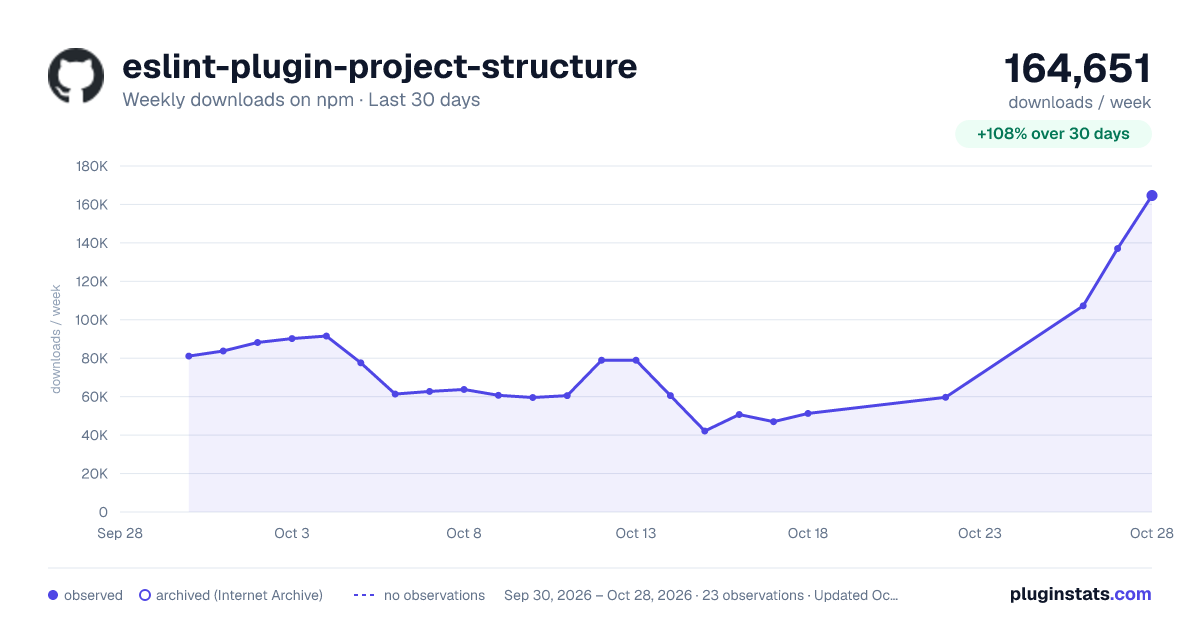
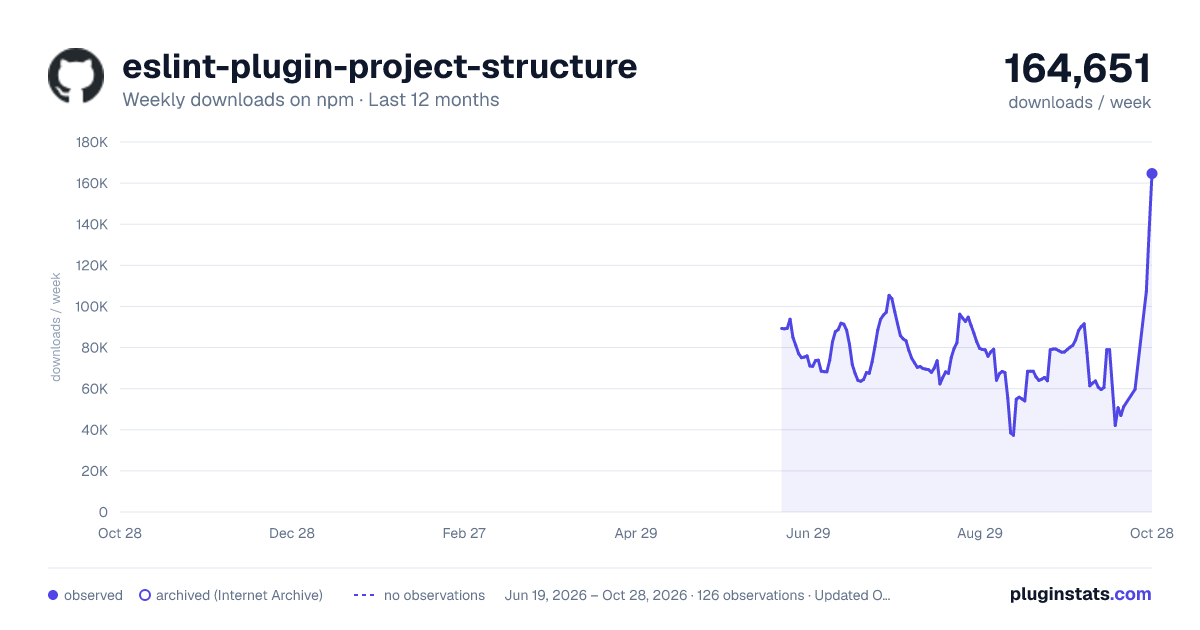
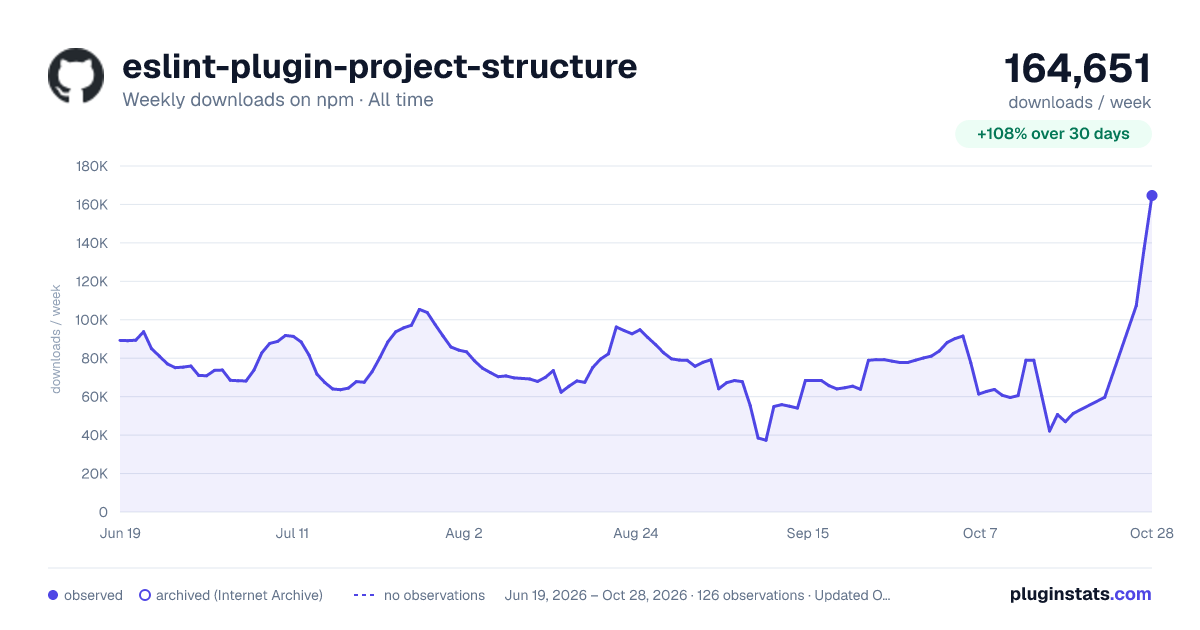

Adoption over time


7/30/90-day growth


Filled points are observed values; hollow points come from Internet Archive snapshots of the listing page. Dashed segments span periods with no observations — values between points are not interpolated.
Recent observations
Full history (121)Similar npm ESLint plugins plugins
Data source
Weekly downloads (trailing 7 complete days) come from the official npm downloads API. Downloads include CI and mirrors and are not equivalent to installs or users. npm publishes no ratings.
Listing: https://www.npmjs.com/package/eslint-plugin-project-structure. First seen Oct 16, 2026; last successful collection Oct 18, 2026. See the methodology.