 PluginStats
kaizen-agent weekly downloads statistics
By hfadhlullah · npm · Claude Code
Staged workflow for AI agents — code, writing, research, operations: plan, human approval, build, independent review, bounded fix loop.
kaizen-agent has 4,106 recorded weekly downloads on npm, a change of +74.9% over the past 7 days, ranking #1185 of 2,322 tracked listings.
About kaizen-agent
The problem
You ask an AI coding agent to retry a payment webhook when the bank times out. It starts editing at once, then says "Done, tests pass." The tests do pass. They were written by the same agent, from the same assumption: that a timeout means the charge failed. Sometimes the bank said yes and the reply got lost. Now a retry charges the customer twice, and nothing in the agent's report would make you look.
None of this is a lack of intelligence. It is a missing workflow:
| What goes wrong | What kaizen does |
|---|---|
| The agent decides what "done" means on its own, and you find out from the diff | It writes a plan first, including what wrong would look like, and waits for your approve or change |
| The author grades its own work, so its blind spot is in the code and in the check | A second agent that never saw the work reviews it, from the request, the plan and the diff only |
| Findings get fixed in an endless loop, or silently dropped | Serious findings are fixed and re-checked, at most twice; the rest come to you, and what is left goes to a backlog |
| Requests live in sheets, docs and social posts; the plan in one chat, the review in another, the commit somewhere else | One board, from an icebox that gathers those requests to an idea, a plan, the build, the review, the fix loop and the commit, every step on file |
Many assistants now ask for approval before they act, and some run a checker on their own draft. The difference here is who checks: a reviewer that shares the author's context shares its blind spots. Kaizen's reviewer starts cold, on purpose.
Every stage is a file in .kaizen/runs/<id>/, so a run can be resumed later, by another session or another tool (Claude Code, Codex, Antigravity), and read back when someone asks why the code is the way it is.
Who it is for
Good fit if you:
- Build and maintain a product, and want one place for it: requests gathered from where they live, then plan, build, review and commit, without switching tools.
- Already use an AI coding agent, and have caught it confidently wrong more than once.
- Change things where a mistake is expensive: money, data, migrations, anything a customer sees.
- Want to see and steer the plan before code is written, not reverse-engineer it from a diff.
Not for you if:
- Your changes are typos and one-liners. A run costs several times one prompt; kaizen takes a short path for small work, but it is not free.
- You want the agent to ship without you. Kaizen is built to stop and ask.
- You do not use an AI coding agent. Kaizen runs inside one; it is not one.
Install
macOS and Linux
curl -fsSL https://bun.sh/install | bash && ~/.bun/bin/bunx kaizen-agent
Already have Bun? Run bunx kaizen-agent.
kaizen needs an AI coding agent such as Claude Code. If none is installed, the installer lets you pick one, runs its official installer after you say yes, and then carries on. Git is needed for the board's commit and push.
Windows
Windows support is still in beta. In PowerShell:
irm bun.sh/install.ps1 | iex; & "$env:USERPROFILE\.bun\bin\bunx.exe" kaizen-agent
Already have Bun? Run bunx kaizen-agent. As on macOS and Linux, the installer offers to install an AI coding agent when none is found; Git is only needed for the board's commit and push.
Use the board
kaizen web
The board opens in your browser. The side menu holds the board, notes, the icebox of gathered requests and settings, with a light and dark switch. From there you can start a run, approve or revise its plan, pick which review findings to fix, then commit and push.
Right after installing, kaizen setup walks you through your project, settings, this board and the phone app (it prints a QR code to scan).
Phone app
The board is a PWA: installed from the browser, it opens full screen with the kaizen icon. It needs Tailscale on this PC and on your phone, both signed in to the same account.
kaizen setup # guided: starts the board, runs tailscale serve, prints a QR code
Scan the QR code with your phone camera, then Add to Home screen (iOS: Share menu; Android: browser menu, Install app).
By hand: run kaizen web, then tailscale serve --bg 127.0.0.1:7420, add <pc>.<tailnet>.ts.net to ~/.kaizen/web-hosts, and open https://<pc>.<tailnet>.ts.net on the phone. Details in docs/guide.md. Never use tailscale funnel — it publishes the board to the internet.
To add a launcher (Spotlight on macOS, the app menu on Linux, a Desktop shortcut on Windows), run kaizen web --shortcut once.
Development…
Description from the npm listing.
- claude-code
- agent
- workflow
- skill
- codex
- antigravity
- code-review
- writing
- research
README badge
Show your rank in a README or on your website. The badge updates automatically.
Charts
Images: 30d · 1y · all time · 1600×900 dark
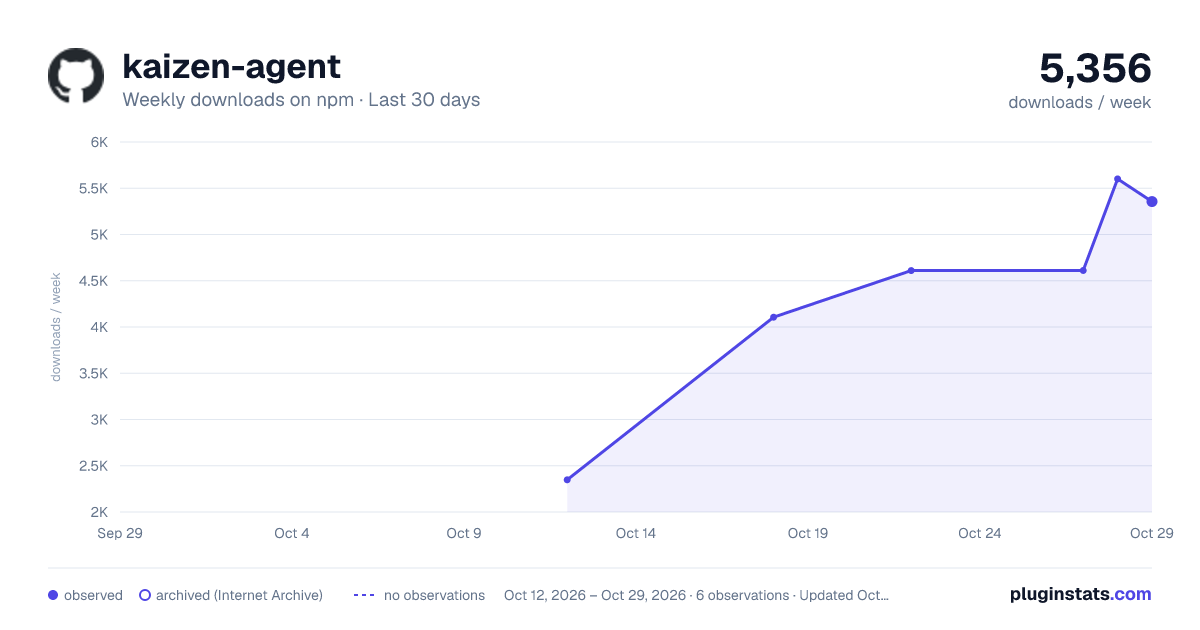
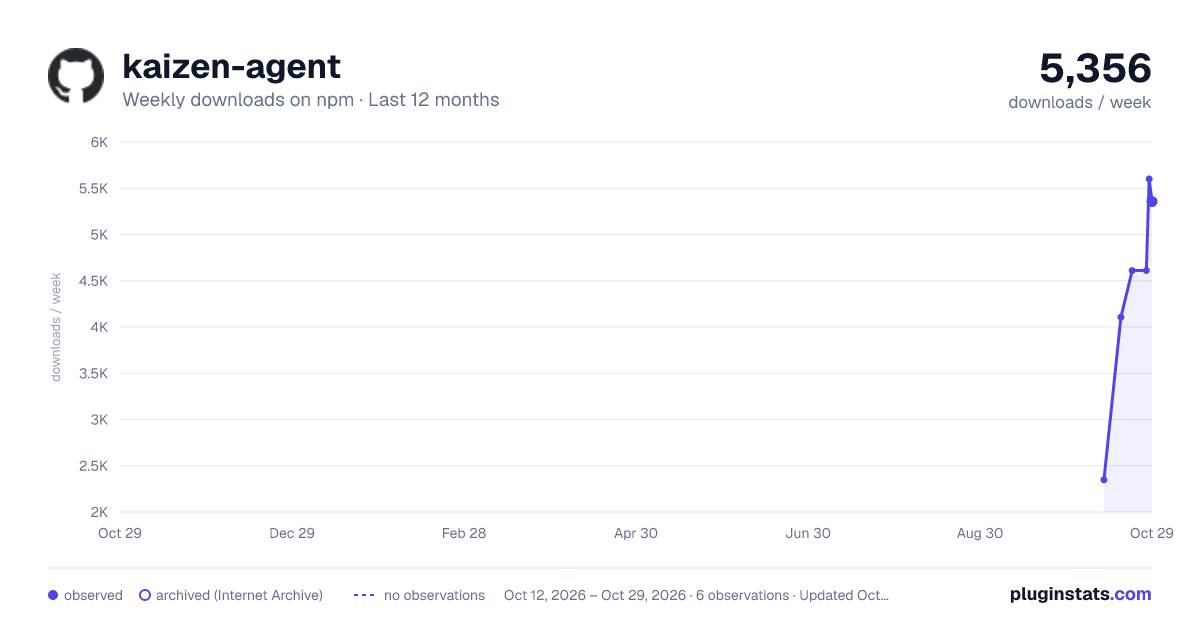
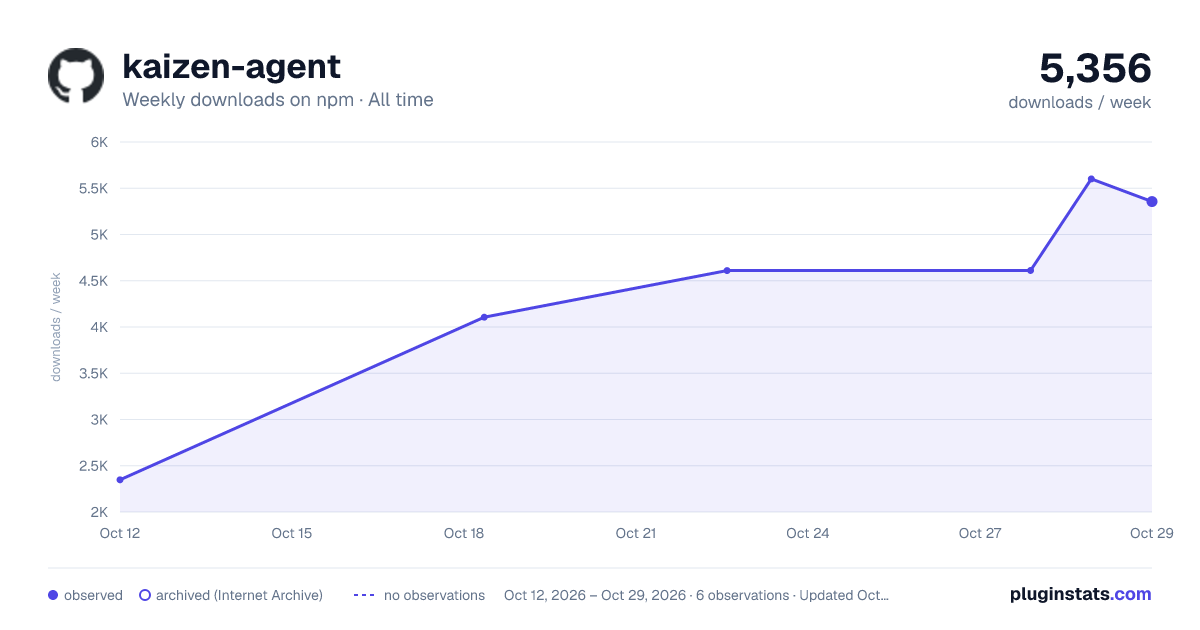

Adoption over time
7/30/90-day growth
Ranking history
Listing placement
Listing placement
Filled points are observed values; hollow points come from Internet Archive snapshots of the listing page. Dashed segments span periods with no observations — values between points are not interpolated.
Each band is one page of 20. Weekly downloads on a linear scale. Placement is projected from weekly downloads, so it can differ from the marketplace's own sort order. Hover a dot to see the listing.
Recent observations
Full history (2)Similar npm Claude Code plugins
All 20 kaizen-agent alternativesData source
Weekly downloads (trailing 7 complete days) come from the official npm downloads API. Downloads include CI and mirrors and are not equivalent to installs or users. npm publishes no ratings.
Listing: https://www.npmjs.com/package/kaizen-agent. First seen Oct 16, 2026; last successful collection Oct 20, 2026. See the methodology.