 PluginStats
@hono/vite-build weekly downloads statistics
By hono (2 listings) · npm · Vite plugins
Vite plugin to build your Hono app
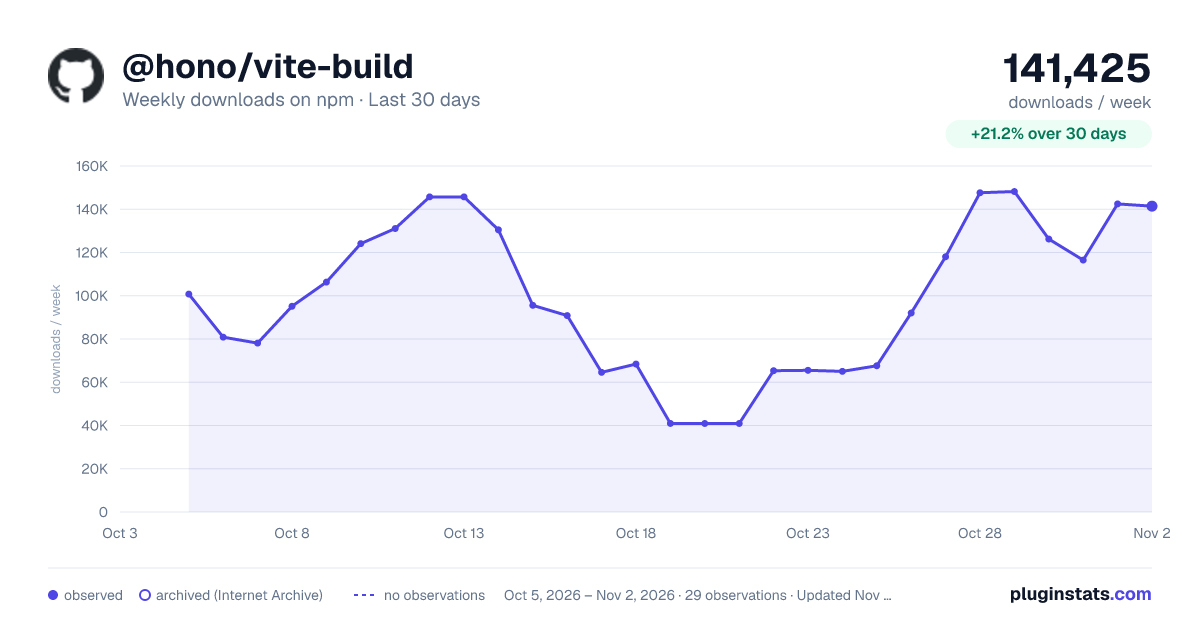
@hono/vite-build has 64,577 recorded weekly downloads on npm, a decrease of 58.5% over the past 30 days.
It ranks #509 of 2,251 tracked npm listings by weekly downloads.
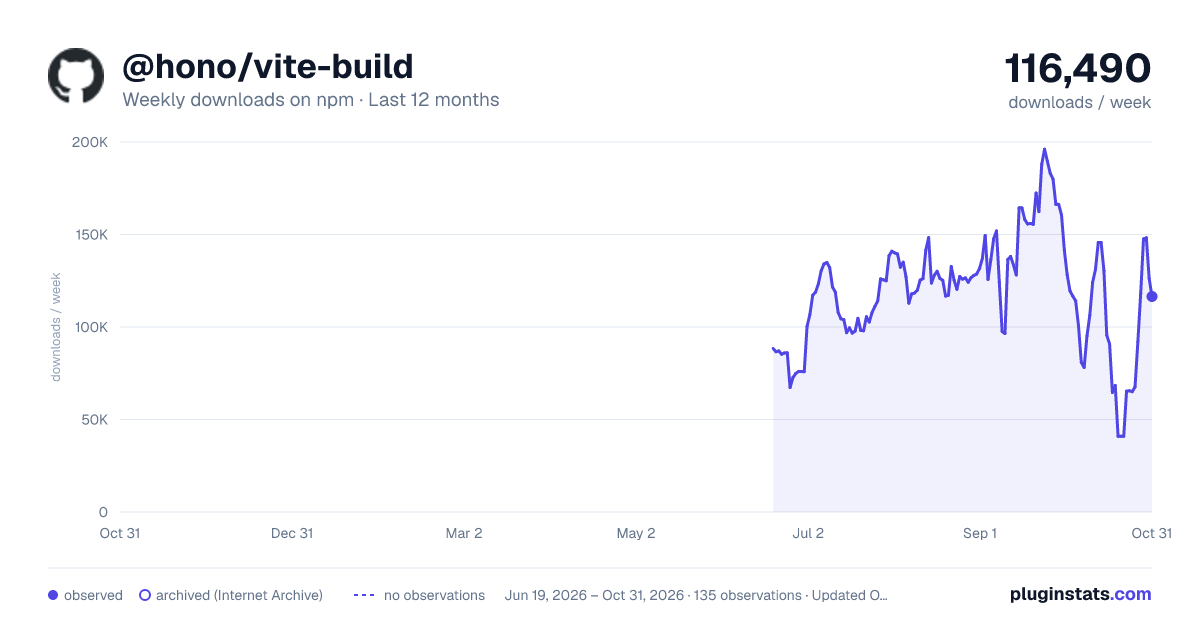
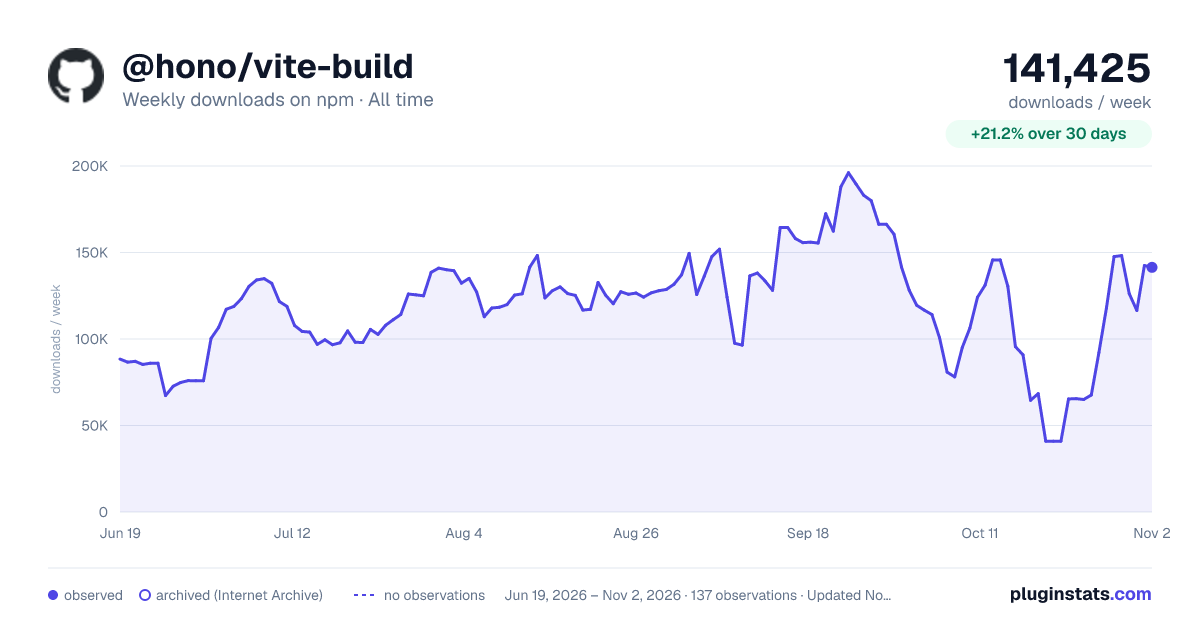
Over 90 days, weekly downloads changed by -38.3%.
PluginStats has 121 daily observations since Jun 19, 2026; the latest is from Oct 17, 2026.
About @hono/vite-build
@hono/vite-build
@hono/vite-build is a set of Vite plugins for building Hono applications with Vite. It supports multiple runtimes and platforms, allowing you to build a project that includes JavaScript files for these platforms from a Hono app.
Here are the modules included:
• @hono/vite-build/base • @hono/vite-build/cloudflare-pages • @hono/vite-build/cloudflare-workers • @hono/vite-build/bun • @hono/vite-build/node • @hono/vite-build/netlify-functions • @hono/vite-build/vercel
Usage
Install
You can install vite and @hono/vite-build via the npm.
Or you can install them with Bun.
Settings
Add "type": "module" to your package.json. Then, create vite.config.ts and edit it. The following is for Bun.
Build
Just run vite build.
Or
Run
Run with the command on your runtime. For examples:
Cloudflare Pages:
Bun:
Node.js:
Common Options
Default values:
Platform specific things
Cloudflare Pages
This plugin generates _routes.json automatically. The automatic generation can be overridden by creating a public/_routes.json. See Create a _routes.json file on Cloudflare Docs for more details.
Vercel
By default, the Vercel adapter emits a single function named __hono and a catch-all route.
To emit multiple functions, add the Vercel adapter multiple times in plugins.
If vercel.routes is omitted, the adapter generates ^/(?:/.*)?$. If vercel.name is omitted, the adapter uses __hono.
Example project
src/index.tsx:
public/static/style.css:
The project with those file will be built to the following files with @hono/vite-build/bun:
Build a client
If you also want to build a client-side script, you can configure it as follows.
The build command:
import.meta.env.PROD is helpful in detecting whether it is in development or production mode if you are using it on a Vite dev server.
Example
You can see the example project here - hono-vite-jsx
Authors
• Yusuke Wada
License
MIT
Description from the npm listing.
- hono
- vite-plugin
Where @hono/vite-build sits in the listing
Each band is one page of 20. Weekly downloads on a log scale. Placement is projected from weekly downloads, so it can differ from the marketplace's own sort order. Hover a dot to see the listing.


Charts
Images: 30d · 1y · all time · 1600×900 dark

Adoption over time


7/30/90-day growth


Filled points are observed values; hollow points come from Internet Archive snapshots of the listing page. Dashed segments span periods with no observations — values between points are not interpolated.
Recent observations
Full history (121)Similar npm Vite plugins plugins
Data source
Weekly downloads (trailing 7 complete days) come from the official npm downloads API. Downloads include CI and mirrors and are not equivalent to installs or users. npm publishes no ratings.
Listing: https://www.npmjs.com/package/@hono/vite-build. First seen Oct 16, 2026; last successful collection Oct 18, 2026. See the methodology.