 PluginStats
firecrawl-mcp weekly downloads statistics
By firecrawl (3 listings) · npm · MCP servers
Firecrawl MCP server, the context API for AI agents: search, scrape, parse, crawl, map, and interact with the web, run Agent and Monitor jobs, and search scientific papers (PubMed, bioRxiv, medRxiv, arXiv). Works with Firecrawl cloud or a self-hosted inst
firecrawl-mcp has 59,233 recorded weekly downloads on npm, an increase of 97.6% over the past 30 days.
It ranks #523 of 2,256 tracked npm listings by weekly downloads.
Over 90 days, weekly downloads changed by +25.6%.
PluginStats has 543 daily observations since Apr 23, 2025; the latest is from Oct 17, 2026.
About firecrawl-mcp
, in place of the client name or User-Agent it would otherwise report. Use letters, digits and dashes: each run of other characters becomes one dash, leading and trailing dashes are dropped, and the name is cut at 48 characters. Tool results are unaffected; only the origin sent to the Firecrawl API (and passed to an embedder's beforeKeylessRequest) changes.
Search-only endpoint
A fixed-scope search surface is also hosted at:
It exposes a fixed set of nine tools: firecrawl_search, firecrawl_developer_search, firecrawl_gov_search, the four firecrawl_research_* tools, and the two Alexandria tools firecrawl_find_tools and firecrawl_scrape. Its firecrawl_search fetches no page content.
Running with npx
Manual Installation
Running on Cursor
Configuring Cursor 🖥️ Note: Requires Cursor version 0.45.6+ For the most up-to-date configuration instructions, please refer to the official Cursor documentation on configuring MCP servers: Cursor MCP Server Configuration Guide
To configure Firecrawl MCP in Cursor v0.48.6
1. Open Cursor Settings 2. Go to Features > MCP Servers 3. Click "+ Add new global MCP server" 4. Enter the following code:
To configure Firecrawl MCP in Cursor v0.45.6
1. Open Cursor Settings 2. Go to Features > MCP Servers 3. Click "+ Add New MCP Server" 4. Enter the following: • Name: "firecrawl-mcp" (or your preferred name) • Type: "command" • Command: env FIRECRAWL_API_KEY=your-api-key npx -y firecrawl-mcp
If you are using Windows and are running into issues, try cmd /c "set FIRECRAWL_API_KEY=your-api-key && npx -y firecrawl-mcp"
Replace your-api-key with your Firecrawl API key. If you don't have one yet, you can create an account and get it from https://www.firecrawl.dev/app/api-keys
After adding, refresh the MCP server list to see the new tools. The Composer Agent will automatically use Firecrawl MCP when appropriate, but you can explicitly request it by describing what you need from the web. Access the Composer via Command+L (Mac), select "Agent" next to the submit button, and enter your query.
Running on Windsurf
Add this to your ./codeium/windsurf/model_config.json:
Running with Streamable HTTP Local Mode
To run the server using Streamable HTTP locally instead of the default stdio transport:
Use the url: http://localhost:3000/mcp
Running with Docker
The ghcr.io/firecrawl/firecrawl-mcp-server image runs the same server as npx -y firecrawl-mcp. Every build from main is tagged latest, v and sha-. v moves to the newest build of that version, so pin sha- (or a digest) when you need a fixed image.
stdio (the default), for MCP clients that launch the server as a command:
Streamable HTTP, served at http://localhost:3000/mcp:
The image sets HOST=0.0.0.0 and PORT=3000; override PORT (and the -p mapping) to listen elsewhere. The server uses the container's FIRECRAWL_API_KEY for requests that don't send their own credential, so the example publishes the port on 127.0.0.1 only; don't expose it more widely unless clients must supply their own key. Set FIRECRAWL_API_URL to use a self-hosted Firecrawl API. The container runs as the unprivileged node user.
Running on VS Code
For one-click installation, click one of the install buttons below...
For manual installation, add the following JSON block to your User Settings (JSON) file in VS Code. You can do this by pressing Ctrl + Shift + P and typing Preferences: Open User Settings (JSON).
Optionally, you can add it to a file called .vscode/mcp.json in your workspace. This will allow you to share the configuration with others:
Configuration
Environment Variables
Required for Cloud API
• FIRECRAWL_API_KEY: Your Firecrawl API key • Required when using cloud API (default) • Optional when using self-hosted instance with FIRECRAWL_API_URL • FIRECRAWL_API_URL (Optional): Custom API endpoint for self-hosted instances • Example: https://firecrawl.your-domain.com • If not provided, the cloud API will be used (requires API key) • FIRECRAWL_INTEGRATION (Optional): Integration tag for apps that launch this server, such as an editor extension • Sent as the integration field of scrape, batch scrape, crawl, map, search, extract, agent, parse, interact and feedback requests • Use a value that starts with _, for example _zed
MCP OAuth (Bearer access tokens)
Firecrawl issues OAuth access tokens (fco_…) via the authorization server on firecrawl.dev. This MCP server forwards whichever credential it resolves to the Firecrawl API as Authorization: Bearer ….
• HTTP stream transports (CLOUD_SERVICE=true, HTTP_STREAMABLE_SERVER=true, or SSE_LOCAL=true): Clients should send Authorization: Bearer on MCP requests. An OAuth bearer token takes precedence over x-firecrawl-api-key / x-api-key when both are present. • stdio: Use FIRECRAWL_OAUTH_TOKEN for a static access token, or keep using FIRECRAWL_API_KEY for an API key.
Use access tokens (fco_…) only. Refresh tokens (fcr_…) must be exchanged at the token endpoint, not passed to the scrape/search API.
CLOUD_SERVICE=true
CLOUD_SERVICE=true serves the tools over streamable HTTP on PORT (default 3000, bound to 0.0.0.0) with stricter defaults: every request must carry a credential (an API key or an OAuth access token), scrape is read-only (see the scrape tool below), and firecrawl_parse accepts uploads only.
FASTMCP_ENDPOINT selects the tool surface: /v2/mcp (default) for the full tool set, /v2/mcp-oauth for the account surface, or /v2/mcp-search for the search-only tools (this also requires FIRECRAWL_MCP_SEARCH_OAUTH_ONLY=true). With the full surface, a search-only instance also starts on port 3001; set FIRECRAWL_MCP_SEARCH_ENABLED=false to turn it off.
Configuration Examples
For cloud API usage:
For self-hosted instance:
Usage with Claude Desktop
Add this to your claude_desktop_config.json:
How to Choose a Tool
Use this guide to select the right tool for your task:…
Description from the npm listing.
- mcp
- firecrawl
- web-search
- web-data
- web-interaction
- research
- paper-search
- literature-search
- biomedical
- pubmed
- arxiv
Where firecrawl-mcp sits in the listing
Each band is one page of 20. Weekly downloads on a log scale. Placement is projected from weekly downloads, so it can differ from the marketplace's own sort order. Hover a dot to see the listing.


Charts
Images: 30d · 1y · all time · 1600×900 dark
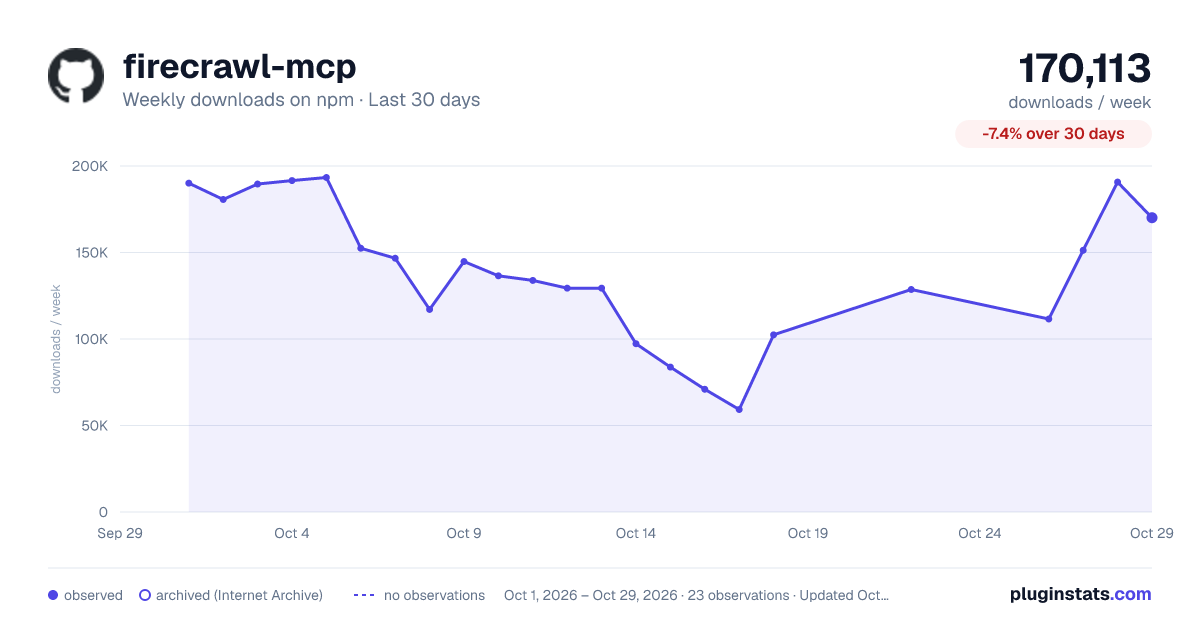
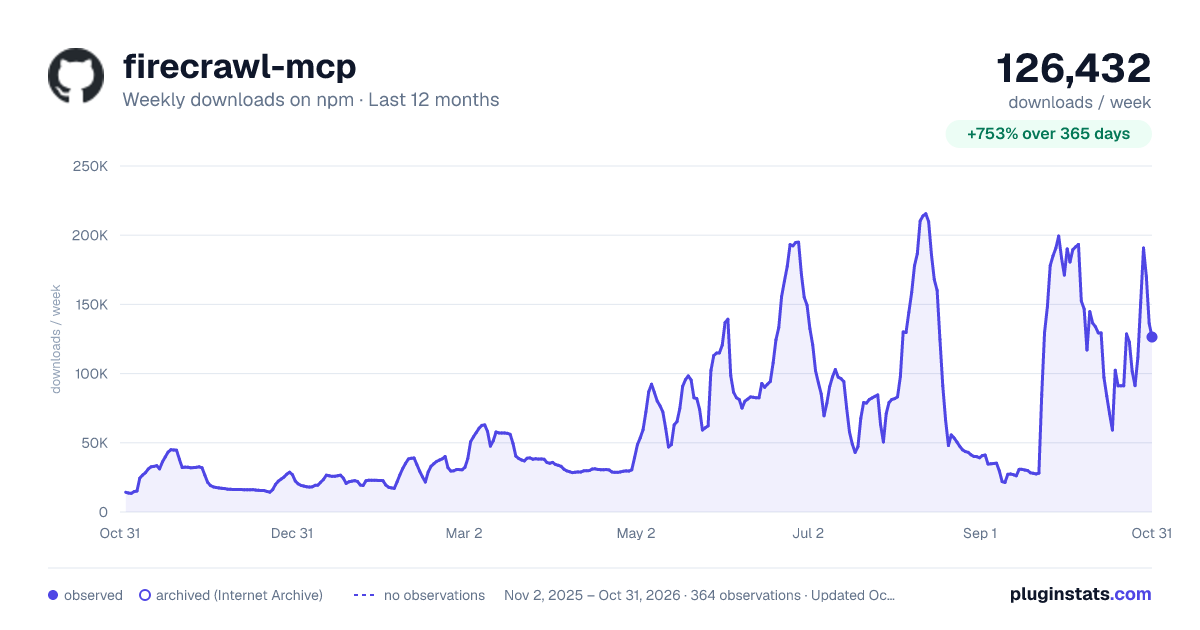
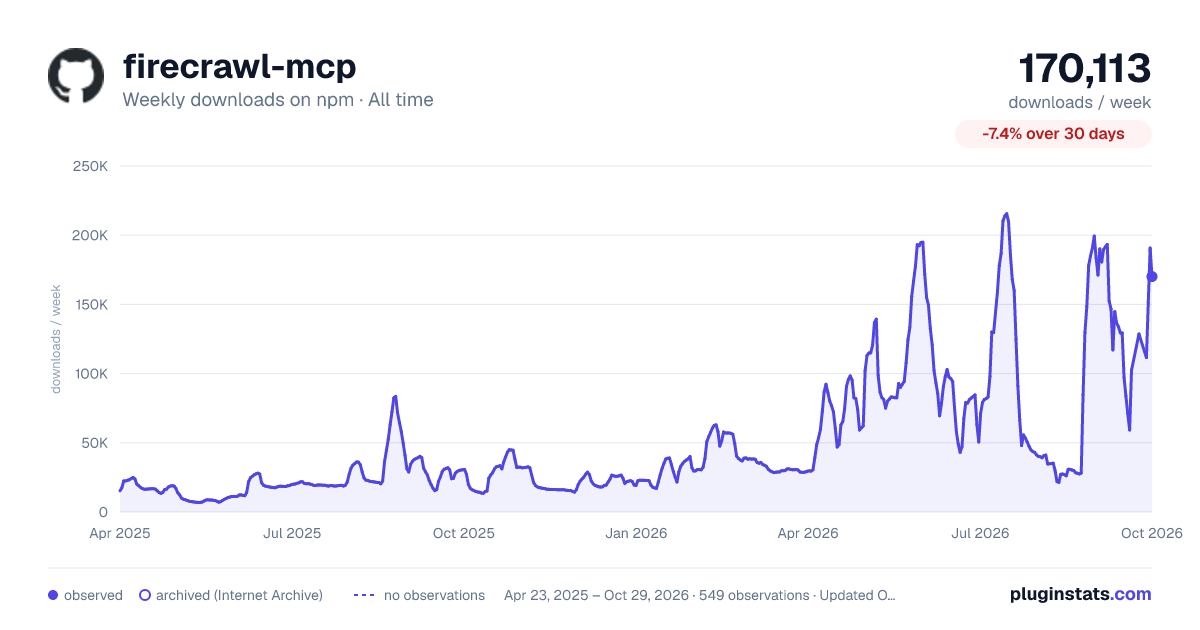

Adoption over time


7/30/90-day growth


Filled points are observed values; hollow points come from Internet Archive snapshots of the listing page. Dashed segments span periods with no observations — values between points are not interpolated.
Recent observations
Full history (543)Similar npm MCP servers plugins
Data source
Weekly downloads (trailing 7 complete days) come from the official npm downloads API. Downloads include CI and mirrors and are not equivalent to installs or users. npm publishes no ratings.
Listing: https://www.npmjs.com/package/firecrawl-mcp. First seen Oct 16, 2026; last successful collection Oct 19, 2026. See the methodology.