 PluginStats
antd-theme weekly downloads statistics
By wuzekang · npm · Webpack plugins
Provide runtime dynamic theme for ant design.
antd-theme has 38 recorded weekly downloads on npm, a decrease of 47.2% over the past 30 days, ranking #1842 of 2,322 tracked listings.
About antd-theme
antd-theme
Provide runtime dynamic theme for ant design.
Features
- Quick synchronous theme switching.
- Support real-time modification of color / dimension variables.
- Small packaging size, no need to pack multiple style files.
- Code splitting friendly.
Install
Install with npm
$ npm install --save antd-theme
Usage
It's recommended to combine antd-theme/plugin with the css-loader and less-loader
Then add the loader and the plugin to your webpack config. For example:
webpack.config.js
const AntdThemePlugin = require('antd-theme/plugin');

module.exports = {
  module: {
    rules: [
      {
        test: /\.(j|t)sx?$/,
        use: [
          {
            loader: 'babel-loader',
            options: {
              plugins: [
                ['import', {
                  libraryName: 'antd',
                  style: true,
                }],
              ],
              presets: ['react-app'],
            },
          },
        ],
      },
      {
        test: /\.less$/i,
        use: [
          {
            loader: AntdThemePlugin.loader,
          },
          {
            loader: 'css-loader',
          },
          {
            loader: 'less-loader',
            options: {
              javascriptEnabled: true,
            },
          },
        ],
      },
    ],
  },
  plugins: [
    new AntdThemePlugin({
      // Variables declared here can be modified at runtime
      variables: ['primary-color'],
      themes: [
        {
          name: 'dark',
          filename: require.resolve('antd/lib/style/themes/dark.less'),
        },
        {
          name: 'compact',
          filename: require.resolve('antd/lib/style/themes/compact.less'),
        },
      ],
    })
  ],
};
app.jsx
import { Button, Select } from 'antd';
import { ThemeProvider, useTheme } from 'antd-theme';
import React from 'react';
import ReactDOM from 'react-dom';
import { SketchPicker } from 'react-color';

const initialTheme = {
  name: 'default',
  variables: { 'primary-color': '#00ff00' },
};

const ThemeSelect = () => {
  const [{ name, variables, themes }, setTheme] = useTheme();

  return (
    <>
      <Select
        style={{ width: 100 }}
        value={name}
        onChange={
          (theme) => setTheme({ name: theme, variables })
        }
      >
        {
          themes.map(
            ({ name }) => (
              <Select.Option key={name} value={name}>
                {name}
              </Select.Option>
            )
          )
        }
      </Select>
      <SketchPicker
        color={variables['primary-color']}
        onChange={(value) => {
          // Will update all css attributes affected by primary-color
          setTheme({ name, variables: { 'primary-color': value.hex } });
        }}
      />
    </>
  );
};

const App = () => {
  const [theme, setTheme] = React.useState(initialTheme);
  return (
    <ThemeProvider
      theme={theme}
      onChange={(value) => setTheme(value)}
    >
      <ThemeSelect />
      <Button type="primary">Button</Button>
    </ThemeProvider>
  );
};

ReactDOM.render(<App />, document.getElementById('root'));
For those who are using react-app-rewire-less and customize-cra with react-app-rewired, enable javascript like this
config-overrides.js
const { override, fixBabelImports, addLessLoader, addPostcssPlugins, adjustStyleLoaders, addWebpackPlugin } = require('customize-cra');

const AntdThemePlugin = require('antd-theme/plugin');

module.exports = override(
  fixBabelImports('import', {
    libraryName: 'antd',
    libraryDirectory: 'es',
    style: true,
  }),
  addLessLoader({
    javascriptEnabled: true,
  }),
  adjustStyleLoaders(
    (loaders) => {
      loaders.use[0] = {
        loader: AntdThemePlugin.loader
      }
    }
  ),
  addWebpackPlugin(
    new AntdThemePlugin({
      themes: [
        {
          name: 'dark',
          filename: require.resolve('antd/lib/style/themes/dark.less'),
        },
        {
          name: 'compact',
          filename: require.resolve('antd/lib/style/themes/compact.less'),
        },
      ],
    })
  ),
);
Security considerations
In order for style elements to be added to the DOM, a nonce attribute may need to be attached to the elements to adhere to a CSP requirements. To provide the value, you can specify the nonce value by defining a CSPSettings object on the page in global scope:
window.CSPSettings = {
  nonce: 'nonce'
};
Description from the npm listing.
- antd
- theme
- less-plugin
- webpack-plugin
- dynamic-themes
README badge
Show your rank in a README or on your website. The badge updates automatically.
Charts
Images: 30d · 1y · all time · 1600×900 dark
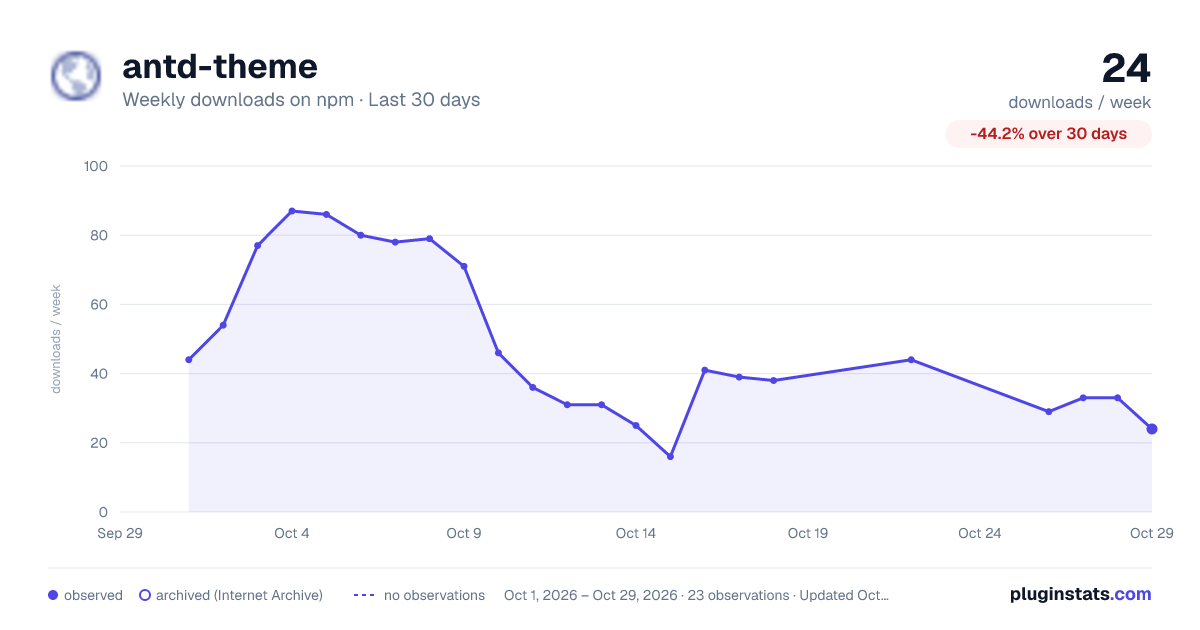
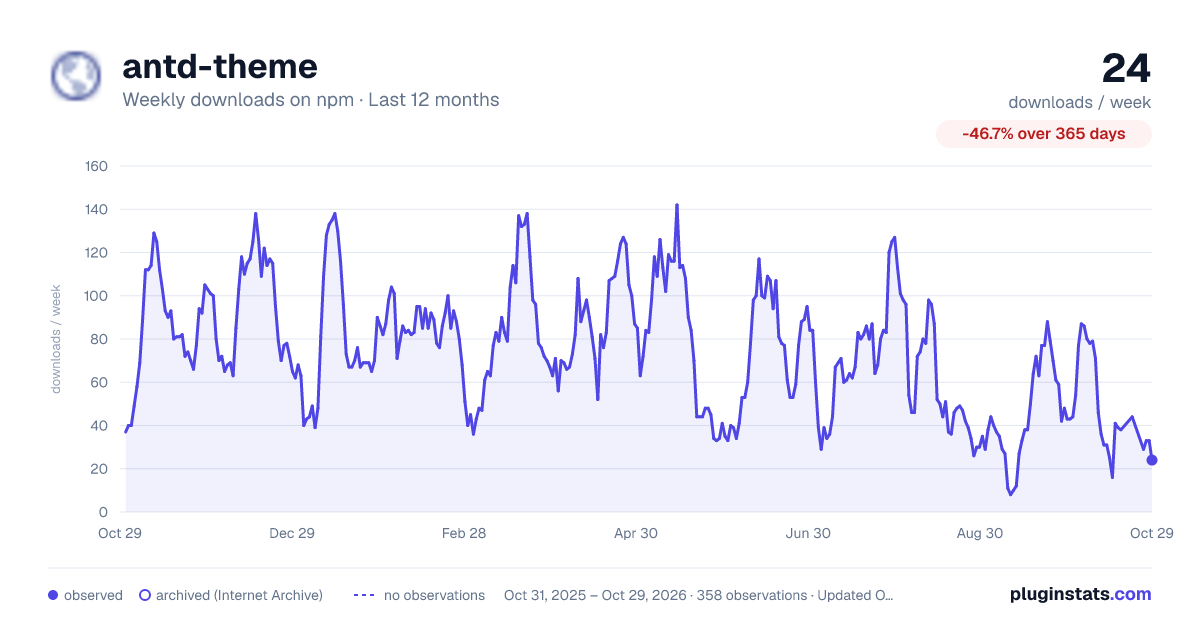
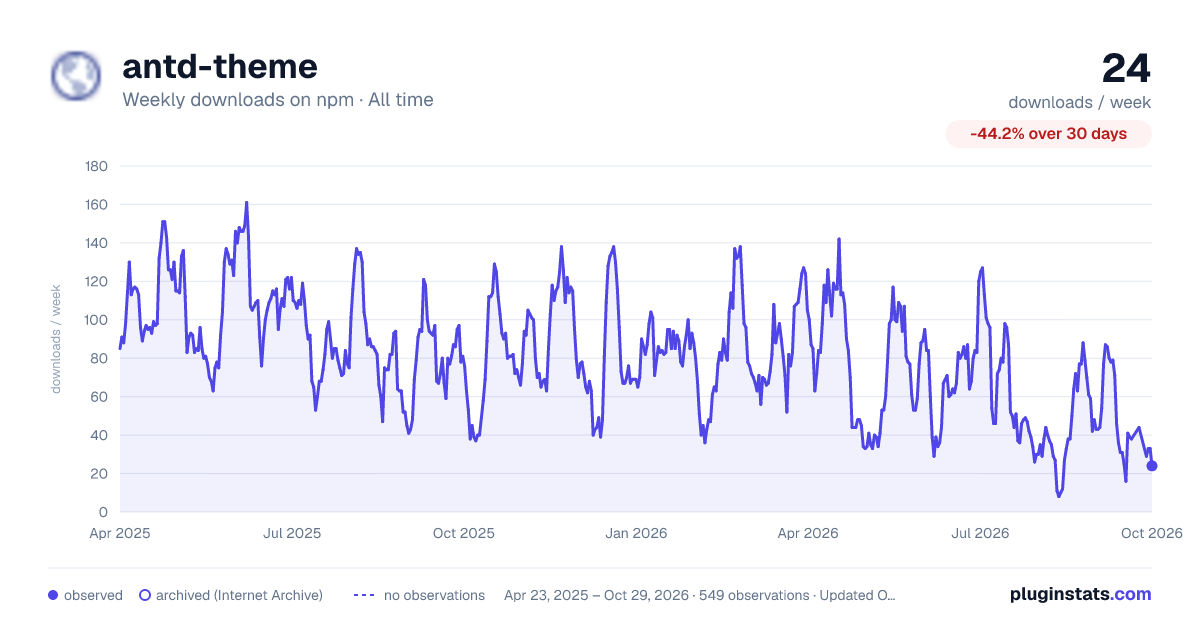

Adoption over time
7/30/90-day growth
Ranking history
Listing placement
Listing placement
Filled points are observed values; hollow points come from Internet Archive snapshots of the listing page. Dashed segments span periods with no observations — values between points are not interpolated.
Each band is one page of 20. Weekly downloads on a linear scale. Placement is projected from weekly downloads, so it can differ from the marketplace's own sort order. Hover a dot to see the listing.
Recent observations
Full history (544)Similar npm Webpack plugins plugins
All 20 antd-theme alternativesData source
Weekly downloads (trailing 7 complete days) come from the official npm downloads API. Downloads include CI and mirrors and are not equivalent to installs or users. npm publishes no ratings.
Listing: https://www.npmjs.com/package/antd-theme. First seen Oct 16, 2026; last successful collection Oct 20, 2026. See the methodology.