 PluginStats
@codeworksh/harness weekly downloads statistics
By codeworksh (3 listings) · npm · AI SDKs
AI agent harness — agent loop, tools, plugins, sandbox, and more.
@codeworksh/harness has 2,354 recorded weekly downloads on npm, an increase of 1558% over the past 30 days.
It ranks #1247 of 2,251 tracked npm listings by weekly downloads.
PluginStats has 543 daily observations since Apr 23, 2025; the latest is from Oct 17, 2026.
About @codeworksh/harness
@codeworksh/harness
Beta: This package is an early release. Expect breaking changes.
@codeworksh/harness is an agent harness built with Effect v4 beta and powered by @codeworksh/aikit. It leverages Effect's typed services, layers, scopes, streams, and structured errors to agent loops, durable sessions, tool execution, and local or remote sandboxes.
The initial public surface is the Effect SDK at @codeworksh/harness/effect.
Features
• Durable Sessions: create, attach, resume, interrupt, and inspect agent sessions without rebuilding orchestration around every turn. • Streaming Agent Loop: consume durable session events while the loop coordinates model output, tool calls, and continuations. • Tool Execution: use the built-in Bash tool or register typed tools with sequential or parallel execution. • Model Flexibility: select any provider and model available in Aikit's generated catalog, including its supported thinking levels. • Pluggable Sandboxes: run the same workflow against the host machine, a virtual filesystem, or a remote sandbox.
Plugins
Third-party plugins build against @codeworksh/plugin, the published SDK that owns the plugin, tool and sandbox contract this package consumes — a plugin package depends on it rather than on the whole harness. The same types are re-exported here as Plugin and Tool for embedders who already hold the harness.
Pass a plugin list when constructing the harness. Each plugin declares an ID and the domain it extends — tool or prompt — and contributes during setup. Setup runs once per exchange, after model resolution; its tools, hooks, and prompt remain pinned through tool continuations.
Hooks belong to the tool registration. Sequential or parallel scheduling, selected with Session.create({ tools: { execution: "parallel" } }), covers the entire hook/handler pipeline. After runs for a started, interrupted tool if it has not already started, with a one-second cooperative cleanup grace period. The kernel owns result settlement.
ctx.plugin.tools.update(name, patch) rewrites a registration's model-facing prose without replacing the tool or its hooks. A read sees only earlier contributions, so a plugin patching promptSnippet or promptGuidelines must run _before_ the tool it patches is indexed. Declaring kind: "tool" puts it ahead of every prompt plugin already; what it still has to get right is its position among the other tool plugins, which is the order their entries are written in.
Prompt plugins write into ctx.plugin.prompt: foundation.set(text) for the untagged head (the last set wins), and sections.append/set/remove/get with a Plugin.Section value — the built-in Rules, Addendum, ProjectContext and Skills, or a custom Plugin.Section.define("github_pr_rules", { format: "list" }). Sections merge by name across plugins. The harness renders the foundation, then , the built-in sections, , and custom sections in first-write order; tools and cwd are its own. Contributions close after setup; plugins receive event publication but no subscription or background lifecycle.
Omitting plugins selects Bash then the default prompt, followed by the host settings' plugins block. An explicit array replaces all of that, and an empty one runs nothing: the prompt is then a fallback foundation with only the harness-owned and .
An entry is a module or a configuration object.
A module is a definition object, a local path, a file: URL, or a package spec. It is loaded if it is not already, and it takes the position it is written at — naming a module again moves it:
A configuration object addresses a plugin something else already selected, and names it one of two ways:
Exactly one of plugin and package per entry. plugin is a plugin's ID; package is any name the module answers to — the package name, the exact spec, the path it was loaded from, or the name a local package's own manifest declares.
An ID is a key. The last module to claim one owns it, and the configuration written against it stays with the key rather than with whichever module is currently behind it. Two modules exporting one ID is the author's conflict to resolve — the replacement is logged at debug, not arbitrated here.
A configuration object never loads, installs or reorders anything. If its name matches nothing in the selection — a typo, a package you have not added, a plugin this build does not ship — the entry is ignored: one debug line, no failure, and nothing fetched. So adding a package and configuring it is two entries, in that order:
Repeated configuration replaces rather than merges — the block is opaque, so the last entry owns it whole. options reaches that plugin as the second argument to setup, {} when nothing configured it. The harness never looks inside it, including the nulls it strips everywhere else in a settings file, since inside an opaque block a null is a value its plugin may need:
Source modules must default-export one plugin object.
Settings entries take the same two forms, and they extend the built-in selection instead of standing in for it, so naming one plugin cannot silently drop Bash or the prompt:
Settings files are JSONC: comments and a trailing comma are part of the format, and a syntax error names what the parser expected and where (PropertyNameExpected at 2:38). Entries accumulate across settings layers, lowest priority first: a project's list extends the user's rather than standing in for it, the way every other key in the document merges. A project drops an inherited plugin the same way it drops a built-in, with { "plugin": "", "enabled": false }. A leading ~ expands to the home directory. A ./ or ../ path resolves against the directory of the file that declared it — inside /.codework/, or beside ~/.codework/settings.jsonc — so one entry means one file in every project; a package naming a relative path is anchored the same way. file: URLs, absolute paths and package specs are taken as written.…
Description from the npm listing.
- agent
- ai
- ai-sdk
- anthropic
- grok
- harness
- llm
- node
- openai
- sandbox
Where @codeworksh/harness sits in the listing
Each band is one page of 20. Weekly downloads on a log scale. Placement is projected from weekly downloads, so it can differ from the marketplace's own sort order. Hover a dot to see the listing.


Charts
Images: 30d · 1y · all time · 1600×900 dark
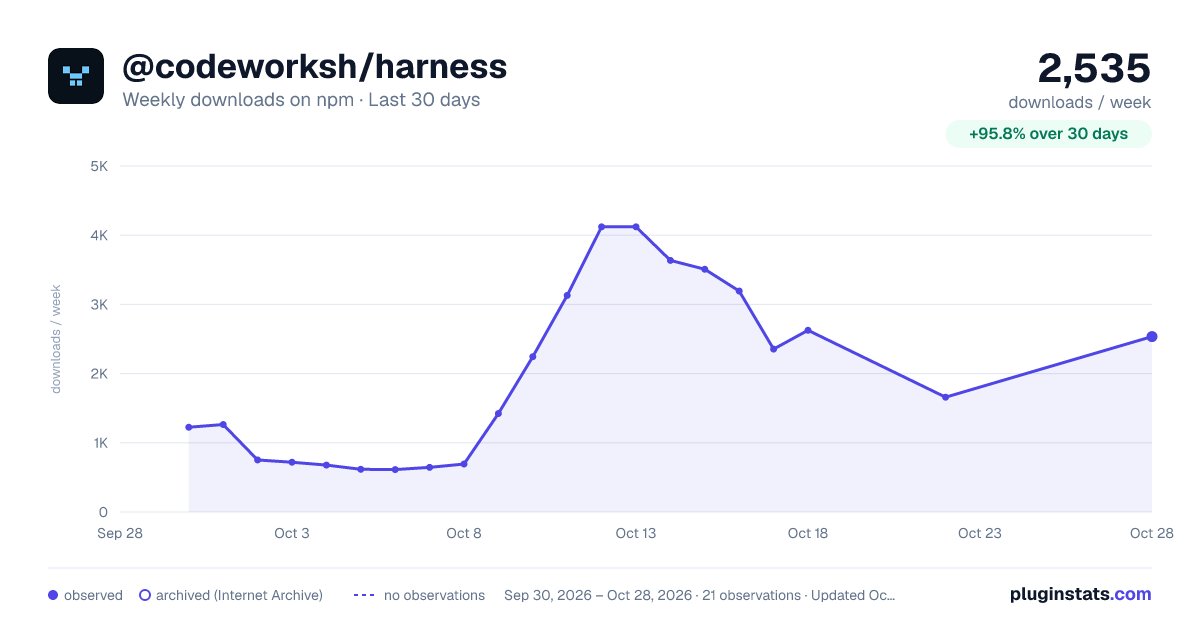
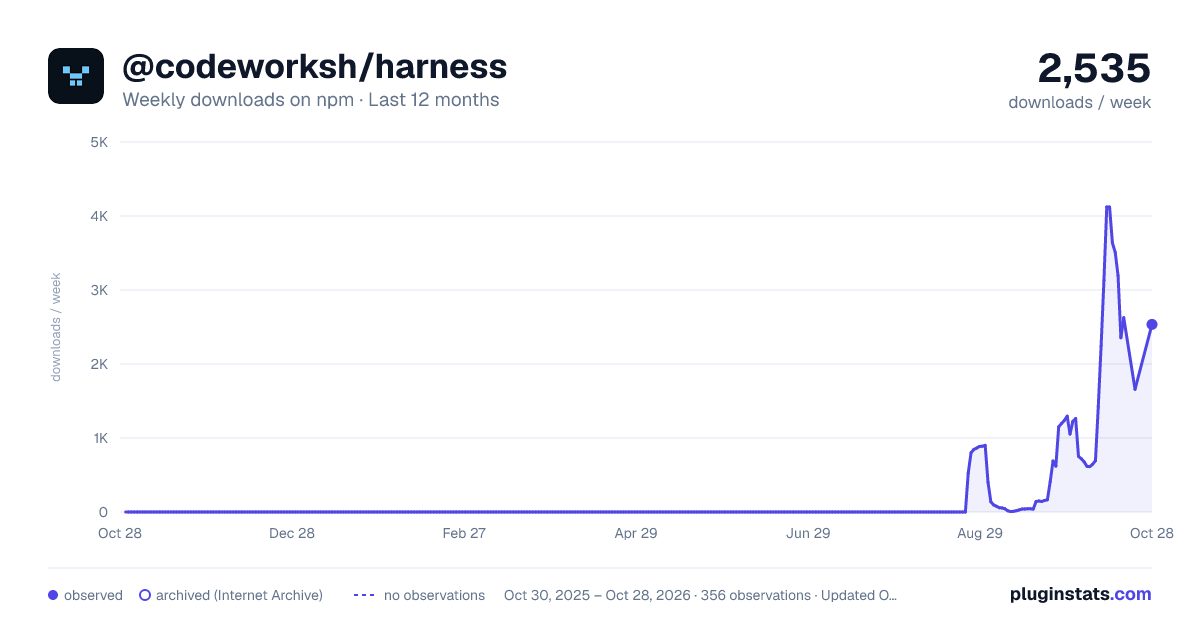
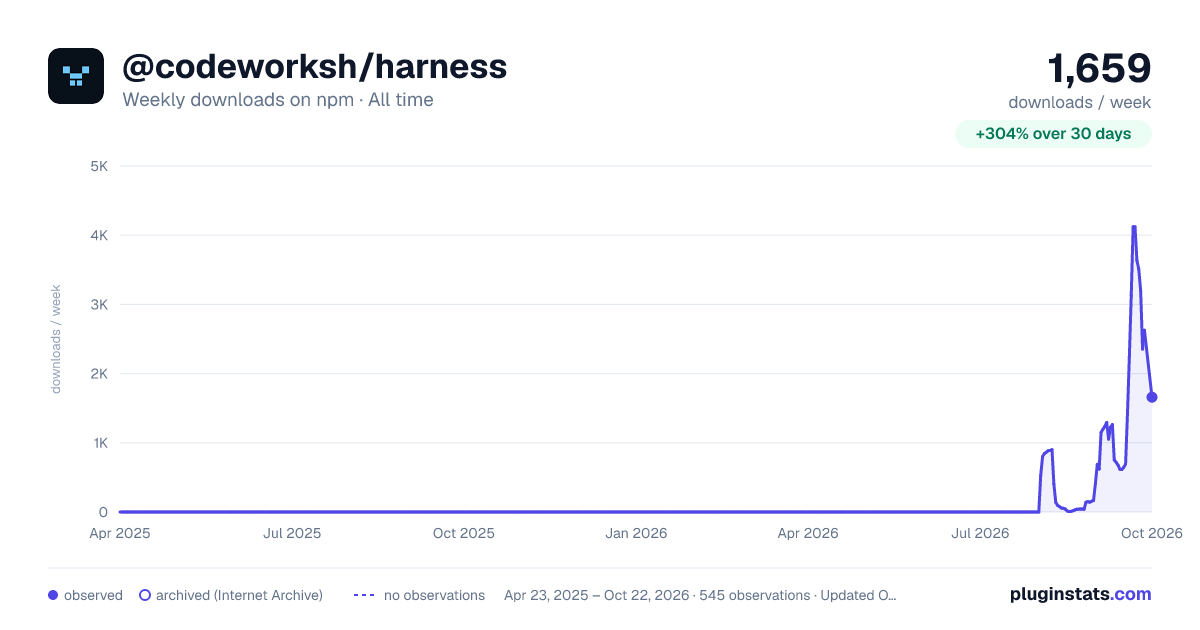

Adoption over time


7/30/90-day growth


Filled points are observed values; hollow points come from Internet Archive snapshots of the listing page. Dashed segments span periods with no observations — values between points are not interpolated.
Recent observations
Full history (543)Similar npm AI SDKs plugins
Data source
Weekly downloads (trailing 7 complete days) come from the official npm downloads API. Downloads include CI and mirrors and are not equivalent to installs or users. npm publishes no ratings.
Listing: https://www.npmjs.com/package/@codeworksh/harness. First seen Oct 16, 2026; last successful collection Oct 18, 2026. See the methodology.