 PluginStats
@sentry/mcp-server weekly downloads statistics
By sentry (6 listings) · npm · MCP servers
Sentry MCP Server
@sentry/mcp-server has 47,444 recorded weekly downloads on npm, a decrease of 57.3% over the past 30 days.
It ranks #573 of 2,251 tracked npm listings by weekly downloads.
Over 90 days, weekly downloads changed by -53.8%.
PluginStats has 121 daily observations since Jun 19, 2026; the latest is from Oct 17, 2026.
About @sentry/mcp-server
sentry-mcp
This is a prototype of an MCP server, acting as a middleware to the upstream Sentry API provider.
This package is primarily for running the stdio MCP server. If you do not know what that is, or do not need it, we suggest using the public remote service:
Note: Some tools require additional configuration: • AI-powered search tools (search_events and search_issues): These tools use OpenAI to translate natural language queries into Sentry's query syntax. They require an OPENAI_API_KEY environment variable. Without this key, these specific tools will be unavailable, but all other tools will function normally.
Authorization
The MCP server uses a skills-based authorization system that maps user-friendly capabilities to technical API permissions.
Available Skills
By default (no --skills flag), the MCP server grants ALL skills for non-interactive convenience:
• inspect (default) - View organizations, projects, teams, issues, traces, and search for errors • docs (default) - Search and read Sentry SDK documentation • seer (default) - Use Seer to analyze issues and generate fix recommendations • triage - Resolve, assign, and update issues • project-management - Create and modify projects, teams, and DSNs
Customizing Skills
You can limit which skills are granted using the --skills flag:
Constraint-Based Tool Exclusion
When a session is scoped to a specific organization or project (tenant-bound context), certain list tools are automatically excluded since they cannot query other resources:
• find_organizations is hidden when the session is constrained to a specific organization (organizationSlug constraint) • find_projects is hidden when the session is constrained to a specific project (projectSlug constraint)
This ensures that only relevant tools are available in constrained contexts. When constraints are not set, all tools are available based on your granted skills.
Environment Variables
You can also use environment variables:
If SENTRY_HOST is not provided, the CLI automatically targets the Sentry SaaS endpoint. Configure this variable only when you operate a self-hosted Sentry deployment.
Note: Command-line flags override environment variables.
Required Sentry Token Scopes
To utilize the stdio transport, create a User Auth Token in Sentry with these scopes:
Minimum (read-only): • org:read, project:read, team:read, event:read
Additional (for write operations): • event:write - Required for triage skill • project:write, team:write - Required for project-management skill
The MCP server will automatically request the appropriate scopes based on your granted skills.
Migration from Scopes (Deprecated)
⚠️ Deprecated: The --scopes and --add-scopes flags are deprecated. Use --skills instead.
If you're currently using scopes:
The host configuration accepts two distinct formats:
• SENTRY_HOST: Hostname only (no protocol) • Examples: sentry.example.com, sentry.internal.example.com, localhost:8000
Note: Only HTTPS connections are supported for security reasons.
By default we also enable Sentry reporting (traces, errors) upstream to our cloud service. You can disable that, or send it to a different Sentry instance by using the --sentry-dsn flag:
Description from the npm listing.
- sentry
- mcp
- model-context-protocol
Where @sentry/mcp-server sits in the listing
Each band is one page of 20. Weekly downloads on a log scale. Placement is projected from weekly downloads, so it can differ from the marketplace's own sort order. Hover a dot to see the listing.


Charts
Images: 30d · 1y · all time · 1600×900 dark
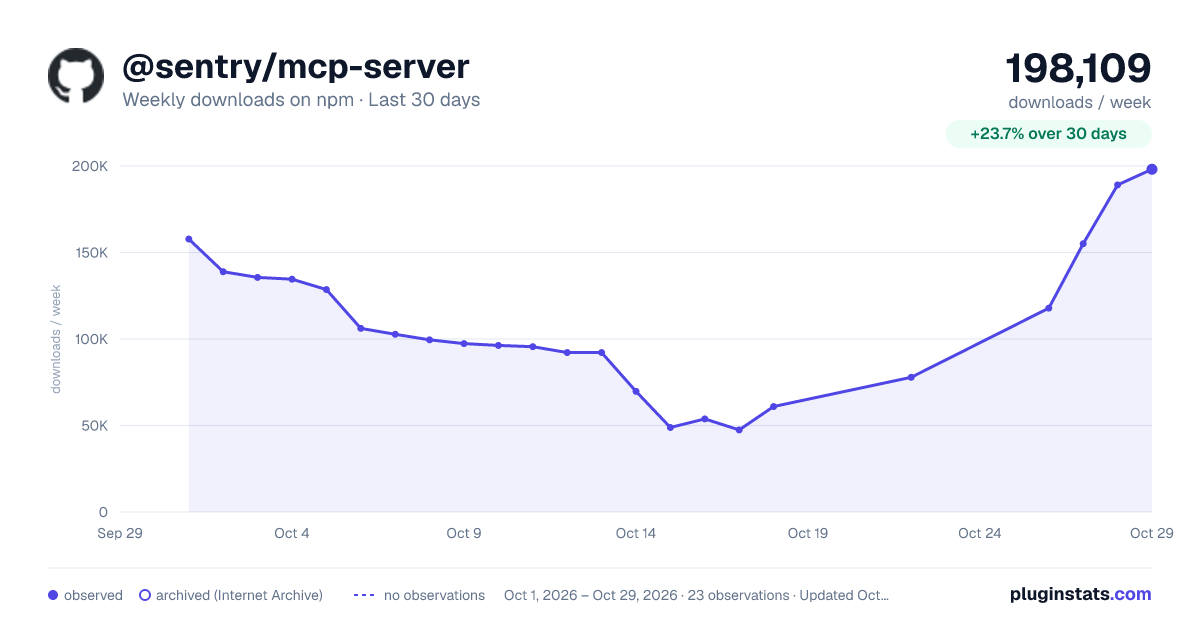
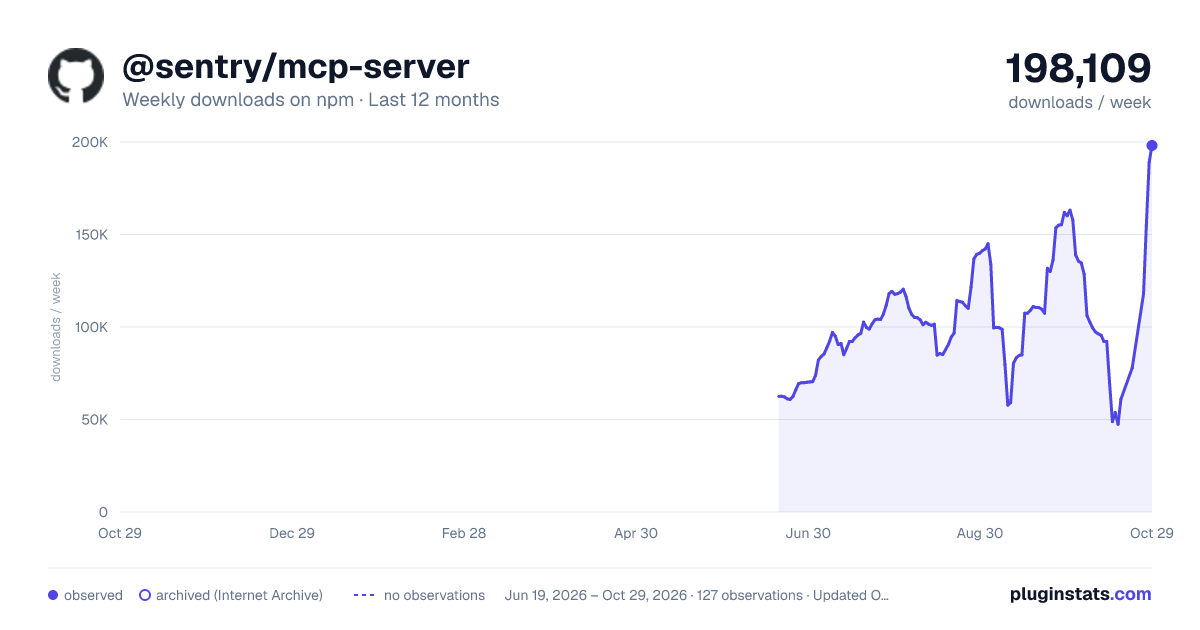
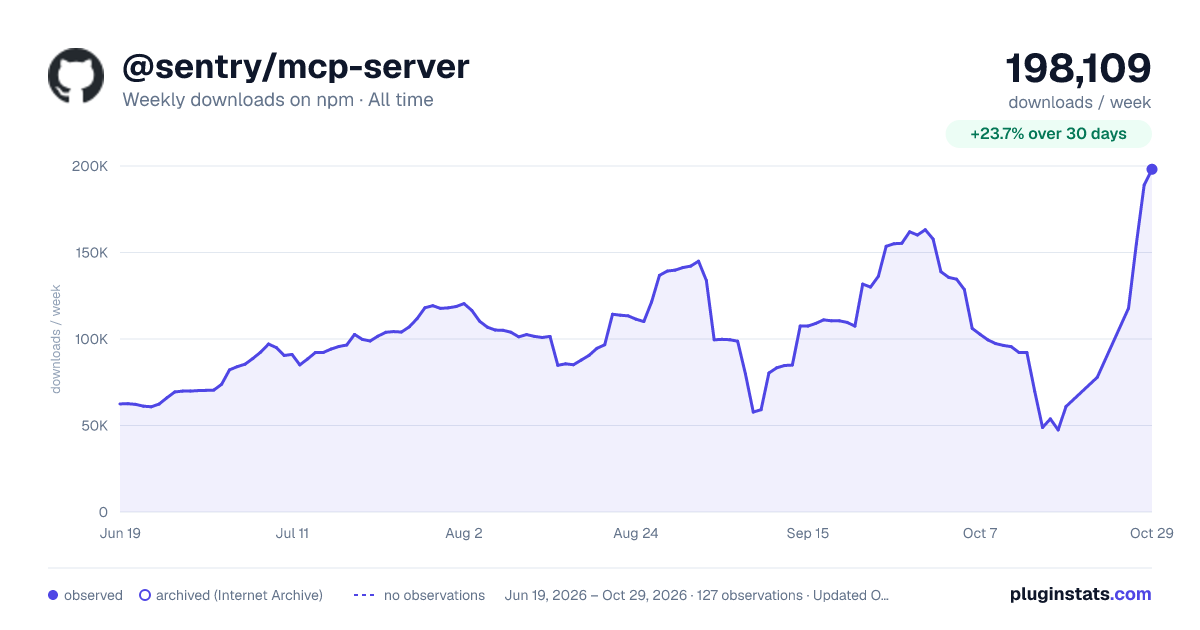

Adoption over time


7/30/90-day growth


Filled points are observed values; hollow points come from Internet Archive snapshots of the listing page. Dashed segments span periods with no observations — values between points are not interpolated.
Recent observations
Full history (121)Similar npm MCP servers plugins
Data source
Weekly downloads (trailing 7 complete days) come from the official npm downloads API. Downloads include CI and mirrors and are not equivalent to installs or users. npm publishes no ratings.
Listing: https://www.npmjs.com/package/@sentry/mcp-server. First seen Oct 16, 2026; last successful collection Oct 17, 2026. See the methodology.