 PluginStats
i18n-key-inspector-plugin weekly downloads statistics
By electroluxcode · npm · Webpack plugins
Dev-only Vite/webpack plugin that stamps rendered DOM elements with their i18n message keys (data-i18n-path), so rendered text can be traced back to its message key in DevTools
i18n-key-inspector-plugin has 29 recorded weekly downloads on npm.
It ranks #1795 of 2,251 tracked npm listings by weekly downloads.
Over the past 7 days it changed by -89.1%.
PluginStats has 121 daily observations since Jun 19, 2026; the latest is from Oct 17, 2026.
About i18n-key-inspector-plugin
i18n-key-inspector-plugin
中文 | English
开发环境 i18n key 标注工具。它会把翻译 key 写到最终渲染元素的 data-i18n-path 属性上,方便在浏览器 DevTools 中从文案反查词条 key。
工作原理
借鉴 Tolgee 的 wrapping + observer 方案,分两步:
1. 标记:t() 的返回值经 wrapWithDevKey 包装,在译文末尾附加不可见字符形式的 key:
ZWNJ / ZWJ 是格式字符,页面不可见,也不会被 trim() 去除。
2. 解码:插件向页面注入一段脚本,设置 window.I18N_KEY_INSPECTOR_DEV flag 并启动 MutationObserver。DOM 变化时,脚本从文本节点和 placeholder、title、 aria-label 属性中解出 key,写到最近元素的 data-i18n-path 属性上,然后清除不可见字符。
这个设计的好处:
• 标注发生在运行时,动态 key(变量拼接)、经 props 传递的翻译结果都能覆盖; • wrapWithDevKey 内部自检 flag,业务代码可以无条件调用;生产环境没有 flag 时原样返回,零开销; • 可选的 transform: true 编译期 AST 注入是补充手段,不是必需的。
快速开始
1. 在 i18n 实现中包装 t() 返回值
只需要在实际负责查词条的 t() 实现中包装一次。没有这个步骤,插件虽然会启动 observer, 但页面没有可供解码的 key 标记。
2. Vite
在 vite.config.ts 中添加插件:
Vite 模式通过 transformIndexHtml 在开发页面的 中注入 observer。
3. Next.js / webpack
在 next.config.ts 的客户端开发编译中添加 webpack 插件:
webpack 模式会把 observer 入口前置到客户端 entry。服务端、edge 和 production 编译会自动跳过, 不需要在 _document.tsx 中手动注入脚本。
可选:编译期 AST 注入
默认的 runtime 模式支持动态 key、变量拼接以及通过 props 传递的翻译结果,一般不需要额外配置。 如果需要对静态 JSX 调用进行编译期标注,可以启用 transform:
编译期模式只处理 .jsx / .tsx 源文件,并跳过 node_modules。它是 runtime 模式的补充, 不是替代品;应用仍建议保留 wrapWithDevKey,这样动态 key 和运行时生成的文案也能被标注。
翻译调用的识别只看函数名(tNames),不再需要配置对象名:
• 直接调用:t('a.b') / $t('a.b') • 成员调用:任意对象上的 .t() / .$t(),如 i18n.t('a.b')、this.$t('a.b')、props.t('a.b')
支持的选项
| 选项 | 默认值 | 说明 |
| bundler | 'vite' | 'vite' 或 'webpack' | | transform | false | 是否额外启用编译期 AST 注入 | | tNames | ['t', '$t'] | 翻译函数名列表(transform 模式下识别 t() 调用) |
结果示例
同一个元素包含多条翻译时,key 使用 | 分隔:
目前会处理正文文本以及 placeholder、title、aria-label 属性。正文 key 写在 data-i18n-path 上;属性翻译的 key 写在对应的 data-i18n-path- 上, 与正文 key 分开存放、互不混合:
测试
包管理器使用 pnpm(仓库是 pnpm workspace,示例项目在 examples/vite-demo)。
单元测试无需浏览器,覆盖:
• wrapWithDevKey:有/无 dev flag、非字符串与空值、防二次包裹、SSR(无 window)场景 • Vite 插件:transformIndexHtml 注入 observer 脚本、transform 模式对 JSX 的静态/动态 key 注入 • runtime observer 全链路(jsdom):文本节点与 placeholder / title 属性中的不可见标记 被解码为 data-i18n-path,不可见字符被清理
examples/vite-demo 是一个最小 Vite + 国际化项目(vanilla JS 自带 t(),已接好 wrapWithDevKey 与插件),覆盖静态 key、多条翻译合并、属性翻译、动态 key、 语言切换等场景,供手动验证使用:pnpm demo 后打开 http://localhost:5173。
常见问题
页面没有 data-i18n-path
确认以下条件:
• 当前是开发服务器,而不是 production build。 • webpack/Next 配置只在客户端编译中注册了插件。 • t() 的返回值经过 wrapWithDevKey(key, value)。 • 浏览器控制台出现 [i18n-key-inspector-plugin] runtime 模式已启用。 • 返回值是非空字符串;对象、React 节点和空值不会被 runtime wrapper 标记。
Next.js 报 entry was not found
不要把 observer 手动写进 webpack entry 的 dependOn。应使用:
插件会保留 webpack entry descriptor 的 dependOn、filename 等元数据,只把 observer 加到 import 中。
API 导出
• i18n-key-inspector-plugin:i18nKeyInspector • i18n-key-inspector-plugin/runtime:wrapWithDevKey
Description from the npm listing.
- i18n
- vite-plugin
- webpack-plugin
- inspector
- devtools
Where i18n-key-inspector-plugin sits in the listing
Each band is one page of 20. Weekly downloads on a log scale. Placement is projected from weekly downloads, so it can differ from the marketplace's own sort order. Hover a dot to see the listing.


Charts
Images: 30d · 1y · all time · 1600×900 dark
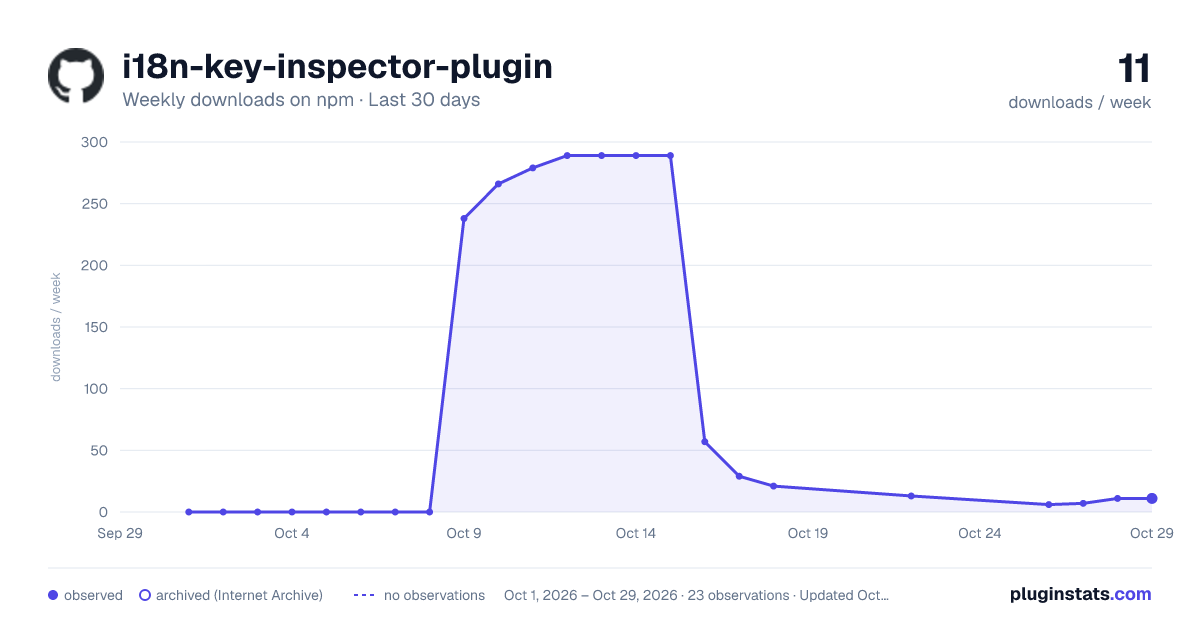
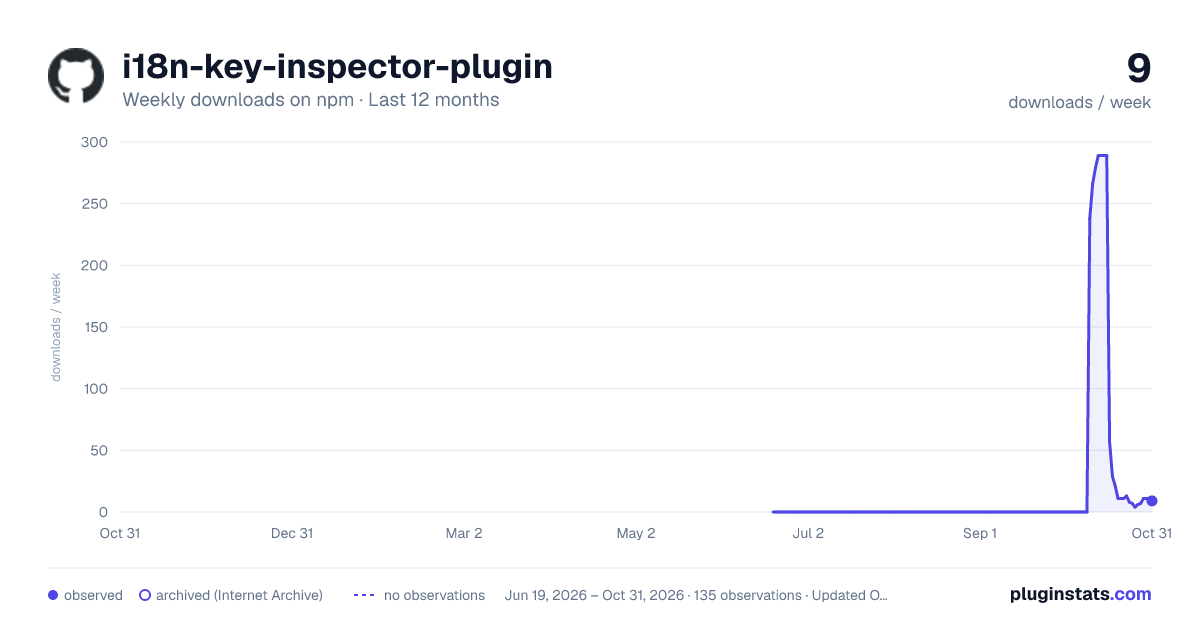
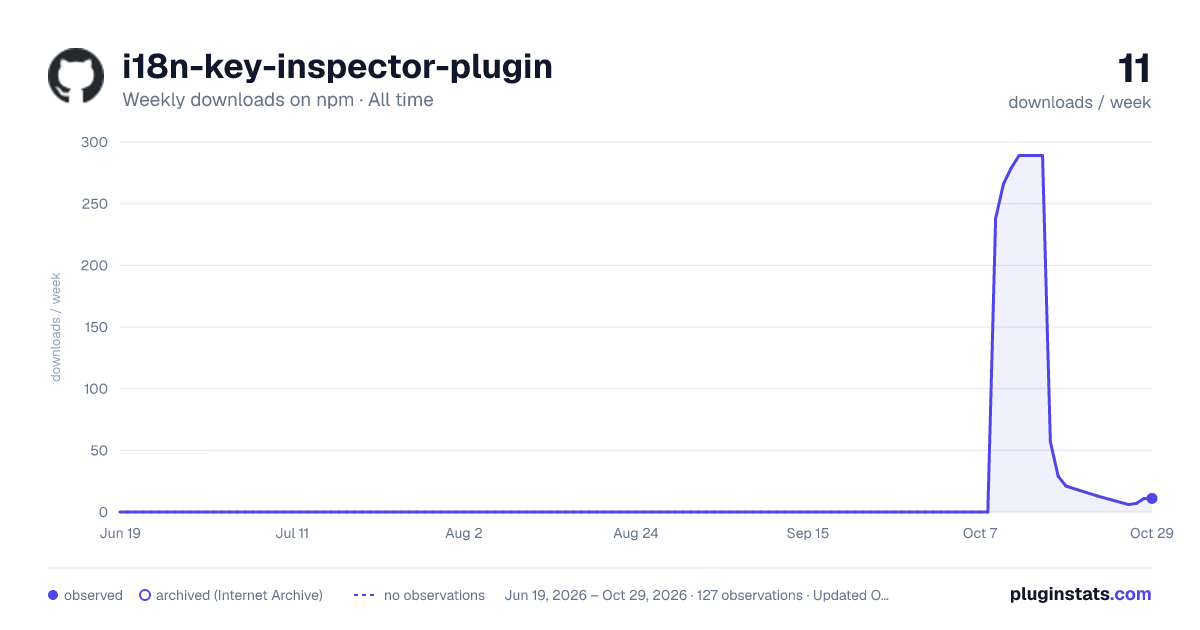

Adoption over time


7/30/90-day growth


Filled points are observed values; hollow points come from Internet Archive snapshots of the listing page. Dashed segments span periods with no observations — values between points are not interpolated.
Recent observations
Full history (121)Similar npm Webpack plugins plugins
Data source
Weekly downloads (trailing 7 complete days) come from the official npm downloads API. Downloads include CI and mirrors and are not equivalent to installs or users. npm publishes no ratings.
Listing: https://www.npmjs.com/package/i18n-key-inspector-plugin. First seen Oct 16, 2026; last successful collection Oct 18, 2026. See the methodology.