 PluginStats
@coder/ai-sdk-sandbox has 544 recorded weekly downloads on npm, a decrease of 27.0% over the past 30 days.
It ranks #1488 of 2,251 tracked npm listings by weekly downloads.
Over 90 days, weekly downloads changed by +224%.
PluginStats has 121 daily observations since Jun 19, 2026; the latest is from Oct 17, 2026.
About @coder/ai-sdk-sandbox
@coder/ai-sdk-sandbox
Run CLI coding agents from the Vercel AI SDK v7 HarnessAgent inside a real Coder workspace instead of an ephemeral cloud sandbox.
• Implements the HarnessV1SandboxProvider contract from @ai-sdk/harness: pass it as the sandbox to a HarnessAgent, exactly like @ai-sdk/sandbox-vercel. • Claude Code is verified end-to-end. Codex is expected to work via the same bridge mechanism but is not yet verified in this repo.
Status: experimental. Tracks the stable AI SDK v7 harness packages (see the @ai-sdk/harness peer range in package.json).
Install
Choose one host transport:
| Transport | Host requirements |
| CoderCliTransport (default) | coder CLI, an authenticated coder login, and an OpenSSH client (ssh) on PATH | | CoderNativeTransport | A deployment URL and token. No coder or ssh binary. See Native transport |
Quick start
Wrap an existing, running workspace and run Claude Code in it:
Runnable version: examples/claude-code.ts.
Native transport
Use CoderNativeTransport when the host should not depend on the Coder CLI or OpenSSH:
• The constructor falls back to CODER_URL and CODER_SESSION_TOKEN, so new CoderNativeTransport() is enough when both are set. • The token is sent only to Coderd in the Coder-Session-Token header. It is never copied into the workspace.
Creating workspaces on demand
Add a create block to create a workspace from a template (with parameters and/or a preset) and tear it down when the session ends:
By default this is fresh-per-session:
• The workspace name is derived from the harness sessionId (e.g. agent-1a2b3c4d5e6f), so each session gets its own workspace. • session.destroy() deletes it. resumeSession re-derives the same name and reattaches. • The harness runs only after the workspace agent finishes connecting and running its startup script (lifecycle_state: ready). A successful _build_ is not enough on its own.
To get-or-create a named workspace, combine workspace with create. If it exists, the provider attaches to it (and never deletes it). If it doesn't, the provider creates it (and, by default, owns it).
Parameters vs. presets:
• A preset's parameter values take precedence over an overlapping parameters entry of the same name (Coder's behavior). Set a given value via the preset _or_ parameters, not both. • Every unset non-ephemeral parameter must be supplied via parameters, parameterFile, or a preset, unless useParameterDefaults accepts its template default. • Parameters marked required have no usable default and must always be supplied; otherwise creation fails because it cannot prompt non-interactively. • If you set a preset, the provider preflight-validates the name against the template's presets and fails fast with the available names. Set validate: false to skip.
Create settings
Provisioning a workspace without a session
ensureCoderWorkspace(settings) provisions a workspace for other tools to bind to. It runs the same get-or-create → start-if-stopped → wait-until-ready pipeline as create mode, without creating a harness sandbox session.
| Setting | Notes |
| workspace | Required, explicit [owner/]workspace name (there is no sessionId to derive one from). | | create | Optional; same shape as above (namePrefix/owner are unused). Without it, the workspace must exist. | | readyTimeoutMs, transport, abortSignal | Optional. |
A stopped workspace is always started. The call returns an EnsuredCoderWorkspace:
• the workspace's final (ready) status snapshot; • created: whether this call created it; • id: the workspace UUID, when the transport reports one. Other Coder packages bind to this handle.
@coder/ai-sdk-agent is intentionally not a dependency of this package. The two compose by a plain string handoff:
The non-null assertion is safe on coder CLIs that emit id in coder list -o json. Old CLIs omit it, so guard (if (ws.id === undefined) throw …) when you can't pin the CLI version.
Terminal UI
For an interactive terminal chat instead of one-shot generate() calls, wrap the agent with @ai-sdk/tui:
The TUI drives a session-less agent, so inject the session for the TUI's lifetime:
Runnable version: CODER_WORKSPACE=my-dev-ws npx tsx examples/claude-code-tui.ts (source; exit with Esc or Ctrl+C).
Workspace requirements
The bridge runs inside the workspace, so the workspace image needs:
| Requirement | Why |
| Node.js ≥ 22 on the login-shell PATH | The bridge is node bridge.mjs, the native transport's relay is node -e, and the pinned @anthropic-ai/claude-code bridge dependency requires Node 22+. | | pnpm on the login-shell PATH (e.g. npm install -g pnpm) | The adapter's bootstrap runs pnpm install --frozen-lockfile to install the bridge's dependencies. | | Outbound access to the npm registry | On first use, the bootstrap downloads the bridge's dependencies, including the Claude Code CLI's ~250 MB platform binary (shipped as an npm package). Pre-bake to skip the registry entirely: see Template authoring. | | Outbound access to the model API | api.anthropic.com for Claude Code, api.openai.com for Codex. | | The model API key (ANTHROPIC_API_KEY / OPENAI_API_KEY) | Available to the bridge: configure it through the adapter's auth option or put it in the workspace environment. | | bash and base64 | Remote commands run through bash -lc; file I/O is base64-encoded. | | stty | The native transport's relay bootstrap. |
bash, base64, and stty are standard on any Linux dev image.
Template authoring: zero-install sessions
Pre-bake the adapter's bootstrap into the workspace image so sessions start with zero runtime install latency. The template authoring guide covers the Dockerfile, main.tf, sizing, and verification. A validated pair lives in examples/template/.
Settings
At least one of workspace or create is required. You may set both; see Creating workspaces on demand.
Lifecycle modes
| Mode | Selected by | Behavior |…
Description from the npm listing.
- ai-sdk
- claude-code
- coder
- codex
- harness
- sandbox
Where @coder/ai-sdk-sandbox sits in the listing
Each band is one page of 20. Weekly downloads on a log scale. Placement is projected from weekly downloads, so it can differ from the marketplace's own sort order. Hover a dot to see the listing.


Charts
Images: 30d · 1y · all time · 1600×900 dark
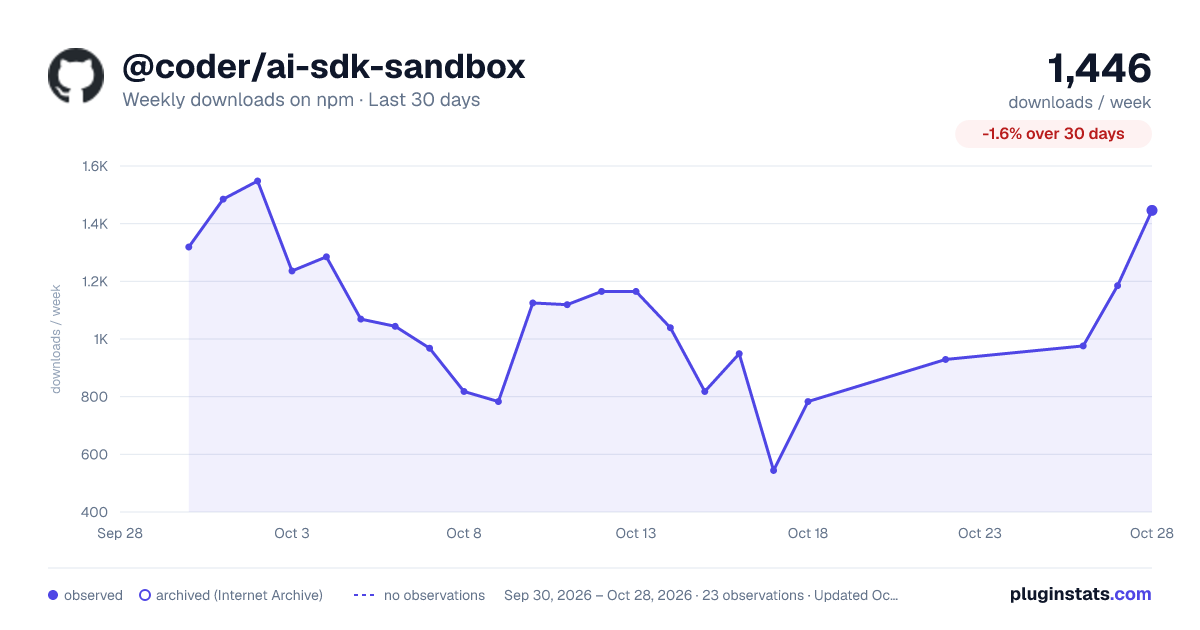
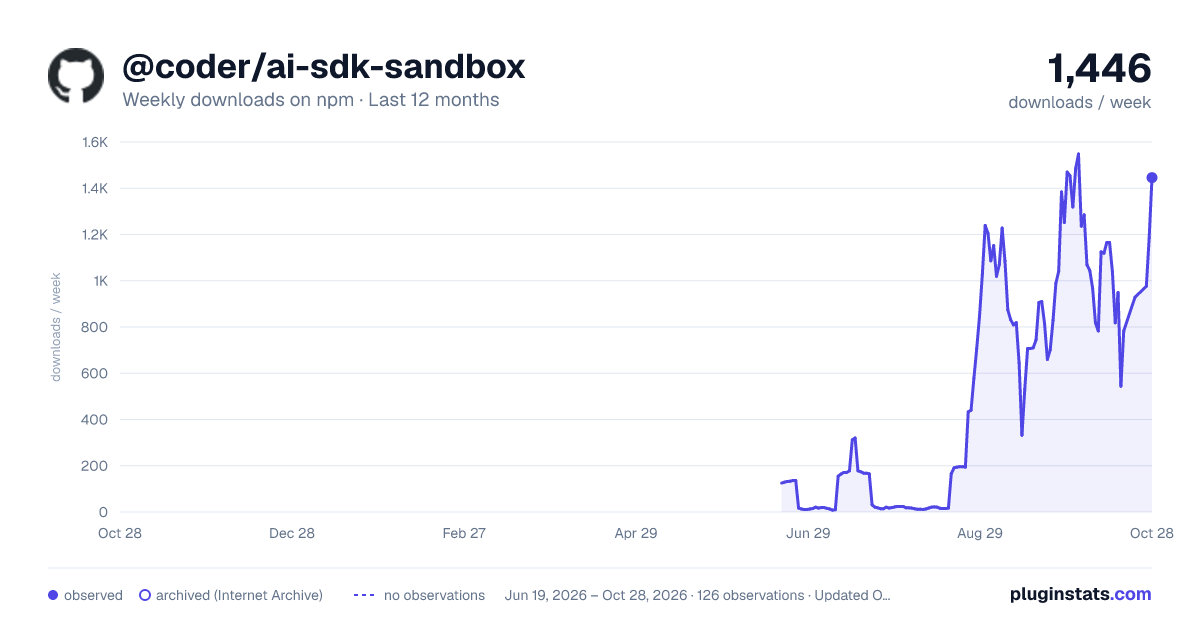
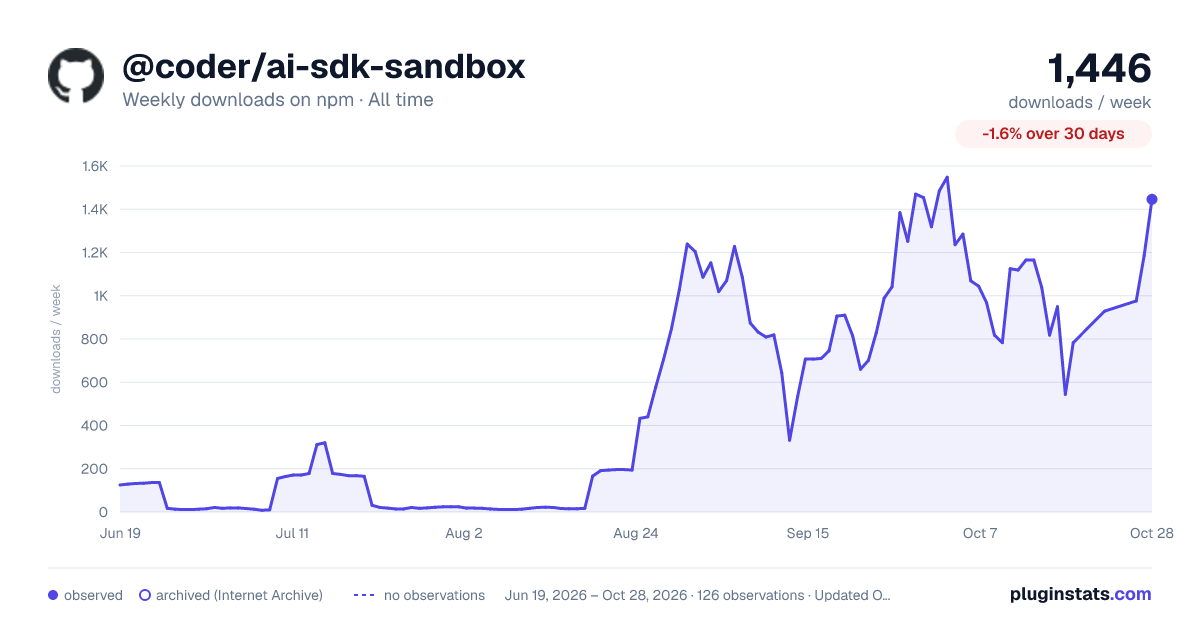

Adoption over time


7/30/90-day growth


Filled points are observed values; hollow points come from Internet Archive snapshots of the listing page. Dashed segments span periods with no observations — values between points are not interpolated.
Recent observations
Full history (121)Similar npm AI SDKs plugins
Data source
Weekly downloads (trailing 7 complete days) come from the official npm downloads API. Downloads include CI and mirrors and are not equivalent to installs or users. npm publishes no ratings.
Listing: https://www.npmjs.com/package/@coder/ai-sdk-sandbox. First seen Oct 16, 2026; last successful collection Oct 18, 2026. See the methodology.