 PluginStats
inspectpack weekly downloads statistics
By FormidableLabs (3 listings) · npm · Webpack plugins
An inspection tool for Webpack frontend JavaScript bundles.
inspectpack has 32,967 recorded weekly downloads on npm, a decrease of 68.0% over the past 30 days.
It ranks #645 of 2,256 tracked npm listings by weekly downloads.
Over 90 days, weekly downloads changed by -56.5%.
PluginStats has 121 daily observations since Jun 19, 2026; the latest is from Oct 17, 2026.
About inspectpack
inspectpack =========== [![npm version][npm_img]][npm_site] [![Actions Status][actions_img]][actions_site] [![Coverage Status][cov_img]][cov_site] [![Maintenance Status][maintenance-image]](#maintenance-status)
An inspection tool for Webpack frontend JavaScript bundles.
inspectpack provides insight into your webpack-built JS bundles and detailed analysis of opportunites to reduce module sizes, unneeded duplicates, etc. It can be used as a webpack plugin during your compliations or as an offline CLI tool to report on your previous builds.
It is also the engine for the handy webpack-dashboard plugin.
• Plugin • Command line tool • duplicates • versions • sizes • Notes, tips, tricks • Other useful tools
Plugin
The DuplicatesPlugin identifies unnecessarily duplicated code in your webpack bundles with an actionable report to help you trim down wasted bytes.
To get started, install the plugin:
Then, add the plugin to your webpack.config.js file:
And from there you'll get actionable reports!
A quick tour
Let's see the plugin in action with a quick scenario that has various duplicates from a simple examples repository. (_Side note_: we've got lots of other interesting inspection scenarios in our test fixtures directory.)
The problem
In this scenario, we have an application that imports a simplified, fake version of lodash in (1) the root application, (2) transitively via a one dependency, and (3) again via a two dependency. Abstractly, the dependency tree (with semver ranges from pacakge.json) looks like:
Using modern npm or yarn to install this project gives us the following on-disk node_modules folder (with version resolutions noted):
Looking to our resulting bundle we have the following duplicated code sources:
• node_modules/lodash/index.js (4.2.3): This code is similar to the code for 3.1.0. • node_modules/one/node_modules/lodash/index.js, node_modules/two/node_modules/lodash/index.js (3.1.0): These two files are identical code sources. They are only included twice in the bundle because npm/yarn could not flatten the dependencies during installation.
So, we've got inefficient code that we discovered via a _manual_ inspection. Wouldn't it be nice to have a report that specifically highlighted problems like these with useful information?
... enter the DuplicatesPlugin.
Diagnosing duplicates
Simple report
With our plugin enabled in the standard configuration:
we get a summary report of the duplicates upon running the webpack command:
Breaking down this report, we get a webpack "warning" emitted by default with an initial summary of the report.
• The Duplicates summary looks at what is in the webpack bundle. It tells us there are 2 files that are not identical, but the same package file path (e.g 3.1.0 vs 4.2.3 for lodash/index.js) and that there are 3 code sources that end up in our final bundle (which includes _two_ for 3.1.0). We also get a byte count for all the files at issue (703 bytes), which presumably could roughly be cut by 2/3 if we could collapse to just one file to do the same thing. • The Packages summary looks at what npm installed to node_modules. This is the other "view" into our problems. • _Terminology_: Let's dig in to what things mean here. • Resolved: We have one package (lodash) that has 2 resolved versions (3.1.0 and 4.2.3). A "resolution" means that upon inspecting the dependency tree and what's in a registry source, these specific versions "match". The results may differ at a different point in time • Installed: These are actual packages installed to the local disk. In our case, we have three installs for 2 resolutions because we place an identical version twice. • Depended: These are the number of upstream packages that create a dependency from a unique path in the graph to a package. Put more concretely, in our case, three unique package.json files have an entry for lodash. • _Note_: This is a bit of a complicated assessment, since aside from the root package.json the rest of the dependency graph depends on what is resolved at the next level to give a dependent package.json and so on recusively. • _~ Note_: The ~ shorthand represents the node_modules folder, which is a common abbreviation for webpack tools. E.g., ~/two/~/lodash really means node_modules/two/node_modules/lodash. • _Note - Duplicates Only_: Unlike the CLI --action=versions report, the DuplicatesPlugin only reports package version skews when there are actual duplicated files (either similar or identical). This means there may be multiple versions of a package with _different_ files as part of your bundle. If you'd like to see these, use the CLI reporting tool!
After the plugin runs, we get a duplicates/package report for asset (e.g. outputted "bundle" files) with duplicate packages that produce duplicate sources in our bundles in the form of:
Looking to our specific report for lodash, we see that we have:
• Two installed paths (~/one/~/lodash, ~/two/~/lodash) for one resolved version (3.1.0). These are part of the dependency tree because of two depended paths: • ROOT -> one@1.2.3 -> lodash@^3.0.0 • ROOT -> two@2.3.4 -> lodash@^3.0.0 • One installed path (~/lodash) for another resolved version (4.2.3). This is part of the dependency tree because of the one root depended path (ROOT -> lodash@^4.1.0). • Take these numbers together and you get our summary of 2 resolved, 3 installed, and 3 depended packages from our summary besides the package name.
Thus for actionable information, there is a naive "quick out" that if we could switch the root dependency _also_ to ^3.0.0 or something that resolves to lodash@3.1.0 all three packages would collapse to one using modern npm or yarn!
Verbose report
But, let's say we want a little more information on the dependency tree besides the packages that end up on disk. For this, we can enable verbose output, which will include information on the bundled files that webpack is bringing in.
Our resulting report is:…
Description from the npm listing.
- webpack
- webpack-plugin
- plugin
- bundle
- size
- duplicates
- packages
Where inspectpack sits in the listing
Each band is one page of 20. Weekly downloads on a log scale. Placement is projected from weekly downloads, so it can differ from the marketplace's own sort order. Hover a dot to see the listing.


Charts
Images: 30d · 1y · all time · 1600×900 dark
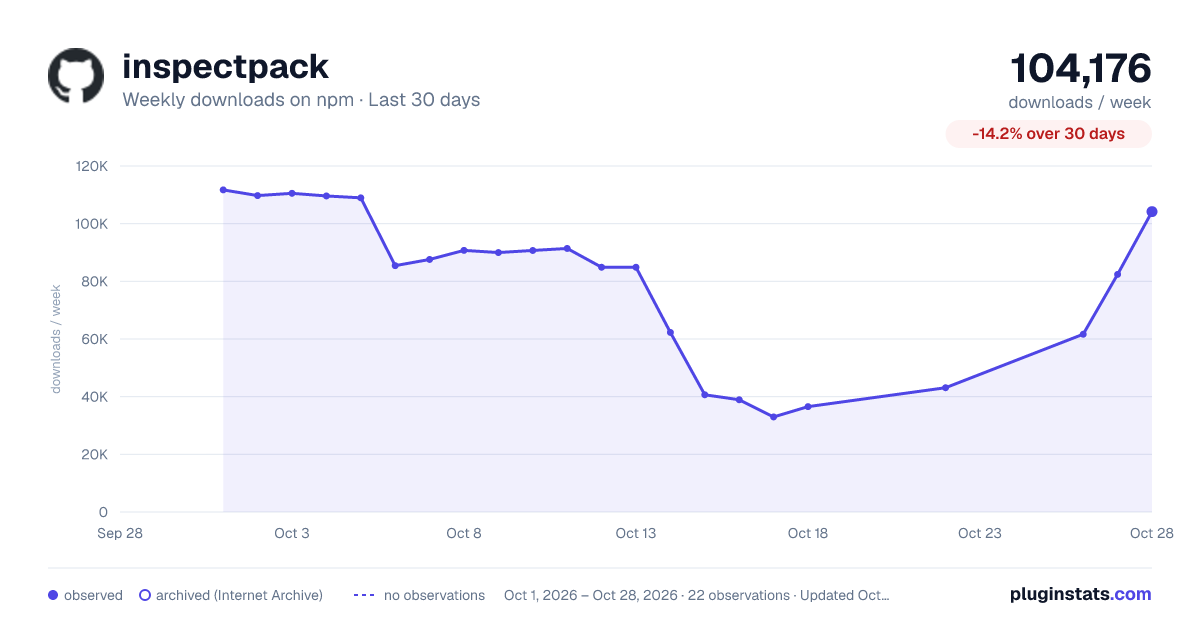
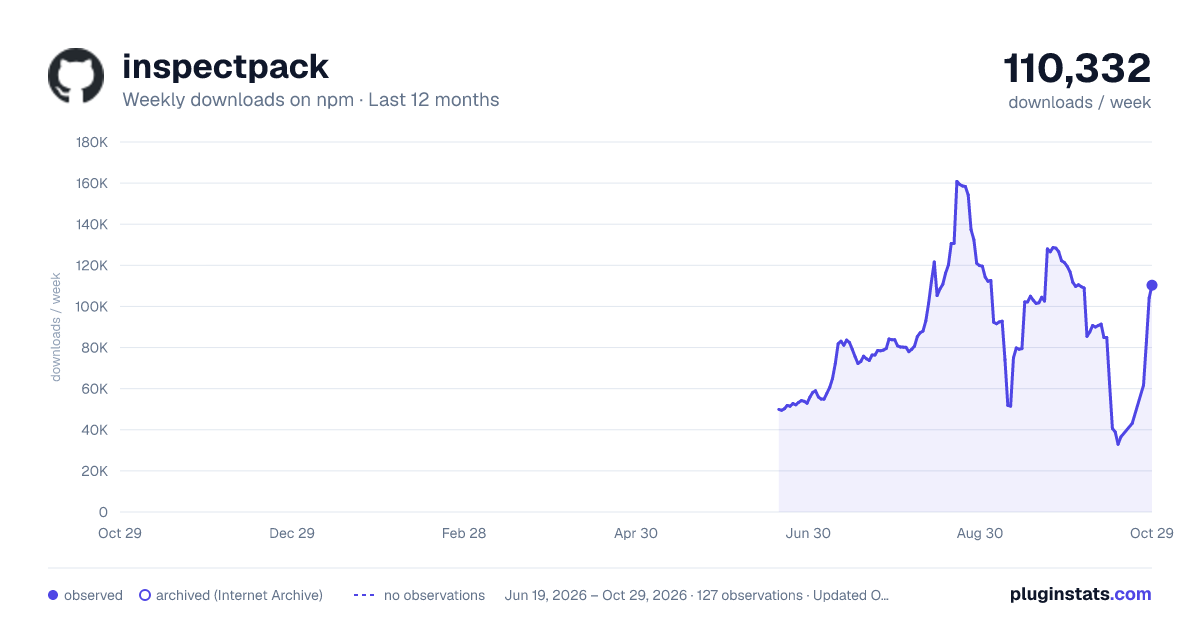
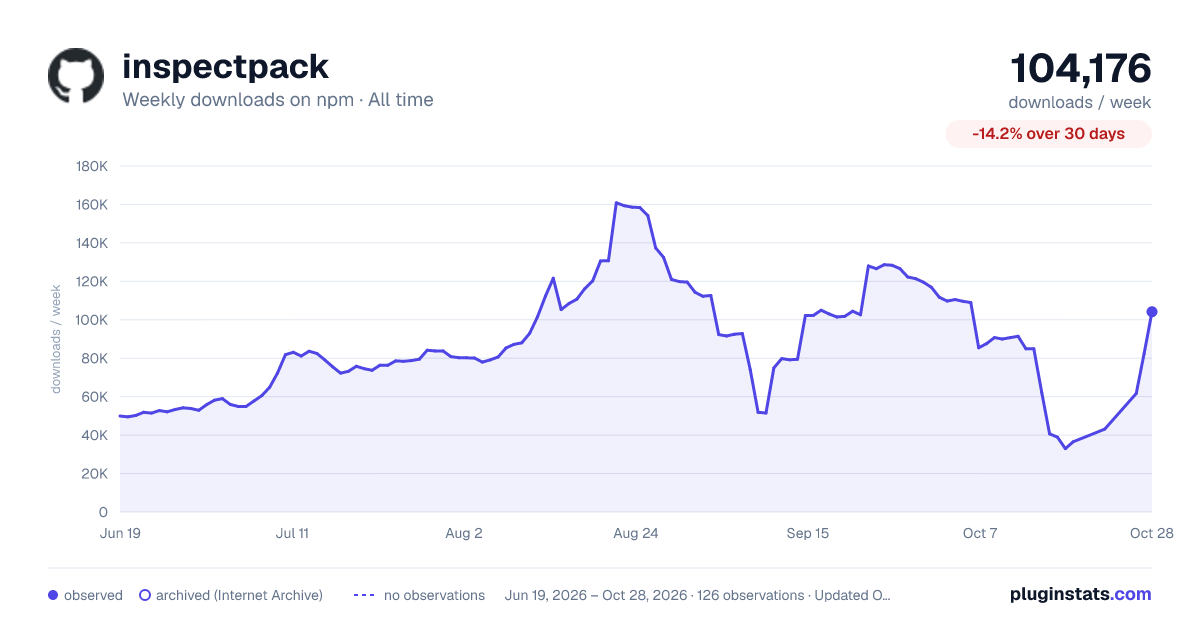

Adoption over time


7/30/90-day growth


Filled points are observed values; hollow points come from Internet Archive snapshots of the listing page. Dashed segments span periods with no observations — values between points are not interpolated.
Recent observations
Full history (121)Similar npm Webpack plugins plugins
Data source
Weekly downloads (trailing 7 complete days) come from the official npm downloads API. Downloads include CI and mirrors and are not equivalent to installs or users. npm publishes no ratings.
Listing: https://www.npmjs.com/package/inspectpack. First seen Oct 16, 2026; last successful collection Oct 19, 2026. See the methodology.