 PluginStats
@aashari/mcp-server-atlassian-jira weekly downloads statistics
By aashari · npm · MCP servers
Node.js/TypeScript MCP server for Atlassian Jira. Equips AI systems (LLMs) with tools to list/get projects, search/get issues (using JQL/ID), and view dev info (commits, PRs). Connects AI capabilities directly into Jira project management and issue tracki
@aashari/mcp-server-atlassian-jira has 8,228 recorded weekly downloads on npm, a decrease of 40.5% over the past 30 days.
It ranks #965 of 2,251 tracked npm listings by weekly downloads.
Over 90 days, weekly downloads changed by -31.3%.
PluginStats has 121 daily observations since Jun 19, 2026; the latest is from Oct 17, 2026.
About @aashari/mcp-server-atlassian-jira
Connect AI to Your Jira Projects
Transform how you manage and track your work by connecting Claude, Cursor AI, and other AI assistants directly to your Jira projects, issues, and workflows. Get instant project insights, streamline issue management, and enhance your team collaboration.
What You Can Do
• Ask AI about your projects: "What are the active issues in the DEV project?" • Get issue insights: "Show me details about PROJ-123 including comments" • Track project progress: "List all high priority issues assigned to me" • Manage issue comments: "Add a comment to PROJ-456 about the test results" • Search across projects: "Find all bugs in progress across my projects" • Create and update issues: "Create a new bug in the MOBILE project"
Perfect For
• Developers who need quick access to issue details and development context • Project Managers tracking progress, priorities, and team assignments • Scrum Masters managing sprints and workflow states • Team Leads monitoring project health and issue resolution • QA Engineers tracking bugs and testing status • Anyone who wants to interact with Jira using natural language
Quick Start
Get up and running in 2 minutes:
1. Get Your Jira Credentials
Generate a Jira API Token: 1. Go to Atlassian API Tokens 2. Click Create API token 3. Give it a name like "AI Assistant" 4. Copy the generated token immediately (you won't see it again!)
2. Try It Instantly
Connect to AI Assistants
For Claude Desktop Users
Add this to your Claude configuration file (~/.claude/claude_desktop_config.json):
Restart Claude Desktop, and you'll see the jira server in the status bar.
For Other AI Assistants
Most AI assistants support MCP. Install the server globally:
Then configure your AI assistant to use the MCP server with STDIO transport.
Alternative: Configuration File
Create ~/.mcp/configs.json for system-wide configuration:
Alternative config keys: The system also accepts "atlassian-jira", "@aashari/mcp-server-atlassian-jira", or "mcp-server-atlassian-jira" instead of "jira".
Available Tools
This MCP server provides 5 generic tools that can access any Jira API endpoint:
| Tool | Description |
| jira_get | GET any Jira API endpoint (read data) | | jira_post | POST to any endpoint (create resources) | | jira_put | PUT to any endpoint (replace resources) | | jira_patch | PATCH any endpoint (partial updates) | | jira_delete | DELETE any endpoint (remove resources) |
Common API Paths
Projects: • /rest/api/3/project/search - List all projects • /rest/api/3/project/{projectKeyOrId} - Get project details
Issues: • /rest/api/3/search/jql - Search issues with JQL (use jql query param) • /rest/api/3/issue/{issueIdOrKey} - Get issue details • /rest/api/3/issue - Create issue (POST) • /rest/api/3/issue/{issueIdOrKey}/transitions - Get/perform transitions
Comments: • /rest/api/3/issue/{issueIdOrKey}/comment - List/add comments • /rest/api/3/issue/{issueIdOrKey}/comment/{commentId} - Get/update/delete comment
Worklogs: • /rest/api/3/issue/{issueIdOrKey}/worklog - List/add worklogs • /rest/api/3/issue/{issueIdOrKey}/worklog/{worklogId} - Get/update/delete worklog
Users & Statuses: • /rest/api/3/myself - Get current user • /rest/api/3/user/search - Search users (use query param) • /rest/api/3/status - List all statuses • /rest/api/3/issuetype - List issue types • /rest/api/3/priority - List priorities
JMESPath Filtering
All tools support optional JMESPath (jq) filtering to extract specific data:
Real-World Examples
Explore Your Projects
Ask your AI assistant: • *"List all projects I have access to"* • *"Show me details about the DEV project"* • *"What projects contain the word 'Platform'?"*
Search and Track Issues
Ask your AI assistant: • *"Find all high priority issues in the DEV project"* • *"Show me issues assigned to me that are in progress"* • *"Search for bugs reported in the last week"* • *"List all open issues for the mobile team"*
Manage Issue Details
Ask your AI assistant: • *"Get full details about issue PROJ-456 including comments"* • *"What's the current status and assignee of PROJ-123?"* • *"Display all comments on the authentication bug"*
Issue Communication
Ask your AI assistant: • *"Add a comment to PROJ-456: 'Code review completed, ready for testing'"* • *"Comment on the login issue that it's been deployed to staging"*
CLI Commands
The CLI mirrors the MCP tools for direct terminal access:
Troubleshooting
"Authentication failed" or "403 Forbidden"
1. Check your API Token permissions: • Go to Atlassian API Tokens • Make sure your token is still active and hasn't expired
2. Verify your site name format: • If your Jira URL is https://mycompany.atlassian.net • Your site name should be just mycompany
3. Test your credentials:
"Resource not found" or "404"
1. Check the API path: • Paths are case-sensitive • Use project keys (e.g., DEV) not project names • Issue keys include the project prefix (e.g., DEV-123)
2. Verify access permissions: • Make sure you have access to the project in your browser • Some projects may be restricted to certain users
"No results found" when searching
1. Try different search terms: • Use project keys instead of project names • Try broader search criteria
2. Check JQL syntax: • Validate your JQL in Jira's advanced search first
Claude Desktop Integration Issues
1. Restart Claude Desktop after updating the config file 2. Verify config file location: • macOS: ~/.claude/claude_desktop_config.json • Windows: %APPDATA%\Claude\claude_desktop_config.json
Getting Help
If you're still having issues: 1. Run a simple test command to verify everything works 2. Check the GitHub Issues for similar problems 3. Create a new issue with your error message and setup details
Frequently Asked Questions
What permissions do I need?…
Description from the npm listing.
- mcp
- typescript
- claude
- anthropic
- ai
- atlassian
- jira
- project-management
- issue-tracking
- server
- model-context-protocol
- tools
- resources
- tooling
- ai-integration
- mcp-server
- llm
- ai-connector
- external-tools
- cli
Where @aashari/mcp-server-atlassian-jira sits in the listing
Each band is one page of 20. Weekly downloads on a log scale. Placement is projected from weekly downloads, so it can differ from the marketplace's own sort order. Hover a dot to see the listing.


Charts
Images: 30d · 1y · all time · 1600×900 dark
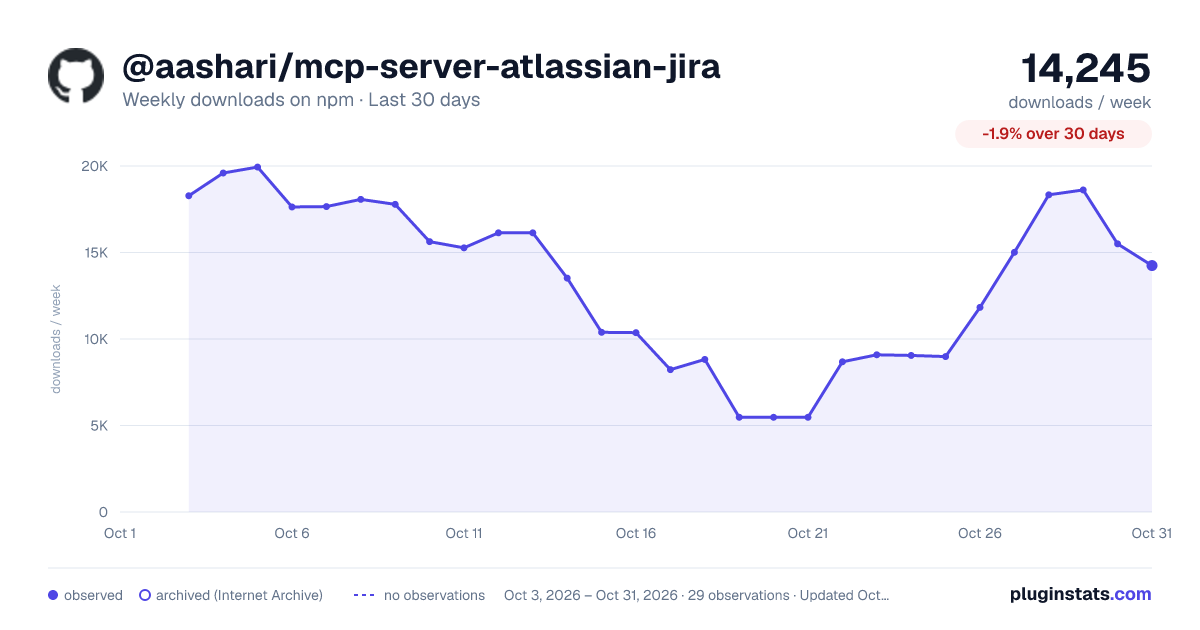
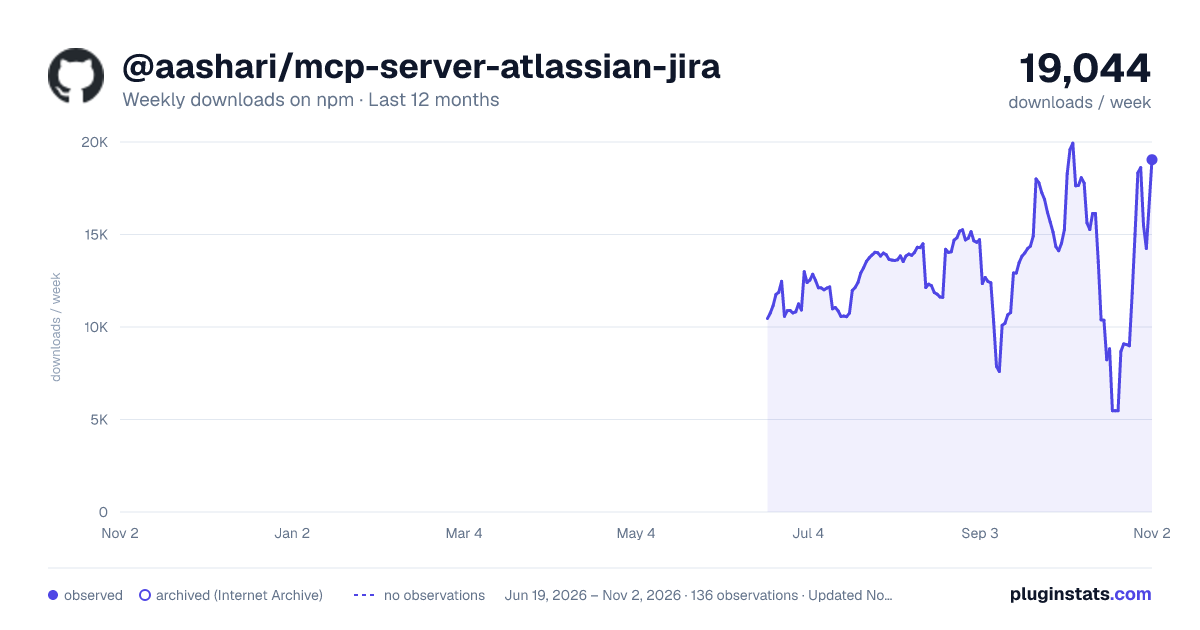
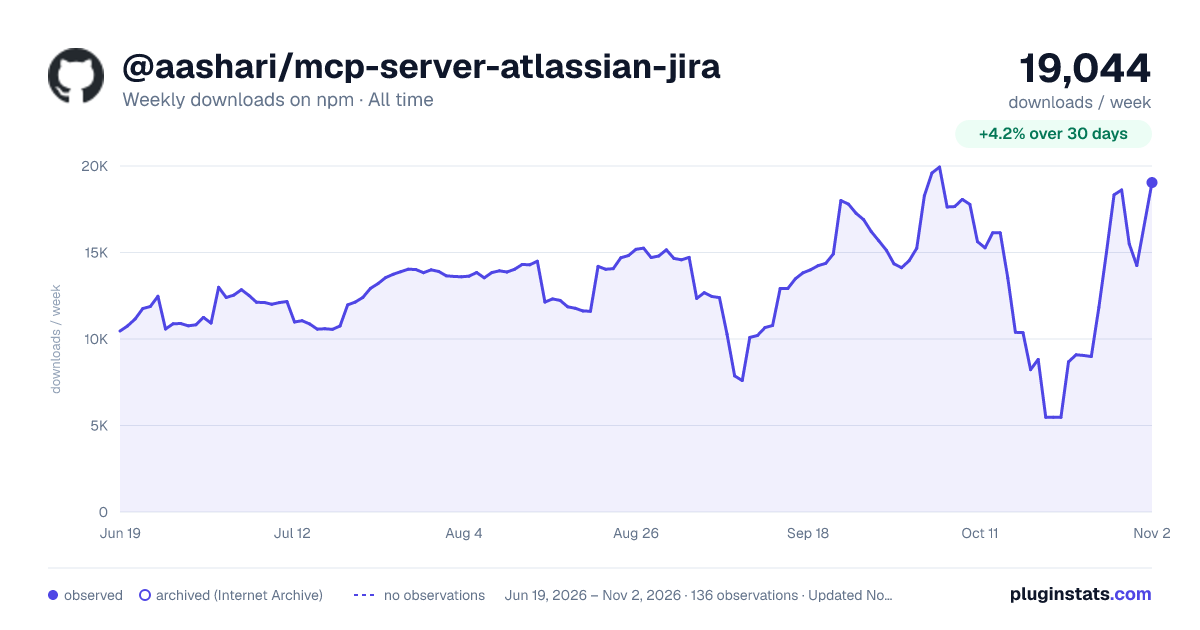

Adoption over time


7/30/90-day growth


Filled points are observed values; hollow points come from Internet Archive snapshots of the listing page. Dashed segments span periods with no observations — values between points are not interpolated.
Recent observations
Full history (121)Similar npm MCP servers plugins
Data source
Weekly downloads (trailing 7 complete days) come from the official npm downloads API. Downloads include CI and mirrors and are not equivalent to installs or users. npm publishes no ratings.
Listing: https://www.npmjs.com/package/@aashari/mcp-server-atlassian-jira. First seen Oct 16, 2026; last successful collection Oct 18, 2026. See the methodology.