 PluginStats
@databuddy/sdk weekly downloads statistics
By databuddy · npm · MCP servers
Databuddy SDK: open-source, cookieless product analytics with custom events, feature flags, and error tracking for React, Next.js, Vue, and Node.js.
@databuddy/sdk has 10,526 recorded weekly downloads on npm, a decrease of 47.8% over the past 30 days.
It ranks #894 of 2,251 tracked npm listings by weekly downloads.
Over 90 days, weekly downloads changed by +10.7%.
PluginStats has 543 daily observations since Apr 23, 2025; the latest is from Oct 17, 2026.
About @databuddy/sdk
Databuddy SDK
Open-source product analytics for your web app: pageviews, custom events, funnels, feature flags, and errors, without cookies.
✨ Features
• 📊 Automatic page/screen view tracking • ⚡ Performance, Web Vitals, and error tracking • 🧑💻 Custom event tracking • 🧩 Drop-in React/Next.js and Vue components • 🖥️ Node.js server-side event tracking • 🚩 Client and server-side feature flags • 🔌 MCP server analytics: tool calls, clients, latency, and errors • 🛡️ Privacy-first: anonymized by default, sampling, batching, and more • 🛠️ Type-safe config and autocompletion • 📋 Observability: logging, error tracking, and distributed tracing
🚀 Quickstart
Add to your root layout (Next.js/React):
🖥️ Node.js Events
🔌 MCP Servers
Records each tool call with its client, duration, result size, error code and error message. Needs only DATABUDDY_API_KEY; for a stdio server, set it in the env of the client config that starts the server. Arguments and successful results never leave your server; only the length of the text a tool returns is recorded. Failed calls send their error message, and Databuddy stores up to 512 characters of it, unless you keep error messages private with beforeSend. On serverless platforms, pass your platform's waitUntil: trackMcp(server, { waitUntil }). See the MCP docs.
🚩 Server-Side Flags
🛠️ Browser Configuration Options
All options are type-safe and documented in DatabuddyConfig:
| Option | Type | Default | Description |
| clientId | string | — | Required. Your Databuddy Client ID. | | apiUrl | string | https://basket.databuddy.cc | Custom API endpoint. | | scriptUrl | string | https://cdn.databuddy.cc/databuddy.js | Custom script URL. | | sdk | string | web | SDK name. Only override for custom builds. | | sdkVersion | string | *auto* | SDK version. Defaults to package version. | | disabled | boolean | false | Disable all tracking. | | debug | boolean | false | Enable debug logging (SDK-only). | | trackHashChanges | boolean | false | Track hash changes in URL. | | trackAttributes | boolean | false | Track data-* attributes on elements. | | trackOutgoingLinks | boolean | false | Track clicks on outgoing links. | | trackInteractions | boolean | false | Track user interactions. | | trackWebVitals | boolean | false | Track Web Vitals metrics. | | trackErrors | boolean | false | Track JavaScript errors. | | ignoreBotDetection | boolean | false | Ignore bot detection. | | usePixel | boolean | false | Use pixel tracking instead of script. | | samplingRate | number | 1.0 | Sampling rate (0.0–1.0). | | enableRetries | boolean | true | Enable retries for failed requests. | | maxRetries | number | 3 | Max retries. | | initialRetryDelay | number | 500 | Initial retry delay (ms). | | enableBatching | boolean | true | Enable event batching. | | batchSize | number | 10 | Events per batch (1–50). | | batchTimeout | number | 5000 | Batch timeout (ms, 100–30000). | | skipPatterns | string[] | — | Array of glob patterns to skip tracking. | | maskPatterns | string[] | — | Array of glob patterns to mask sensitive paths. | | filter | function | — | Filter function to conditionally skip events. |
💡 FAQ
Q: Is Databuddy privacy-friendly? A: Yes. The tracker sets no cookies and does no fingerprinting. It keeps a random visitor ID in localStorage, visitor IDs are salted and hashed at ingestion by default, and location is stored at city level. Traits you send with identify(), such as email or name, are personal data and are stored on that website's profiles.
Q: Can I use this in Next.js, Remix, or plain React? A: Yes! works in any React app. For non-React, use the script tag directly.
Q: How do I disable analytics in development? A: Use the disabled prop:
Q: Where do I find my clientId? A: In your Databuddy dashboard.
🧑💻 Troubleshooting
• Script not loading? • Make sure your clientId is correct and the script URL is reachable. • No events in dashboard? • Check your config, especially clientId and network requests in the browser dev tools. • Type errors? • All config options are type-safe. Use your IDE's autocomplete for help. • SSR/Next.js? • The component is safe for SSR/React Server Components. It only injects the script on the client.
📚 Documentation & Support
• Databuddy Docs • Dashboard • Contact Support
© Databuddy. All rights reserved.
Description from the npm listing.
- analytics
- product-analytics
- web-analytics
- cookieless
- feature-flags
- error-tracking
- tracking
- databuddy
- sdk
- react
- nextjs
- vue
- node
- mcp
Where @databuddy/sdk sits in the listing
Each band is one page of 20. Weekly downloads on a log scale. Placement is projected from weekly downloads, so it can differ from the marketplace's own sort order. Hover a dot to see the listing.


Charts
Images: 30d · 1y · all time · 1600×900 dark
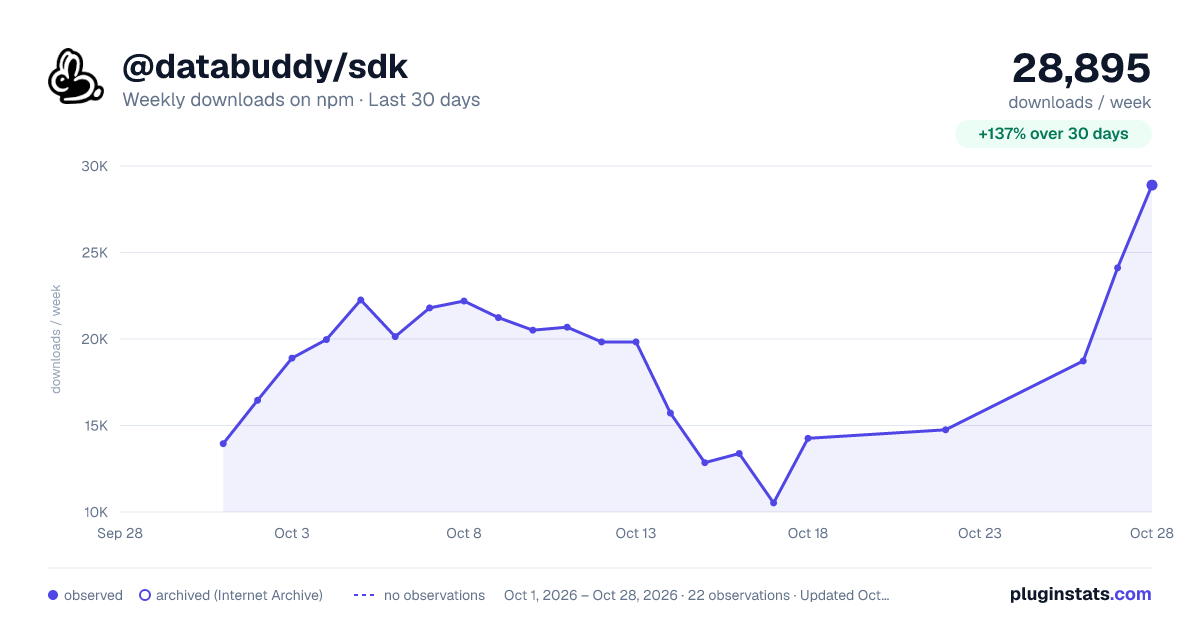
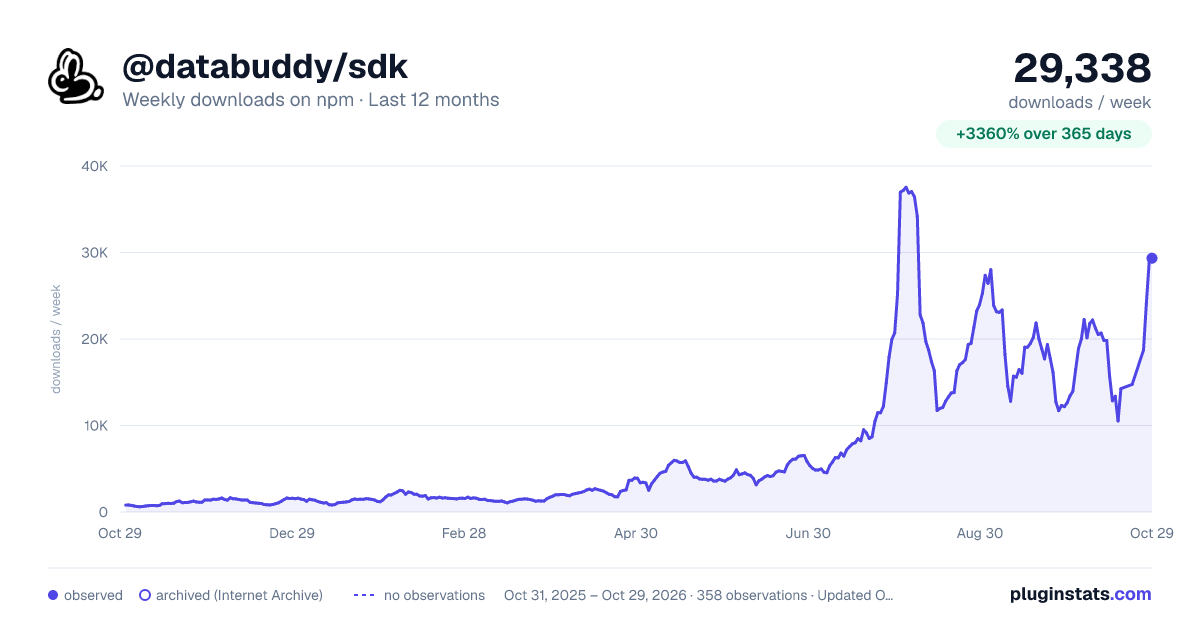
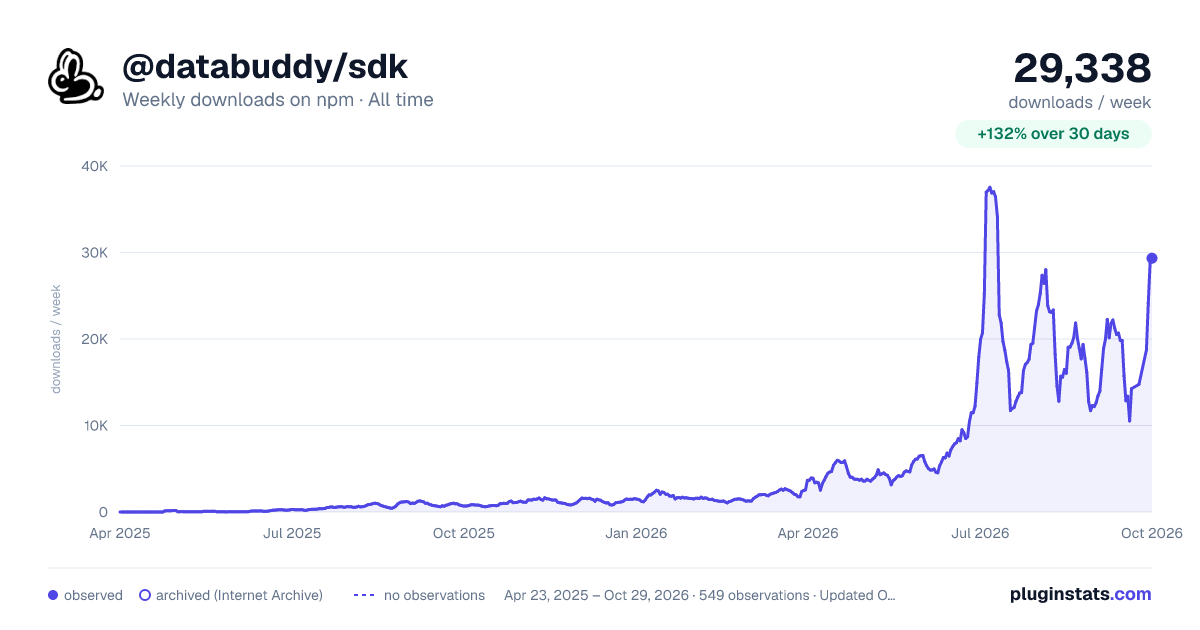

Adoption over time


7/30/90-day growth


Filled points are observed values; hollow points come from Internet Archive snapshots of the listing page. Dashed segments span periods with no observations — values between points are not interpolated.
Recent observations
Full history (543)Similar npm MCP servers plugins
Data source
Weekly downloads (trailing 7 complete days) come from the official npm downloads API. Downloads include CI and mirrors and are not equivalent to installs or users. npm publishes no ratings.
Listing: https://www.npmjs.com/package/@databuddy/sdk. First seen Oct 16, 2026; last successful collection Oct 18, 2026. See the methodology.