 PluginStats
@testsprite/testsprite-mcp weekly downloads statistics
By testsprite · npm · MCP servers
The TestSprite MCP plugin brings fully automated software testing into your coding workflow. It connects your IDE's AI assistant (like Cursor or Copilot) with TestSprite's intelligent testing engine to automatically generate, execute, and debug integratio
@testsprite/testsprite-mcp has 3,310 recorded weekly downloads on npm, a decrease of 78.7% over the past 30 days.
It ranks #1179 of 2,251 tracked npm listings by weekly downloads.
Over 90 days, weekly downloads changed by -75.2%.
PluginStats has 543 daily observations since Apr 23, 2025; the latest is from Oct 17, 2026.
About @testsprite/testsprite-mcp
TestSprite MCP Server
Let your AI code - we'll make it work
This npm package provides the Model Context Protocol (MCP) server for TestSprite, enabling AI assistants in your IDE to automatically test, debug, and fix your code. No manual test writing, no complex prompts, no testing expertise required.
✨ Recognition: TestSprite has been recognized as one of the Top 10 AI tools of 2025 on Product Hunt.
Prerequisites
Before getting started, ensure you have:
• Compatible IDE - Cursor or VSCode with MCP support • TestSprite Account - Sign up for free • API Key - Get yours from TestSprite API Key Page
What This Package Provides
• MCP Server - Model Context Protocol server for IDE integration • One-Command Testing - Just say "Help me test this project with TestSprite" • AI-Driven - Automatically generates PRDs, test plans, and test code • IDE Integration - Works with Cursor, VSCode, and other MCP-compatible editors • Cloud Execution - Tests run in secure TestSprite cloud environments
For detailed features and capabilities, see our full documentation.
10-Minute Demo Video
Watch TestSprite automatically test an entire project with just one command.
Installation
NPM Installation
IDE Configuration
Add TestSprite MCP Server to your IDE's MCP configuration:
For detailed setup instructions for your specific IDE: • Cursor Setup • VSCode Setup • Other IDEs
Usage
Once configured, simply drag your project into the chat and say:
TestSprite will automatically: 1. Analyze your code structure and provided PRD 2. Generate test plans and test code 3. Execute tests in the cloud 4. Provide detailed results and fix suggestions
MCP vs CLI: the two products overlap in what they can test — the choice is about workflow, not reachability. Use the MCP when you're driving from an IDE assistant conversation; use the CLI (a standalone binary) for scripting or CI. See the CLI's own documentation for exactly which targets it can reach. If you name a specific tool, that choice wins.
For comprehensive usage examples and advanced features, see our documentation.
Tunnel transport
The production tunnel control plane uses WebSocket TLS by default. The v2 data plane also uses TLS when the backend advertises tunnelTlsAddr or when TSEMCP_TUNNEL_DATA_TLS_ADDRESS is configured. The client verifies the certificate chain, sends SNI, requires TLS 1.2 or newer, and sends tunnel credentials only after the TLS handshake succeeds. There is no option to disable certificate verification.
Malformed mint endpoint fields and malformed TSEMCP_TUNNEL_DATA_TLS_ADDRESS values are configuration errors: the client fails closed and never selects plaintext because a TLS value was invalid. Programmatic clients retry one continuous data-plane failure episode for dataPlaneRetryDeadlineMs (60,000 ms by default) before reporting DataPlaneUnreachable and stopping; set the option to 0 only when retries must remain unbounded. Writing TunnelHello does not end the episode. A session becomes established when it receives its first inbound yamux stream or remains open for dataPlaneSettleMs after the hello write completes. Only establishment clears the episode, so an immediate peer close continues the same bounded retry window.
| Programmatic option | Default | Purpose |
| dataPlaneRetryDeadlineMs | 60_000 | Maximum duration of one continuous data-plane failure episode. 0 retries without a deadline. | | dataPlaneSettleMs | 5_000 | Time an open post-hello session must remain stable before it is established. The first inbound yamux stream establishes it sooner. | | connectTimeoutMs | 10_000 | Maximum wait for a plaintext data-plane TCP connection. | | tlsHandshakeTimeoutMs | 10_000 | Maximum wait for the data-plane TLS handshake. |
Older backends do not return TLS endpoint fields. For compatibility, those responses continue to use the plaintext tunnelAddr, and the client logs a one-time warning. The built-in data-plane fallback also remains data.tun.testsprite.com:7400 so the backend can roll clients back by omitting the TLS endpoint. An explicitly configured plaintext address is treated as an intentional developer override and also logs the warning.
Data-plane selection order is: explicit TLS address, explicit plaintext address (or host/port), mint-advertised TLS address, mint-advertised plaintext address, then the built-in plaintext fallback.
| Variable | Default | Purpose |
| TSEMCP_TUNNEL_CONTROL_URL | Backend mint, then wss://control.tun.testsprite.com/ws | Override the v2 control-plane WebSocket URL. | | TSEMCP_TUNNEL_DATA_TLS_ADDRESS | Backend tunnelTlsAddr | Use a verified TLS data-plane endpoint in host:port form. | | TSEMCP_TUNNEL_DATA_TLS_SERVERNAME | TLS address host | Override SNI/certificate hostname verification for private deployments. Required when the TLS address host is an IP literal. | | TSEMCP_TUNNEL_DATA_TLS_CA | — | Path to a PEM file containing additional trusted CA roots. Default Node.js roots remain trusted. | | TSEMCP_TUNNEL_DATA_ADDRESS | Backend tunnelAddr, then data.tun.testsprite.com:7400 | Explicitly select a plaintext data-plane endpoint in host:port form. | | TSEMCP_TUNNEL_DATA_HOST | data.tun.testsprite.com | Plaintext endpoint host when TSEMCP_TUNNEL_DATA_ADDRESS is unset. | | TSEMCP_TUNNEL_DATA_PORT | 7400 | Plaintext endpoint port when TSEMCP_TUNNEL_DATA_ADDRESS is unset. |
What TestSprite Tests
• Functional Testing - Core business logic and user workflows • Error Handling Testing - Exception handling and error recovery • Security Testing - Vulnerability scanning and security validation • Authorization & Authentication - User permissions and access control • Boundary Testing - Input validation and data limits • Edge Case Testing - Unusual scenarios and corner cases • Response Content Testing - Data validation and format verification • UI/UX Testing - User interface interactions and user experience flows…
Description from the npm listing.
- testing
- automation
- ai
- cursor
- vscode
- mcp
- testsprite
Where @testsprite/testsprite-mcp sits in the listing
Each band is one page of 20. Weekly downloads on a log scale. Placement is projected from weekly downloads, so it can differ from the marketplace's own sort order. Hover a dot to see the listing.


Charts
Images: 30d · 1y · all time · 1600×900 dark
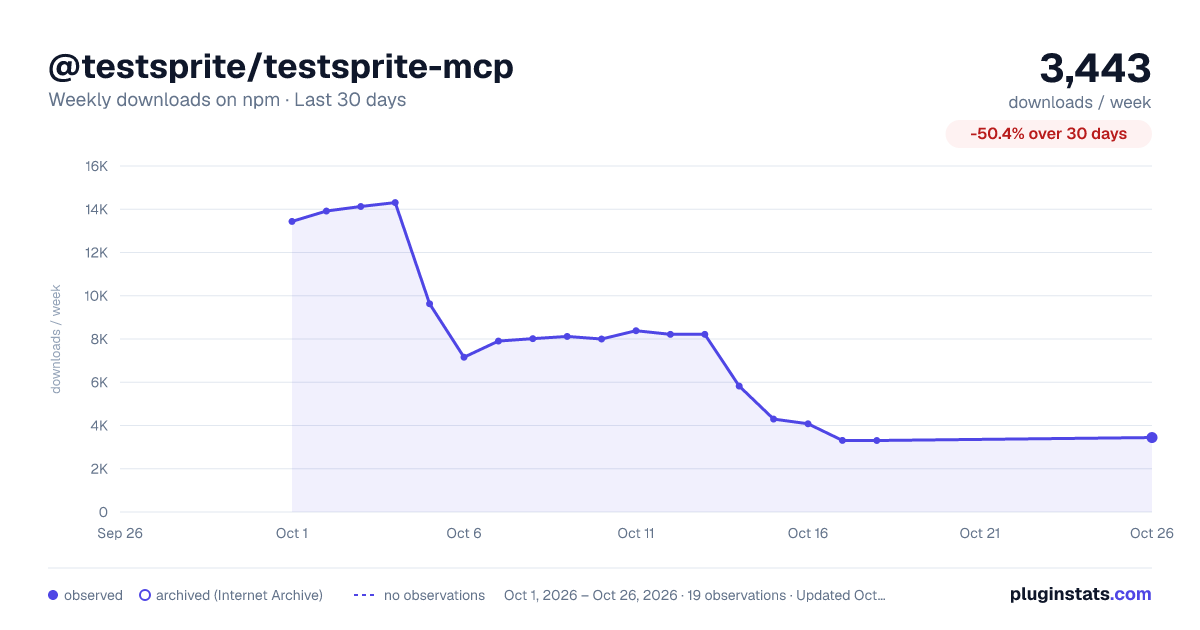
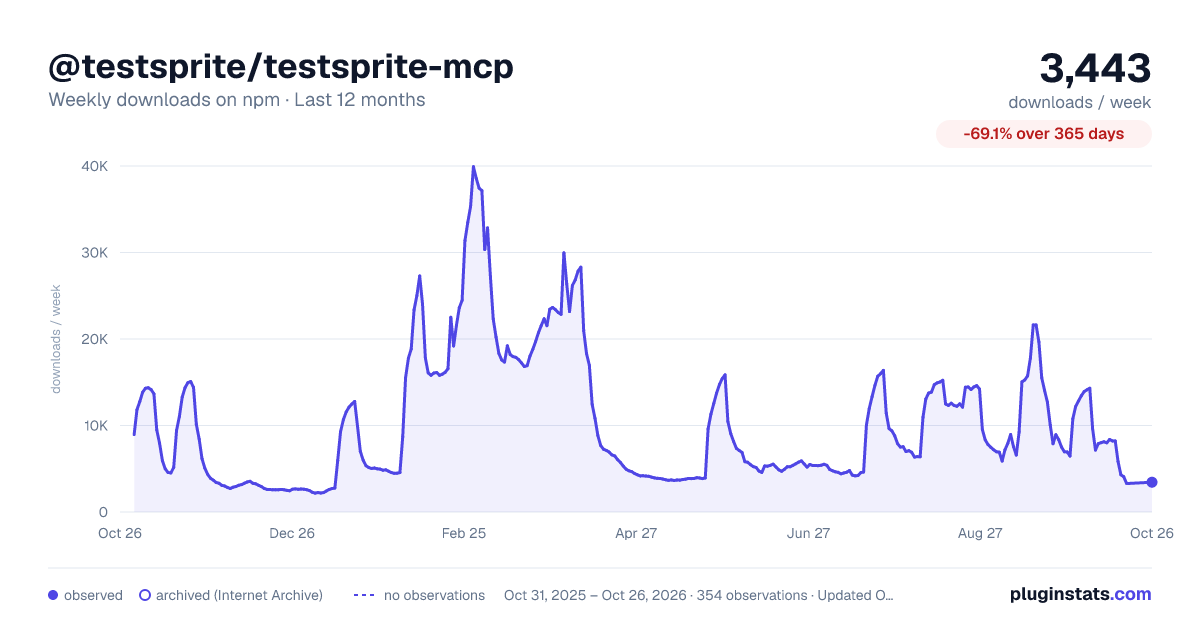
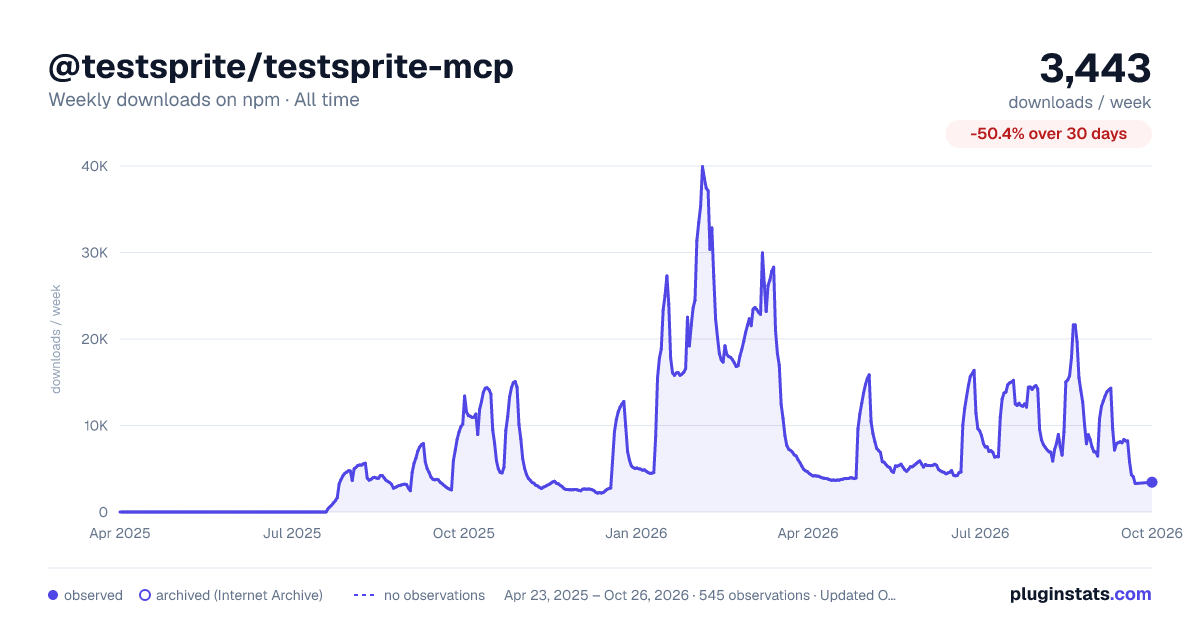

Adoption over time


7/30/90-day growth


Filled points are observed values; hollow points come from Internet Archive snapshots of the listing page. Dashed segments span periods with no observations — values between points are not interpolated.
Recent observations
Full history (543)Similar npm MCP servers plugins
Data source
Weekly downloads (trailing 7 complete days) come from the official npm downloads API. Downloads include CI and mirrors and are not equivalent to installs or users. npm publishes no ratings.
Listing: https://www.npmjs.com/package/@testsprite/testsprite-mcp. First seen Oct 16, 2026; last successful collection Oct 18, 2026. See the methodology.