 PluginStats
unplugin-preprocessor-directives weekly downloads statistics
By kejunmao (2 listings) · npm · Vite plugins
<img src="assets/logo.svg" alt="logo" width="100" height="100" align="right" />
unplugin-preprocessor-directives has 2,657 recorded weekly downloads on npm, a decrease of 66.8% over the past 30 days.
It ranks #1225 of 2,251 tracked npm listings by weekly downloads.
Over 90 days, weekly downloads changed by -40.2%.
PluginStats has 121 daily observations since Jun 19, 2026; the latest is from Oct 17, 2026.
About unplugin-preprocessor-directives
unplugin-preprocessor-directives
[![npm version][npm-version-src]][npm-version-href] [![npm downloads][npm-downloads-src]][npm-downloads-href] [![github stars][github-stars-src]][github-stars-href] [![bundle][bundle-src]][bundle-href] [![License][license-src]][license-href] [![JSDocs][jsdocs-src]][jsdocs-href]
English | 简体中文
Install
[!NOTE] This plugin should be placed before all other plugins in your configuration to ensure preprocessor directives are processed first.
Vite
Example: playground/
Rollup
Webpack
Nuxt
This module works for both Nuxt 2 and Nuxt Vite
Vue CLI
esbuild
Rspack (⚠️ experimental)
Usage
Defining symbols
You use the following two preprocessor directives to define or undefine symbols for conditional compilation:
• #define: Define a symbol. • #undef: Undefine a symbol.
You use #define to define a symbol. When you use the symbol as the expression that's passed to the #if directive, the expression will evaluate to true, as the following example shows:
Conditional compilation
• #if: Opens a conditional compilation, where code is compiled only if the specified symbol is defined and evaluated to true. • #elif: Closes the preceding conditional compilation and opens a new conditional compilation based on if the specified symbol is defined and evaluated to true. • #else: Closes the preceding conditional compilation and opens a new conditional compilation if the previous specified symbol isn't defined or evaluated to false. • #endif: Closes the preceding conditional compilation.
[!NOTE] By default, use vite's loadEnv function to load environment variables based on process.env.NODE_ENV and compile symbols as conditions.
You can use the operators == (equality) and != (inequality) to test for the bool values true or false. true means the symbol is defined. The statement #if DEBUG has the same meaning as #if (DEBUG == true). You can use the && (and), || (or), and ! (not) operators to evaluate whether multiple symbols have been defined. You can also group symbols and operators with parentheses.
Error and warning and info messages
You instruct the compiler to generate user-defined compiler errors and warnings and informational messages.
• #error: Generates an error, but does not terminate compilation. • #warning: Generates a warning. • #info: Generates an informational message.
Of course, it can also be combined with conditional compilation:
#include directive
You can use the #include directive to include the contents of other files into the current file. The included files are also processed by the preprocessor.
[!WARNING] The #include directive is a compile-time text replacement tool, primarily intended for these scenarios: - Including different configuration code snippets in different environments - Combining with conditional compilation to include different code based on compilation conditions - Sharing code snippets that require preprocessing
It cannot and should not replace: - JavaScript/TypeScript import or require - for modularization and dependency management - CSS @import - for stylesheet modularization - HTML template systems or component systems
If you simply want to modularize your code, please use the language's native module system. Only use #include when you need compile-time processing and conditional inclusion.
this directive supports the following two syntaxes:
[!NOTE] 1. Circular references: If file A includes file B, and file B includes file A, circular references will be automatically detected and prevented, processing only once 2. Path resolution: Relative paths are resolved relative to the configured working directory (cwd) 3. File extensions: Any type of text file can be included, not limited to .js files 4. Nested processing: Included files are fully processed by the preprocessor, so all supported directives can be used
Custom directive
You can used defineDirective to define your own directive.
Taking the built-in directive as an example:
enforce: 'pre' | 'post'
Execution priority of directives
• pre: Execute as early as possible • post: Execute as late as possible
Description from the npm listing.
- unplugin
- vite
- webpack
- rollup
- rspack
- transform
- vite-plugin
- webpack-plugin
- rollup-plugin
- esbuild-plugin
- rspack-plugin
- nuxt-plugin
- directives
- preprocessor
Where unplugin-preprocessor-directives sits in the listing
Each band is one page of 20. Weekly downloads on a log scale. Placement is projected from weekly downloads, so it can differ from the marketplace's own sort order. Hover a dot to see the listing.


Charts
Images: 30d · 1y · all time · 1600×900 dark
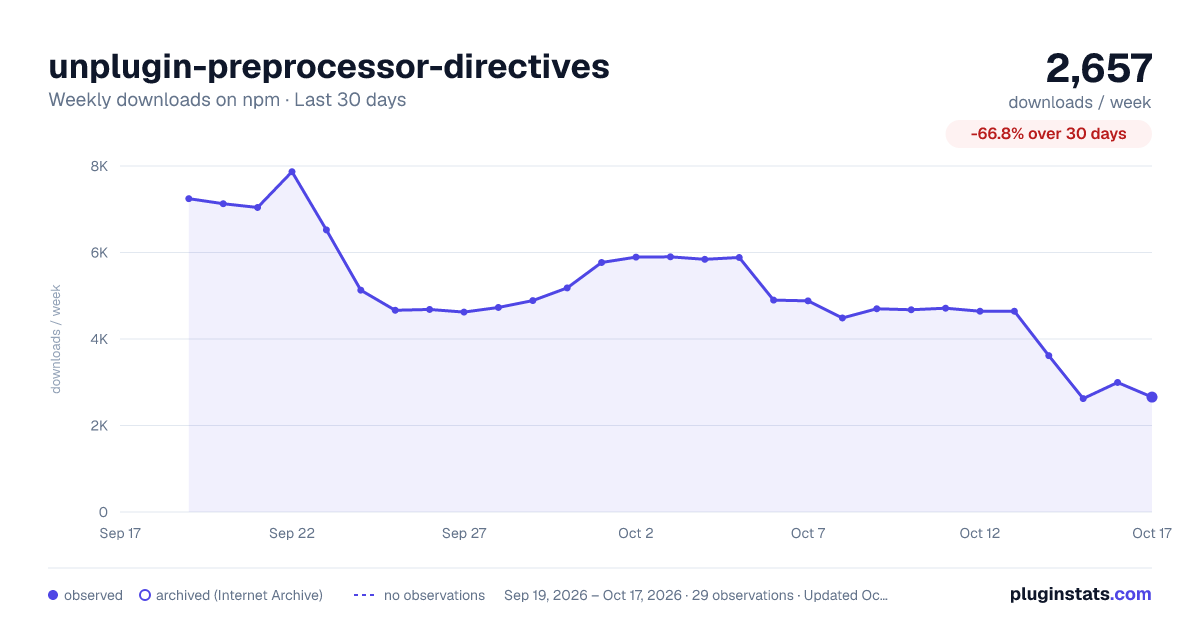

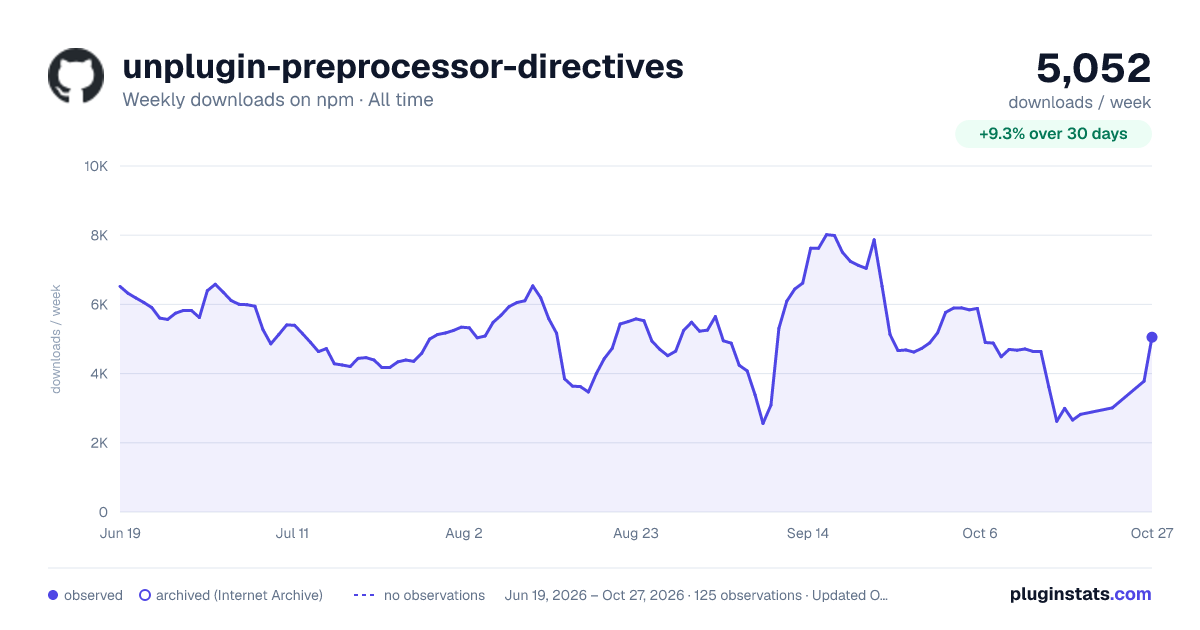

Adoption over time


7/30/90-day growth


Filled points are observed values; hollow points come from Internet Archive snapshots of the listing page. Dashed segments span periods with no observations — values between points are not interpolated.
Recent observations
Full history (121)Similar npm Vite plugins plugins
Data source
Weekly downloads (trailing 7 complete days) come from the official npm downloads API. Downloads include CI and mirrors and are not equivalent to installs or users. npm publishes no ratings.
Listing: https://www.npmjs.com/package/unplugin-preprocessor-directives. First seen Oct 16, 2026; last successful collection Oct 18, 2026. See the methodology.