 PluginStats
@hubspot/mcp-server weekly downloads statistics
By hubspot (4 listings) · npm · MCP servers
MCP Server for developers building HubSpot Apps
@hubspot/mcp-server has 16,295 recorded weekly downloads on npm, a decrease of 22.0% over the past 30 days.
It ranks #805 of 2,251 tracked npm listings by weekly downloads.
Over 90 days, weekly downloads changed by +16.5%.
PluginStats has 543 daily observations since Apr 23, 2025; the latest is from Oct 17, 2026.
About @hubspot/mcp-server
HubSpot MCP Server
HubSpot's MCP server is now available as a beta release. This enables AI clients to seamlessly take HubSpot actions and interact with your HubSpot data, opening up powerful new integration possibilities for our ecosystem. For more information and to provide feedback, visit https://developers.hubspot.com/mcp. You can also use the prompt Provide feedback for HubSpot MCP tools from your preferred client application!
What is MCP?
MCP (Model Context Protocol) is an emerging standard that allows AI models to interact with applications through a consistent interface. It acts as an abstraction layer over HTTP, letting AI agents access application functionality without needing to understand specific API protocols.
Terms and Conditions
The HubSpot MCP Server is in beta and subject to the Early Adopter Program terms.
Pre-requisites
Install node and npm
Visit this link to download Node and NPM.
Create a private app in HubSpot:
• Go to Settings > Integrations > Private Apps • Click "Create private app" • Name your app and set required scopes • Click "Create app" • Copy the generated access token
_Consider starting with read-only scopes_
Using the MCP Server
Claude Desktop
1. Download Claude Desktop here. 2. Add the server configuration to your Claude Desktop config file (usually located at ~/Library/Application Support/Claude/claude_desktop_config.json in macOS) and restart Claude Desktop:
3. Save the file and restart Claude. You should now be able to access all the tools! 4. Visit this page for more information and troubleshooting.
Cursor
1. Create a .cursor/mcp.json file in your project
2. Put the following configuration to the file.
3. Save the file and restart Cursor. You should now be able to access all the tools!
4. Visit this page for more information and troubleshooting.
Other MCP Clients
List of other popular MCP Clients are here.
Example Usage
Once set up, try these example prompts:
Get Insights from Your HubSpot Data
• Get me the latest update about Acme Inc. from my HubSpot account. • Summarize all deals in the "Decision maker bought in" stage in my HubSpot pipeline with deal value > $1000. • Summarize the last five tickets created for Alex Smith in my HubSpot account.
Create and Update CRM Records
• Update the address for John Smith in my HubSpot account. • Create a new contact "John.Johnson@email.com" for Acme Inc. in my HubSpot account.
CRM Associations
• List all associated contacts and their roles for Acme Inc. from my HubSpot account. • List associated contacts for Acme Inc. in my HubSpot account. • Associate John Smith with Acme Inc. as a company in my HubSpot account.
Add Engagements
• Add a task to send a thank-you note to jane@example.com in my HubSpot account. • Add a note for Acme Inc. in my HubSpot account. • List my overdue HubSpot tasks. • From my HubSpot account, find the number of contacts does have?
Tools
This MCP server provides a set of tools for interacting with the HubSpot CRM API.
| Category | Tool Name | Description |
| OAuth | hubspot-get-user-details | Authenticates the current HubSpot private app access token, providing user information, hub details, authorized scopes, and account information. | | Objects | hubspot-list-objects | Retrieves a paginated list of CRM records for a specified object type. | | Objects | hubspot-search-objects | Performs filtered searches across CRM records using complex criteria and property-based filtering. | | Objects | hubspot-batch-create-objects | Creates multiple CRM records of the same object type in a single API call. | | Objects | hubspot-batch-update-objects | Updates multiple existing CRM records with new property values in a single API call. | | Objects | hubspot-batch-read-objects | Retrieves multiple CRM records by their IDs in a single batch operation. | | Objects | hubspot-get-schemas | Retrieves available custom object schemas with their objectTypeId and definitions. | | Properties | hubspot-list-properties | Retrieves the complete catalog of properties defined for any CRM object type. | | Properties | hubspot-get-property | Retrieves detailed information about a specific property definition. | | Properties | hubspot-create-property | Creates new custom properties for CRM object types. | | Properties | hubspot-update-property | Updates settings for existing custom properties. | | Associations | hubspot-batch-create-associations | Establishes multiple relationships between CRM records across different object types. | | Associations | hubspot-list-associations | Retrieves existing relationships between a specific record and other associated records. | | Associations | hubspot-get-association-definitions | Retrieves valid association types and labels between specific object types. | | Engagements | hubspot-create-engagement | Creates engagements (Notes or Tasks) associated with contacts, companies, deals, or tickets. | | Engagements | hubspot-get-engagement | Retrieves engagement details by ID. | | Engagements | hubspot-update-engagement | Updates an existing engagement with new information. | | Workflows | hubspot-list-workflows | Retrieves a paginated list of workflows | | Workflows | hubspot-get-workflow | Retrieves detailed information about a specific workflow, including actions, enrollment criteria, and scheduling. | | Links | hubspot-generate-feedback-link | Generates a feedback link for reporting tool issues or providing feedback. | | Links | hubspot-get-link | Generates HubSpot UI URLs to directly access records in the HubSpot interface. |
Description from the npm listing.
- mcp
- hubspot
Where @hubspot/mcp-server sits in the listing
Each band is one page of 20. Weekly downloads on a log scale. Placement is projected from weekly downloads, so it can differ from the marketplace's own sort order. Hover a dot to see the listing.


Charts
Images: 30d · 1y · all time · 1600×900 dark
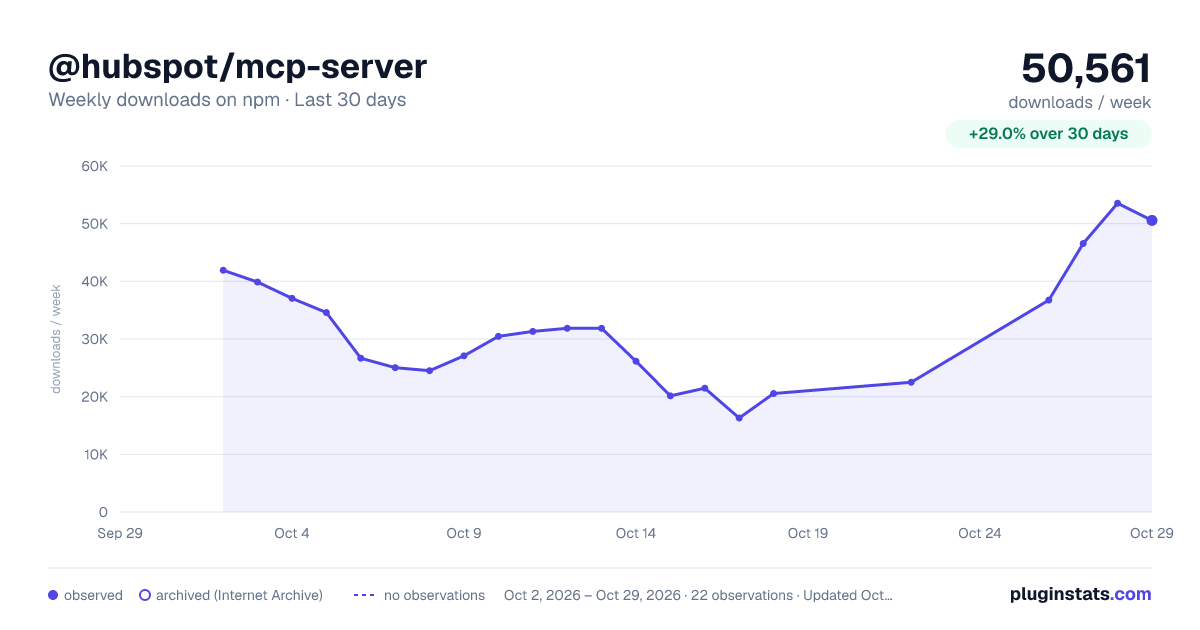
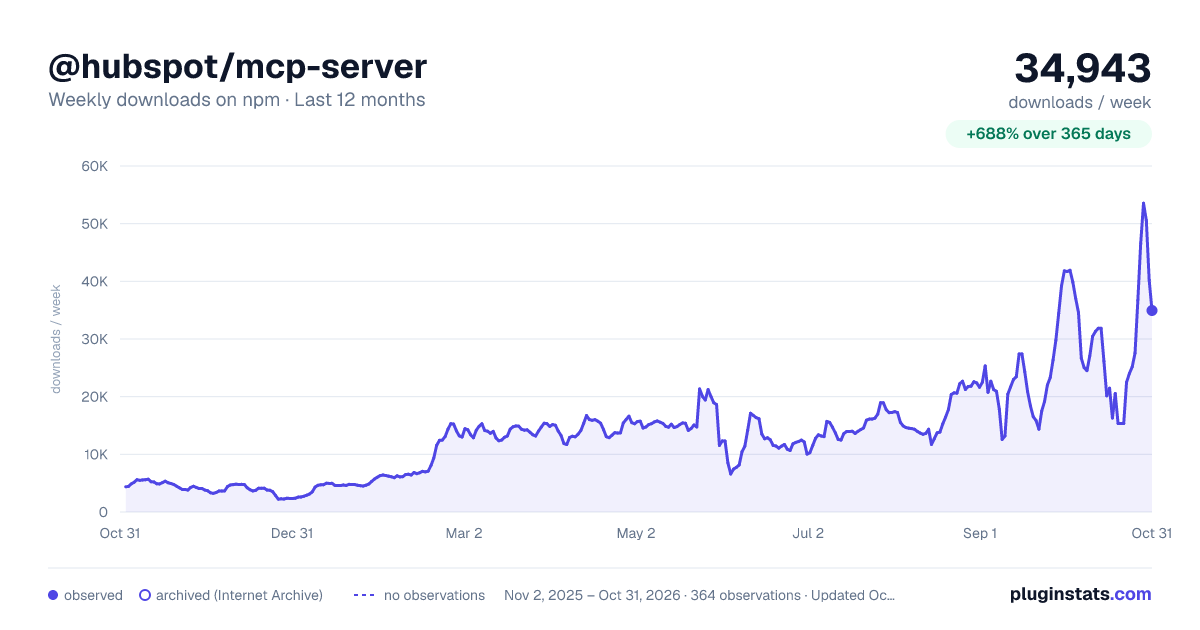
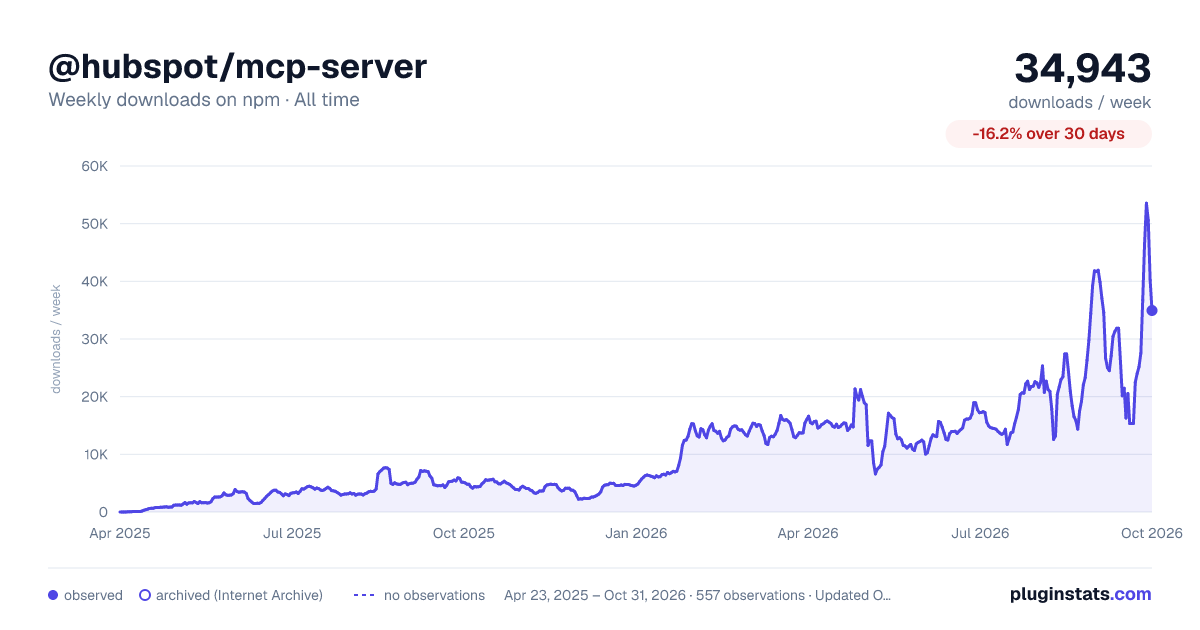

Adoption over time


7/30/90-day growth


Filled points are observed values; hollow points come from Internet Archive snapshots of the listing page. Dashed segments span periods with no observations — values between points are not interpolated.
Recent observations
Full history (543)Similar npm MCP servers plugins
Data source
Weekly downloads (trailing 7 complete days) come from the official npm downloads API. Downloads include CI and mirrors and are not equivalent to installs or users. npm publishes no ratings.
Listing: https://www.npmjs.com/package/@hubspot/mcp-server. First seen Oct 16, 2026; last successful collection Oct 18, 2026. See the methodology.