 PluginStats
davinci-resolve-mcp weekly downloads statistics
By samuelgursky · npm · MCP servers
NPM bootstrapper for the DaVinci Resolve MCP Server.
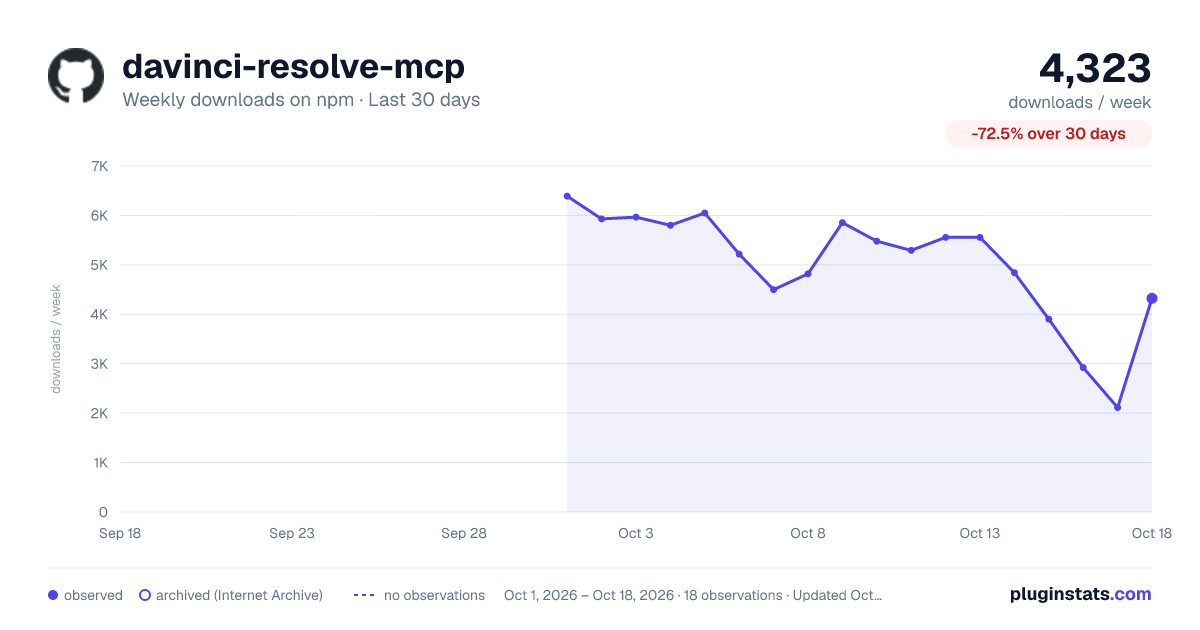
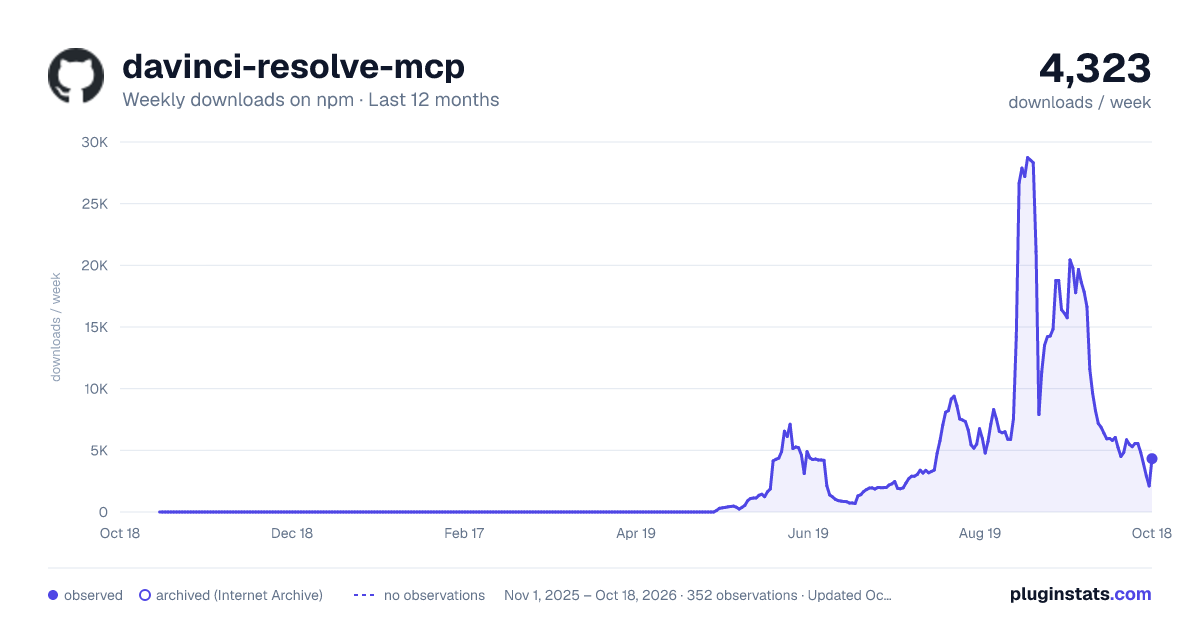
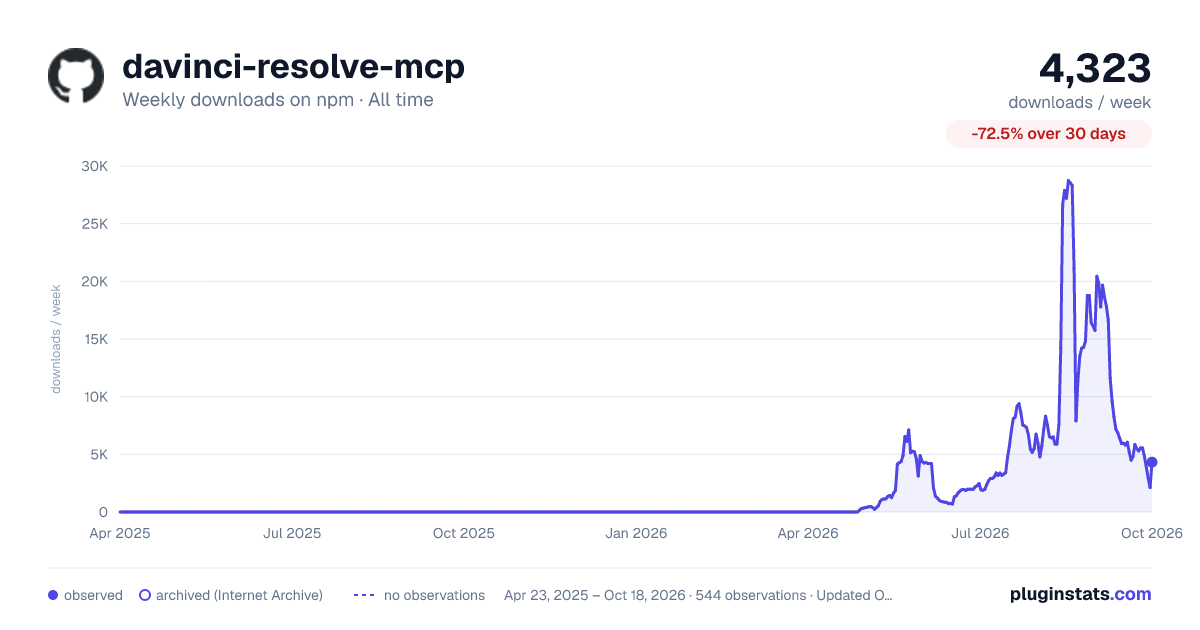
davinci-resolve-mcp has 2,114 recorded weekly downloads on npm, a decrease of 86.9% over the past 30 days.
It ranks #1274 of 2,251 tracked npm listings by weekly downloads.
Over 90 days, weekly downloads changed by -14.4%.
PluginStats has 543 daily observations since Apr 23, 2025; the latest is from Oct 17, 2026.
About davinci-resolve-mcp
DaVinci Resolve MCP Server
English | 简体中文
-blue.svg) -18%20tools-blueviolet.svg)
A Model Context Protocol (MCP) server that lets AI assistants control DaVinci Resolve Studio through the official Scripting API. It provides full API coverage plus guarded workflow helpers for editing, media pool organization, render setup, review markers, grading, Fusion, Fairlight, project lifecycle tasks, extension authoring, and source-safe media analysis.
A local browser control panel ships with the server for inspecting Resolve state, running source-safe analysis, drilling into analyzed clips and shots, and editing analysis output inline. See the Control Panel Guide for the full tour.
Quick Start
Before connecting, open DaVinci Resolve Studio and set Preferences > General > External scripting using to Local. (On the free edition that preference does not help — see Free edition below.) The npm launcher installs a managed copy under your user application-data directory, then runs the universal Python installer. The installer creates a virtual environment, detects Resolve paths, and can configure Claude Desktop, Claude Code, Cursor, VS Code, Windsurf, Zed, Continue, Cline, Roo Code, OpenCode, Codex CLI, and JetBrains IDEs.
For source installs:
For platform paths, client-specific config, and manual setup, see Installation and Configuration.
The installer and server check the latest GitHub release for MCP updates. Checks are best-effort and throttled; the server never blocks MCP startup for a prompt. The installer can prompt, snooze, ignore a release, disable checks, or apply an opt-in safe auto-update for clean git checkouts.
Free edition (in-app bridge)
Blackmagic gates *external* scripting to Studio: on the free edition scriptapp("Resolve") refuses a foreign process, whatever the preference says. Through Resolve 21.0.x the Workspace ▸ Scripts menu was not gated — a script launched from it is handed the live resolve object (measured on free 21.0.3.7) — so the server can reach the free edition through a small script that runs *inside* Resolve and re-exports it over an authenticated loopback listener. **Resolve 21.1 moved Python scripting to Studio.** On free 21.1 the Scripts menu no longer lists .py files at all (reported on Fedora 44 in #203; a Lua script in the same folder lists normally). Whether the Console still runs Python there is unconfirmed, so treat the bridge as a 21.0.x path until that is measured.
The installer and MCP client use ~/.config/davinci-resolve-mcp/bridge.json by default. To keep the authenticated bridge config elsewhere, set DAVINCI_RESOLVE_BRIDGE_CONFIG while running the installer and in the MCP client environment; both sides will use that path.
Once that listener is running it is used automatically whenever external scripting is unavailable — no environment variable required. Setting DAVINCI_RESOLVE_BRIDGE=1 *forces* the bridge instead: it becomes the only transport tried, so a bridge that stops answering reports its own fault rather than quietly falling back to another transport. Use it when the bridge is the path you intend to depend on.
On macOS, Resolve looks for Python 3 in exactly two places: the PYTHON3HOME environment variable, then /usr/local/bin/python3. Homebrew, pyenv, uv and conda land in neither, so the script silently never appears in the menu. A python.org install works because its installer creates /usr/local/bin/python3 — but you do not need one: point Resolve at the interpreter you already have, no sudo required.
Use launchctl setenv, not export — Resolve is launched from the Dock and never sees your shell's environment. Restart Resolve afterwards. A Lua canary is installed alongside so you can tell "Python not detected" apart from a wrong folder.
Two things that bite (#182). The prefix must contain both lib/libpython3.X.dylib and bin/python3 under that exact unversioned name — Homebrew's framework builds often ship only bin/python3.13, which is half a Python as far as Resolve is concerned, and the installer's preflight now says so instead of reporting a usable prefix. And launchctl setenv **does not survive a reboot**; if scripts stop listing weeks later with no error, that is why. For something persistent, put an interpreter where Resolve already looks (this one needs sudo, and check that /usr/local/bin does not precede your normal Python on PATH):
Validated on free 21.0.3.7 and Studio 19.1.3.7, both macOS. The Windows paths added in v2.70.1 (issue #106) shipped unverified; reports on free 21.0.1.11 (issue #109) and free 21.0.3.7 (issue #112) have since shown the bridge installing, listing and serving from both %PROGRAMDATA% and %APPDATA% on Windows 11, so those paths are now confirmed rather than assumed. Linux is confirmed as well: a report on free 20.3.2.9 (issue #129, Fedora 43) shows the bridge installing to ~/.local/share/DaVinciResolve/Fusion/Scripts/Utility, listing against the system Python — Linux has none of this discovery problem — and serving end-to-end. No platform now rests on an assumption: macOS was validated directly, Windows and Linux on user reports.
Note that the bridge holds its port for as long as it serves. Before v2.70.3 a Windows bridge could outlive Resolve and block the next session's listener; if you are on an older build and a bridge stops answering, check for a stale fuscript.exe still holding the port.
This is the documented in-app path, not a licence circumvention, but Blackmagic could close it — treat it as a supported-until-it-is-not tier. Loopback only, HMAC-signed requests, one-use nonces.
Local Control Panel
Launch the single-user local control panel from the repository root:…
Description from the npm listing.
- davinci-resolve
- resolve
- mcp
- model-context-protocol
- video-editing
- post-production
Where davinci-resolve-mcp sits in the listing
Each band is one page of 20. Weekly downloads on a log scale. Placement is projected from weekly downloads, so it can differ from the marketplace's own sort order. Hover a dot to see the listing.


Charts
Images: 30d · 1y · all time · 1600×900 dark

Adoption over time


7/30/90-day growth


Filled points are observed values; hollow points come from Internet Archive snapshots of the listing page. Dashed segments span periods with no observations — values between points are not interpolated.
Recent observations
Full history (543)Similar npm MCP servers plugins
Data source
Weekly downloads (trailing 7 complete days) come from the official npm downloads API. Downloads include CI and mirrors and are not equivalent to installs or users. npm publishes no ratings.
Listing: https://www.npmjs.com/package/davinci-resolve-mcp. First seen Oct 16, 2026; last successful collection Oct 18, 2026. See the methodology.