 PluginStats
@denkwerk/unplugin-favicon-generator weekly downloads statistics
By denkwerk (3 listings) · npm · Webpack plugins
Vite, Rollup, Rolldown, webpack and Rspack plugin that generates favicons, touch icons and a web app manifest from an SVG or a Figma node, and adds the head tags
@denkwerk/unplugin-favicon-generator has 12 recorded weekly downloads on npm.
It ranks #1893 of 2,251 tracked npm listings by weekly downloads.
Over the past 7 days it changed by -42.9%.
PluginStats has 543 daily observations since Apr 23, 2025; the latest is from Oct 17, 2026.
About @denkwerk/unplugin-favicon-generator
@denkwerk/unplugin-favicon-generator
A complete favicon set for your Vite, Rollup, Rolldown, webpack or Rspack build, generated from one SVG or a Figma component, emitted with your assets and linked for you.
Setup · Tags in your own HTML · Config file · Options · Overview
A bundler plugin, written once with unplugin, that generates favicons and an Apple touch icon from one SVG, a raster image or a Figma component and writes them into your build output. Additionally, it can add a web app manifest, a theme color and Windows tiles. It is built on @denkwerk/favicon-generator.
• Nothing is written to public/: the files are generated into node_modules/.cache/favicon-generator and emitted as build assets. • Output is cached until the options or the source image change. A Figma export is reused while the Figma file is unchanged, which one small API request checks. • Vite: the tags are injected into every HTML page and follow base; the dev server serves the files and reloads the page when the image or the config file changes. Server (SSR) builds get no copies of the files.
Setup
Vite
Rollup
Rolldown, tsdown
tsdown builds with Rolldown, so it takes the same plugin in plugins of tsdown.config.ts.
webpack
Rspack
That's it for Vite. Other bundlers have no HTML to add the tags to, so render them yourself (see below). Remove any favicon.ico or other icons from public/, because they would conflict with the generated ones. The Vite plugin warns about this.
The tags in your own HTML
The tags are also available as a module, e.g. for an SSR template or a page that is not processed by Vite:
webpack and Rspack read virtual: as a URL scheme, so import ~favicons there; it works in the other bundlers too. For the types, add @denkwerk/unplugin-favicon-generator/client to compilerOptions.types in your tsconfig.json.
Config file
Instead of (or in addition to) plugin options, the plugin reads a favicon.config.ts, the same file the CLI uses:
It is looked up with the CLI's rules, starting in Vite's root (or root, see below): the first of favicon.config.{js,ts,mjs,mts,cjs,cts,json}, then parent directories up to the nearest one with a package.json or .git. Plugin options take precedence over the file, and the options of a group (manifest, …) are merged key by key. The file's output, overwrite and snippets are ignored because the plugin decides where files go. Add @denkwerk/favicon-generator to your dependencies so the file can import defineConfig.
Options
Besides these plugin options, every @denkwerk/favicon-generator option except output, overwrite and snippets is supported (themeColor, manifest, windows, legacy, figmaToken, …). Relative paths are resolved against root.
| Option | Default | |
| input | none | Source image or Figma link. Nothing is generated without it. | | pathPrefix | / | Directory in the build output, and URL path below base, for the files. / keeps /favicon.ico where browsers look for it. | | mirrorPrefixes | [] | More directories that get the same files, e.g. ['/'] with pathPrefix: '/public/'. The tags use pathPrefix. | | base | / | URL the build output is served from, e.g. a CDN. Vite uses its own base. | | root | Vite's root, else process.cwd() | Where the config file lookup and relative paths start, and where node_modules/.cache/favicon-generator is. | | inject | true | Vite: add the / tags to every HTML page. | | cache | true | Reuse generated files while options and source are unchanged, and a Figma export while the Figma file is unchanged (one small API request per build checks it). false generates and exports on every build. | | cacheDir | node_modules/.cache/favicon-generator | Where the cache and the generated files are kept. | | configFile | looked up | Path to a specific config file, or false to ignore config files. |
Examples
• examples/vite: a Vite app with the tags injected and read from virtual:favicons • examples/vite-config-file: options in favicon.config.ts • examples/tsdown: a library built with tsdown that ships its favicons and exports their tags
License
MIT
Description from the npm listing.
- favicon
- favicon-generator
- favicons
- favicon.ico
- apple-touch-icon
- web-app-manifest
- manifest
- pwa
- svg
- figma
- icons
- unplugin
- vite
- vite-plugin
- rollup
- rollup-plugin
- rolldown
- rolldown-plugin
- tsdown
- webpack
Where @denkwerk/unplugin-favicon-generator sits in the listing
Each band is one page of 20. Weekly downloads on a log scale. Placement is projected from weekly downloads, so it can differ from the marketplace's own sort order. Hover a dot to see the listing.


Charts
Images: 30d · 1y · all time · 1600×900 dark
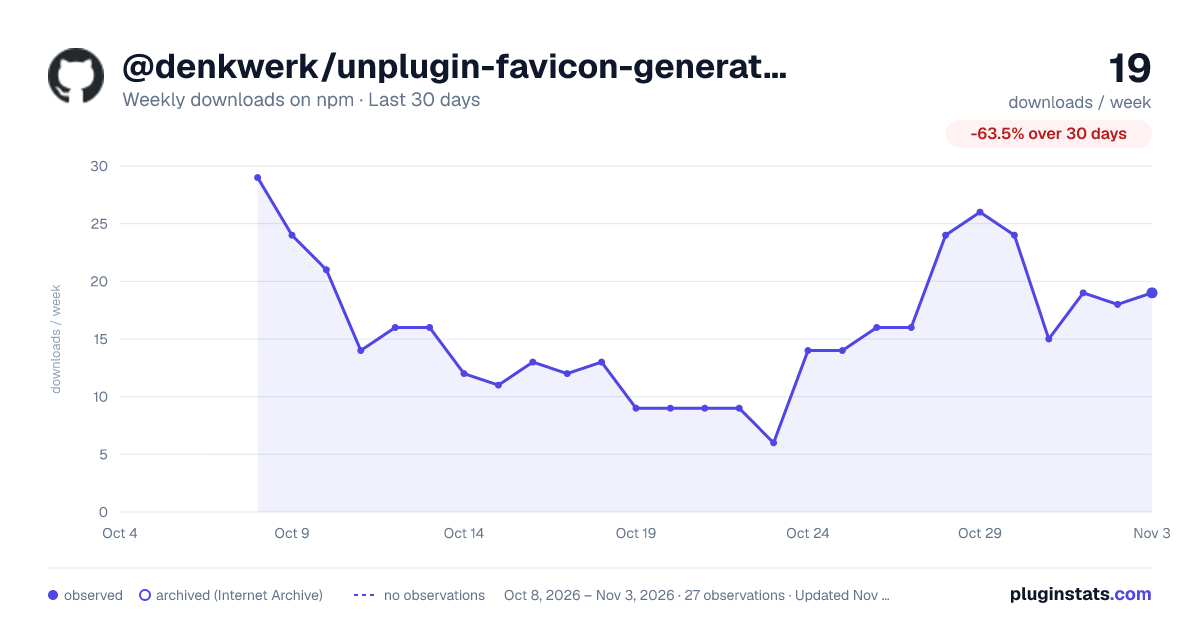
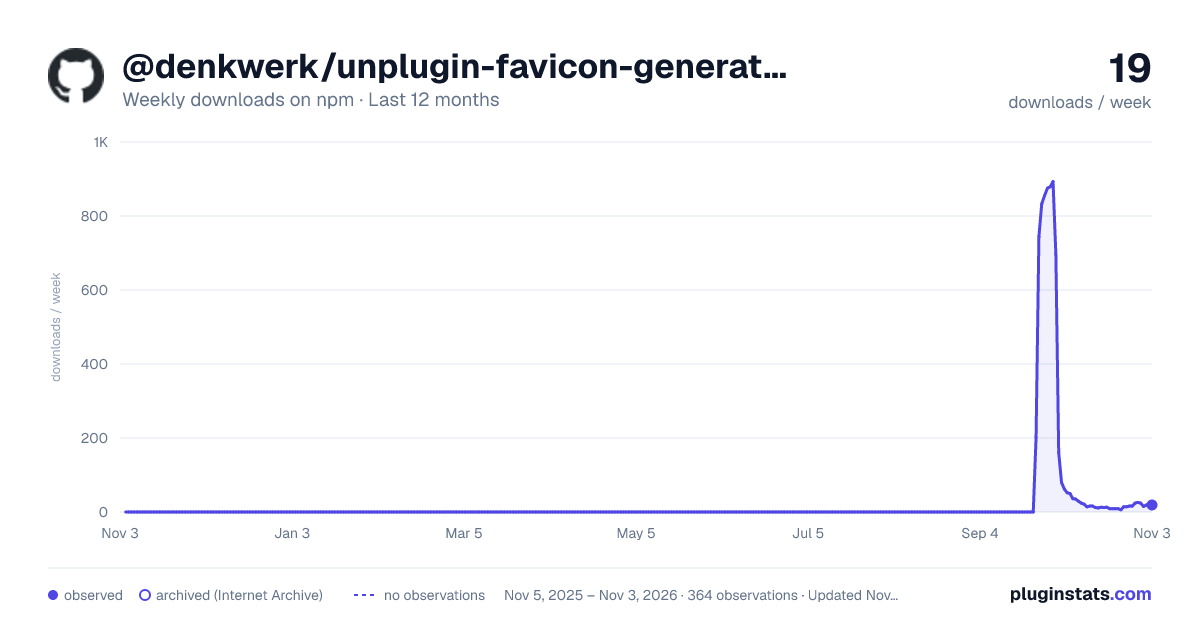
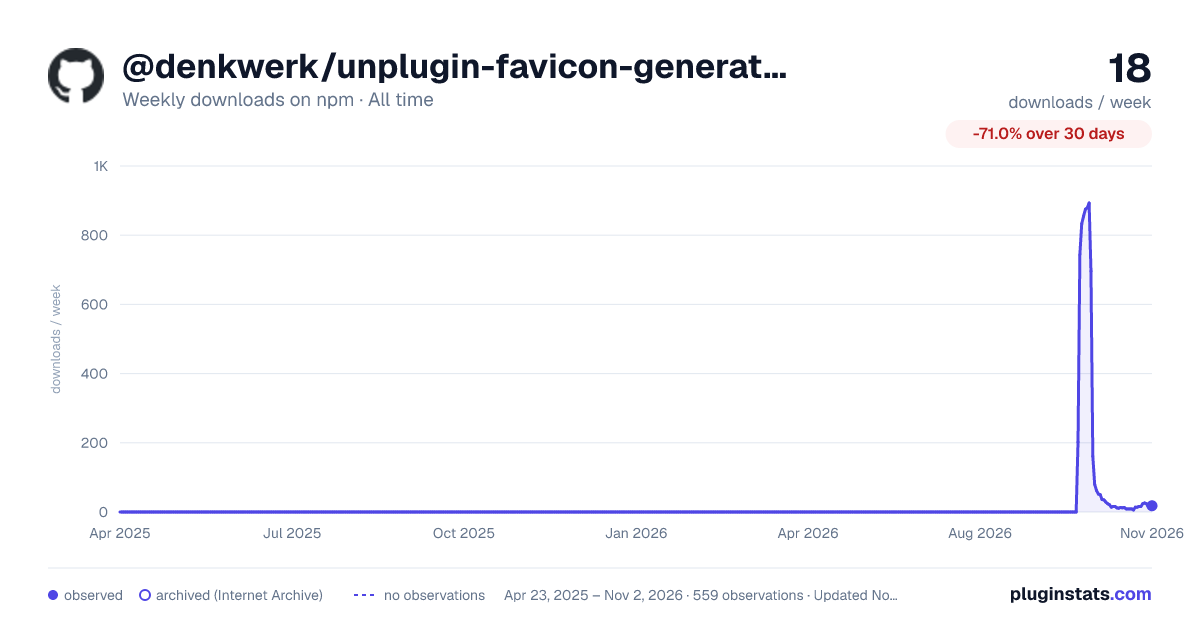

Adoption over time


7/30/90-day growth


Filled points are observed values; hollow points come from Internet Archive snapshots of the listing page. Dashed segments span periods with no observations — values between points are not interpolated.
Recent observations
Full history (543)Similar npm Webpack plugins plugins
Data source
Weekly downloads (trailing 7 complete days) come from the official npm downloads API. Downloads include CI and mirrors and are not equivalent to installs or users. npm publishes no ratings.
Listing: https://www.npmjs.com/package/@denkwerk/unplugin-favicon-generator. First seen Oct 16, 2026; last successful collection Oct 18, 2026. See the methodology.