 PluginStats
patchwork-os weekly downloads statistics
By Oolab-labs · npm · Claude Code
Your personal AI runtime, local-first. Patchwork OS gives any AI model a consistent set of tools, YAML recipes, a delegation policy with approval queue, and a durable trace memory — all on your machine, all under your policy.
patchwork-os has 4,032 recorded weekly downloads on npm, an increase of 97.5% over the past 30 days.
It ranks #1145 of 2,251 tracked npm listings by weekly downloads.
Over 90 days, weekly downloads changed by -50.2%.
PluginStats has 121 daily observations since Jun 19, 2026; the latest is from Oct 17, 2026.
About patchwork-os
Patchwork OS
You don't have an automation problem. You have a decision problem.
Every AI-agent horror story ends the same way: an action nobody stopped to question. Patchwork OS is the layer between the agent's impulse and the action — a local-first runtime where your AI can automate real work across your editor, GitHub, Slack, Gmail, and 45+ services, while anything consequential can be made to stop and ask you first.
Who it's for: developers and technical operators who already run agents against real systems — a repo that ships, an inbox that matters, a production service — and who want a record of what was allowed and why. It expects a terminal, a Node install, and comfort editing YAML.
Three ideas, one runtime:
• Ask before acting. Every action is classified by blast radius — can it be undone, and how much breaks if it's wrong? Reversible things flow freely. Risky things wait in an approval queue with the evidence attached: what exactly will run, why it fired, and what happens if it's wrong. • Trust is earned, never assumed. Workers — named agents with jobs — start supervised and earn independence from their track record, per action type. Good at filing issues ≠ allowed to push code. One bad high-stakes action outweighs a hundred trivial successes. You set the ceiling; the math never raises it for them. • Every decision leaves a receipt. What was done, why it was allowed, and how it turned out — durable, replayable, explainable via patchwork judgments, the dashboard's traces page, and patchwork gate explain. When you approve something, you find out later whether you were right.
An agent wants to write a file. With the gate on, it waits — and shows you exactly what it would do:
You approve. The call proceeds, and both halves are on the record:
Status: stable 1.2
Version 1.2.4, published to npm as latest. The decision layer, recipes, connectors and IDE bridge all work and are dogfooded daily. Interfaces can still change between minor versions and some surfaces are rougher than others. Pin an exact version if you are building on it.
Whether the safety features are on depends on how you installed. This matters more than any other line in this README:
• New install: patchwork-os init on a machine with no ~/.patchwork/config.json writes profile: governed. The gate is on from the first run. • Existing install: upgrading never changes your profile. An existing config stays as it is; opt in with patchwork profile governed and restart the bridge. • No config at all (starting the bridge without init): the compat profile, where nothing is gated.
Run patchwork doctor to see what is enforced on your machine right now. Trust its output over this table.
| Feature | governed (new init) | compat (existing config, or none) |
| Approval queue | on at high, for automated triggers (cron, webhook, file-watch, git-hook) as well as manual runs | off unless --approval-gate high or all, and then manual runs only | | Non-reversible writes | ask for approval whatever their tier | follow the tier threshold | | Agent steps | contained: read-only tools, no network or shell | full access unless a step sets sandbox: true | | Recipe plugins (servers:) | load only if listed in plugins.allow | any entry loads, in-process | | A tool nothing is registered under | the run halts | the step is skipped | | Kill switch (patchwork panic) | available; fails closed if its state is unreadable | available; fails open | | Worker autonomy ramp | on for worker-owned recipes (runs need a driver, e.g. --driver subprocess) | off unless PATCHWORK_FLAG_WORKER_AUTONOMY=1 (same driver requirement) | | Telemetry | off | off; opt in explicitly (details) |
Under compat, a fresh bridge is an automation runtime, and it becomes a decision layer when you switch the gate on. Everything above about "stops and asks you first" describes the gate when it is on.
The loop
patchwork panic blocks every write-tier tool call across all running bridges, immediately. Reads keep working, and in-flight reasoning is not killed — it is a write block, not a full stop.
Install
init scaffolds ~/.patchwork, seeds local-only recipes, and registers Patchwork's PreToolUse hook in ~/.claude/settings.json. Restart Claude Code afterwards — it reads hooks at session start.
Prereqs: Node 22.5+. macOS, Linux, and native Windows (no WSL).
Two things worth knowing before you start:
• Use a global install, not npx. npx does not persist the binary, so the very next command in any guide will not be found. • The web dashboard is not in the npm package. It's a Next.js app that needs its own build, so it ships with the repo: Everything below works from the CLI without it. The dashboard is where approvals, traces and connector setup are pleasant rather than possible.
First run: zero connectors
Prove the runtime works before wiring any service to it. daily-status touches only git and local files — no accounts, no network:
It reads your commits since yesterday plus ~/.patchwork/planned.md, and writes a Markdown digest to ~/.patchwork/inbox/daily-status-.md. If that file exists, your install is sound.
Useful neighbours: patchwork recipe list, patchwork status, patchwork recipe doctor when something misbehaves.
Morning Brief: the connected workflow
The recipe pulls unread mail, today's calendar, your open GitHub issues and PRs, Linear issues, and local git activity, then has a model summarise them into one Markdown brief in ~/.patchwork/inbox/. Its email step is triage — it lists what needs an answer; it does not compose or send replies. Nothing leaves your machine except the API calls to the services you connected.
All four connectors are required as written — no step is guarded, so a missing one halts the run. Drop the steps you don't want, or start from daily-status and add sources one at a time.…
Description from the npm listing.
- claude
- claude-code
- mcp
- mcp-server
- ide
- ide-bridge
- vscode
- cursor
- windsurf
- lsp
- debugging
- terminal
- git
- github
- ai
- agent
- ai-agent
- automation
- approval-queue
- oversight
Where patchwork-os sits in the listing
Each band is one page of 20. Weekly downloads on a log scale. Placement is projected from weekly downloads, so it can differ from the marketplace's own sort order. Hover a dot to see the listing.


Charts
Images: 30d · 1y · all time · 1600×900 dark
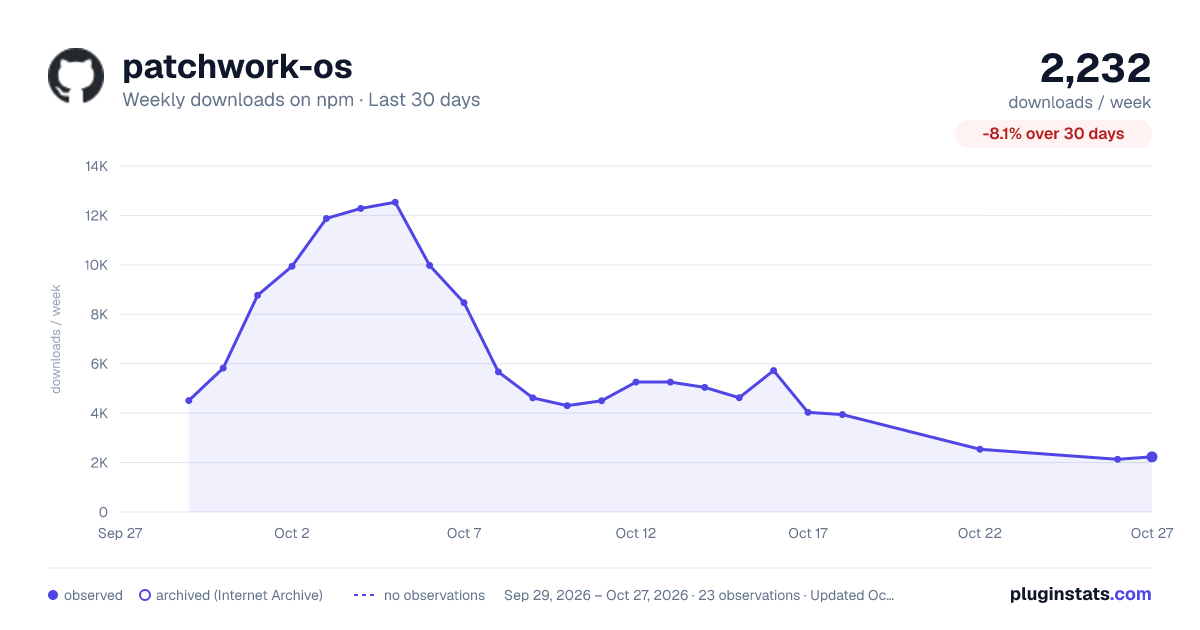
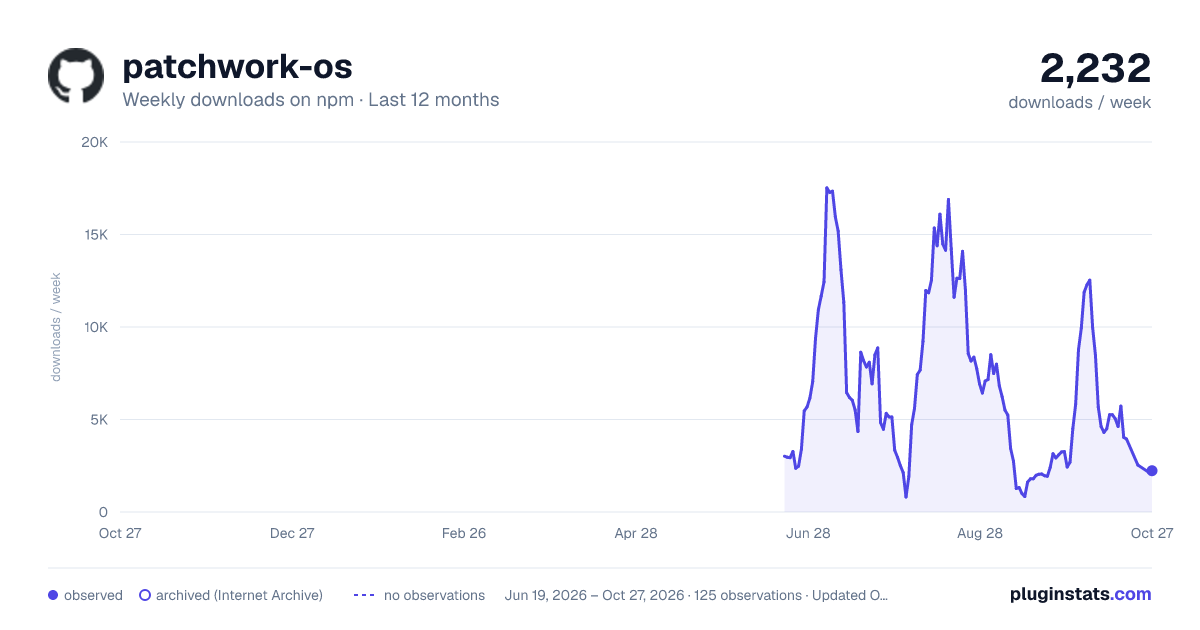
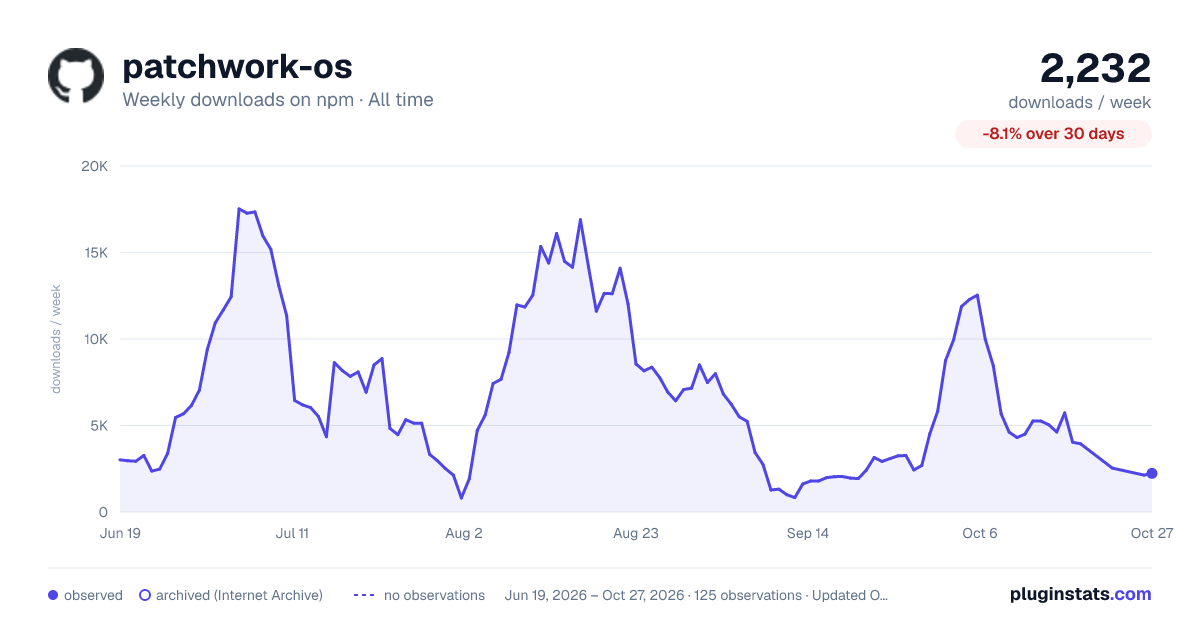

Adoption over time


7/30/90-day growth


Filled points are observed values; hollow points come from Internet Archive snapshots of the listing page. Dashed segments span periods with no observations — values between points are not interpolated.
Recent observations
Full history (121)Similar npm Claude Code plugins
Data source
Weekly downloads (trailing 7 complete days) come from the official npm downloads API. Downloads include CI and mirrors and are not equivalent to installs or users. npm publishes no ratings.
Listing: https://www.npmjs.com/package/patchwork-os. First seen Oct 16, 2026; last successful collection Oct 18, 2026. See the methodology.