 PluginStats
@chat-adapter/messenger weekly downloads statistics
By chat-adapter (14 listings) · npm · AI SDKs
Facebook Messenger adapter for Chat SDK — Send API webhooks, templates, and quick replies
@chat-adapter/messenger has 14,358 recorded weekly downloads on npm, a decrease of 30.4% over the past 30 days, ranking #871 of 2,322 tracked listings.
About @chat-adapter/messenger
@chat-adapter/messenger
npm package:
@chat-adapter/messenger


Facebook Messenger adapter for Chat SDK, using the Messenger Platform API.
Documentation: chat-sdk.dev/adapters/official/messenger · Guides: vercel.com/kb/chat-sdk
Building for Instagram Direct Messages? Use
@chat-adapter/instagraminstead. It connects through Instagram API with Instagram Login and does not require a Facebook Page.
Installation
pnpm add @chat-adapter/messenger
Scaffold with the CLI
To scaffold a new Messenger bot with this adapter preselected:
npx create-chat-sdk@latest my-bot --adapter messenger memory
Visit the adapters directory to see other available official and vendor-official adapters.
Usage
import { Chat } from "chat";
import { createMessengerAdapter } from "@chat-adapter/messenger";

const bot = new Chat({
  userName: "mybot",
  adapters: {
    messenger: createMessengerAdapter(),
  },
});

bot.onDirectMessage(async (thread, message) => {
  await thread.post("Hello from Messenger!");
});
When using createMessengerAdapter() without arguments, credentials are auto-detected from environment variables.
Facebook Messenger setup
1. Create a Meta app
- Go to developers.facebook.com/apps
- Click Create App
- Select the use case "Engage with customers on Messenger from Meta"
- Enter your app name and contact email, then create the app
- Go to App > App Settings > Basic and copy your App Secret — this becomes
FACEBOOK_APP_SECRET
2. Create a Facebook Page
Your Messenger bot needs a Facebook Page to send and receive messages. If you don't have one:
- The easiest approach is to create a Facebook Business profile first
- Then create a Page under that business profile
- Note the Page name — users will message this Page to interact with your bot
3. Configure Messenger API
- In your Meta app dashboard, go to Use Cases
- Find "Engage with customers on Messenger from Meta" and click Customize
- Then open Messenger API Settings
Configure webhooks
- Under Configure webhooks, click Add Callback URL
- Enter your webhook URL:
https://your-domain.com/api/webhooks/messenger - Enter a Verify Token — this is a secret string you create (this becomes
FACEBOOK_VERIFY_TOKEN) - Click Verify and Save
- After verification, click Add Subscriptions and enable:
messagesmessaging_postbacksmessaging_reactionsmessage_deliveriesmessage_reads
Generate a Page Access Token
- Under Generate access tokens, click Add or remove Pages
- Your Pages should populate — select the Page you created
- Assign the standard permissions when prompted
- Click Generate Token
- Copy the token — this becomes
FACEBOOK_PAGE_ACCESS_TOKEN
Environment variables
FACEBOOK_APP_SECRET=...              # App secret from App Settings > Basic
FACEBOOK_PAGE_ACCESS_TOKEN=...       # Generated Page access token
FACEBOOK_VERIFY_TOKEN=...            # User-defined webhook verification secret
FACEBOOK_BOT_USERNAME=...            # Optional, defaults to "messenger-bot"
FACEBOOK_API_URL=...                 # Optional, override the Meta Graph API base URL
Webhook setup
Messenger uses two webhook mechanisms:
- Verification handshake (GET) — Meta sends a
hub.verify_tokenchallenge that must match yourFACEBOOK_VERIFY_TOKEN. - Event delivery (POST) — incoming messages, reactions, and postbacks, verified via
X-Hub-Signature-256.
// Next.js App Router example
import { bot } from "@/lib/bot";

export async function GET(request: Request) {
  return bot.webhooks.messenger(request);
}

export async function POST(request: Request) {
  return bot.webhooks.messenger(request);
}
Features
Messaging
| Feature | Supported |
|---|---|
| Post message | Yes |
| Edit message | No (Messenger limitation) |
| Delete message | No (Messenger limitation) |
| Streaming | Buffered (accumulates then sends) |
| Typing indicator | Yes |
| Mark as read | Yes |
Rich content
| Feature | Supported |
|---|---|
| Card format | Generic/Button Templates |
| Buttons | Yes (max 3 per message) |
| Link buttons | Yes (web_url) |
| Select menus | No |
| Tables | Text fallback |
| Fields | Text fallback |
| Images in cards | Yes (Generic Template) |
| Modals | No |
Conversations
| Feature | Supported |
|---|---|
| Reactions | Receive only |
| Typing indicator | Yes |
| DMs | Yes (DM-only platform) |
| Postbacks | Yes |
Inbound attachments
Inbound attachment URLs remain available as attachment.url. The adapter's
fetchData function downloads media only from Meta's fbsbx.com and
fbcdn.net hosts, refuses private and internal addresses (including after
redirects), limits responses to 25 MB, and times out after 30 seconds.
External fallback and link-share URLs are preserved but rejected before any
network request.
Read receipts
Use thread.markAsRead() in a message handler to send Messenger's mark_seen sender action:…
Description from the npm listing.
- chat
- chat-sdk
- chatbot
- messenger
- facebook-messenger
- meta
- bot
- adapter
- messaging
- ai-agent
- ai-sdk
- vercel
README badge
Show your rank in a README or on your website. The badge updates automatically.
Charts
Images: 30d · 1y · all time · 1600×900 dark
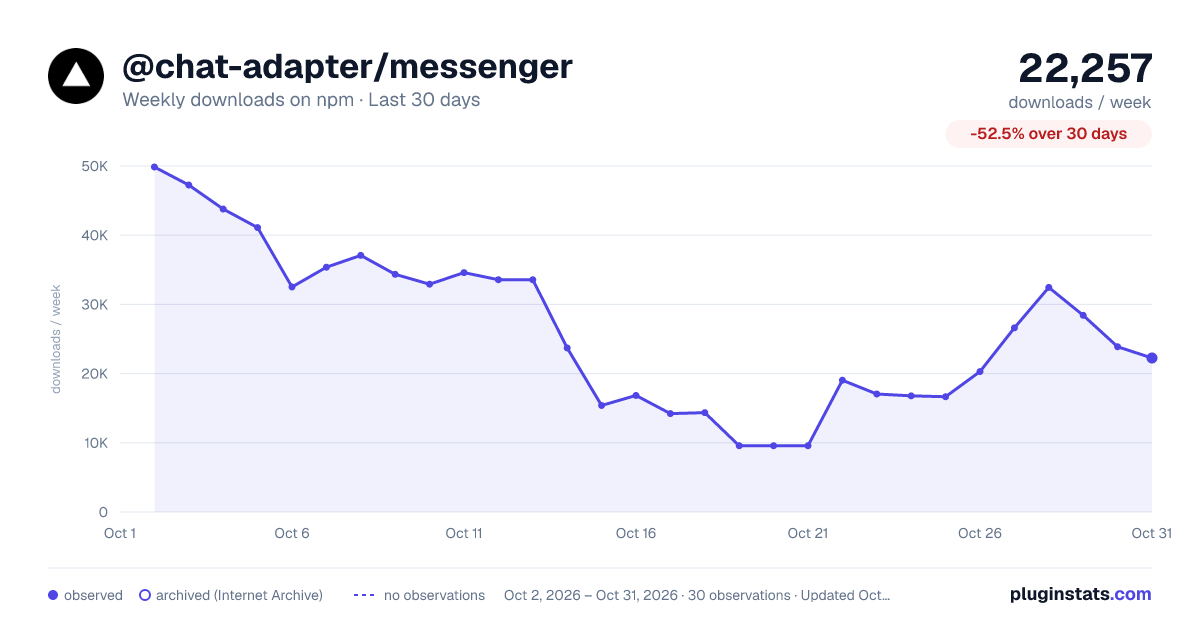
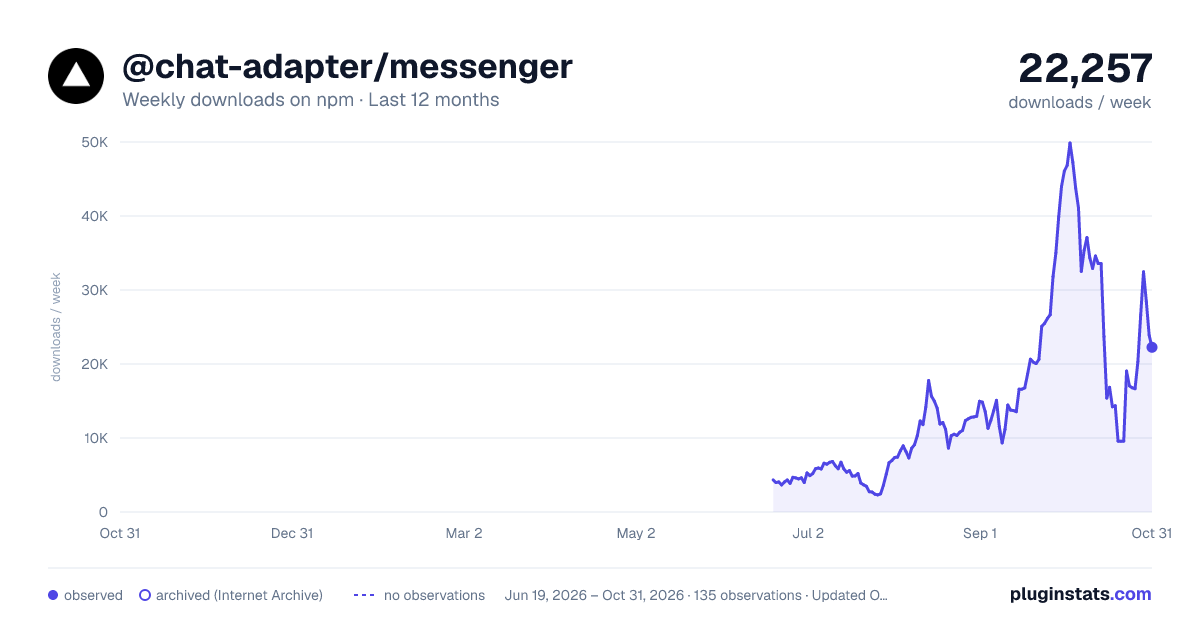
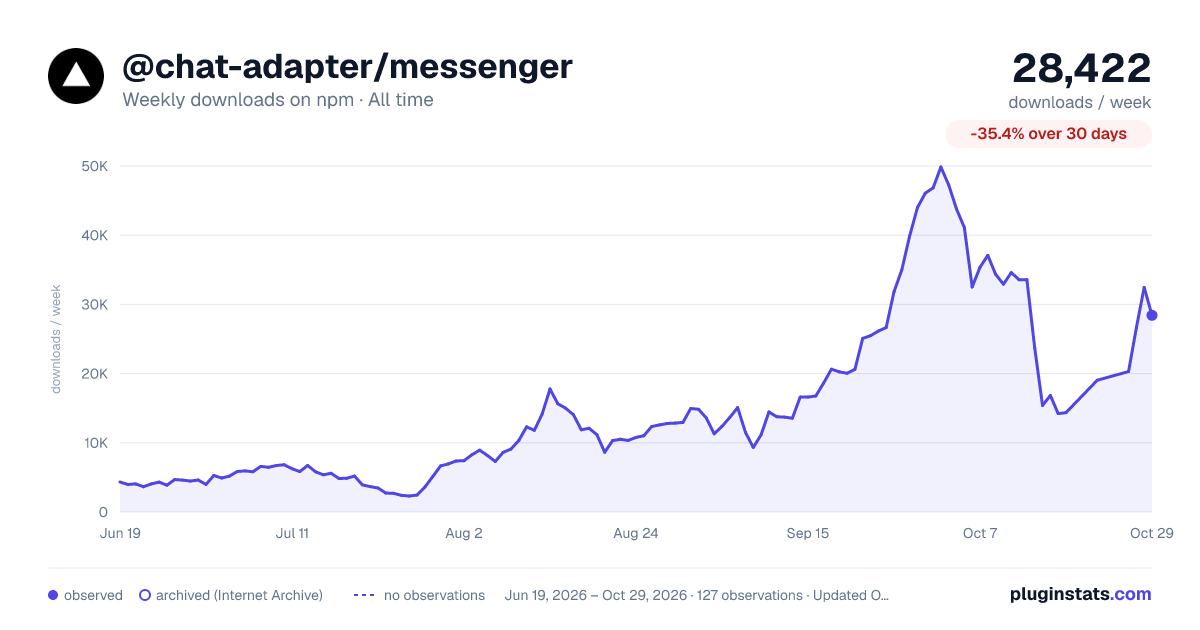

Adoption over time
7/30/90-day growth
Ranking history
Listing placement
Listing placement
Filled points are observed values; hollow points come from Internet Archive snapshots of the listing page. Dashed segments span periods with no observations — values between points are not interpolated.
Each band is one page of 20. Weekly downloads on a linear scale. Placement is projected from weekly downloads, so it can differ from the marketplace's own sort order. Hover a dot to see the listing.
Recent observations
Full history (122)Similar npm AI SDKs plugins
All 20 @chat-adapter/messenger alternativesData source
Weekly downloads (trailing 7 complete days) come from the official npm downloads API. Downloads include CI and mirrors and are not equivalent to installs or users. npm publishes no ratings.
Listing: https://www.npmjs.com/package/@chat-adapter/messenger. First seen Oct 16, 2026; last successful collection Oct 20, 2026. See the methodology.