 PluginStats
opencode-cmd-provider weekly downloads statistics
By rashidrazak · npm · AI SDKs
Command Code provider + plugin for opencode
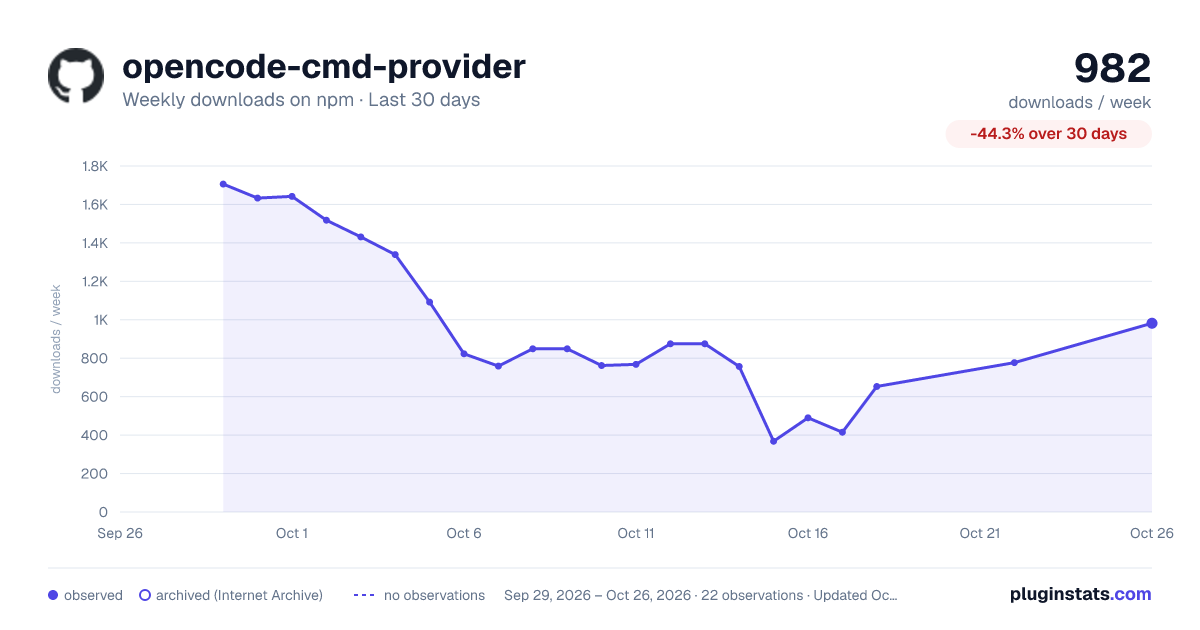
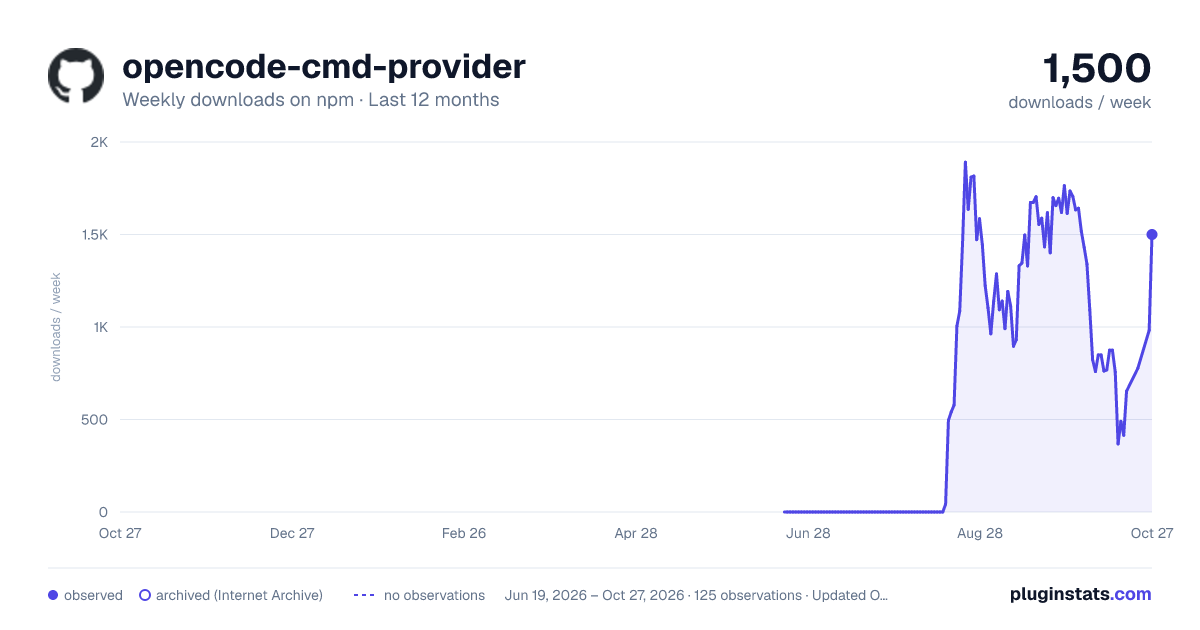
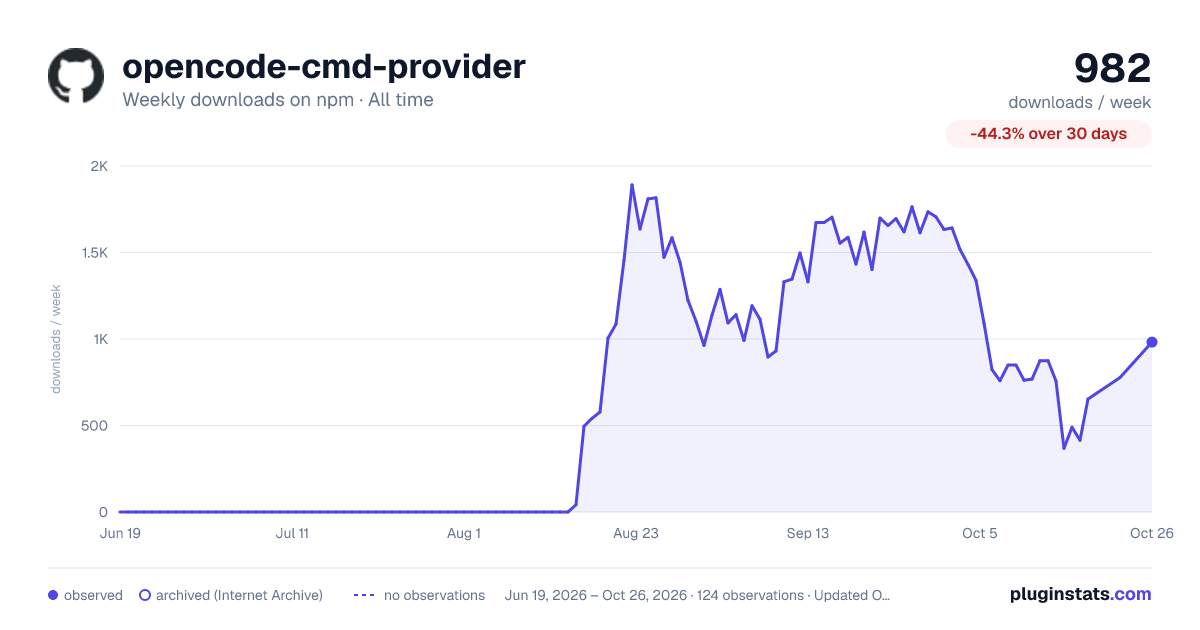
opencode-cmd-provider has 415 recorded weekly downloads on npm, a decrease of 73.3% over the past 30 days.
It ranks #1518 of 2,256 tracked npm listings by weekly downloads.
PluginStats has 121 daily observations since Jun 19, 2026; the latest is from Oct 17, 2026.
About opencode-cmd-provider
opencode-cmd-provider
Use your Command Code plan inside OpenCode.
This plugin connects OpenCode to Command Code and adds every Command Code model to the model picker, so you can use your Go, GOAT, Pro, Max 10×, Max 20×, Provider, Team, or Enterprise plan from OpenCode. It also adds the **Rates & usage panel — a Command Code** section in the session sidebar — with your plan's allowances, benchmarks, current deals, and live usage.
Disclaimer: This is an unofficial, community-maintained integration. It is not affiliated with, endorsed by, or supported by Command Code. You need your own Command Code account, and Command Code's terms, availability, and pricing apply.
Before you start
• OpenCode installed — opencode.ai. • A Command Code account and API key — commandcode.ai.
Not sure which OpenCode version you have? Run:
• Prints 1.18.x (or lower) → follow Install on OpenCode v1. • Prints 2.0.x → follow Install on OpenCode v2.
Install on OpenCode v1
Run it inside the project where you want the plugin, or add --global to make it available in every project:
That one command adds the plugin to your OpenCode configuration, registers Command Code and all of its models, and adds the sidebar section. **Restart OpenCode** when it finishes.
Install on OpenCode v2
OpenCode v2 uses a different command — note the add:
This adds the plugin to your global OpenCode configuration, so it works in every project, registers Command Code and all of its models, and adds the sidebar section. Restart OpenCode when it finishes.
If an install command fails on your machine, you can add the plugin to your configuration by hand — see Installation mechanics in the technical reference.
Connect your Command Code account
OpenCode v1: sign in from the browser
In OpenCode, run:
Select Command Code in the provider list, then pick how to sign in:
• Command Code — the browser flow. Finish the sign-in in your browser; the key is stored by OpenCode and reused from then on. Take your time: the plugin waits up to five minutes for the browser to hand the key back, so there is no rush picking an organization or approving access. • Command Code API key — paste the key the Command Code studio shows you. Use this when the browser cannot reach OpenCode's localhost callback, for example when OpenCode runs on a remote host.
OpenCode v2: use your API key
OpenCode v2 has no browser sign-in for Command Code. Set your API key before starting OpenCode:
Or run /connect inside OpenCode and paste the key when asked.
Already signed in with the Command Code CLI?
OpenCode reuses an existing Command Code CLI login automatically, so you may not need to connect at all.
Start using it
1. Pick a model: run /models and choose any entry starting with [CMD], for example [CMD] Claude Sonnet 5. 2. Start chatting. Your Command Code plan handles the requests.
Prefer the command line? Run a single prompt without the interactive interface:
What you get
The Rates & usage panel
While a session uses a [CMD] model, the sidebar shows the Rates & usage panel (titled Command Code) for that model, split into segments:
• tier and status • an Allowance section listing the Go, GOAT, Pro, Max 10×, Max 20× and Team Pro monthly allowances • a Rates section with the published rate bands — peak/off-peak for time-of-day pricing (DeepSeek) and context-window tiers (OpenAI, Grok, Qwen) — each band showing input, output, cache-read and cache-write rates per million tokens, plus the peak windows; a model with no published band shows its actual per-million price instead • an Other Information section with benchmark scores (intelligence, tokens/second), current deals and was/now rates • a Usage section with live 5-hour, weekly and monthly usage plus the current cycle's requests, tokens and spend, read from the account you're connected with and refreshed as you work (never polled)
Every row is always shown: when a model has nothing for a row, its value reads N/A instead of the row disappearing.
Don't need every segment? Type /cmd-rates-usage in the prompt — or run **Show, hide and reorder sidebar content** from the command palette (ctrl+p) — then: press space to show or hide the selected segment, shift+↑/↓ to move it, r to restore the default layout. Your choices are remembered per machine. The blank line between segments is kept, and with every segment hidden the whole section disappears.
Toggle the sidebar with ctrl+x b. Switch to a model that isn't from Command Code and the section disappears — there is nothing to show for other providers.
Plan and deal summaries
Ask OpenCode something like _"Which Command Code plan am I on?"_ or _"How many requests does my Command Code plan cover this month?"_ and it uses the built-in cmd_plan_summary tool: the plan and account the current credential resolves to (or the plan you pinned), its allowances and the current deals, turned into an estimate. If you want to force a plan, add it to the question (for example plan=pro) — a plan pinned that way is marked (pinned) in the header, so it never reads as a plan that was detected.
The summary always says where the credential came from — your OpenCode connection, COMMANDCODE_API_KEY, a legacy Command Code auth file, or the plan you pinned — and names the account it answered for when the API reports one. So an answer that came from a different account than the one you signed in with is visible instead of silent.
Everyday details…
Description from the npm listing.
- opencode
- opencode-plugin
- commandcode
- provider
- ai-sdk
Charts
Images: 30d · 1y · all time · 1600×900 dark

Adoption over time


7/30/90-day growth


Ranking history


Listing placement


Filled points are observed values; hollow points come from Internet Archive snapshots of the listing page. Dashed segments span periods with no observations — values between points are not interpolated.
Each band is one page of 20. Weekly downloads on a log scale. Placement is projected from weekly downloads, so it can differ from the marketplace's own sort order. Hover a dot to see the listing.
Recent observations
Full history (121)Similar npm AI SDKs plugins
All 20 opencode-cmd-provider alternativesData source
Weekly downloads (trailing 7 complete days) come from the official npm downloads API. Downloads include CI and mirrors and are not equivalent to installs or users. npm publishes no ratings.
Listing: https://www.npmjs.com/package/opencode-cmd-provider. First seen Oct 16, 2026; last successful collection Oct 19, 2026. See the methodology.