 PluginStats
@piotr-agier/google-drive-mcp weekly downloads statistics
By piotr-agier · npm · MCP servers
Secure access to Google Drive, Docs, Sheets, Slides, and Calendar through MCP.
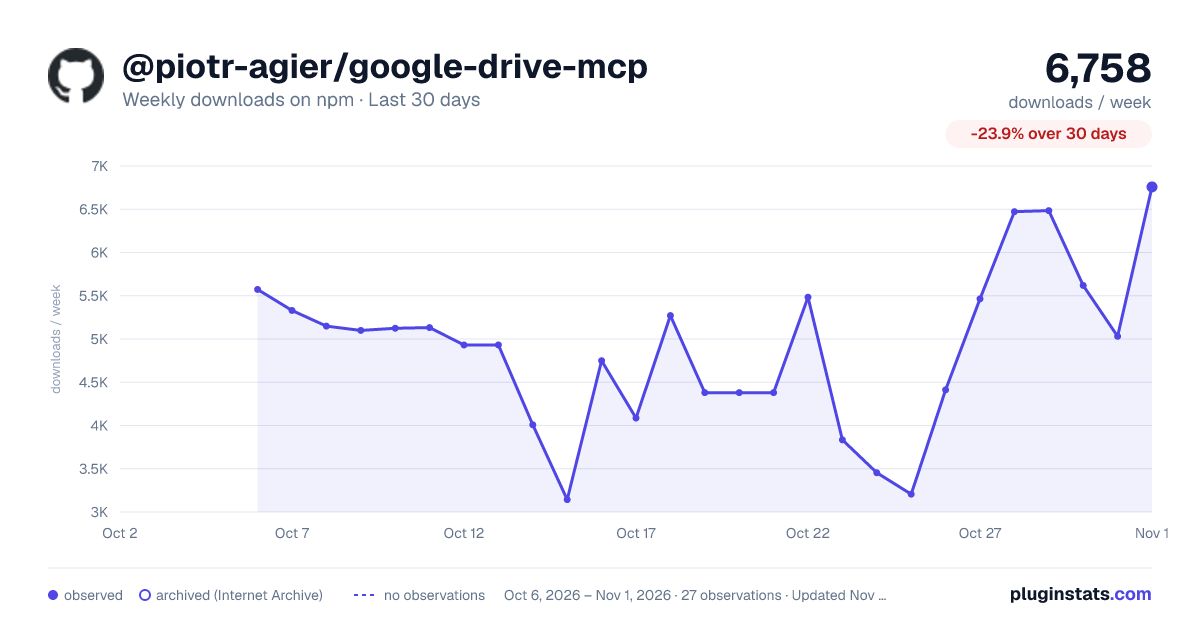
@piotr-agier/google-drive-mcp has 4,086 recorded weekly downloads on npm, a decrease of 58.8% over the past 30 days.
It ranks #1141 of 2,251 tracked npm listings by weekly downloads.
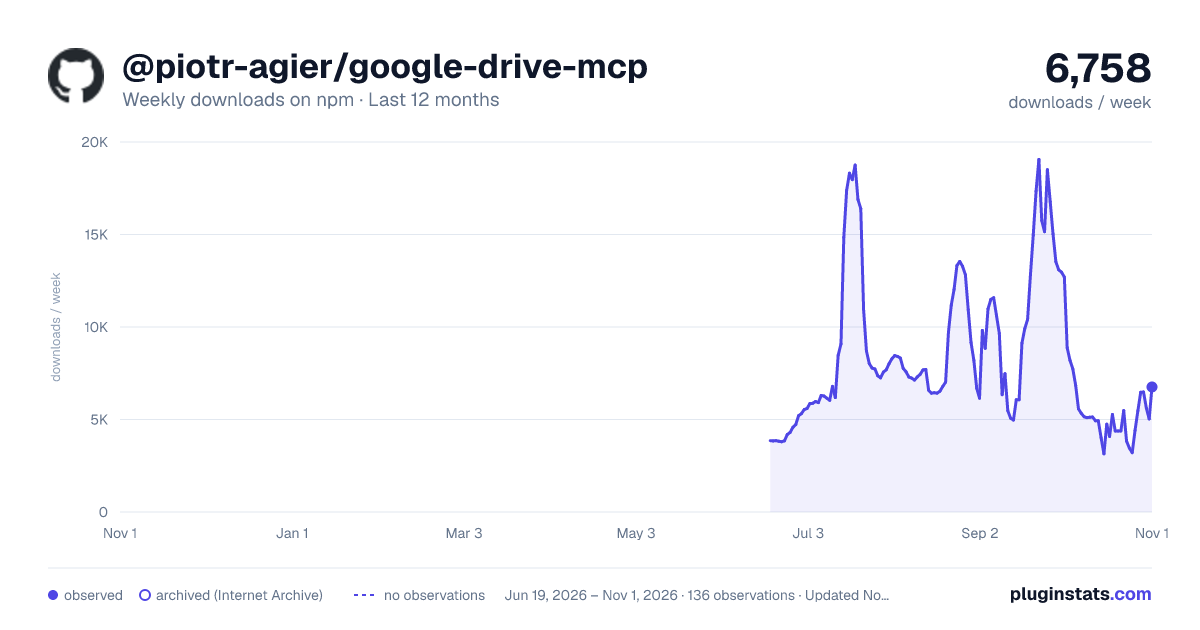
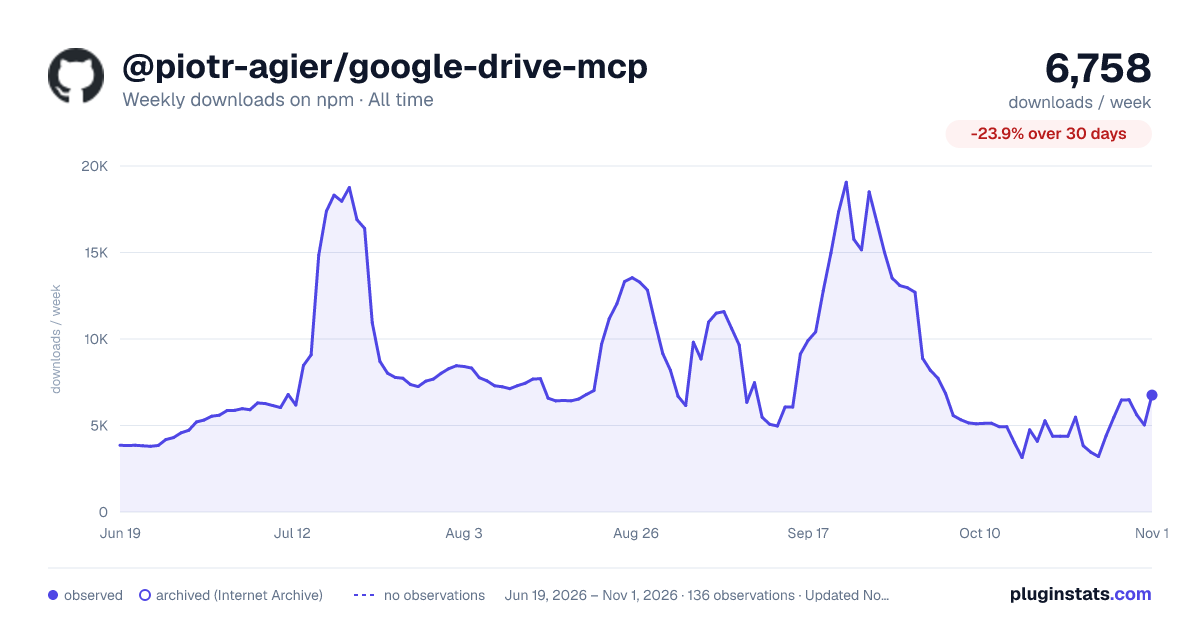
Over 90 days, weekly downloads changed by -78.2%.
PluginStats has 121 daily observations since Jun 19, 2026; the latest is from Oct 17, 2026.
About @piotr-agier/google-drive-mcp
Google Drive MCP Server
Connect an MCP client to Google Drive, Docs, Sheets, Slides, and Calendar through one self-hosted server. Search and organize files, create and edit Workspace content, manage sharing, and automate multi-step workflows while keeping control of the Google identity and credentials used for every call.
Why this server
• Drive-first workflows: 130 tools cover file management, Shared Drives, permissions, revisions, rich Docs editing, Sheets formatting, Slides authoring, and Calendar events. • Local or hosted: use stdio for a personal desktop client, Streamable HTTP for a hosted integration, or OAuth-protected team mode for a shared service. • Identity control: local OAuth supports multiple Google accounts and per-tool account selection; service accounts and externally managed OAuth tokens are also supported. • Agent-friendly access: tools expose targeted operations, while the optional gdrive:/// resource interface supports direct reading and discovery. • Open and self-hosted: credentials and tokens stay in the environment you operate.
This project remains focused on deep Drive and editor workflows rather than attempting to expose every Google Workspace API.
Client compatibility
Compatibility is determined by the transport and authentication flow a client supports.
| Client type | Transport | Recommended mode |
| Claude Desktop | stdio | Local OAuth | | Other local MCP clients, including Gemini CLI | stdio | Local OAuth | | claude.ai custom connectors | Streamable HTTP | Team mode | | Other remote MCP clients | Streamable HTTP | Single identity behind access control, or team mode with OAuth 2.1 |
See Client configuration for configuration examples and transport requirements.
Quick start
1. Create Google OAuth credentials
In a Google Cloud project:
1. Enable the Drive, Docs, Sheets, Slides, and Calendar APIs. 2. Configure the OAuth consent screen and add your Google account as a test user when the app is in testing. 3. Create an OAuth client with application type Desktop app. 4. Download the JSON file and save it as:
The setup guide has the complete Google Cloud walkthrough and alternative credential locations.
2. Authenticate
Complete the Google consent flow in the browser. Tokens are stored by default at ~/.config/google-drive-mcp/tokens.json.
3. Add the server to your MCP client
For clients that use the common mcpServers configuration shape:
Restart the client after saving its configuration. Claude Desktop paths and HTTP examples are documented in Client configuration.
4. Make a first tool call
Ask your client:
Then try a read-only Drive request:
If the identity is wrong or search returns no files, use the troubleshooting guide.
What you can do
Organize Drive
Build a report
Edit a document
Prepare a meeting
Documentation
Every section that used to live in this README is now in one of these guides.
| Guide | Contents |
| Setup | Requirements, Google Cloud APIs, OAuth credentials, and installation | | Client configuration | Supported transports and client configuration | | Authentication | Local OAuth, multi-account, service accounts, external tokens, and scopes | | Configuration | CLI flags, environment variables, defaults, and precedence | | Deployment | Docker, Streamable HTTP, team mode, and reverse-proxy security | | Tool reference | All Drive, Docs, Sheets, Slides, Calendar, and account tools | | Troubleshooting | Authentication, API, identity, Docker, and rate-limit problems | | Development | Repository structure, build commands, tests, and contributions |
Security
• Never commit OAuth credentials, service-account keys, access tokens, refresh tokens, or tokens.json. • Use the narrowest OAuth scopes that support the tools you need. • Keep the default HTTP bind address on 127.0.0.1 unless the server is protected by TLS and access control. • Use team mode for shared deployments so every request is authenticated as its caller. • Treat team-store.json as a secret because it contains members' Google refresh tokens.
See Authentication and Deployment for the complete security and identity model.
Development and support
See the development guide to build and test the project.
• Report defects and request features in GitHub Issues. • Review released changes in the changelog. • Contributions are welcome through pull requests.
License
MIT
Acknowledgments
• Built on the Model Context Protocol. • Uses the Google APIs Node.js Client.
Description from the npm listing.
- mcp
- model-context-protocol
- claude
- google-drive
- google-docs
- google-sheets
- google-slides
- google-workspace
- ai
- llm
- integration
- oauth2
- file-management
- document-automation
Where @piotr-agier/google-drive-mcp sits in the listing
Each band is one page of 20. Weekly downloads on a log scale. Placement is projected from weekly downloads, so it can differ from the marketplace's own sort order. Hover a dot to see the listing.


Charts
Images: 30d · 1y · all time · 1600×900 dark

Adoption over time


7/30/90-day growth


Filled points are observed values; hollow points come from Internet Archive snapshots of the listing page. Dashed segments span periods with no observations — values between points are not interpolated.
Recent observations
Full history (121)Similar npm MCP servers plugins
Data source
Weekly downloads (trailing 7 complete days) come from the official npm downloads API. Downloads include CI and mirrors and are not equivalent to installs or users. npm publishes no ratings.
Listing: https://www.npmjs.com/package/@piotr-agier/google-drive-mcp. First seen Oct 16, 2026; last successful collection Oct 18, 2026. See the methodology.