 PluginStats
@cloudbase/cloudbase-mcp weekly downloads statistics
By cloudbase · npm · MCP servers
CloudBase MCP Server — operate Tencent CloudBase (database, auth, functions, storage, hosting) from AI coding tools via the Model Context Protocol. Part of CloudBase AI Toolkit.
@cloudbase/cloudbase-mcp has 11,553 recorded weekly downloads on npm, a decrease of 67.0% over the past 30 days.
It ranks #875 of 2,256 tracked npm listings by weekly downloads.
Over 90 days, weekly downloads changed by +18.4%.
PluginStats has 543 daily observations since Apr 23, 2025; the latest is from Oct 17, 2026.
About @cloudbase/cloudbase-mcp
@cloudbase/cloudbase-mcp
MCP Server for Tencent CloudBase. Part of CloudBase AI Toolkit.
Operate CloudBase from AI coding tools: login, databases, functions, storage, hosting, and logs—via the Model Context Protocol.
English · 简体中文 · Toolkit README · [Docs][docs] · [Changelog][changelog] · [Issues][github-issues-link]
[![][npm-version-shield]][npm-link] [![][npm-downloads-shield]][npm-link] [![][github-stars-shield]][github-stars-link] ![][github-license-shield]
What this package is
@cloudbase/cloudbase-mcp is the npm distribution of the CloudBase MCP Server. It is one piece of the Toolkit:
| Piece | Role |
| Plugin | Installs MCP + Skills + Hooks together | | Agent Skills | Scenario skills toward workable CloudBase practice | | MCP (this package) | Tools the agent calls to act on your CloudBase environment |
Prefer Plugin when your IDE supports it. Use this package alone when you only need MCP config.
Full Toolkit narrative, related repos, and IDE matrix: repository README.
Quick start
First prompts:
You need a CloudBase environment and should confirm sensitive actions the AI proposes.
Other install paths
| Path | When |
| Official MCP Registry io.github.TencentCloudBase/cloudbase-mcp | Discover via registry search=cloudbase | | npx plugins add TencentCloudBase/cloudbase-plugin | Open Plugin Spec tools | | npm i -g @cloudbase/cli && tcb ai | CloudBase AI CLI configures many IDEs | | Marketplace / built-in plugin | Claude Code, Codex, CodeBuddy, WorkBuddy, Doubao, MiniMax Code, DeepSeek Harness, Kimi Code, Kimi Work, ZCode, etc. |
Connection modes
Remote (recommended): your IDE connects over HTTP to Tencent Cloud MCP. No local Node, and interactive clients finish authorization in the browser.
| Site | MCP endpoint |
| China (domestic) | https://tcb-api.cloud.tencent.com/mcp/v1 | | International | https://tcb-api.tencentcloud.com/mcp/v1 |
Pick the endpoint matching the site your environment lives in—the two sites use separate accounts and credentials.
OAuth (interactive, recommended): the URL is the whole configuration—your IDE opens the browser for login and consent, and you pick the environment there. No keys land in config files, and there is nothing to rotate.
Static credentials (for a client without OAuth, and for CI/CD): append env_id and a key pair created on the same site as the endpoint.
A static key pair stays valid until it is rotated or deleted; an OAuth session ends when you log out. Use the static form only where the browser flow is impossible—and keep it out of a repository.
Local: runs npx @cloudbase/cloudbase-mcp@latest on your machine—full features, including local filesystem upload and template download. Requires Node.js v18.15.0+.
Remote trade-off: local-filesystem features (upload, template download) are unavailable, and the international site does not yet expose NoSQL tools.
Remote URLs accept site for one case only—a China-site environment in ap-singapore, where the region is ambiguous—plus enable_plugins / disable_plugins (comma-separated). Canonical plugin names: see src/server.ts in this package (e.g. env, database, functions, hosting, storage, pg_database, cloudrun, logs, feedback).
Self-hosted Cloud Mode: set CLOUDBASE_MCP_CLOUD_MODE=true (or MCP_CLOUD_MODE=true) so local file and process tools are disabled for remote callers.
| Scenario | Suggestion |
| Personal / fastest start | Remote URL (OAuth) | | Need local file features | Local npx | | CI / automation | Remote + static credentials | | Self-hosted MCP | Cloud Mode required |
Site & region
Set TCB_SITE (domestic / intl) to select the login/credential site, and TCB_REGION for API routing. The domestic and international sites are separate account systems. ap-singapore exists on both, so domestic-site Singapore users must set TCB_SITE=domestic; otherwise it defaults to intl. Project-level .cloudbase/project.json ({ site, region, envId }) is also supported.
In remote mode the site is determined by the endpoint host itself—tcb-api.cloud.tencent.com is the China site, tcb-api.tencentcloud.com is the international site—and there is no site query parameter to set. This holds for a China-site environment in ap-singapore too: keep using the China-site endpoint. Self-hosted Cloud Mode deployments can still use the TCB_SITE environment variable.
Experimental: MCP Apps panels (off by default)
auth, queryEnv and the deploy tools can render MCP Apps panels (ui://cloudbase/*) in hosts that support them. This is experimental and switched off by default: with no environment variable set, no ui:// resource is registered and no tool carries _meta.ui, so a host sees an ordinary MCP server and results stay plain JSON text.
Turn it on with CLOUDBASE_MCP_UI=on (also accepts 1 / true / yes / enabled). Anything else — off, 0, false, no, disabled, or a typo — leaves it off. Tools behave identically either way; the flag only decides whether panels are offered.
Capabilities
Typical backend work in your environment (confirm critical steps):
• Database: PostgreSQL and document DB, data models, CRUD, permissions • Compute: cloud functions / Cloud Run—author, deploy, invoke, debug • Auth & storage: login methods, object storage, permission linkage • Release & ops: static hosting / Mini Program publish; logs and redeploy
Tool catalog: MCP tools · tools.json
Confirmations before destructive calls…
Description from the npm listing.
- mcp
- model-context-protocol
- cloudbase
- tencent-cloud
Charts
Images: 30d · 1y · all time · 1600×900 dark
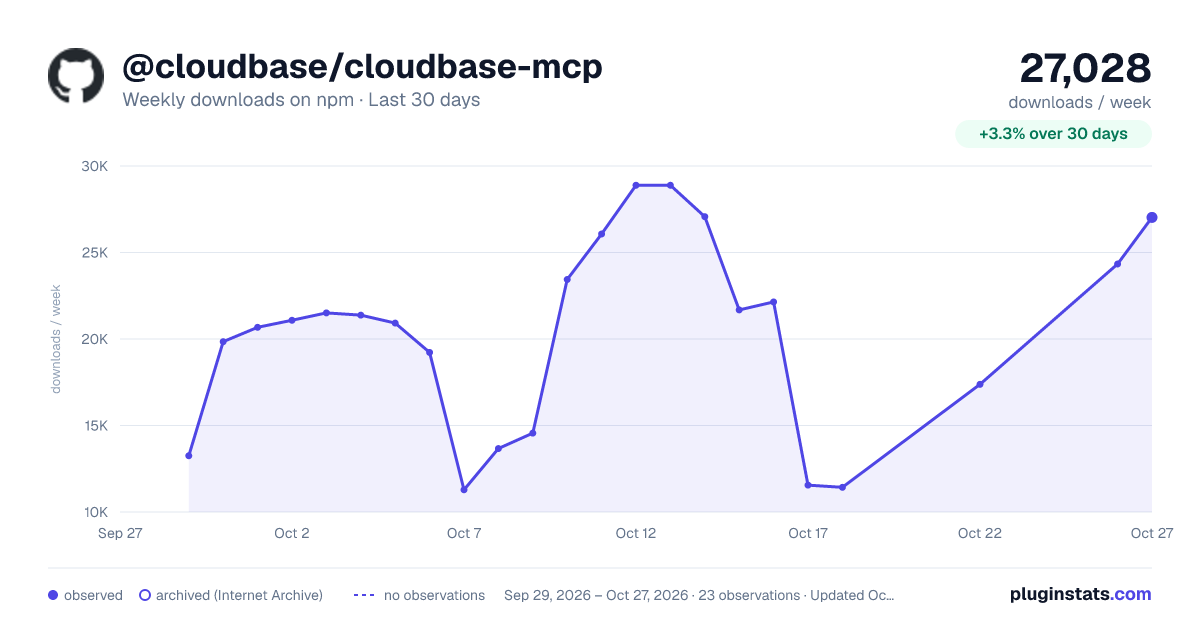
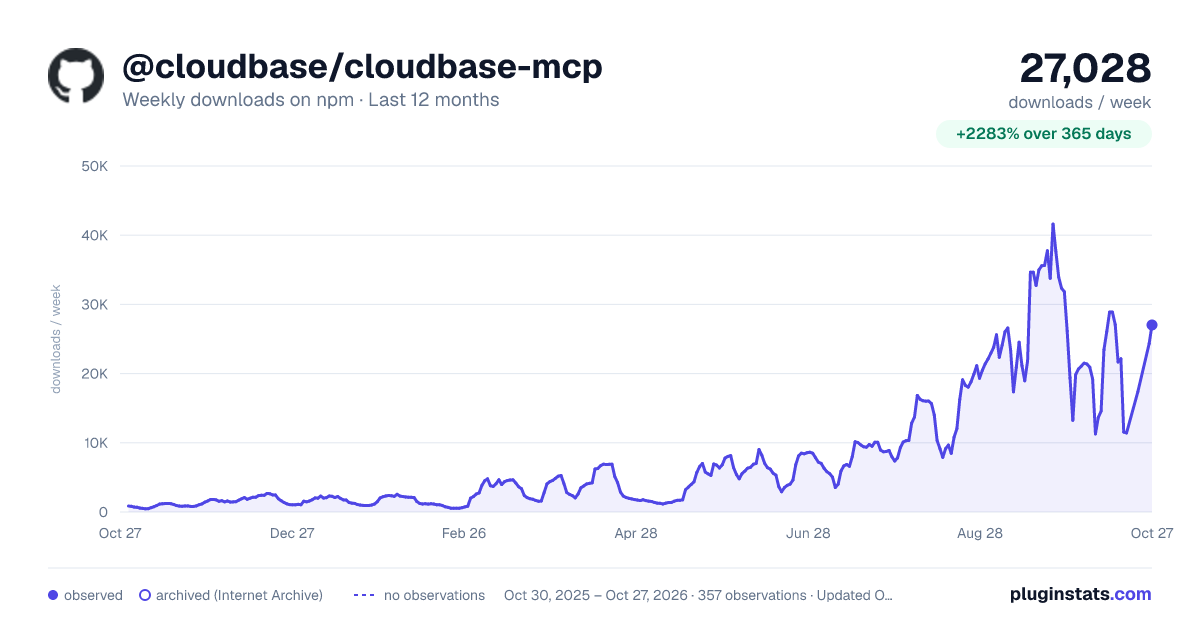
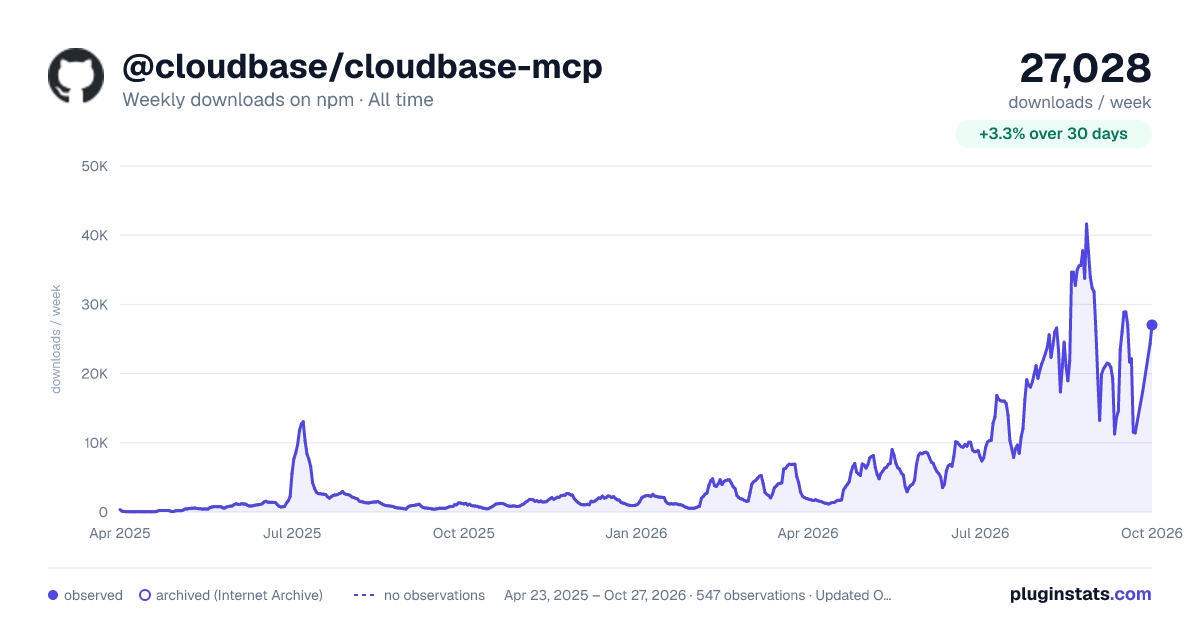

Adoption over time


7/30/90-day growth


Ranking history


Listing placement


Filled points are observed values; hollow points come from Internet Archive snapshots of the listing page. Dashed segments span periods with no observations — values between points are not interpolated.
Each band is one page of 20. Weekly downloads on a log scale. Placement is projected from weekly downloads, so it can differ from the marketplace's own sort order. Hover a dot to see the listing.
Recent observations
Full history (543)Similar npm MCP servers plugins
All 20 @cloudbase/cloudbase-mcp alternativesData source
Weekly downloads (trailing 7 complete days) come from the official npm downloads API. Downloads include CI and mirrors and are not equivalent to installs or users. npm publishes no ratings.
Listing: https://www.npmjs.com/package/@cloudbase/cloudbase-mcp. First seen Oct 16, 2026; last successful collection Oct 19, 2026. See the methodology.