 PluginStats
aiwg weekly downloads statistics
By jmagly · npm · Claude Code
Reusable project context and specialist workflows for the AI tools you already use. AIWG places agents, skills, commands, and rules in provider-readable locations, with optional utilities for artifact memory, workflow orchestration, recovery, and discover
aiwg has 5,342 recorded weekly downloads on npm, a decrease of 43.8% over the past 30 days.
It ranks #1075 of 2,251 tracked npm listings by weekly downloads.
Over 90 days, weekly downloads changed by +89.7%.
PluginStats has 543 daily observations since Apr 23, 2025; the latest is from Oct 17, 2026.
About aiwg
AIWG
Reusable project context and specialist workflows for the AI tools you already use.
Plan software, coordinate specialist reviews, prepare campaigns, investigate incidents, organize research, curate media, and maintain operational knowledge. AIWG combines agents, skills, rules, templates, and workflow utilities around these tasks, adapting them to your existing AI provider.
Project artifacts carry decisions from one session to the next. Domain frameworks supply the procedures; addons extend them with writing profiles, task loops, memory, testing tools, decision support, and other capabilities. The sections below show what you can do, how the pieces work together, and how to use them.
The simplest setup is to paste this into a supported AI provider:
The installer detects old, broken, duplicate, and development-mode installs, then guides you through repair or update. It deploys the preferred complete system with one self-verifying aiwg use all command. That command refreshes the indices, regenerates project context, verifies the resulting deployment, and reports whether a provider reload is actually required.
For long-running agents that need an isolated executor, optionally install AIWG Cockpit with a self-hosted Agentic Sandbox executor you control and audit:
This option audits the host, installs the approved Docker or KVM/libvirt runtime and sandbox prerequisites, connects Cockpit to the real executor, applies your resource and access choices, and verifies the control and audit path end to end.
If you prefer to install manually:
Replace with your AI tool's name, such as claude, codex, copilot, cursor, omp, or pi.
The final command deploys, indexes, connects, verifies, and reports one outcome. The standalone index, regenerate, status, and doctor commands remain available for advanced maintenance and troubleshooting; they are not extra install steps.
For the complete beginner path and provider-name table, see Install, Connect, and Verify.
For a lightweight install that resolves signed, versioned resources from the release host, install the executable:
Find the architecture-evolution workflow, read its requirements, and help me apply it to this project.
See Web-Backed AIWG Resources for source selection, exact-version overrides, cache verification, offline use, and the current framework-graph constraints.
For a larger project, ask your AI assistant to establish project policy as well. The agent-led setup conversation should establish remotes, issue storage, delivery behavior, signing policy, and provider choices; the assistant discovers the project-setup workflow and handles its tools.
macOS users: if npm fails with EACCES under /usr/local/lib/node_modules, use the macOS Install Guide. Agents and stewards setting up AIWG end-to-end should use the Agentic Install Runbook.
Get Started · Features · Agents · Decision Support · Documentation · Community · Badges
Installation Troubleshooting
Optional native features
The base global install intentionally excludes native packages whose lifecycle scripts require explicit trust. Core deployment, discovery, and provider tooling work without them. Enable only the capability you need:
Enable the native features needed for interactive terminals, semantic search, or graph-backed artifacts in this workspace. Explain which dependencies are required, install only the selected features, and verify they load.
The feature installer writes a private manifest and lockfile under the AIWG user data directory and approves scripts only for that feature. Do not set a broad user-level npm allow-scripts policy. If an older install left native package files present but unbuilt, aiwg doctor reports the broken capability and the same scoped rebuild command.
macOS npm EACCES
If npm install -g aiwg fails with EACCES while writing to /usr/local/lib/node_modules/aiwg, npm is using a system-owned global install directory. The Node.js setup guide covers the supported runtime and version-manager choices. After setting up Node, run:
If Node is already installed and you need a quick recovery, one manual alternative is a user-owned npm prefix. Choose this only after checking your existing Node version-manager configuration:
See macOS Install Guide for the full walkthrough. Avoid sudo npm install -g aiwg as the default fix; it can create root-owned npm files that break later upgrades.
aiwg command not found
If aiwg is not found after npm i -g aiwg, the npm global bin directory is not on your PATH. Confirm and fix:
Diagnose why this shell cannot find AIWG. Check the npm installation and PATH, and apply the appropriate local fix.
You can also invoke AIWG without adjusting PATH by using npx aiwg doctor. For a broader health check — version, deployed providers, missing dependencies, kernel-skill probes — run aiwg doctor. See the troubleshooting guide for the full recovery paths.
What AIWG Is
AIWG gives your AI assistant reusable project context and specialist workflows. Its deployment layer connects those instructions to your provider: aiwg use copies markdown and YAML source files into the paths each provider reads, so one source of truth works across 18 named provider integrations. A nineteenth generic adapter emits portable files for unrecognized or custom harnesses and is not counted as a named integration.
Around that core, AIWG ships agent-facing utilities for work that benefits from additional structure: persistent artifact memory (.aiwg/), background orchestration, autonomous loops, artifact indexing, cost telemetry, health diagnostics, and more. These are tools the agent calls when the task calls for them — you stay in chat. Most are opt-in. The deployment layer works standalone as plain text files the platform reads natively.
Project scope, user scope, and multi-project workspaces
aiwg use supports project deployments, additive user mirrors, and a user-global bootstrap:…
Description from the npm listing.
- aiwg
- ai-agents
- multi-agent
- agentic-ai
- agent-framework
- cognitive-architecture
- claude-code
- claude-code-plugin
- claude-skills
- claude-desktop
- cursor-ide
- github-copilot
- copilot
- warp-terminal
- factory-ai
- opencode
- codex
- windsurf
- mcp-server
- model-context-protocol
Where aiwg sits in the listing
Each band is one page of 20. Weekly downloads on a log scale. Placement is projected from weekly downloads, so it can differ from the marketplace's own sort order. Hover a dot to see the listing.


Charts
Images: 30d · 1y · all time · 1600×900 dark
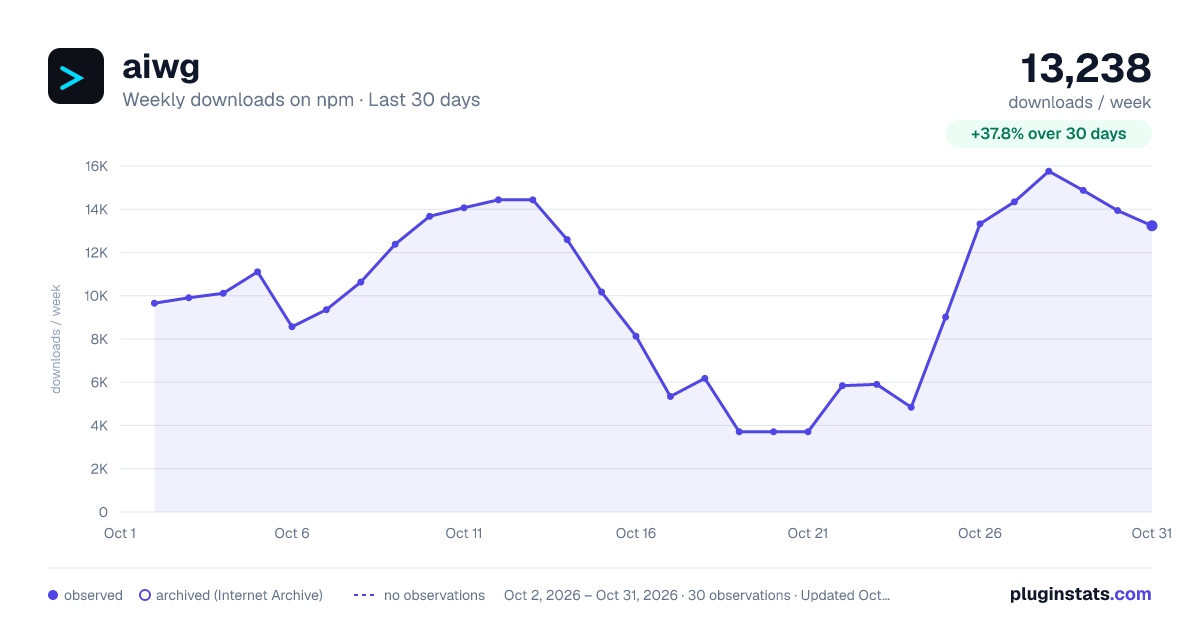
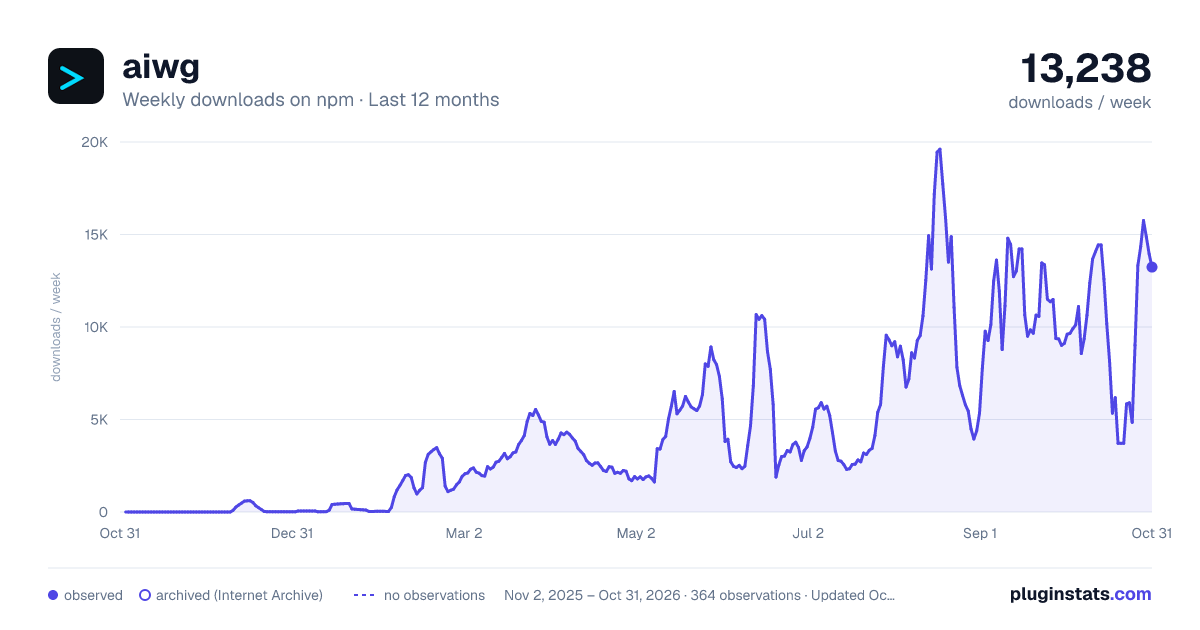
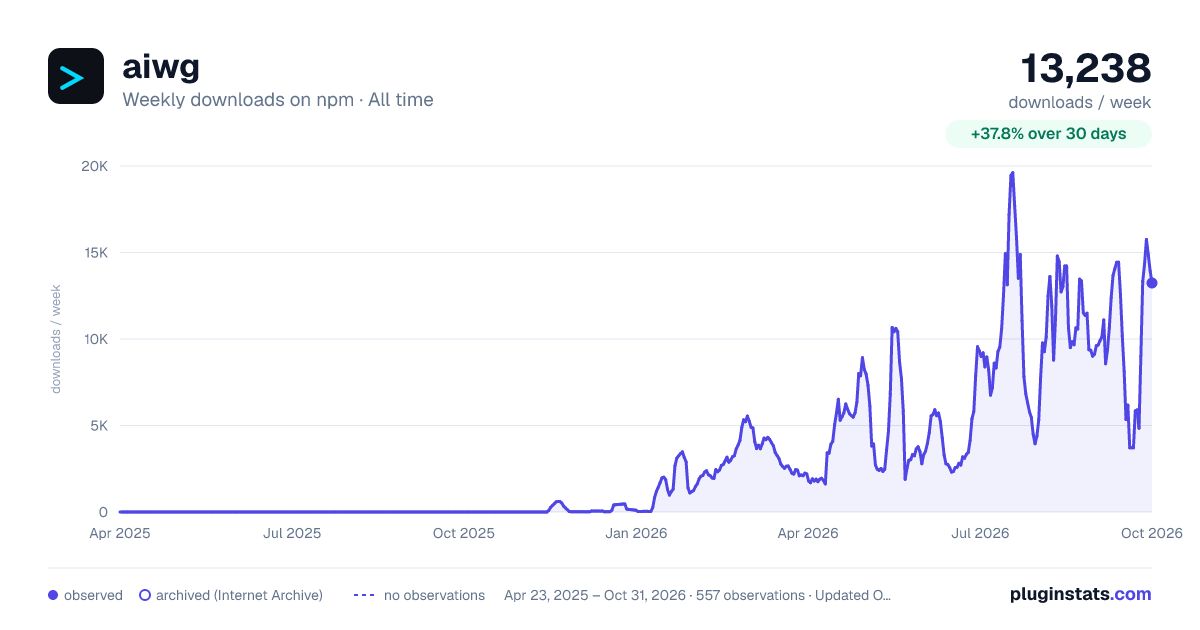

Adoption over time


7/30/90-day growth


Filled points are observed values; hollow points come from Internet Archive snapshots of the listing page. Dashed segments span periods with no observations — values between points are not interpolated.
Recent observations
Full history (543)Similar npm Claude Code plugins
Data source
Weekly downloads (trailing 7 complete days) come from the official npm downloads API. Downloads include CI and mirrors and are not equivalent to installs or users. npm publishes no ratings.
Listing: https://www.npmjs.com/package/aiwg. First seen Oct 16, 2026; last successful collection Oct 18, 2026. See the methodology.