 PluginStats
ai-resumable-stream has 548 recorded weekly downloads on npm, a decrease of 58.4% over the past 30 days.
It ranks #1486 of 2,251 tracked npm listings by weekly downloads.
Over 90 days, weekly downloads changed by -65.7%.
PluginStats has 543 daily observations since Apr 23, 2025; the latest is from Oct 17, 2026.
About ai-resumable-stream
ai-resumable-stream
AI SDK: Resume and stop UI message streams
This library provides resumable streaming for UI message streams created by streamText() in the AI SDK. The library stores chunks as they are produced. Clients can then resume an interrupted stream, and any request can stop an active stream.
You choose where the chunks are stored. The library includes adapters for Redis and S3 Express. You can also write your own adapter by implementing four methods.
Why?
A stream does not keep its data. After a chunk is sent, it is gone. This causes two problems.
Resume: The server does not record which chunks it has sent. When a client disconnects (network drop, page reload, tab switch), the stream continues on the server, but the client misses the chunks that are sent during that time. The server can only replay the missed chunks if they are stored somewhere.
Stop: The request that stops a stream is not the request that started it. When the user clicks "Stop generating", the client sends a new HTTP request, but the stream runs in a different request or process. The two requests need a shared place to pass the stop signal.
Install
Install the optional peer dependencies for the features you use:
| Package | Needed for |
| redis | ai-resumable-stream/adapters/redis | | @aws-sdk/client-s3 | ai-resumable-stream/adapters/s3-express | | ai | ai-resumable-stream/ai-sdk |
[!NOTE] Version compatibility:
- Use ai-resumable-stream@1.x for AI SDK v6 - Use ai-resumable-stream@2.x or ai-resumable-stream@3.x and later for AI SDK v7
Quick start
Create one context and reuse it for every stream.
Then use the context in your three routes:
Usage
startStream
Starts a stream and stores the chunks as they are produced. Returns the stream for the client, the stream id and the generation id.
[!TIP] The returned stream is both a ReadableStream and an async iterable, so return stream and yield* stream both work.
| Option | Type | Description |
| streamId | string | Id of the stream. Use it to resume or stop the stream. Defaults to a generated id, returned as streamId | | generationId | string | Id of this generation. Use it to resume or stop only this generation. Must be unique within the stream id. Defaults to a generated id, returned as generationId | | abortController | AbortController | Aborted when the stream is stopped. Created by the library if you do not pass one | | stopTimeoutMs | number | Time that a stop waits for the source to end before it cancels the source. Defaults to 1000 with a supplied abortController, 0 without one | | onStopSubscriptionError | (error: unknown) => void | Called when the subscription to stop requests fails. The stream continues, but it cannot be stopped | | onFinish | () => void \| Promise | Called after the source stream has ended, also after an error or a stop. Errors thrown by the callback are ignored |
Abort controller
You can always stop a stream. If you do not pass an abortController, the library creates one.
We recommend that you pass your own abortController and give its signal to streamText. A stop then aborts the request to the provider directly, and the AI SDK emits its abort chunk and calls onAbort. Without it, a stop only cancels the source stream, and the cancellation must propagate back to streamText.
Stop timeout
A stop aborts the abortController and waits up to stopTimeoutMs for the source to end. This lets streamText emit its abort chunk, so onEnd and onFinish get isAborted: true. A source that does not end in time is cancelled.
With stopTimeoutMs: 0, or without an abortController, a stop cancels the source immediately and isAborted is false.
resumeStream
Resumes an existing stream. The returned stream first replays all chunks produced so far and then continues with the new chunks. Pass generationId to resume a specific generation. Omit it to resume the current generation of the stream id. Returns null when there is nothing to resume.
The result is null in three cases. The library does not tell you which case applies:
• no stream was started with that id • the stream has already completed • the source stream failed, the producer died, or the stream was stopped before it completed
If the source stream fails, only the client that started the stream receives the error. A client that resumes while the stream is running receives the chunks produced before the failure, and then its stream ends without an error. After that, a resume returns null, the same as for a completed stream.
If your application must know whether a stream completed, failed or was cut off, store that information together with the message.
stopStream
Stops a running stream. Pass generationId to stop a specific generation. Omit it to stop the current generation of the stream id.
A stop request with a generation id can arrive before that generation listens for stop requests, or before it starts. Both included adapters store the request, and the generation stops as soon as it starts to listen. A stop request without a generation id applies to the generation that is current at the time of the request. If there is no current generation, the request is not stored and has no effect.
See Identifiers for details about stream ids and generation ids.
Identifiers
A stream has two ids. If you do not pass an id, startStream generates it and returns both ids.
• streamId identifies the stream. A stream can run more than once. Each run is a generation. • generationId identifies one generation of the stream.
Each call to startStream creates a new generation. The generation that started last is the current generation of the stream id.
[!TIP] Most applications only need the stream id. Use an id that the client already knows, for example the chat id or the session id. A client that reconnects can then call resumeStream({ streamId: chatId }) without any other id.
Stream ID
With only a stream id, resumeStream and stopStream apply to the current generation.…
Description from the npm listing.
- ai
- ai-sdk
- redis
- resumable
- resumable-stream
- s3
- stream
Where ai-resumable-stream sits in the listing
Each band is one page of 20. Weekly downloads on a log scale. Placement is projected from weekly downloads, so it can differ from the marketplace's own sort order. Hover a dot to see the listing.


Charts
Images: 30d · 1y · all time · 1600×900 dark
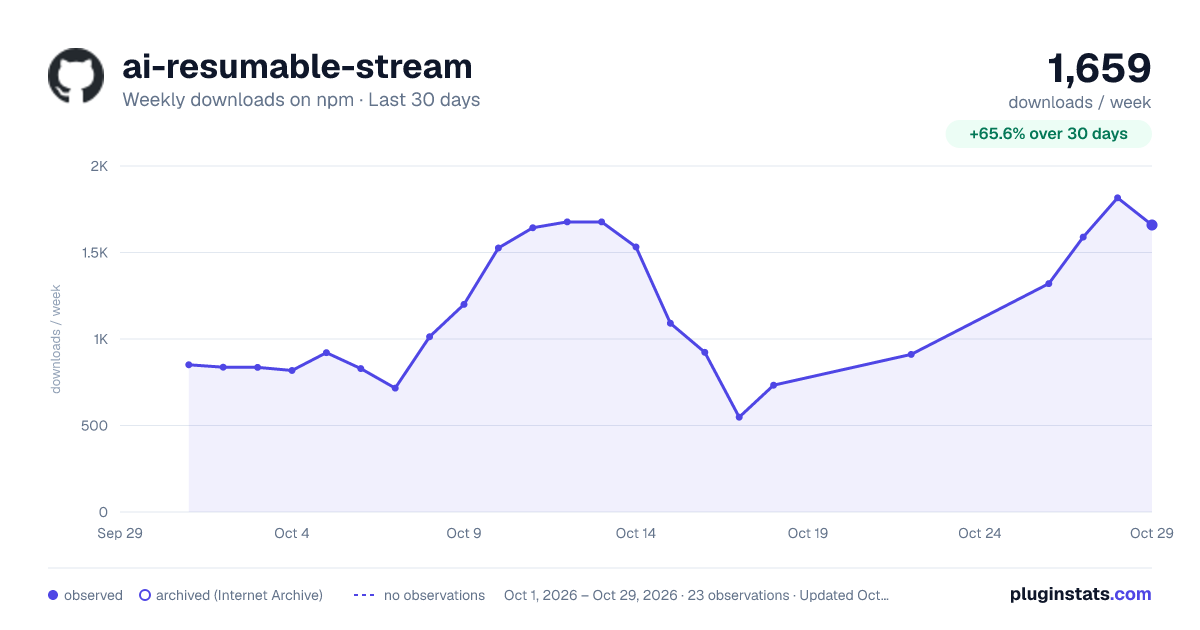
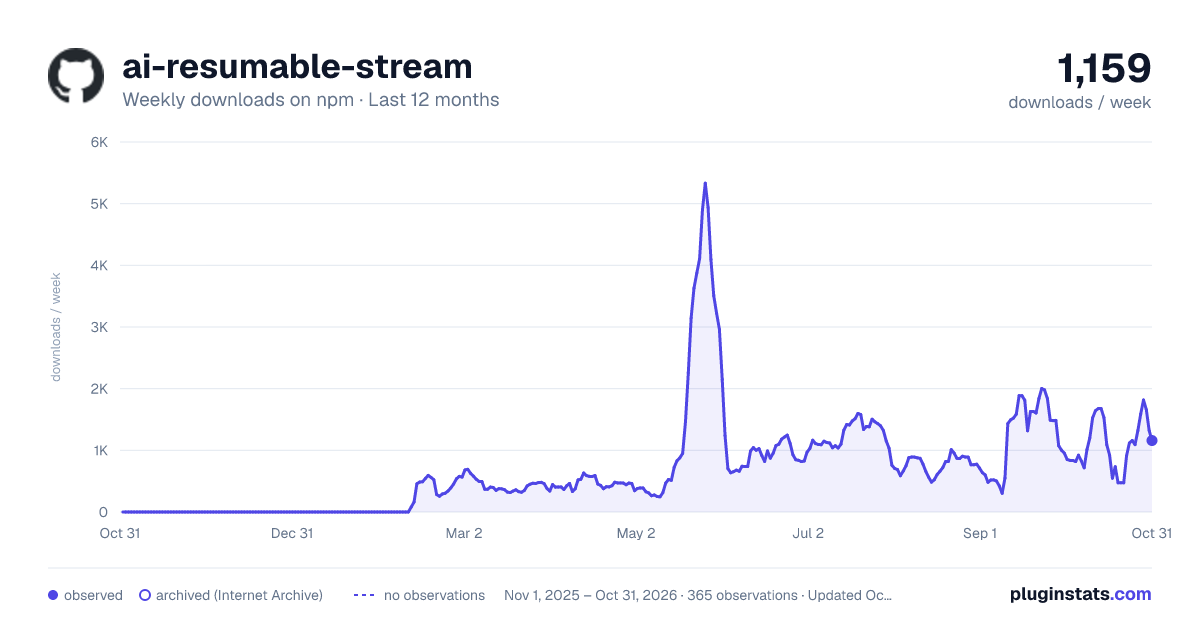
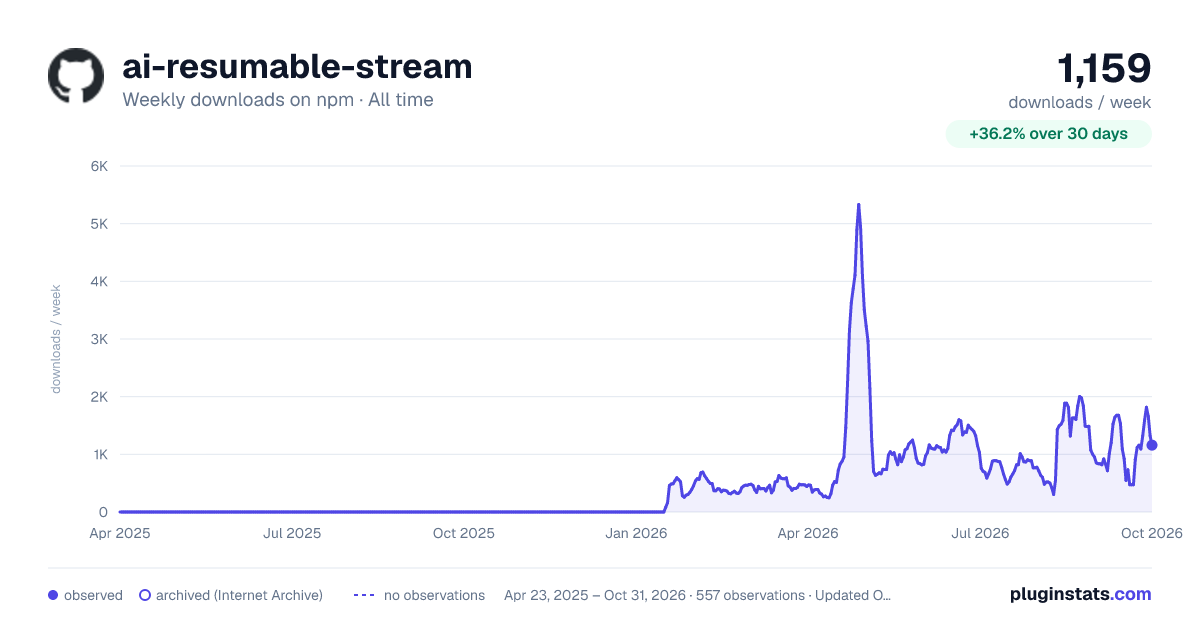

Adoption over time


7/30/90-day growth


Filled points are observed values; hollow points come from Internet Archive snapshots of the listing page. Dashed segments span periods with no observations — values between points are not interpolated.
Recent observations
Full history (543)Similar npm AI SDKs plugins
Data source
Weekly downloads (trailing 7 complete days) come from the official npm downloads API. Downloads include CI and mirrors and are not equivalent to installs or users. npm publishes no ratings.
Listing: https://www.npmjs.com/package/ai-resumable-stream. First seen Oct 16, 2026; last successful collection Oct 18, 2026. See the methodology.