 PluginStats
@agimon-ai/log-sink-mcp weekly downloads statistics
By agimon-ai · npm · MCP servers
Log sink MCP server with HTTP ingestion and AI analysis
@agimon-ai/log-sink-mcp has 5,763 recorded weekly downloads on npm.
It ranks #1049 of 2,251 tracked npm listings by weekly downloads.
PluginStats has 1 daily observations since Oct 16, 2026; the latest is from Oct 16, 2026.
About @agimon-ai/log-sink-mcp
log-sink-mcp
AI-powered log analysis MCP server with HTTP ingestion and SQLite storage.
Runtime requirement: Node.js 22.13 or newer. Log storage uses the built-in node:sqlite module, which is unavailable on Node.js 20. Other servers that use this package's /telemetry/node export may run on Node.js 20, but strict engine checks still apply to the installed log-sink package.
Agent integration: skill and CLI
Agent investigations use a log-sink skill and CLI commands, not a dedicated MCP connection. Run from the application's repository so configuration and instance resolution match the existing collector.
Use the same local/global instance selector for every query. Query commands reuse stored telemetry without starting a per-agent server. Keep the HTTP/OTEL ingestion service running under its existing lifecycle owner. Never clear logs or restart a shared collector to inspect an incident. The MCP interface documented below remains available for compatibility and transport testing.
Overview
log-sink-mcp provides a complete log analysis solution for AI assistants like Claude. It combines:
• HTTP Server: REST endpoint for log ingestion from any application • MCP Server: 5 application-focused tools for searching/filtering, tracing, and inspecting logs • CLI Analysis Commands: Local shell commands for deeper error and agent-issue analysis • Pi Extension: Ships a Pi extension that exports the agent's own session telemetry into the sink • SQLite Database: Fast local storage with FTS5 full-text search plus cached local embeddings • Real-time Analysis: Query logs, trace distributed requests, analyze error patterns
Perfect for debugging, monitoring, and understanding application behavior through AI-powered analysis.
Features
• ✅ HTTP Log Ingestion: POST logs from any application via REST API • ✅ 5 MCP Tools: Search/filter, trace, agent-issue analysis, and inspect stats/services • ✅ Agent Telemetry: Pi extension records prompts, turns, tool calls, token usage, and cost • ✅ Hybrid Search: FTS5-powered search plus optional local semantic retrieval across messages and errors • ✅ Distributed Tracing: Timeline view for trace IDs and span relationships • ✅ Error Analysis: Pattern detection and error categorization • ✅ Structured Logging: JSON metadata, trace IDs, span IDs • ✅ Auto-Migration: Drizzle ORM with automatic schema migrations • ✅ Type-Safe: Full TypeScript coverage with Drizzle schema inference
Architecture
Singleton HTTP Server Management
log-sink-mcp implements automatic singleton coordination to prevent port conflicts when multiple MCP servers run concurrently.
How It Works
1. Service Discovery: When an MCP server starts, it checks .agiflow/registry/log-sink-mcp-http_{env}.json for an existing HTTP server 2. Health Check: Pings /health endpoint to verify the registered server is alive 3. Reuse or Start: If healthy, reuses existing server; otherwise starts a new one 4. PID Tracking: Process IDs stored in .pids/ for lifecycle management 5. Auto-Cleanup: Registry and PID files removed on graceful shutdown
Service Registry Schema
Management Commands
Installation
Semantic embeddings are disabled by default. Set LOG_SINK_ENABLE_EMBEDDINGS=true to enable local model loading and semantic indexing. If ruvector-onnx-embeddings-wasm is not installed, log-sink-mcp still starts and falls back to FTS5 search only.
Quick Start
1. Start the Servers
The start command uses singleton pattern, multiple MCP servers will share a single HTTP server automatically.
Programmatic Metrics
Use the worker-backed reader when metrics are requested from a latency-sensitive process such as a TUI. SQLite queries and database lifecycle work stay in a dedicated Node worker, while repeated calls reuse the same worker and connection.
createLogMetricsReader and readLogMetrics remain available for server or worker contexts where in-process queries are appropriate.
Local vs Global Log Sink
By default, log-sink resolves to a repo-local instance. Add a .logsink.yaml file when selected MCP/tooling packages should send telemetry to a shared global instance instead:
Only exact package/service names listed in global.services use the global instance. Unlisted names stay local. If global.port is omitted, log-sink asks the port registry to allocate and register an available global port dynamically.
Config lookup uses LOG_SINK_CONFIG or --config first, then the nearest .logsink.yaml from the current directory upward, then ~/.logsink.yaml. The global instance stores its registry identity and default database under ~/.log-sink-mcp/global/.
Useful overrides:
2. Configure MCP Server
Add to your mcp-config.yaml:
3. Send Logs
4. Query with AI
Ask Claude:
"Query all error logs from the database"
"Show me the trace timeline for trace ID abc123"
"Analyze error patterns in the logs"
5. Claude Code Hook Context
Use the hook command to surface fresh errors back into Claude Code after each tool use:
The hook reads the Claude hook payload from stdin, checks the current log database, and emits additionalContext only when there are new error or fatal entries. After it notifies Claude, it advances its checkpoint so the same errors are not reported again.
HTTP API Reference
POST /logs
Ingest log entries in batch.
Request Body:
Response (201 Created):
Response (400 Bad Request):
GET /health
Health check endpoint.
Response (200 OK):
MCP Tools Reference
1. search_logs
Search and filter log entries. Without query/searchQuery, it behaves as a structured filter tool. With query or searchQuery, it searches across log messages and error messages. By default text search combines:
• FTS5 exact / keyword matching • Local semantic similarity from cached embeddings…
Description from the npm listing.
- mcp
- model-context-protocol
- pi-package
- telemetry
- typescript
Where @agimon-ai/log-sink-mcp sits in the listing
Each band is one page of 20. Weekly downloads on a log scale. Placement is projected from weekly downloads, so it can differ from the marketplace's own sort order. Hover a dot to see the listing.


Charts
Images: 30d · 1y · all time · 1600×900 dark
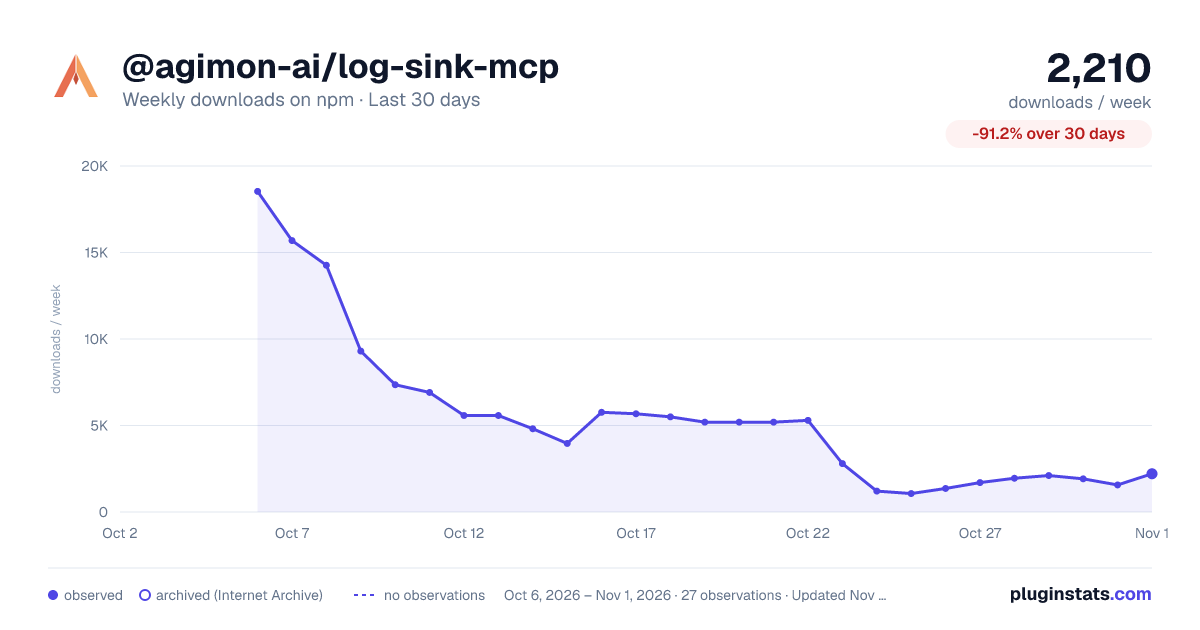
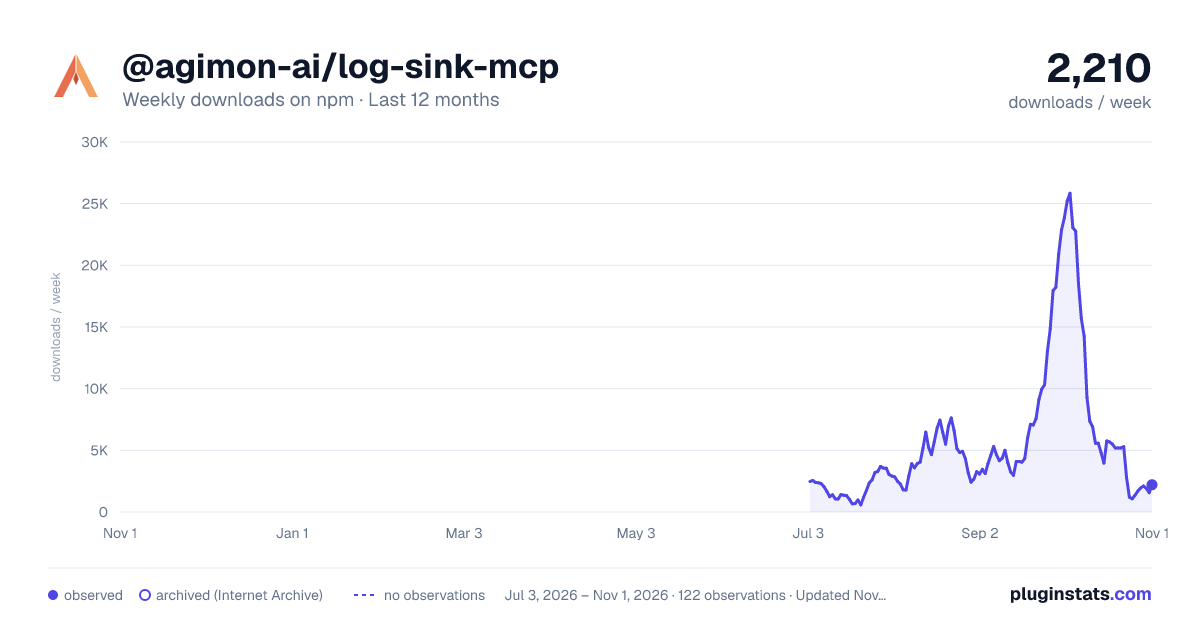
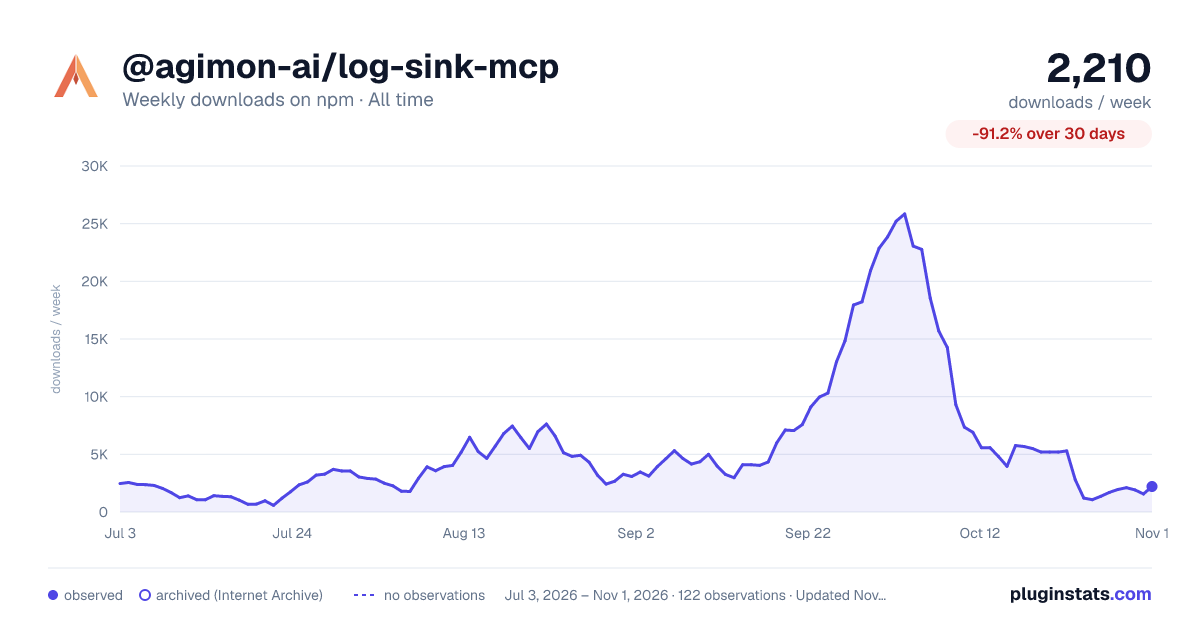

Adoption over time


7/30/90-day growth


Filled points are observed values; hollow points come from Internet Archive snapshots of the listing page. Dashed segments span periods with no observations — values between points are not interpolated.
Recent observations
Full history (1)Similar npm MCP servers plugins
Data source
Weekly downloads (trailing 7 complete days) come from the official npm downloads API. Downloads include CI and mirrors and are not equivalent to installs or users. npm publishes no ratings.
Listing: https://www.npmjs.com/package/@agimon-ai/log-sink-mcp. First seen Oct 18, 2026; last successful collection Oct 18, 2026. See the methodology.