 PluginStats
eslint-plugin-regex weekly downloads statistics
By gmullerb · npm · ESLint plugins
ESLint rules using Regular Expression
eslint-plugin-regex has 54,023 recorded weekly downloads on npm, a decrease of 59.8% over the past 30 days.
It ranks #541 of 2,251 tracked npm listings by weekly downloads.
Over 90 days, weekly downloads changed by -59.0%.
PluginStats has 121 daily observations since Jun 19, 2026; the latest is from Oct 17, 2026.
About eslint-plugin-regex
ESLint rules using Regular Expressions
Quick Start
1 . Add dependencies:
package.json:
2 . Configure eslint:
Short configuration:
.eslintrc.json:
Files will be checked for the absence of invalidRegex1 and invalidRegexN, and for the presence of requiredRegex1 and requiredRegexN, and files with name matching ignoreFilesRegex will not be checked.
Detailed configuration:
.eslintrc.json:
Files will be checked for:
• The absence of invalidRegex1 but if found it will be replaced with newValue. • The absence of invalidRegexN only in files with name not matching ignoreFilesRegexN, but if found errorMessageN will be shown. • The presence of requiredRegex1 only in files with name matching inspectFilesRegex1, but if not found errorMessage1 will be shown. • The presence of requiredRegexN only in files with name matching inspectFilesRegexA and not matching ignoreFilesRegexZ.
Goals
The idea is to allow the creation of different eslint rules based on Regular Expressions in order to have some "freedom" to create quick ESLint custom rules.
Rules
Name | Fixable | Description
regex/invalid | Yes | checks that specified patterns are not found regex/required | No | checks that specified patterns are found
Each rule defines a set of patterns:
📏 regex/invalid
This rule checks that specified patterns are not found in files, i.e. Invalid patterns.
✏ Example of incorrect code for this rule:
The error message will reflect the exact location, e.g.:
✏ Example of correct code for this rule:
📏 regex/required
This rule looks for specific patterns that must be present in each file, i.e. Required patterns.
✏ Example of incorrect code for this rule:
The error message will point to the beginning of the file, e.g.:
✏ Example of correct code for this rule:
Options
Both rule has two options:
• array of patterns definitions to analyze. [REQUIRED] • Each pattern definition can be 'Short' or 'Detailed'. • a string representing the regular expression for ignoring files for all patterns. [OPTIONAL]
The *string* representing the regular expression
Remember, Slashes (/) are not required in the string that defines the regex,
e.g. To get the following regex /^(test|spec)$/, define:
• "^(test|spec)$", when using .eslintrc.js or .eslintrc.json.
e.g. To get the following regex /\bhttp:/, define:
• "\bhttp:", when using .eslintrc.js, or • "\\bhttp:", when using .eslintrc.json. (backslash needs to be double in a json file)
e.g. To get the following regex /.*test\.js/, define:
• ".*test\.js", when using .eslintrc.js, or • ".*test\\.js", when using .eslintrc.json. (backslash needs to be double in a json file)
Short pattern definition
Each pattern is specified by just a string representing the regular expression, i.e. "regex"
Detailed pattern definition
It is specified by an object, with the following fields:
• regex: A required string for regex/required and regex/invalid representing the Regular expression to look for. [REQUIRED] • flags: A combination of flags, i, s and/or u, to be used by the Regular Expression. [OPTIONAL] • replacement for regex/invalid [1]: [OPTIONAL] • An optional string used to replace the invalid found pattern, or • An optional object that establish how the invalid found pattern will be replaced: • function: used to replace the invalid found pattern. • It will receive 3 parameters: text, captured and $, that can be used as desired. • It must return a string value, if not, return value will be ignored. • Its definition must be only the body of the function. • One must be defined, either the string or function. • id: An optional string representing the Pattern Id. [OPTIONAL] • message: An optional string specifying the Message to be shown when an error happens (invalid regex is found or required regex is not found). [OPTIONAL] • files: An optional object specifying which files to analyze: [OPTIONAL] • ignore: A string representing Regular expression of the files to be ignored when validating this specific pattern. • inspect: A string representing Regular expression of the files to be inspected when validating this specific pattern.
* regex is the only Required field. * When ignore and inspect are present, ignore takes precedence. * Global ignore file pattern, takes precedence over files patterns.
[1] In order to fix issues eslint must be run with --fix option.
Using message is pretty useful since it will give a better understanding to the developer when an error happens:
e.g. Given the following definition:
then shown error will be similar to:
or
instead of
or
Definition of the Function used to replace the *invalid* found pattern
Definition of the function must be done as a string in 1 line, and the following rules apply:
• It must return a string value, if not, return value will be ignored, i.e. it will silently fail. • Its definition must be only the body of the function. • For "simple" functions where the return is found at the beginning of the body of the function and the exact word *return* is not present, return can be omitted. • If the function has invalid Javascript code, the function will be ignored, i.e. it will silently fail.
Function will receive 3 parameters, to be used as desired:
• text: a string with the value of the invalid text found. • captured: an array of strings with the values of the captured groups for the regex. • $: an array of strings, with the value of the invalid text found plus the values of the captured groups for the regex, i.e. • $[0] = text: a string with the value of the invalid text found. • $[1..] = captured: an array of strings with the values of the captured groups for the regex. • $[1] = captured[0] and so on. • It allows smaller definitions.
Using parameter text
e.g.
"return text.trim()" => only the body of the function + returns a string value based on text
Having the following rule in .eslintrc.json:
or using $:
then, given:
example.js
when linting with fix, the result will be:…
Description from the npm listing.
- eslint-plugin-regex
- eslint
- regex-rule
- regex
- regexp
- eslint-regex
- eslint-rule
- eslint-regex-rule
- rule
- expression
- regular-expression
- eslint-regular-expression
- eslint-regular-expression-rule
- eslintrule
- regular-expression-rule
- eslintplugin
- eslint-plugin
- plugin
- coding style
- coding standards
Where eslint-plugin-regex sits in the listing
Each band is one page of 20. Weekly downloads on a log scale. Placement is projected from weekly downloads, so it can differ from the marketplace's own sort order. Hover a dot to see the listing.


Charts
Images: 30d · 1y · all time · 1600×900 dark
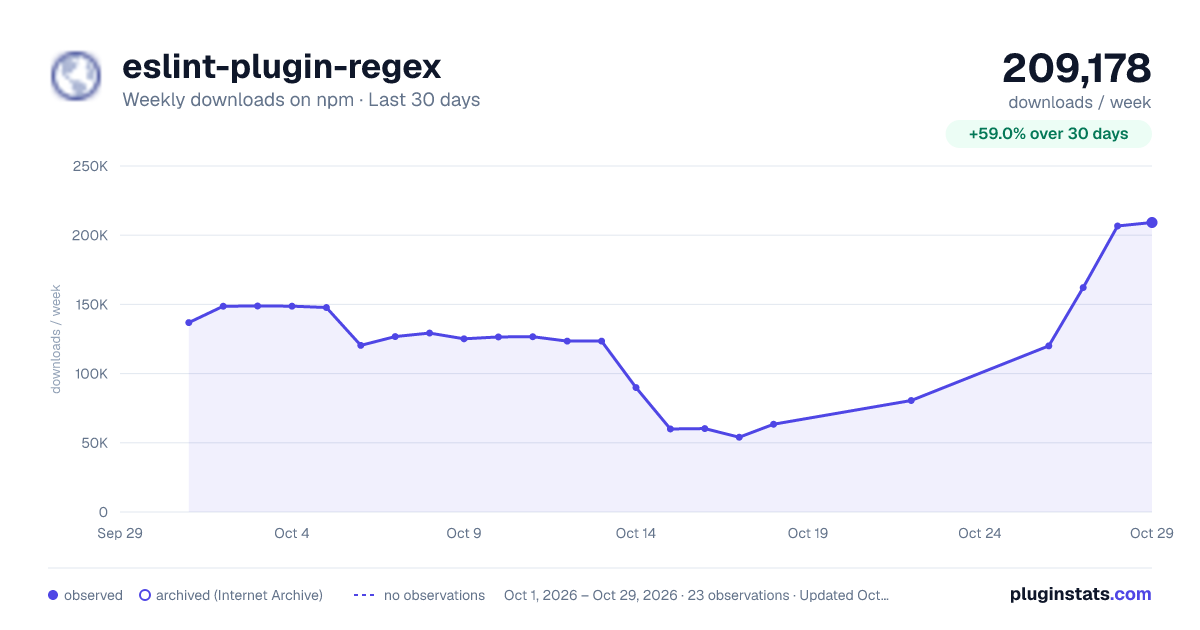
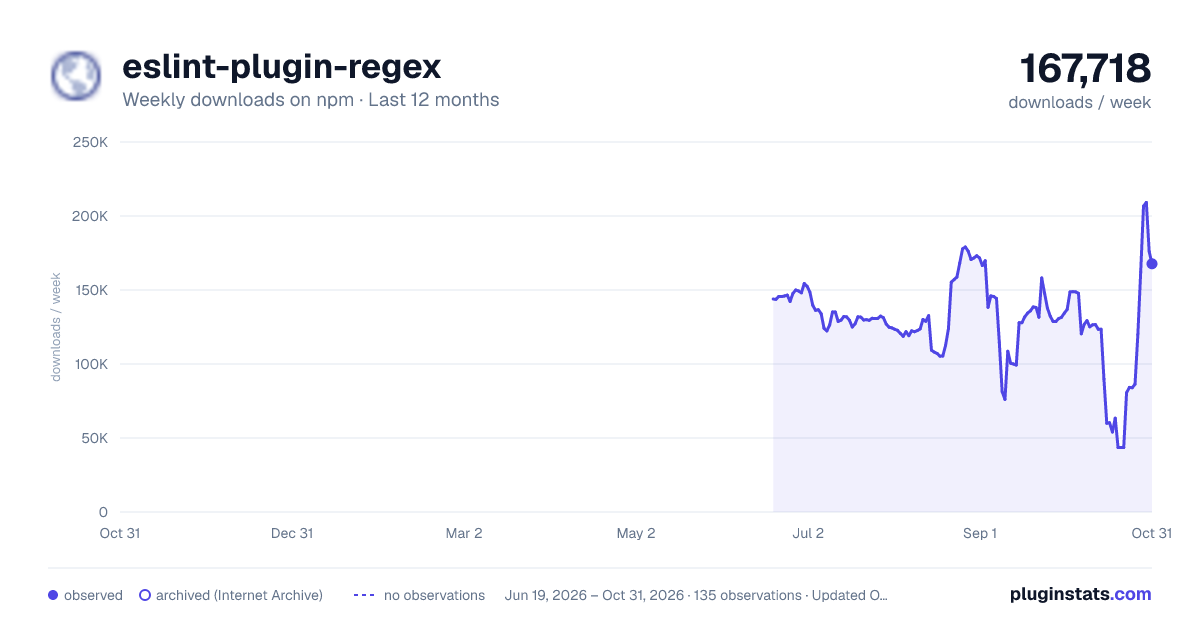
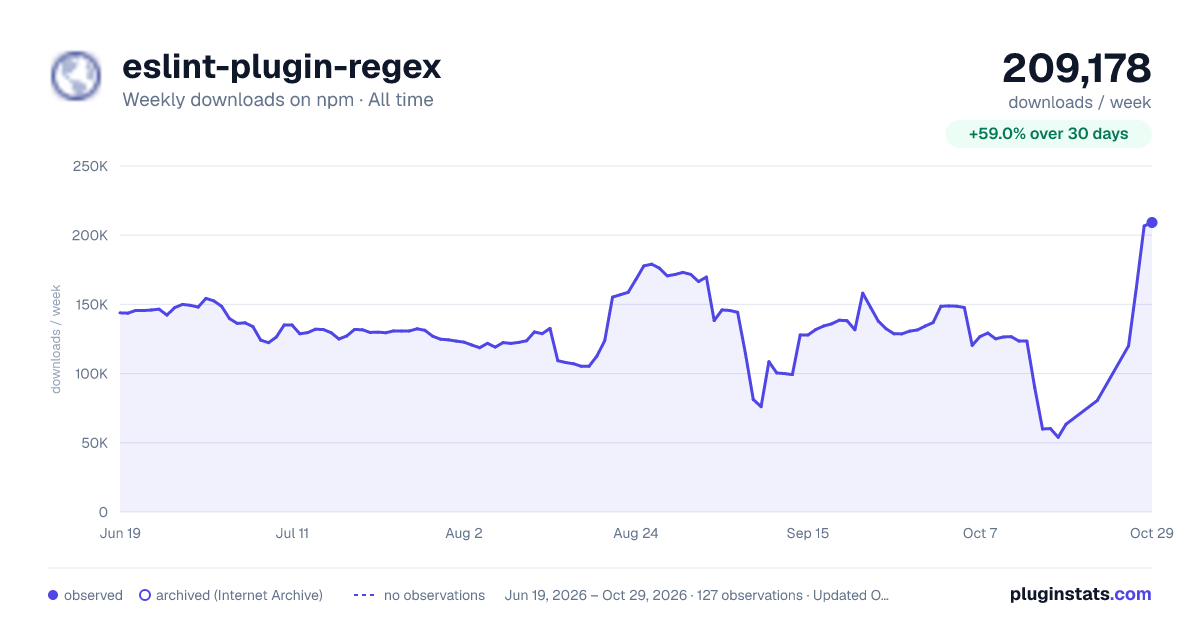

Adoption over time


7/30/90-day growth


Filled points are observed values; hollow points come from Internet Archive snapshots of the listing page. Dashed segments span periods with no observations — values between points are not interpolated.
Recent observations
Full history (121)Similar npm ESLint plugins plugins
Data source
Weekly downloads (trailing 7 complete days) come from the official npm downloads API. Downloads include CI and mirrors and are not equivalent to installs or users. npm publishes no ratings.
Listing: https://www.npmjs.com/package/eslint-plugin-regex. First seen Oct 16, 2026; last successful collection Oct 18, 2026. See the methodology.