 PluginStats
@upstash/context7-mcp weekly downloads statistics
By upstash (9 listings) · npm · MCP servers
MCP server for Context7
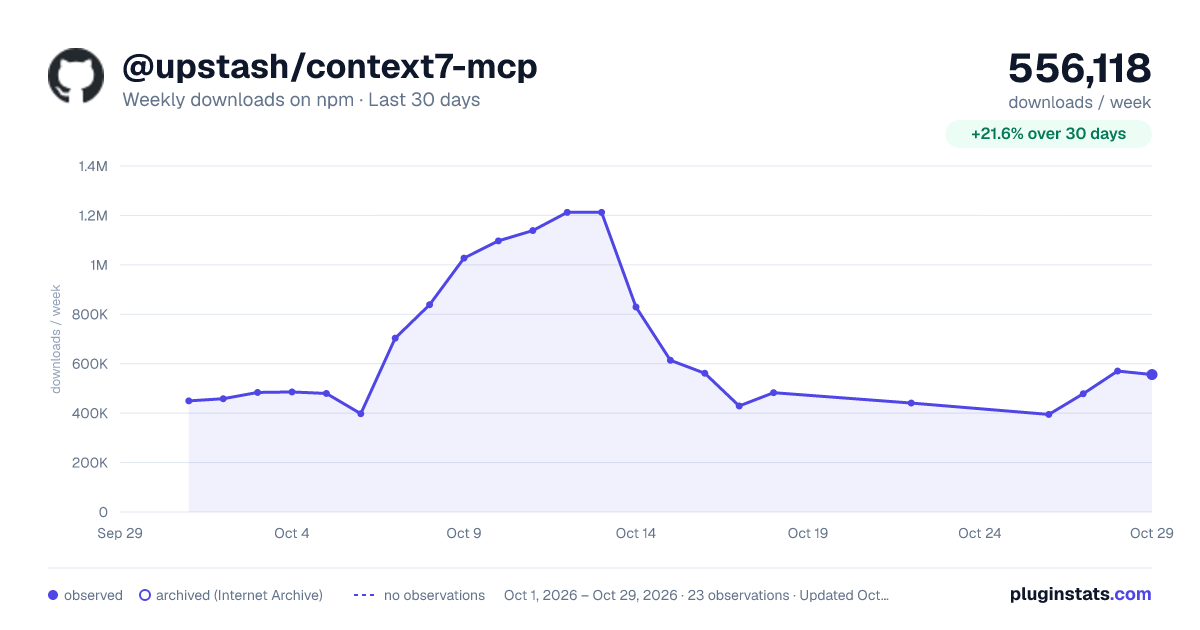
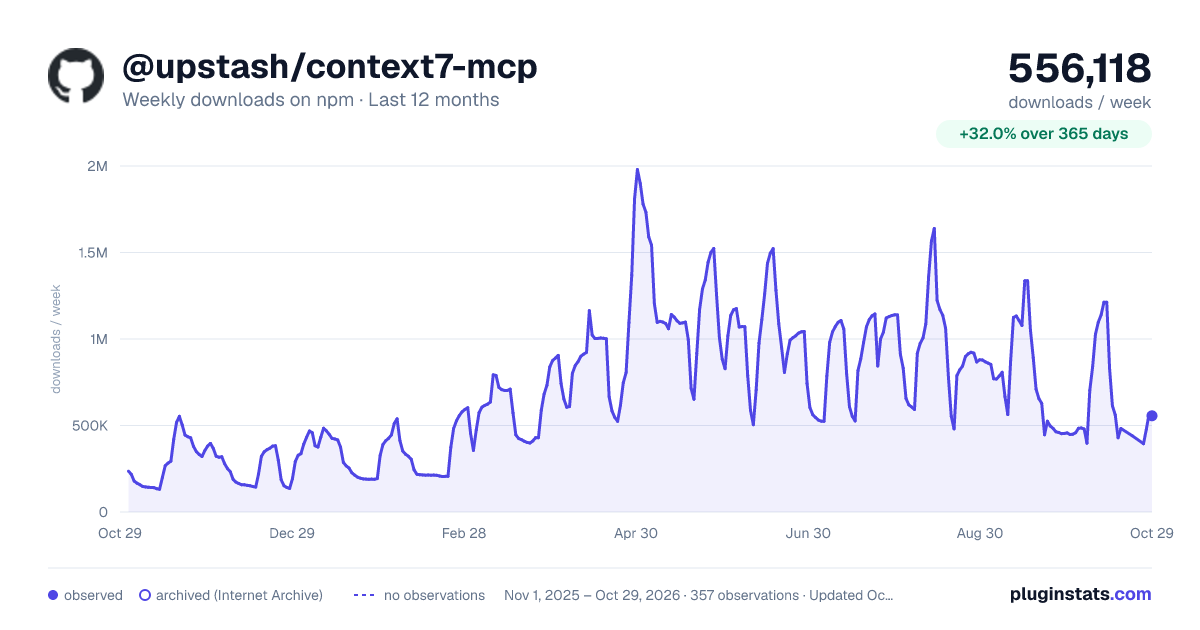
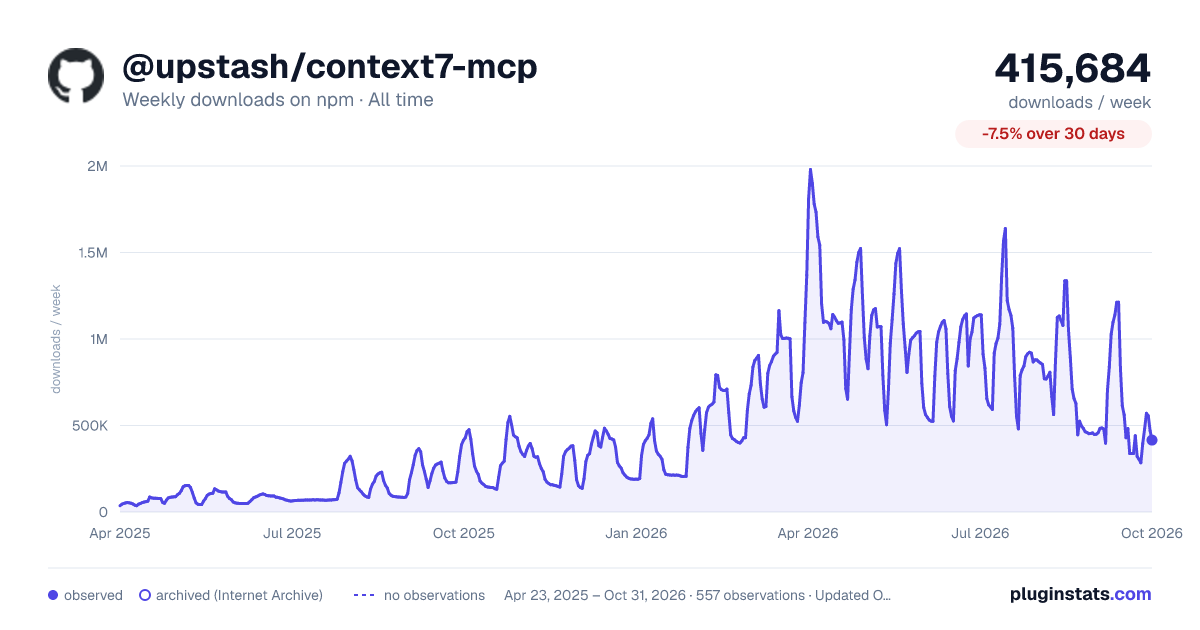
@upstash/context7-mcp has 429,013 recorded weekly downloads on npm, a decrease of 51.9% over the past 30 days.
It ranks #267 of 2,251 tracked npm listings by weekly downloads.
Over 90 days, weekly downloads changed by -56.2%.
PluginStats has 543 daily observations since Apr 23, 2025; the latest is from Oct 17, 2026.
About @upstash/context7-mcp
Context7 MCP - Up-to-date Code Docs For Any Prompt
-purple>)
❌ Without Context7
LLMs rely on outdated or generic information about the libraries you use. You get:
• ❌ Code examples are outdated and based on year-old training data • ❌ Hallucinated APIs that don't even exist • ❌ Generic answers for old package versions
✅ With Context7
Context7 MCP pulls up-to-date, version-specific documentation and code examples straight from the source — and places them directly into your prompt.
Add use context7 to your prompt (or set up a rule to auto-invoke):
Context7 fetches up-to-date code examples and documentation right into your LLM's context.
• 1️⃣ Write your prompt naturally • 2️⃣ Tell the LLM to use context7 (or set up a rule once) • 3️⃣ Get working code answers
No tab-switching, no hallucinated APIs that don't exist, no outdated code generation.
[!NOTE] This repository hosts the source code of Context7 MCP server. The supporting components — API backend, parsing engine, and crawling engine — are private and not part of this release.
📚 Adding Projects
Check out our project addition guide to learn how to add (or update) your favorite libraries to Context7.
🛠️ Installation
Requirements
• Node.js >= v20.18.1 • Cursor, Claude Code, VSCode, Devin Desktop or another MCP Client • Context7 API Key (Optional) for higher rate limits and private repositories (Get yours by creating an account at context7.com/dashboard)
[!TIP] Recommended Post-Setup: Add a Rule to Auto-Invoke Context7
After installing Context7 (see instructions below), enhance your workflow by adding a rule so you don't have to type use context7 in every prompt. Define a simple rule in your MCP client's rule section to automatically invoke Context7 on any code question:
- For Devin Desktop, in .devin/rules/ directory - For Cursor, from Cursor Settings > Rules section - For Claude Code, in CLAUDE.md file - Or the equivalent in your MCP client
Example Rule:
From then on, you'll get Context7's docs in any related conversation without typing anything extra. You can alter the rule to match your use cases.
Installing via Smithery
To install Context7 MCP Server for any client automatically via Smithery:
You can find your Smithery key in the Smithery.ai webpage.
Install in Cursor
Go to: Settings -> Cursor Settings -> MCP -> Add new global MCP server
Pasting the following configuration into your Cursor ~/.cursor/mcp.json file is the recommended approach. You may also install in a specific project by creating .cursor/mcp.json in your project folder. See Cursor MCP docs for more info.
Since Cursor 1.0, you can click the install button below for instant one-click installation.
Cursor Remote Server Connection
Cursor Local Server Connection
Install in Claude Code
Run this command. See Claude Code MCP docs for more info.
Claude Code Local Server Connection
Claude Code Remote Server Connection
Remove --scope user to install for the current project only.
Install in Amp
Run this command in your terminal. See Amp MCP docs for more info.
With OAuth
With API Key (Higher Rate Limits & Private Repos)
Install in Devin Desktop
Add this to your Devin Desktop MCP config file. See Devin Desktop MCP docs for more info.
Devin Desktop Remote Server Connection
Devin Desktop Local Server Connection
Install in VS Code
Add this to your VS Code MCP config file. See VS Code MCP docs for more info.
VS Code Remote Server Connection
VS Code Local Server Connection
Install in Cline
You can easily install Context7 through the Cline MCP Server Marketplace by following these instructions:
1. Open Cline. 2. Click the hamburger menu icon (☰) to enter the MCP Servers section. 3. Use the search bar within the Marketplace tab to find _Context7_. 4. Click the Install button.
Or you can directly edit MCP servers configuration:
1. Open Cline. 2. Click the hamburger menu icon (☰) to enter the MCP Servers section. 3. Choose Remote Servers tab. 4. Click the Edit Configuration button. 5. Add context7 to mcpServers:
Install in Zed
It can be installed via Zed Extensions or you can add this to your Zed settings.json. See Zed Context Server docs for more info.
Install in Augment Code
To configure Context7 MCP in Augment Code, you can use either the graphical interface or manual configuration.
A. Using the Augment Code UI
1. Click the hamburger menu. 2. Select Settings. 3. Navigate to the Tools section. 4. Click the + Add MCP button. 5. Enter the following command:
6. Name the MCP: Context7. 7. Click the Add button.
Once the MCP server is added, you can start using Context7's up-to-date code documentation features directly within Augment Code.
B. Manual Configuration
1. Press Cmd/Ctrl Shift P or go to the hamburger menu in the Augment panel 2. Select Edit Settings 3. Under Advanced, click Edit in settings.json 4. Add the server configuration to the mcpServers array in the augment.advanced object
Once the MCP server is added, restart your editor. If you receive any errors, check the syntax to make sure closing brackets or commas are not missing.
Install in Kilo Code
You can configure the Context7 MCP server in Kilo Code using either the UI or by editing your project's MCP configuration file.
Kilo Code supports two configuration levels:
• Global MCP Configuration — stored in mcp_settings.json • Project-level MCP Configuration — stored in .kilocode/mcp.json (recommended)
If a server is defined in both places, the project-level configuration overrides the global one.
Configure via Kilo Code UI
1. Open Kilo Code. 2. Click the Settings icon in the top-right corner. 3. Navigate to Settings → MCP Servers. 4. Click Add Server. 5. Choose HTTP Server (Streamable HTTP Transport). 6. Enter the details:
URL https://mcp.context7.com/mcp
Headers → Add Header
• Key: Authorization • Value: Bearer YOUR_API_KEY
7. Click Save. 8. Ensure the server toggle is enabled. 9. If needed, click Refresh MCP Servers to reload the configuration.…
Description from the npm listing.
- modelcontextprotocol
- mcp
- context7
- vibe-coding
- developer tools
- documentation
- context
Where @upstash/context7-mcp sits in the listing
Each band is one page of 20. Weekly downloads on a log scale. Placement is projected from weekly downloads, so it can differ from the marketplace's own sort order. Hover a dot to see the listing.


Charts
Images: 30d · 1y · all time · 1600×900 dark

Adoption over time


7/30/90-day growth


Filled points are observed values; hollow points come from Internet Archive snapshots of the listing page. Dashed segments span periods with no observations — values between points are not interpolated.
Recent observations
Full history (543)Similar npm MCP servers plugins
Data source
Weekly downloads (trailing 7 complete days) come from the official npm downloads API. Downloads include CI and mirrors and are not equivalent to installs or users. npm publishes no ratings.
Listing: https://www.npmjs.com/package/@upstash/context7-mcp. First seen Oct 16, 2026; last successful collection Oct 18, 2026. See the methodology.