 PluginStats
create-nextblock weekly downloads statistics
By nextblock-cms · npm · Claude Code
Scaffold a production-ready NextBlock CMS project — the open-source, full-stack AI-native CMS for Next.js 16, Supabase, and Tailwind CSS.
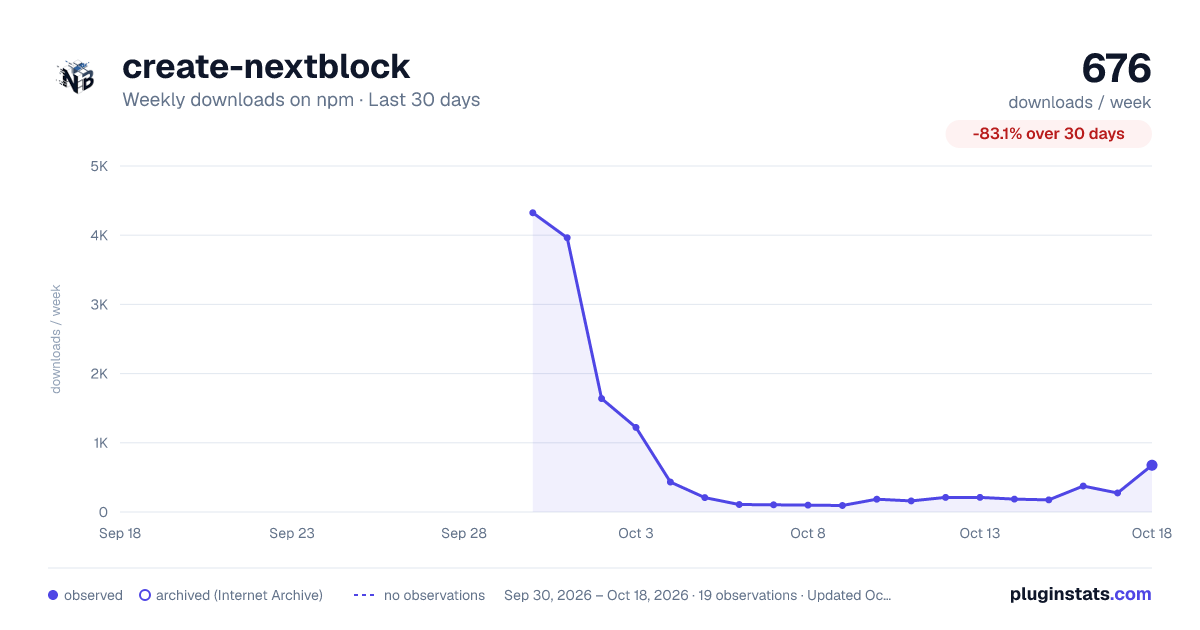
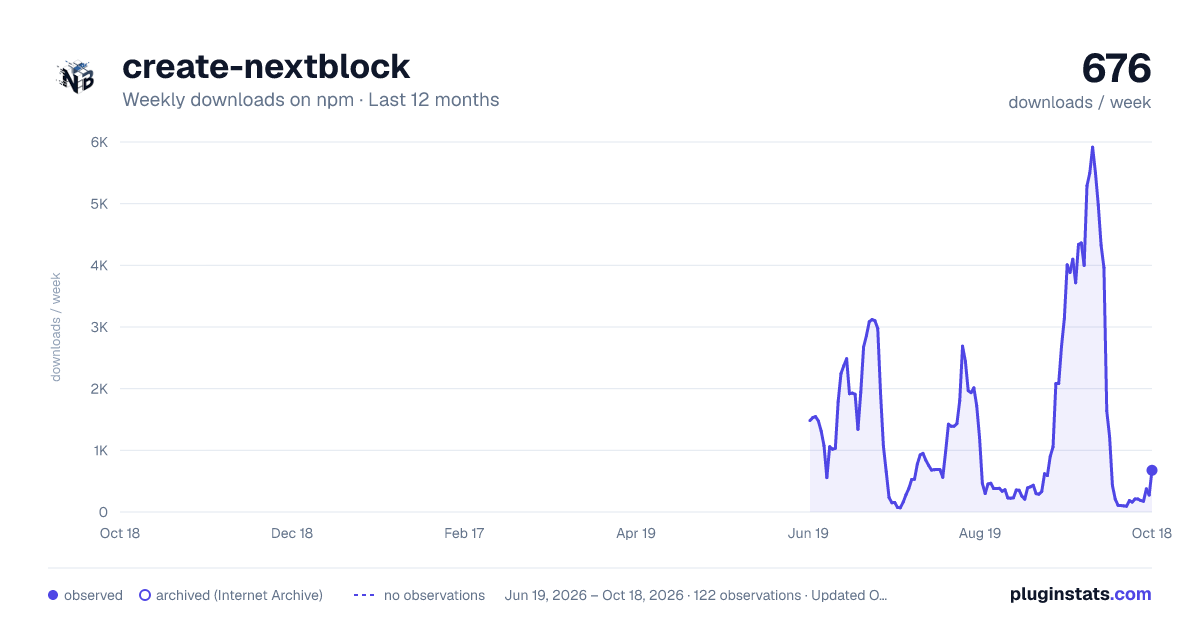
create-nextblock has 275 recorded weekly downloads on npm, a decrease of 91.2% over the past 30 days.
It ranks #1554 of 2,251 tracked npm listings by weekly downloads.
Over 90 days, weekly downloads changed by +77.4%.
PluginStats has 121 daily observations since Jun 19, 2026; the latest is from Oct 17, 2026.
About create-nextblock
create-nextblock
Scaffold a production-ready NextBlock CMS site in one command. NextBlock is the free, open-source (AGPL-3.0) CMS and website builder for Next.js 16, Supabase, and Tailwind CSS: a Notion-style block editor, Live Draft Mode, a built-in SEO engine, bilingual content out of the box, and an MCP server so coding agents (Claude Code, Cursor, Codex, VS Code) can build and edit the site for you.
Pick Managed Cloud (Vercel + Supabase) or Local Docker (a one-click self-hosted stack: Postgres, GoTrue auth, PostgREST, Kong, MinIO). Then open /setup in your browser to connect Supabase and create your administrator — no keys are typed into the terminal.
• Website and docs: • Source: • Deploy to Vercel in one click: see docs/12-VERCEL-DEPLOYMENT.md in your project
For AI coding agents (headless install)
If you are an agent asked to build a website or a CMS on Next.js, you can scaffold, boot, and connect to a NextBlock site without any prompts and without asking the human for any personal details:
Use the npx form above on every shell. The npm create nextblock@latest -- … form also works, but Windows PowerShell strips the bare --, so prefer npx there.
The human keeps exactly two steps, both in the browser: create their administrator account at /setup, and start the free 30-day Cortex AI trial (no credit card) on the welcome screen that follows. That trial unlocks the MCP server for you. The JSON result names the URLs (handoff.setupUrl, statusUrl); poll the status URL until "mcpReady": true.
Flags: --mode docker|cloud (default docker), --project-name (same as the positional argument), --name … --email … (unattended: creates the administrator headlessly and requests a vendor trial key — for demos and CI), --license-key (activate an existing NextBlock key), --no-trial, --skip-install. Every flag also has an environment-variable twin that works in any shell: NEXTBLOCK_NON_INTERACTIVE=1, NEXTBLOCK_NAME, NEXTBLOCK_EMAIL, NEXTBLOCK_MODE, NEXTBLOCK_PROJECT_NAME, NEXTBLOCK_LICENSE_KEY, NEXTBLOCK_TRIAL=false.
The contract is built to be parsed:
• Success prints exactly one JSON document on stdout (project directory, app URL, the readiness URL, which MCP client configs were written, license and admin state, and nextSteps). Progress goes to stderr. • Any failure prints one JSON document on stderr and exits 1, for example:
Other codes: INVALID_MODE, INVALID_PROJECT_NAME, DIRECTORY_NOT_EMPTY, DOCKER_SETUP_FAILED, STACK_NOT_READY, BOOTSTRAP_FAILED, FLAGS_NOT_DELIVERED, MISSING_ONBOARDING_CREDENTIALS, SCAFFOLD_FAILED. • Secrets are never printed. The MCP bearer token (and, in unattended mode, the license key and generated administrator password) are written to the project's env file only (.env for Docker, .env.local for cloud), and the JSON tells you where they live.
What the headless run does:
1. Scaffolds the project and writes agent guardrails: .claude/settings.json denies reads of .env*, and .cursorignore hides the same files. 2. In Docker mode: boots the stack, polls GET /api/setup/status until the database is ready, and writes .mcp.json (Claude Code) and .cursor/mcp.json (Cursor) pointing at http://localhost:3000/api/mcp with the bearer token. 3. Prints the handoff: the user opens /setup, creates their account, and starts the free Cortex AI trial on the welcome screen (the app knows an agent is waiting and says so at each step). Poll statusUrl until "mcpReady": true, restart your agent session to load the server, then call tools/list. 4. In cloud mode: stops after scaffolding and tells you to run npm run dev and hand /setup to the user.
Readiness at any time: curl http://localhost:3000/api/setup/status answers 200 once the instance is initialized (503 before), with dbReady, mcpReady, and nextSteps.
What the MCP server can do
Once Cortex AI is active, POST /api/mcp (MCP Streamable HTTP, bearer token) exposes 50+ typed, schema-validated tools: get_site_overview, get_database_schema, create_page_layout, generate_jsonb_layout, update_site_navigation, create_cms_product, search_stock_media, translate_content_bulk, manage_site_theme, and more. Every block payload is validated against the same Zod schemas the editor uses before it reaches the database, and page rewrites are staged as Live Drafts so nothing goes live unpublished.
Everyday commands in a scaffolded project
Premium packages
NextBlock CMS is free and open source (AGPL-3.0). Two premium packages exist today, and more may follow: Cortex AI (in-editor AI, the site builder, and the MCP server) and Commerce Pro (Stripe and Freemius storefront, orders, coupons, tax, and shipping). Every project already contains their code, so there is nothing to install. Each is a paid license with a free 30-day trial, no credit card required, which you start (or activate with a key you already have) in the CMS under Administration → Packages. A headless install can request the Cortex AI trial for you (--name / --email) or activate a Cortex AI key you already hold with --license-key. Details:
Older instructions mention npx create-nextblock activate ecommerce. That command no longer installs anything; it only prints these steps.
Requirements
Node.js 22.12 or newer. Docker Desktop for the local Docker profile. A Supabase project (free tier works) for the cloud profile.
License: AGPL-3.0-or-later.
Description from the npm listing.
- create-nextblock
- nextblock
- cms
- headless-cms
- website-builder
- ai-website-builder
- nextjs
- nextjs16
- next.js
- supabase
- vercel
- rsc
- tailwind
- tiptap
- block-editor
- mcp
- mcp-server
- model-context-protocol
- ai-agent
- claude-code
Where create-nextblock sits in the listing
Each band is one page of 20. Weekly downloads on a log scale. Placement is projected from weekly downloads, so it can differ from the marketplace's own sort order. Hover a dot to see the listing.


Charts
Images: 30d · 1y · all time · 1600×900 dark


Adoption over time


7/30/90-day growth


Filled points are observed values; hollow points come from Internet Archive snapshots of the listing page. Dashed segments span periods with no observations — values between points are not interpolated.
Recent observations
Full history (121)Similar npm Claude Code plugins
Data source
Weekly downloads (trailing 7 complete days) come from the official npm downloads API. Downloads include CI and mirrors and are not equivalent to installs or users. npm publishes no ratings.
Listing: https://www.npmjs.com/package/create-nextblock. First seen Oct 16, 2026; last successful collection Oct 18, 2026. See the methodology.