 PluginStats
aiterm-mcp weekly downloads statistics
By kitepon · npm · Claude Code
Persistent terminal MCP with one harness-based launcher for Claude Code, Codex CLI, Grok CLI, and Cursor Agent CLI, plus durable PTYs for SSH, containers, and REPLs.
aiterm-mcp has 1,237 recorded weekly downloads on npm.
It ranks #1355 of 2,251 tracked npm listings by weekly downloads.
PluginStats has 2 daily observations since Oct 12, 2026; the latest is from Oct 16, 2026.
About aiterm-mcp
From any MCP client, launch Claude Code, Codex CLI, Grok CLI, or Cursor Agent CLI through one harness API inside a persistent interactive TUI.
This image represents different intelligences sharing one persistent workspace and advancing the same work from their own perspectives.
Aiterm
*(日本語: README.ja.md)*
Let your AI orchestrate other AIs. One agent_launch call selects the execution harness separately from its model and hands you a persistent session to drive. Cursor can run GPT, Claude, or Grok while Cursor still owns the session, hooks, and transcript.
What it is: one persistent MCP terminal your AI drives — and can launch other coding agents into. ssh, docker exec, a REPL, or another agent's TUI all nest inside that one terminal as just text you send in. The mechanism is deliberately plain — your MCP client drives the other agent's terminal turn by turn: no hidden protocol, no separate aiterm-owned shared-memory layer, no autonomous negotiation. Launched agents still read the normal project and harness memory/configuration that a direct CLI launch would use.
No human at a terminal required. aiterm is driven programmatically over MCP, so an AI can launch and drive another agent with no one sitting in the terminal — from an orchestration loop, a CI step, or a cron job.
*MCP = Model Context Protocol — the open standard that lets tools like Claude Code plug capabilities into an AI.*
Built and maintained by Quo at kitepon.dev.
Install in your MCP client
検出したClaude Code・Codex・Grok・Cursorのユーザー設定へ登録する標準入口:
aiterm-setupは端末の依存準備、MCP経由の端末実行、登録と読戻しまでを一回で行う。 WindowsはwingetでPowerShell 7・Git for Windows・psmux、macOSはHomebrewでtmux、 Ubuntu/Debianはsudoとaptでtmuxを準備する。必要な公式package managerと実行権限は事前に必要。 他のLinuxでも既存tmuxを利用できるが、自動導入はunsupportedで停止する。 既存設定の他サーバーを保持し、JSON設定は変更前の.aiterm-backupを残す。 結果のstatusはready/unsupported/failed/restart_required。未検出のAIはnot_detectedとし、全AI未検出は成功にしない。 登録先はglobal packageのNodeとMCP入口の絶対パスで、npm一時cacheやsource checkoutは登録しない。 global packageは、npmの現在のglobal rootか、実行中のNodeの既定のglobal rootにあるものを指す。npmのprefixを利用者ごとの場所へ向けた環境でも、共通の場所へ導入したAitermを登録できる。 CodexとGrokは、登録が同じなら公式CLIで作り直さず、利用者が足した項目(待ち時間など)を保つ。 HomebrewのNodeは更新後も有効なoptのパスをMCP登録とCodexのhookに使う。旧版の登録でNode更新後に起動できなくなった場合も、更新後のaiterm-setup --jsonで修復できる。 更新後も同じ入口を実行し、MCP clientを再起動する。npm install自体はユーザー設定を変更しない。 公開JSONはschema: "aiterm.setup-result.v1"、全体のstatus、端末のbackend、 AI別のintegrationsと選択機能のcodex_steerを持つ。失敗時はreason_codeを付け、終了コードはreadyなら0、再起動待ちは3、それ以外は2となる。
MCP登録を利用者や他の製品が管理する環境では、aiterm-setup --hooks-onlyでClaude Code・Cursorの親配送hookだけを登録できる。 依存準備、端末の実動作確認、MCP登録、Codex Steerには触れない。登録済みなら設定を書き換えない。 結果はschema: "aiterm.parent-hooks-result.v1"、全体のstatus(ready/unsupported/failed)、AI別のhooks(configured/unchanged/not_detected/failed)を持つ。終了コードはreadyなら0、それ以外は2となる。
CodexへSteerを有効にする(macOS・Windows・Linux)
対話実行のaiterm-setupで「Aiterm単品」と「Steer付き」を選べます。無人導入では明示します。
公式キューと公式hookを使い、実行中の親には同じターンの次の推論へ回答を渡し、終了後は同じ会話を自動再開します。 Codexの起動プログラムと通常のstdio通信は変更しません。hookの実行ファイルが失われてもCodexの起動・応答は継続します。 終了後の再開は公式キューの監視周期に従い、約10秒かかる場合があります。 Codexのアプリは、見ていない会話を60秒で寝かせます。寝ている会話のキューは、その会話が開かれるまで動きません。 Aitermは、入れた約15秒後にまだ文が残っていて、番が普通に終わって寝ている会話なら、アプリにその会話を開かせて起こします(codex://threads/)。 その時、アプリの画面はその会話へ切り替わります。番の途中の会話、途中で止められた会話、CLIの席は起こしません。止める時は環境変数AITERM_STEER_CODEX_WAKE=0を立てます。 起こすのはmacOSとWindowsのアプリです。Linuxのアプリが寝かせた会話は、まだ起こしません(実物で確かめられていません。会話が開かれた時に届きます)。
aiterm-setupはCODEX_HOME/hooks.jsonへ専用のPostToolUseとStopを追加し、公式APIでその2件だけを承認・読戻しします。 他のhookや承認は保持します。選択と配送の所有記録は~/.config/aiterm-mcp/codex-parent-hooks/へ保存します。 同じ設定で再実行しても既存hookの順序を変えず、新たな再起動要求を発生させません。 WindowsのhookはPowerShell 7で実行します。更新後のsetupで、既存のAiterm hookコマンドも更新します。 既存の中継は新しいhookの確認後に解除し、保存していたCODEX_CLI_PATHを復元します。macOSの専用LaunchAgentも解除します。 移行前から動いているCodexがあればrestart_required(終了コード3)を返します。完全終了・再起動後に aiterm-setup --codex-steer statusでreadyを確認してください。旧設定は移行を実行するまで維持します。
hookはAiterm自身の配送記録と本文が一致する回答だけを取り出し、利用者がキューに入れた入力は保持します。 取り出し中断や出力失敗はparent_deliveriesにunknownとCODEX_HOOK_DELIVERY_UNCONFIRMEDで現れ、本文を保存します。 自動再送はしません。長い回答はCodexの公式hook処理で抜粋と全文ファイルへの参照になる場合があります。
解除・hook未対応の旧版への巻き戻し前はaiterm-setup --codex-steer disableを実行してCodexを再起動してください。 公式Codex Desktop(macOS・Windows・Linux)の同梱CLIを先に使い、Desktopが無い端末では通常のCodex CLI(公式キュー・hookに対応する0.154以上)を使います。 When a Desktop update moves the bundled Codex CLI, Aiterm finds it again at use time and updates its configuration. If it cannot, it returns CODEX_DESKTOP_BINARY_MOVED; start Desktop and rerun setup. Aiterm単品の公式キュー配送は従来どおり利用できます。
No clone or build is required. Each client launches the published package with:
Requires Node.js ≥ 18 and a supported multiplexer backend: tmux on POSIX or psmux 3.3.8+ on native Windows. Driving Codex also requires the Codex CLI to be installed and authenticated.
Claude Code
Add it for your user account:
Or commit this as a project-scoped .mcp.json:
Claude Desktop
Add this server to claude_desktop_config.json:
Cursor
Save this as .cursor/mcp.json for the project, or ~/.cursor/mcp.json globally:
Ownership boundary: this repository owns installation, configuration, persistent PTYs, agent sessions, state/schema/migrations, diagnostics, recovery, updates, and releases. It can be cloned and operated on its own using this README and the product docs. dotagents optionally integrates Aiterm into the wider factory—host wiring, cross-product compatibility, and aggregate acceptance—but does not control Aiterm and is not a runtime dependency.
Measured, not claimed: in the recorded 203-test benchmark, a pty_read puts ~7.1× fewer tokens in your context than the raw log — and the pass/fail verdict survives the fold. → When to reach for it vs. the built-in shell…
Description from the npm listing.
- mcp
- mcp-server
- model-context-protocol
- terminal
- tmux
- pty
- ssh
- claude
- claude-code
- cursor
- ai-agent
- agent
- codex
- codex-cli
- grok
- devtools
- terminal-mcp
- persistent-terminal
- interactive-cli
Where aiterm-mcp sits in the listing
Each band is one page of 20. Weekly downloads on a log scale. Placement is projected from weekly downloads, so it can differ from the marketplace's own sort order. Hover a dot to see the listing.


Charts
Images: 30d · 1y · all time · 1600×900 dark
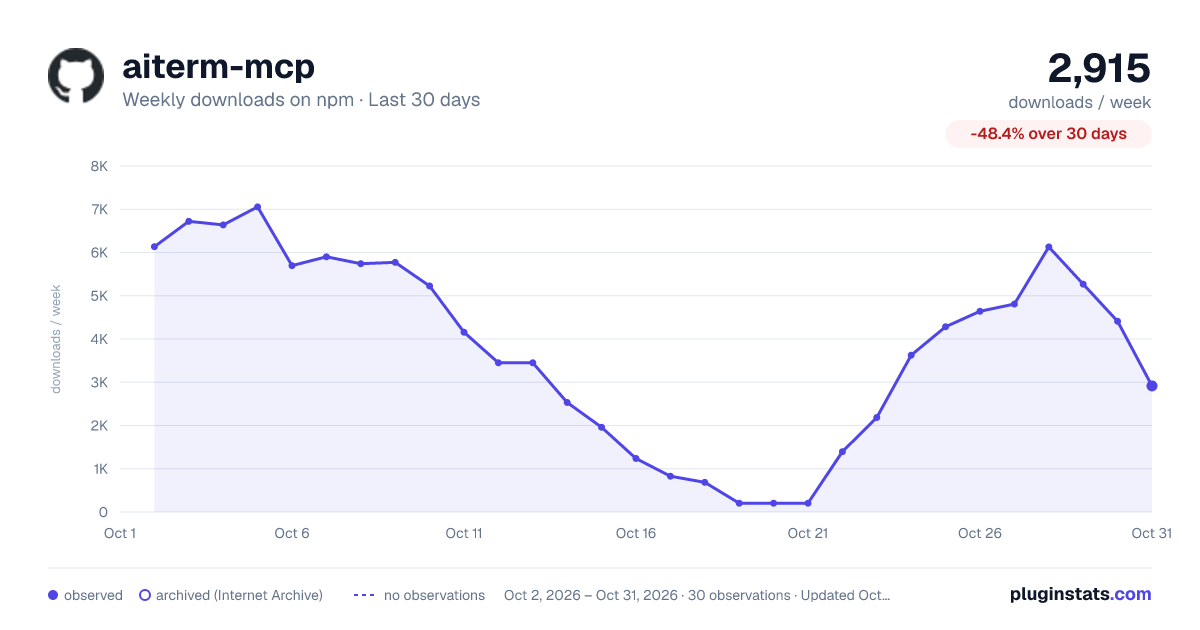
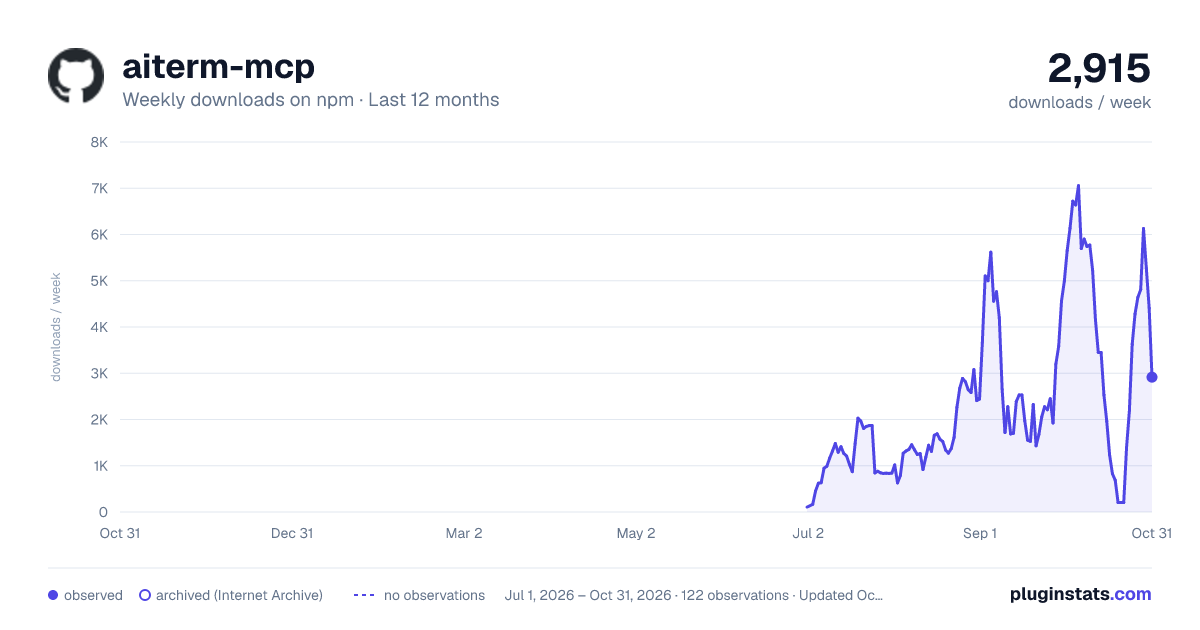
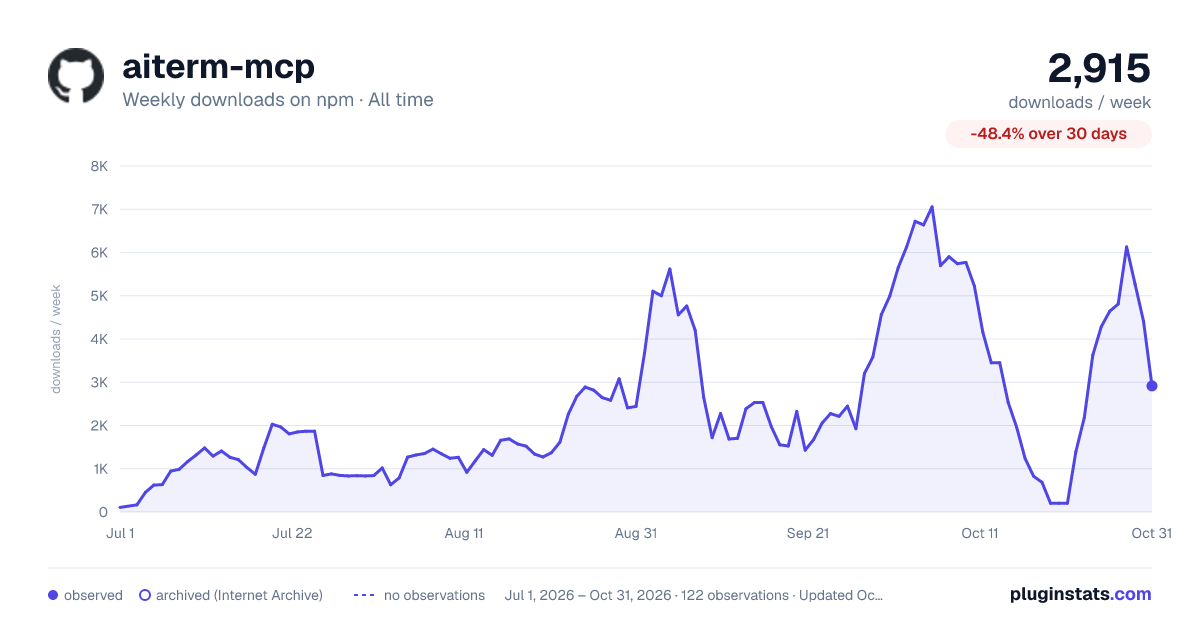

Adoption over time


7/30/90-day growth


Filled points are observed values; hollow points come from Internet Archive snapshots of the listing page. Dashed segments span periods with no observations — values between points are not interpolated.
Recent observations
Full history (2)Similar npm Claude Code plugins
Data source
Weekly downloads (trailing 7 complete days) come from the official npm downloads API. Downloads include CI and mirrors and are not equivalent to installs or users. npm publishes no ratings.
Listing: https://www.npmjs.com/package/aiterm-mcp. First seen Oct 16, 2026; last successful collection Oct 18, 2026. See the methodology.