 PluginStats
@ait-co/devtools weekly downloads statistics
By ait-co · npm · Webpack plugins
Browser development tools for Apps in Toss mini-apps — mock SDK, floating devtools panel, and universal bundler plugin. devDependency only; contributes nothing to a production bundle
@ait-co/devtools has 46 recorded weekly downloads on npm, a decrease of 94.7% over the past 30 days.
It ranks #1746 of 2,256 tracked npm listings by weekly downloads.
Over 90 days, weekly downloads changed by -97.5%.
PluginStats has 121 daily observations since Jun 19, 2026; the latest is from Oct 17, 2026.
About @ait-co/devtools
@ait-co/devtools
한국어 · English
@apps-in-toss/web-framework SDK의 mock 라이브러리입니다. @apps-in-toss/webview-bridge import도 unplugin이 함께 인터셉트합니다(high-level SDK 함수만 노출 — bridge primitive는 미노출). (2.x의 @apps-in-toss/web-bridge, @apps-in-toss/web-analytics도 back-compat으로 지원.)
앱인토스(Apps in Toss) 미니앱을 일반 브라우저에서 개발하고 테스트할 수 있게 해줍니다. 토스 앱 없이도 SDK의 모든 기능을 시뮬레이션하여 빠른 개발 사이클을 지원합니다.
이 프로젝트는 더 이상 유지보수되지 않습니다. repo는 archive되어 read-only가 되며, 소스와 이슈 기록은 GitHub에 그대로 남습니다. npm에 올라간 패키지는 계속 설치할 수 있지만 더 이상 업데이트되지 않습니다. aitc.dev 도메인과 그 위에서 서비스하던 사이트도 함께 종료되므로, 문서와 예제는 GitHub 소스를 보세요. 이 패키지에서 그 도메인에 의존하는 부분은 환경 2(실기기 PWA 미리보기)입니다 — 진입점인 launcher PWA가 https://devtools.aitc.dev/launcher/에 배포돼 있고, 터널 QR/deep-link도 그 주소로 만들어집니다. 이미 배포된 버전과 폰에 이미 설치된 launcher에는 이 사실을 소급 적용할 수 없습니다. 환경 1(로컬 브라우저 + mock SDK + DevTools 패널)은 외부 호스트에 의존하지 않습니다.
• 60+ SDK API mock — 인증, 결제, IAP, 위치, 카메라, 스토리지 등 • Device API 모드 시스템 — mock / web / prompt 세 가지 모드로 디바이스 API 동작 전환 • Device simulation — iPhone/Galaxy 프리셋 + orientation 토글로 데스크탑 브라우저에서 모바일 뷰포트 시뮬레이션 • Floating DevTools Panel — 브라우저에서 SDK 상태를 실시간으로 제어 (12개 탭, mock state preset library 포함) • 모든 번들러 지원 — unplugin 기반 Vite, Webpack, Rspack, esbuild, Rollup 통합
데모 소스: e2e/fixture/ (self-contained 데모 앱. GitHub Pages 호스팅은 도메인 종료와 함께 내려갑니다 — 로컬에서 pnpm e2e:build로 빌드해 볼 수 있습니다).
15초 quickstart — 내 상황에 맞는 환경 고르기
3가지 실행 환경이 있습니다. 지금 상황에 맞는 카드 하나를 고르고, 해당 상세 시나리오 문서로 이동하세요.
환경 1 — 로컬 브라우저 (가장 빠름, HMR O)
데스크탑 Chrome에서 mock SDK + DevTools 패널로 개발합니다. 토스 앱·폰 없이 즉시 시작.
DevTools 패널: 화면 우하단 AIT 버튼. 상세: docs/scenarios/env-1.md
환경 2 — 실기기 PWA (실 WebKit 엔진, HMR O, 토스 검수 불필요)
폰에서 실기기 Safari/WebKit 엔진으로 미니앱을 확인합니다. launcher PWA를 한 번 설치하고, 매 세션마다 QR 스캔.
tunnel: { cdp: true }를 켜면 같은 QR 한 번으로 화면 미리보기 + on-device CDP가 함께 열려 실기기 WebKit의 DOM·콘솔·예외를 MCP로 관측합니다 (call_sdk는 환경 2에서 mock — 실 SDK는 환경 3). CDP를 쓰려면 디버깅 패키지 두 개를 추가로 설치하세요 — 아래 디버깅 패키지 참고.
사전: 폰에 https://devtools.aitc.dev/launcher/ 를 홈 화면에 한 번 추가. 이 호스트는 aitc.dev 도메인 정리와 함께 사라집니다. 상세: docs/scenarios/env-2.md
환경 3 — intoss-private (토스 WebView, HMR X, debug 전용)
실기기 토스 앱 WebView에서 dog-food 번들을 로드하고 MCP relay로 디버깅합니다. @ait-co/debugger 설치가 필요합니다 — 아래 디버깅 패키지 참고.
HMR 없음(토스 WebView cold-load만). 상세: docs/scenarios/env-3.md
on-device 디버깅 한 줄 설정
환경 2·3에서 on-device CDP 디버깅을 활성화하려면 미니앱 entry(main.tsx 등)에 한 줄을 추가하세요:
이 한 줄이 하는 일:
• self-gate: URL에 ?debug=1 또는 ?relay=가 없고, DEV 빌드도 아니라면 아무것도 하지 않습니다. 청크는 dormant 상태로 남아 일반 프로덕션 로드에 영향을 주지 않습니다. • attach: gate가 통과하면 maybeAttach()를 호출해 Chii target.js를 주입합니다 (Layer B·C 게이트 시맨틱스는 완전히 유지). • SDK 브리지: window.sdk / window.sdkCall을 설치해 에이전트가 CDP relay의 Runtime.evaluate로 SDK API를 직접 구동할 수 있게 합니다. @apps-in-toss/web-framework가 없으면 조용히 skip합니다. • 타입: Window.sdk / sdkCall 글로벌 타입을 자동으로 제공합니다 — 별도 globals.d.ts 불필요.
환경 3(intoss-private relay) 빌드는 relay QR deep-link가 ?debug=1&relay= 파라미터를 실어 보내므로, 이 한 줄만 있으면 별도 게이트 코드가 필요 없습니다. 환경 2(PWA, tunnel: { cdp: true })도 동일하게 동작합니다.
옛 경로 @ait-co/devtools/in-app/auto는 0.2.x에서도 계속 resolve되지만 inert한 no-op 스텁이며 1.0.0에서 제거됩니다 — import를 위 새 경로로 옮기세요.
TOTP 인증이 필요한 dog-food 빌드는 빌드 define으로 DEBUG_TOTP_SECRET을 주입하고 @ait-co/debug-console을 직접 import해 evaluateDebugGate({ verifyTotpCode }) + maybeAttach()를 사용하세요. in-app/auto는 TOTP verifier를 주입하지 않으므로 C3 레이어가 비활성화됩니다.
자주 겪는 문제 5가지
"QR 창이 안 열림"
start_attach을 먼저 호출하지 않았거나, GUI 없는 headless 환경이라 대시보드를 열 수 없는 경우입니다. 도구 결과에 텍스트 QR이 출력되므로 폰 카메라로 직접 스캔하세요. 로컬 GUI 환경에서는 대시보드가 자동으로 브라우저에 열립니다.
"page 미attach" — list_pages가 빈 배열 반환
relay에 붙은 페이지가 없는 상태입니다. start_attach → QR 스캔 순서로 폰을 다시 진입시키세요. MCP 에러 메시지가 "페이지가 attach 안 됨. start_attach → QR 스캔."으로 뜨면 이 케이스입니다.
"tunnel down" — 터널 응답 없음 또는 timeout
cloudflared quick tunnel은 수 시간 후 drop될 수 있습니다. debugger 프로세스를 재시작하면 새 tunnel URL이 발급됩니다. 재발급 후 QR을 다시 스캔하세요. (관련: #290)
"page crash" — list_pages에 crashDetectedAt이 찍힘
폰 측 페이지가 OOM·JS exception·native bridge crash로 죽은 상태입니다. 앱을 재실행 후 start_attach → QR 스캔으로 다시 attach하세요. (관련: #265)
"SDK 부재" — window.__sdkCall 미주입
call_sdk 호출 시 ok: false, error: "window.__sdkCall is not available" 에러가 뜨면 SDK 브리지가 아직 설치되지 않은 상태입니다. 아래 "on-device 디버깅 한 줄 설정" 섹션을 참고해 import '@ait-co/debug-console/auto'가 미니앱 entry에 추가돼 있는지 확인하세요. 환경 2(PWA)에서는 이 에러가 예상 결과입니다. (관련: #285)
"QR 스캔했는데 인증 실패" — TOTP 만료
AIT_DEBUG_TOTP_SECRET 설정 시 start_attach이 반환하는 attachUrl에는 TOTP 코드(at=)가 자동으로 포함됩니다. 코드 1개는 30초 창이고, relay는 만료 후 ~3분(±6 step) 이내 소급을 허용합니다. start_attach은 attach를 기다리는 동안 코드가 만료 창에 가까워지면 호출 안에서 코드를 자동 재발행하므로(재발행 횟수는 응답의 totp.reminted로 노출), 대기 중에는 보통 재호출이 필요 없습니다. 그래도 만료된 QR을 스캔해 relay가 인증을 거부하면 start_attach을 재호출해 새 URL과 QR을 발급받으세요.
설치
두 채널 — stable과 beta
devtools는 같은 코드에서 두 개의 npm dist-tag를 동시에 운영합니다. 쓰는 web-framework 버전에 맞는 채널을 고르세요.
| 채널 | 설치 | web-framework peer |
| stable (latest, 기본) | pnpm add -D @ait-co/devtools | >=2.6.0 =3.0.0-beta -)이라 버전을 핀하기 어려우니 @beta 태그로 설치하는 걸 권장합니다. • 두 채널 모두 web-framework peer는 optional이라 MCP 디버깅만 쓰는 경우 SDK를 강제로 끌어오지 않습니다.
3.0이 정식(GA) 출시되면 stable latest peer가 3.0 라인으로 올라가고 beta 채널은 정리됩니다. devtools가 아직 mock하지 않은 API를 호출하면 런타임에 에러가 발생합니다 — 누락된 API는 이슈로 알려주세요.
디버깅 패키지 (환경 2·3)
환경 1(로컬 브라우저 + mock + 패널)만 쓴다면 위 설치가 전부입니다. 아무것도 더 설치하지 않아도 됩니다.
on-device CDP 디버깅(환경 2의 tunnel: { cdp: true }, 환경 3의 relay attach)을 쓰려면 디버깅 패키지 두 개를 추가로 설치하세요:
| 패키지 | 역할 | 번들 반입 |
| @ait-co/debugger | MCP 데몬 · 실기기 테스트 러너 · dev-bridge(환경 2 CDP relay + QR 대시보드) | 안 됨 — devDependency / npx 전용 | | @ait-co/debug-console | on-device attach + 인앱 eruda 콘솔 | 됨 — debug 빌드에만 들어가는 유일한 패키지 |
두 패키지 모두 devtools의 optional peer입니다.
• @ait-co/debugger가 없으면 tunnel: { cdp: true }는 CDP 배선을 건너뛰고 일반 화면 미리보기 터널로 degrade하며, 터미널에 설치 안내를 한 번 출력합니다. • @ait-co/debug-console이 없으면 unplugin이 in-app attach를 아예 주입하지 않습니다 — attach 코드가 번들에 구조적으로 들어갈 수 없다는 뜻이고, 이게 디버그 표면의 기술적 경계입니다.
Reference consumer…
Description from the npm listing.
- apps-in-toss
- toss
- mini-app
- devtools
- mock
- sdk
- miniapp
- simulator
- testing
- vite-plugin
- webpack-plugin
Where @ait-co/devtools sits in the listing
Each band is one page of 20. Weekly downloads on a log scale. Placement is projected from weekly downloads, so it can differ from the marketplace's own sort order. Hover a dot to see the listing.


Charts
Images: 30d · 1y · all time · 1600×900 dark
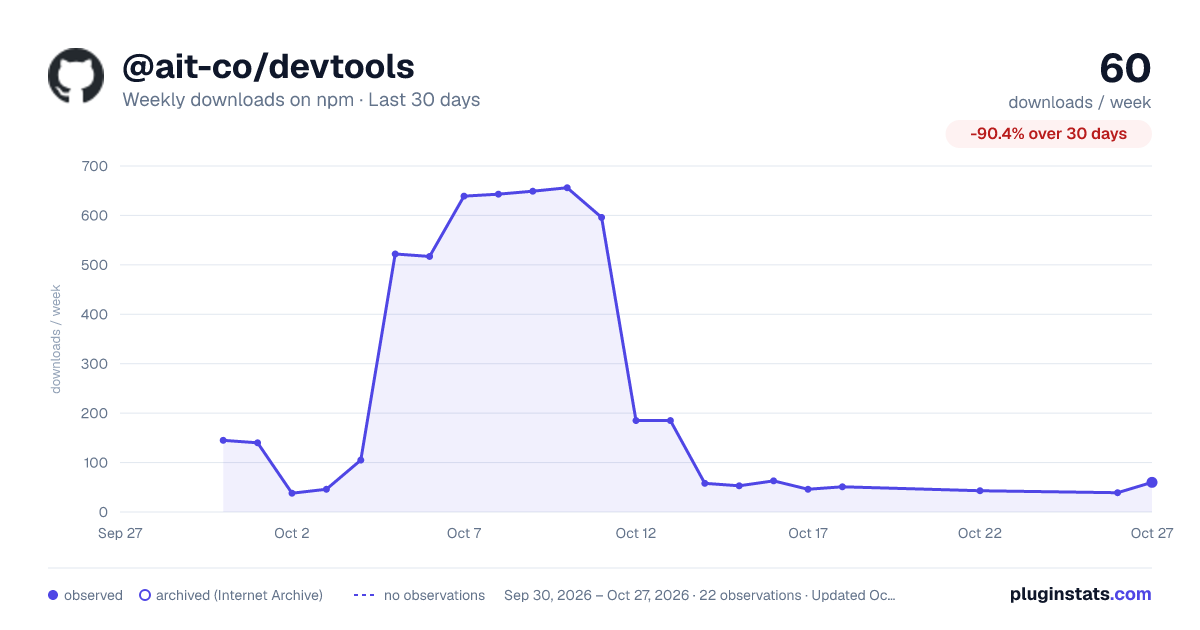
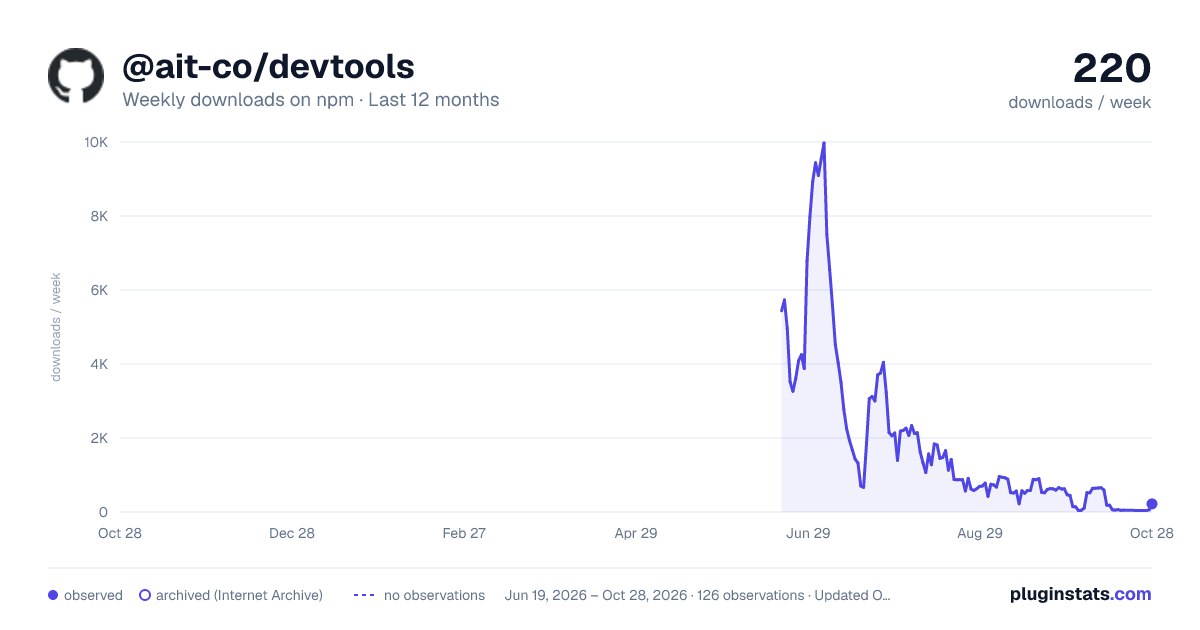
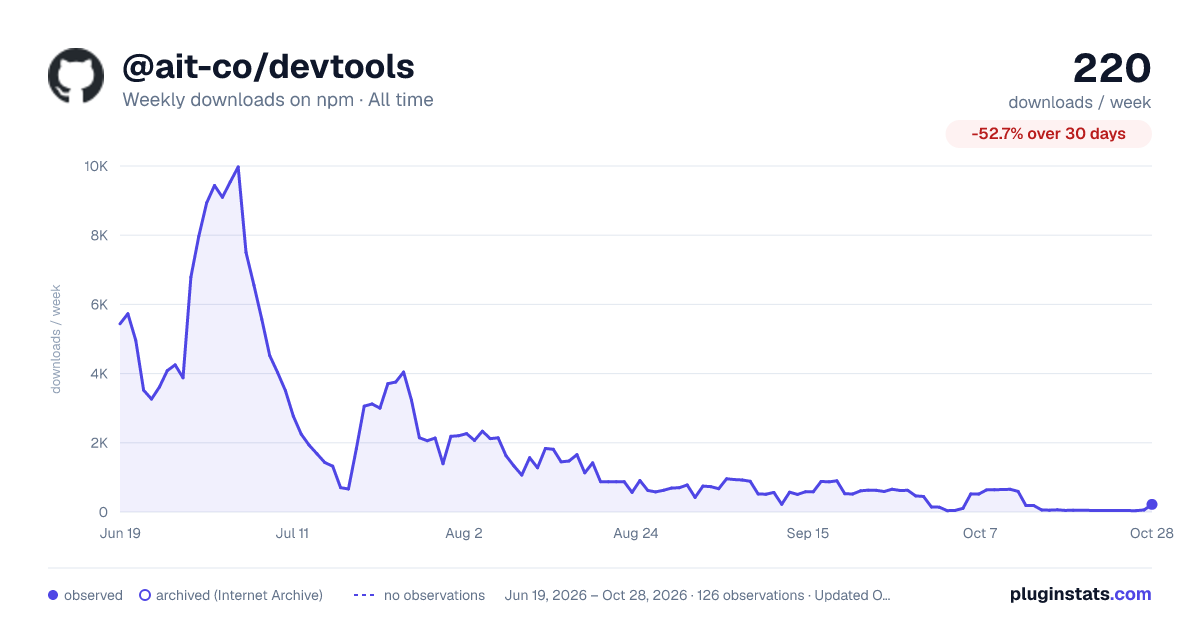

Adoption over time


7/30/90-day growth


Filled points are observed values; hollow points come from Internet Archive snapshots of the listing page. Dashed segments span periods with no observations — values between points are not interpolated.
Recent observations
Full history (121)Similar npm Webpack plugins plugins
Data source
Weekly downloads (trailing 7 complete days) come from the official npm downloads API. Downloads include CI and mirrors and are not equivalent to installs or users. npm publishes no ratings.
Listing: https://www.npmjs.com/package/@ait-co/devtools. First seen Oct 16, 2026; last successful collection Oct 19, 2026. See the methodology.