 PluginStats
@apify/actors-mcp-server weekly downloads statistics
By apify (2 listings) · npm · MCP servers
Apify MCP Server
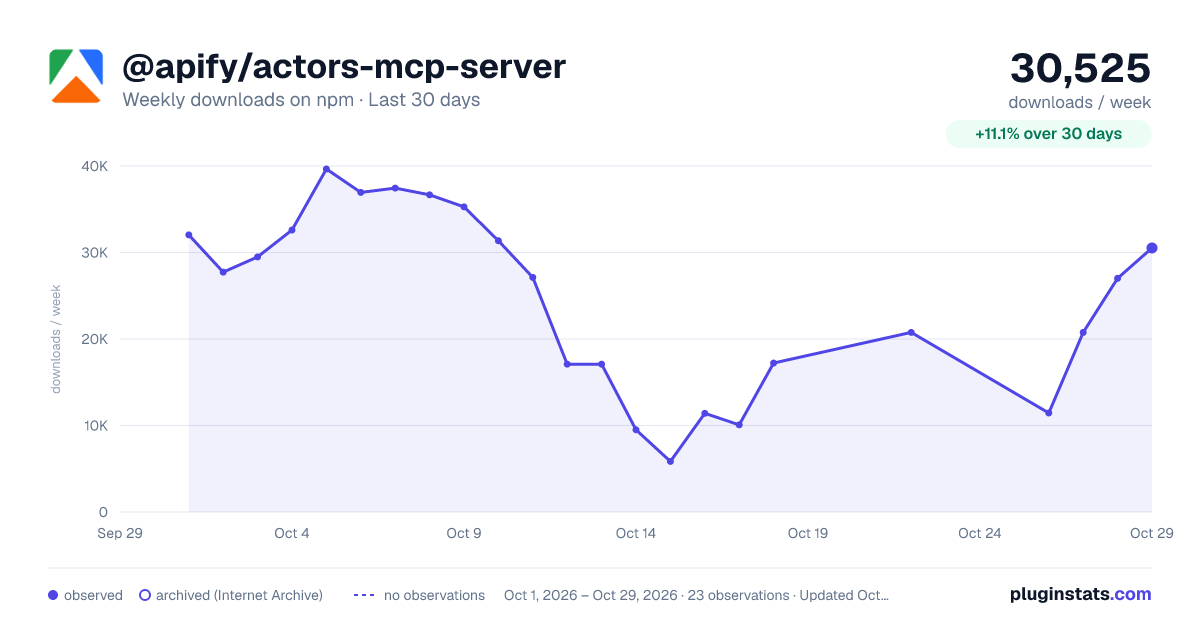
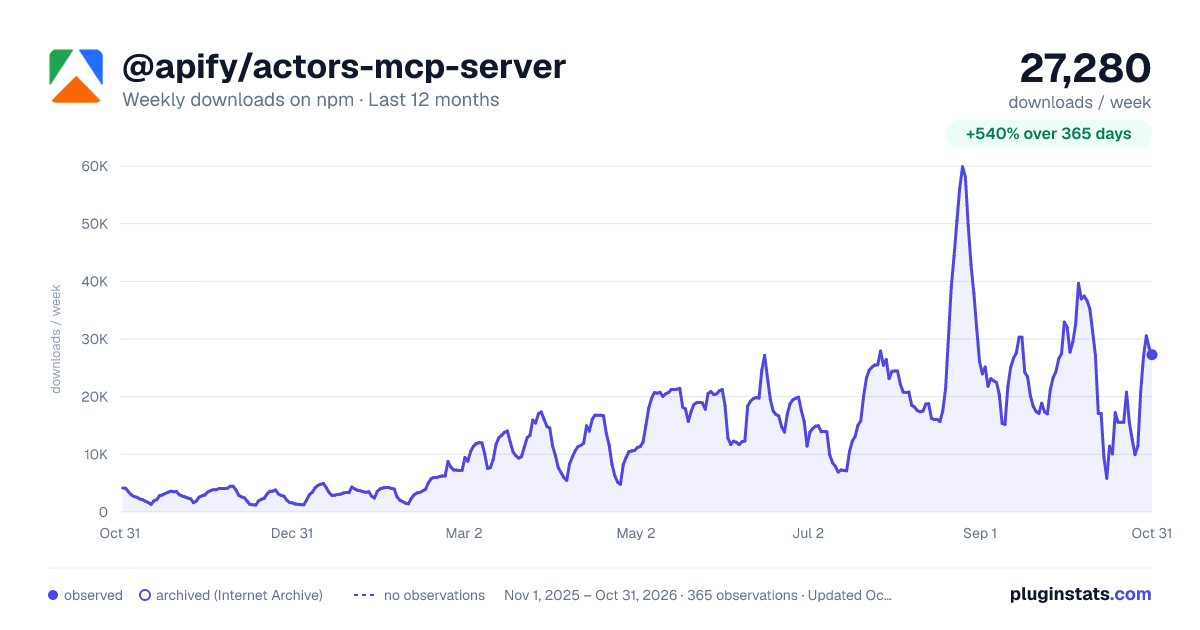
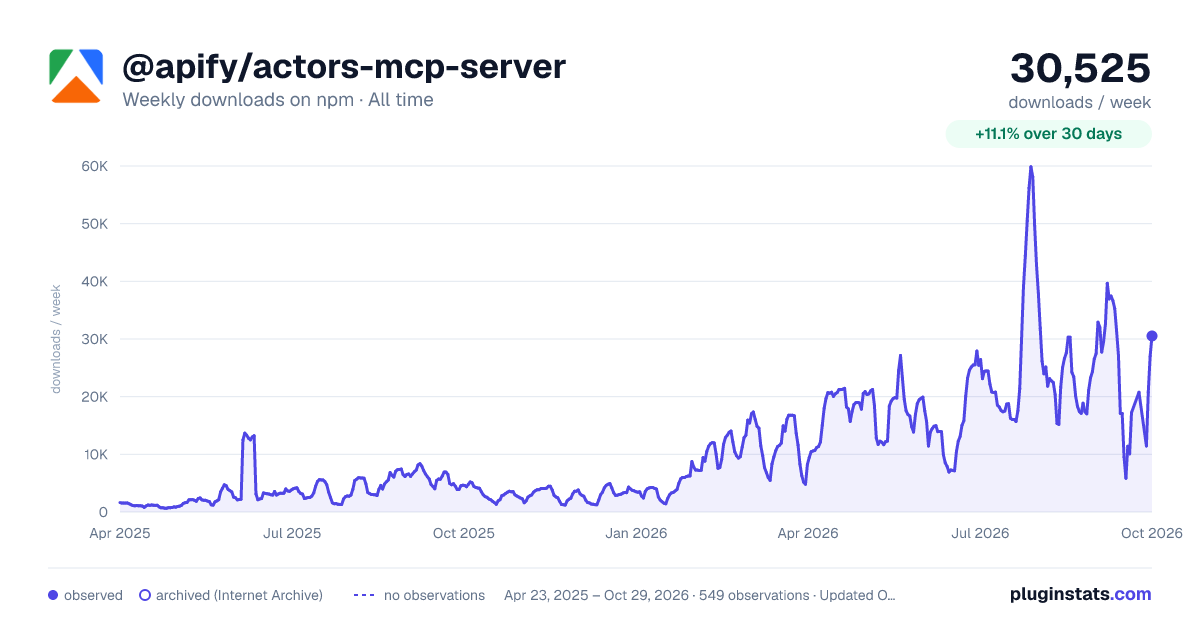
@apify/actors-mcp-server has 10,078 recorded weekly downloads on npm, a decrease of 57.0% over the past 30 days.
It ranks #904 of 2,251 tracked npm listings by weekly downloads.
Over 90 days, weekly downloads changed by -33.0%.
PluginStats has 543 daily observations since Apr 23, 2025; the latest is from Oct 17, 2026.
About @apify/actors-mcp-server
mcp.apify.com
The Apify Model Context Protocol (MCP) server at mcp.apify.com enables your AI agents to extract data from social media, search engines, maps, e-commerce sites, and any other website using thousands of ready-made scrapers, crawlers, and automation tools from Apify Store. It supports OAuth, allowing you to connect from clients like Claude.ai or Visual Studio Code using just the URL.
🚀 Use the hosted Apify MCP Server!
For the best experience, connect your AI assistant to our hosted server at https://mcp.apify.com. The hosted server supports the latest features - including output schema inference for structured Actor results - that are not available when running locally via stdio.
⚠️ Legacy SSE transport removed. The https://mcp.apify.com/sse endpoint has been removed in favor of Streamable HTTP. Migrate your client to https://mcp.apify.com — drop the /sse suffix from your configuration.
💰 The server also supports agentic payments: buy a token from AGI to run any Actor, or pay per-request via direct x402 (Pay Per Event Actors only) or Skyfire.
Apify MCP Server is compatible with Claude Code, Claude.ai, Cursor, VS Code and any client that adheres to the Model Context Protocol. Check out the MCP clients section for more details or visit the MCP configuration page.
Table of Contents
• 🌐 Introducing Apify MCP Server • 🚀 Quickstart • 🤖 MCP clients • 🪄 Try Apify MCP instantly • 💰 Agentic payments • How agentic payments work • 🪙 AGI (recommended) • 💸 Direct x402 • 🔥 Skyfire • 🛠️ Tools, resources, and prompts • 📊 Telemetry • 💬 Usage examples • 🐛 Troubleshooting • ⚙️ Development • 🔒 Privacy policy • 🤝 Contributing • 📚 Learn more
🌐 Introducing Apify MCP Server
The Apify MCP Server allows an AI assistant to use any Apify Actor as a tool to perform a specific task. For example, it can: • Use Facebook Posts Scraper to extract data from Facebook posts from multiple pages/profiles. • Use Google Maps Email Extractor to extract contact details from Google Maps. • Use Google Search Results Scraper to scrape Google Search Engine Results Pages (SERPs). • Use Instagram Scraper to scrape Instagram posts, profiles, places, photos, and comments. • Use RAG Web Browser to search the web, scrape the top N URLs, and return their content. • Use Web Fetch to fetch any URL and return its content as Markdown, plain text, HTML, or links — with JavaScript rendering and anti-bot protection.
Video tutorial: Integrate 8,000+ Apify Actors and Agents with Claude
🚀 Quickstart
You can use the Apify MCP Server in two ways:
HTTPS Endpoint (mcp.apify.com): Connect from your MCP client via OAuth or by including the Authorization: Bearer header in your requests. This is the recommended method for most use cases. Because it supports OAuth, you can connect from clients like Claude.ai or Visual Studio Code using just the URL: https://mcp.apify.com. • https://mcp.apify.com streamable transport
Standard Input/Output (stdio): Ideal for local integrations and command-line tools like the Claude for Desktop client. • Set the MCP client server command to npx @apify/actors-mcp-server and the APIFY_TOKEN environment variable to your Apify API token. • See npx @apify/actors-mcp-server --help for more options.
You can find detailed instructions for setting up the MCP server in the Apify documentation.
🤖 MCP clients
Apify MCP Server is compatible with any MCP client that adheres to the Model Context Protocol, but the level of support for dynamic tool discovery and other features may vary between clients.
To interact with the Apify MCP Server, you can use clients such as Claude Desktop, Visual Studio Code, or Apify Tester MCP Client.
Visit mcp.apify.com to configure the server for your preferred client.
Tested clients
• Claude Desktop • Claude.ai (web) • ChatGPT • VS Code (Genie) • Cursor • OpenCode • Kiro • Apify Tester MCP Client — designed for testing Apify MCP servers
🪄 Try Apify MCP instantly
Want to try Apify MCP without any setup?
Check out Apify Tester MCP Client
This interactive, chat-like interface provides an easy way to explore the capabilities of Apify MCP without any local setup. Sign in with your Apify account and start experimenting with web scraping, data extraction, and automation tools!
Or use the MCP bundle file (formerly known as Anthropic Desktop extension file, or DXT) for one-click installation: Apify MCP Server MCPB file
💰 Agentic payments
You can pay for Actor runs without an Apify API token using AGI, direct x402, or Skyfire.
• AGI (agi.apify.com) mints a prepaid Apify API token in exchange for an x402 or MPP payment. Use the token like a normal API token against mcp.apify.com and api.apify.com — works for any Actor, not just Pay Per Event ones. Recommended for new integrations; see AGI (recommended) below. • Direct x402 pays with USDC on Base per request and does not require a separate platform account. It is fully supported by mcpc (brew install apify/tap/mcpc or npm install -g @apify/mcpc). We use mcpc because it is one of the few MCP clients that supports the latest features and the x402 protocol natively. • Skyfire pays with PAY tokens and requires a Skyfire account with a funded wallet. It does not require a special MCP client; the entire payment flow is handled directly through the MCP tool call parameters.
ℹ️ Scope: Both direct x402 and Skyfire are limited to Pay Per Event Actors, don't support Standby Actors, and settle per run instead of minting a token.
How agentic payments work
Actor run costs vary, so both payment methods use a prepaid balance model. The payment flow happens in four steps:…
Description from the npm listing.
- apify
- mcp
- server
- actors
- model context protocol
Where @apify/actors-mcp-server sits in the listing
Each band is one page of 20. Weekly downloads on a log scale. Placement is projected from weekly downloads, so it can differ from the marketplace's own sort order. Hover a dot to see the listing.


Charts
Images: 30d · 1y · all time · 1600×900 dark

Adoption over time


7/30/90-day growth


Filled points are observed values; hollow points come from Internet Archive snapshots of the listing page. Dashed segments span periods with no observations — values between points are not interpolated.
Recent observations
Full history (543)Similar npm MCP servers plugins
Data source
Weekly downloads (trailing 7 complete days) come from the official npm downloads API. Downloads include CI and mirrors and are not equivalent to installs or users. npm publishes no ratings.
Listing: https://www.npmjs.com/package/@apify/actors-mcp-server. First seen Oct 16, 2026; last successful collection Oct 18, 2026. See the methodology.